---
title: Post-purchase
description: >-
The post-purchase screen appears after merchants complete a sale, return, or
exchange transaction. This screen displays the transaction summary and
provides opportunities for follow-up actions, customer service, and revenue
generation.
api_version: 2025-07
api_name: pos-ui-extensions
source_url:
html: 'https://shopify.dev/docs/api/pos-ui-extensions/2025-07/targets/post-purchase'
md: >-
https://shopify.dev/docs/api/pos-ui-extensions/2025-07/targets/post-purchase.md
---
Migrate to Polaris
Version 2025-07 is the last API version to support React-based UI components. Later versions use [web components](https://shopify.dev/docs/api/pos-ui-extensions/latest/web-components), native UI elements with built-in accessibility, better performance, and consistent styling with [Shopify's design system](https://shopify.dev/docs/apps/design). Check out the [migration guide](https://shopify.dev/docs/apps/build/pos/upgrading-to-2025-10) to upgrade your extension.
# Post-purchase
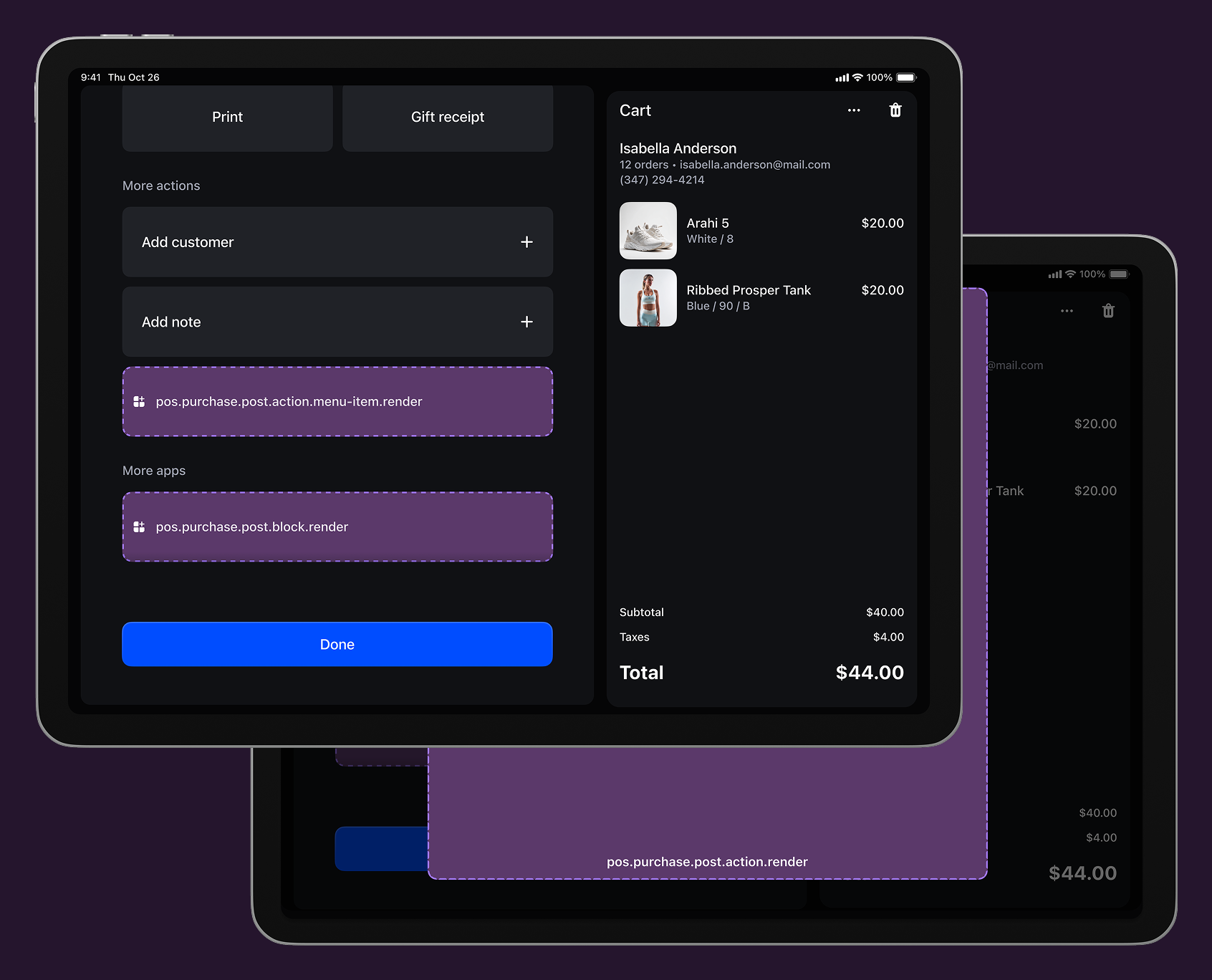
The post-purchase screen appears after merchants complete a sale, return, or exchange transaction. This screen displays the transaction summary and provides opportunities for follow-up actions, customer service, and revenue generation.
### Use cases
* **Purchase details:** Display warranty information, registration links, and care instructions.
* **Customer follow-up:** Launch satisfaction surveys, loyalty enrollment, and follow-up communications.
* **Upselling:** Present complementary products and service add-ons.
* **External integrations:** Connect with CRM (Customer Relationship Management), marketing automation, and inventory systems.
***
## Post-purchase targets
Use these targets for purchase completion workflows, post-sale analytics, or integration with external systems for customer engagement and business intelligence.
### Post-purchase block target
`pos.purchase.post.block.render`
Renders a custom information section within the post-purchase screen. Use this target for displaying supplementary purchase data like completion status, customer feedback prompts, or next-step workflows alongside standard purchase details.
Extensions at this target appear as persistent blocks within the post-purchase interface and support interactive elements that can launch modal workflows using `api.action.presentModal()` for more complex post-purchase operations.
### Support Components (11) APIs (10)
### Supported components
* [Badge](https://shopify.dev/docs/api/pos-ui-extensions/2025-07/ui-components/feedback-and-status-indicators/badge)
* [Button](https://shopify.dev/docs/api/pos-ui-extensions/2025-07/ui-components/actions/button)
* [DatePicker](https://shopify.dev/docs/api/pos-ui-extensions/2025-07/ui-components/forms/datepicker)
* [Dialog](https://shopify.dev/docs/api/pos-ui-extensions/2025-07/ui-components/feedback-and-status-indicators/dialog)
* [Icon](https://shopify.dev/docs/api/pos-ui-extensions/2025-07/ui-components/media-and-visuals/icon)
* [Image](https://shopify.dev/docs/api/pos-ui-extensions/2025-07/ui-components/media-and-visuals/image)
* [POSBlock](https://shopify.dev/docs/api/pos-ui-extensions/2025-07/ui-components/layout-and-structure/posblock)
* [POSBlockRow](https://shopify.dev/docs/api/pos-ui-extensions/2025-07/ui-components/layout-and-structure/posblockrow)
* [Stack](https://shopify.dev/docs/api/pos-ui-extensions/2025-07/ui-components/layout-and-structure/stack)
* [Text](https://shopify.dev/docs/api/pos-ui-extensions/2025-07/ui-components/layout-and-structure/text)
* [TimePicker](https://shopify.dev/docs/api/pos-ui-extensions/2025-07/ui-components/forms/timepicker)
### Available APIs
* [Action API](https://shopify.dev/docs/api/pos-ui-extensions/2025-07/target-apis/standard-apis/action-api)
* [Connectivity API](https://shopify.dev/docs/api/pos-ui-extensions/2025-07/target-apis/platform-apis/connectivity-api)
* [Device API](https://shopify.dev/docs/api/pos-ui-extensions/2025-07/target-apis/platform-apis/device-api)
* [Locale API](https://shopify.dev/docs/api/pos-ui-extensions/2025-07/target-apis/standard-apis/locale-api)
* [Order API](https://shopify.dev/docs/api/pos-ui-extensions/2025-07/target-apis/contextual-apis/order-api)
* [Print API](https://shopify.dev/docs/api/pos-ui-extensions/2025-07/target-apis/platform-apis/print-api)
* [Product Search API](https://shopify.dev/docs/api/pos-ui-extensions/2025-07/target-apis/standard-apis/product-search-api)
* [Session API](https://shopify.dev/docs/api/pos-ui-extensions/2025-07/target-apis/standard-apis/session-api)
* [Storage API](https://shopify.dev/docs/api/pos-ui-extensions/2025-07/target-apis/platform-apis/storage-api)
* [Toast API](https://shopify.dev/docs/api/pos-ui-extensions/2025-07/target-apis/standard-apis/toast-api)
Examples
### Examples
* #### Add a post-purchase block
##### Description
Display custom information within the post-purchase screen as a persistent block. This example shows how to create blocks that show supplementary purchase data like completion status, customer feedback prompts, or next-step workflows with interactive elements.
##### React
```tsx
import React from 'react';
import {
Text,
useApi,
reactExtension,
POSBlock,
POSBlockRow,
} from '@shopify/ui-extensions-react/point-of-sale';
const Block = () => {
const api = useApi<'pos.purchase.post.block.render'>();
return (
{'This is a block extension'}{`Order ID for complete checkout: ${api.order.id}`}
);
};
export default reactExtension('pos.purchase.post.block.render', () => (
));
```
##### TS
```ts
import {
POSBlock,
Text,
POSBlockRow,
extension,
} from '@shopify/ui-extensions/point-of-sale';
export default extension('pos.purchase.post.block.render', (root, api) => {
const block = root.createComponent(POSBlock, {
action: {title: 'Open action', onPress: api.action.presentModal},
});
const mainText = root.createComponent(Text);
mainText.append('This is a block extension');
const subtitleText = root.createComponent(Text);
subtitleText.append(`Order ID for complete checkout: ${api.order.id}`);
const blockMainRow = root.createComponent(POSBlockRow);
blockMainRow.append(mainText);
const blockSubtitleRow = root.createComponent(POSBlockRow);
blockSubtitleRow.append(subtitleText);
block.append(blockMainRow);
block.append(blockSubtitleRow);
root.append(block);
});
```
### Post-purchase action (menu item) target
`pos.purchase.post.action.menu-item.render`
Renders a single interactive button component as a menu item in the post-purchase action menu. Use this target for post-purchase operations like sending receipts, collecting customer feedback, or launching follow-up workflows after completing a sale.
Extensions at this target can access the order identifier through the Order API to perform purchase-specific operations. Menu items typically invoke `api.action.presentModal()` to launch the companion [modal](#post-purchase-action-modal-) for complete post-purchase workflows.
### Support Components (1) APIs (10)
### Supported components
* [Button](https://shopify.dev/docs/api/pos-ui-extensions/2025-07/ui-components/actions/button)
### Available APIs
* [Action API](https://shopify.dev/docs/api/pos-ui-extensions/2025-07/target-apis/standard-apis/action-api)
* [Connectivity API](https://shopify.dev/docs/api/pos-ui-extensions/2025-07/target-apis/platform-apis/connectivity-api)
* [Device API](https://shopify.dev/docs/api/pos-ui-extensions/2025-07/target-apis/platform-apis/device-api)
* [Locale API](https://shopify.dev/docs/api/pos-ui-extensions/2025-07/target-apis/standard-apis/locale-api)
* [Order API](https://shopify.dev/docs/api/pos-ui-extensions/2025-07/target-apis/contextual-apis/order-api)
* [Print API](https://shopify.dev/docs/api/pos-ui-extensions/2025-07/target-apis/platform-apis/print-api)
* [Product Search API](https://shopify.dev/docs/api/pos-ui-extensions/2025-07/target-apis/standard-apis/product-search-api)
* [Session API](https://shopify.dev/docs/api/pos-ui-extensions/2025-07/target-apis/standard-apis/session-api)
* [Storage API](https://shopify.dev/docs/api/pos-ui-extensions/2025-07/target-apis/platform-apis/storage-api)
* [Toast API](https://shopify.dev/docs/api/pos-ui-extensions/2025-07/target-apis/standard-apis/toast-api)
Examples
### Examples
* #### Create a post-purchase action menu item
##### Description
Add an interactive menu item to the post-purchase action menu for operations after completing a sale. This example shows how to create a menu item that accesses order data and launches modal workflows for tasks like sending receipts, collecting feedback, or follow-up processes.
##### React
```tsx
import React from 'react';
import {
reactExtension,
Button,
useApi,
} from '@shopify/ui-extensions-react/point-of-sale';
const ButtonComponent = () => {
const api = useApi<'pos.purchase.post.action.menu-item.render'>();
return