Syntax
Syntax is the set of clauses and parameters you write. Every query needs FROM, which chooses a schema. A query must also select results with SHOW or VISUALIZE. Other clauses filter, group, and shape the result.
Use this reference to explore every clause and understand how to combine them into a query.
ShopifyQL
Anchor to Anatomy of a queryAnatomy of a query
A query combines a schema, result selection, and optional clauses that shape the result. FROM with SHOW makes a complete tabular query. If you omit SHOW, then the query must include VISUALIZE to select the metric it renders.
ShopifyQL requires FROM, but doesn't require the main clauses to be written in a fixed order. Unlike in SQL, you set a date range with SINCE, UNTIL, or DURING instead of WHERE.
ShopifyQL
Anchor to Schema (,[object Object],)Schema (FROM)
FROM)FROM picks the schema you want to query, like sales or customers. Each schema lists the metrics and dimensions you can use, and querying a field outside that schema returns a parse error.
Anchor to Metrics (,[object Object],)Metrics (SHOW)
SHOW)SHOW lists the metrics you want returned as result columns, like total_sales or orders. VISUALIZE also names a metric, and renders it as a chart.
Anchor to Grouping, filters, and timeGrouping, filters, and time
Group results by dimensions like sales_channel, product_title, or month with GROUP BY, bucket them over time with TIMESERIES, or filter on them with WHERE. The dimensions you group by come back alongside your metrics.
Time clauses are optional, but pairing TIMESERIES with a date window (SINCE, UNTIL, or DURING) scopes the results to that window. For example, TIMESERIES day SINCE -30d.
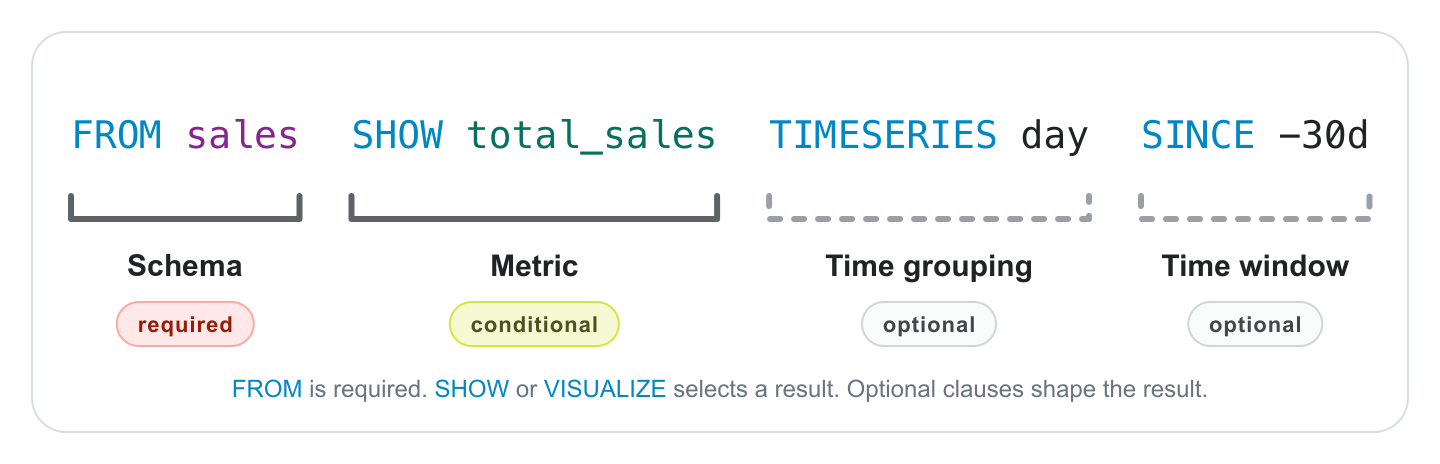
A query with optional clauses
Anchor to ClausesClauses
Every query is a sequence of clauses. Square brackets mark optional parts, a slash or | separates alternatives, and [, ...] marks a part you can repeat.
Some syntax isn't tied to a single clause. Combine metrics from related schemas in one query with a multi-fact query, or add comments to document a longer query.
Anchor to Keyword referenceKeyword reference
FROM is required. A query also needs result selection from SHOW, VISUALIZE, or both, and you add only the other optional clauses your query needs.
| Clause | Required? | What it does |
|---|---|---|
FROM | required | Chooses the schema, which determines the available metrics and dimensions. |
SHOW | conditional | Lists the metrics and dimensions to return from the schema. Required unless VISUALIZE selects a metric. Rename a field with AS. |
WHERE | optional | Filters rows before grouping. |
GROUP BY | optional | Groups results by one or more dimensions. |
TIMESERIES | optional | Buckets results into a chartable time series. |
WITH | optional | Applies modifiers like totals, percent change, and attribution. |
HAVING | optional | Filters grouped results. |
SINCE, UNTIL, DURING | optional | Sets the reporting period. |
COMPARE TO | optional | Compares the result against another period or target. |
ORDER BY | optional | Sorts results by one or more columns. |
LIMIT | optional | Limits the number of rows returned. |
VISUALIZE | conditional | Renders results as a chart and sets the type. Required when SHOW is omitted. |
ANNOTATE | optional | Overlays contextual events on time-based charts. |
Syntax
Anchor to TerminologyTerminology
These terms are used throughout the ShopifyQL reference. Some keywords take metrics, some take dimensions, and some take either. If you're not sure whether a field is a metric or a dimension, check the schema reference for the schema named in FROM. Each schema lists its metrics and dimensions separately.
| Term | Definition |
|---|---|
| Keyword | A reserved word that begins a clause, such as FROM, SHOW, or GROUP BY. |
| Clause | A keyword and the parameters that follow it, such as SHOW total_sales. A query is a sequence of clauses. |
| Parameter | A value you pass to a clause, such as a schema, column, condition, or date range. |
| Operator | A reserved word or symbol used within a condition, such as >=, STARTS WITH, or AND. |
| Metric | A count or calculation that tracks a business indicator. Metrics are the columns you select with SHOW. |
| Dimension | An attribute you break metrics down by. Dimensions appear as columns, and their values define the rows. |