Feature preview for market-driven shipping
Market-driven shipping is an upgrade to how merchants configure shipping in Shopify. It attaches shipping options directly to markets, so merchants can manage where they sell and how they ship from the same place in the Shopify admin.
This change gives merchants a clearer shipping setup, better support for different buyer contexts, and more predictable rates at checkout. When several rates inside the same shipping option match a cart, Shopify can charge the highest matching rate instead of adding them together, so buyers aren't overcharged for shipping.
Market-driven shipping is available in feature preview. Use this overview to understand the new merchant experience before reviewing the upgrade guide.
As merchants configure shipping by market, your app might encounter subdivision markets: markets that target a country subdivision, such as a state or province. Shipping is the first responder to support them. For the generic Markets API contract, including how to read a market's subdivision membership, refer to Work with subdivision markets.
As merchants configure shipping by market, your app might encounter subdivision markets: markets that target a country subdivision, such as a state or province. Shipping is the first responder to support them. For the generic Markets API contract, including how to read a market's subdivision membership, refer to Work with subdivision markets.
Anchor to What's changingWhat's changing
Today, merchant shipping is product-driven. Merchants configure delivery profiles, then configure location groups, shipping zones, and rates inside those profiles.
Market-driven shipping changes that hierarchy. Merchants attach shipping options directly to markets. Inside a shipping option, merchants can define variations in the rate based on product and location conditions.
Merchant-owned shipping configuration moves from the existing DeliveryProfile API to the Markets API. App-owned delivery profiles continue to use the existing DeliveryProfile API, and app-provided rates still appear in the market-driven experience so merchants can understand the full set of shipping options their buyers may see.
| Today | Market-driven shipping |
|---|---|
| Delivery profile → Location group → Shipping zone → Shipping rates | Market → Shipping options → Rate variations by product and location conditions |
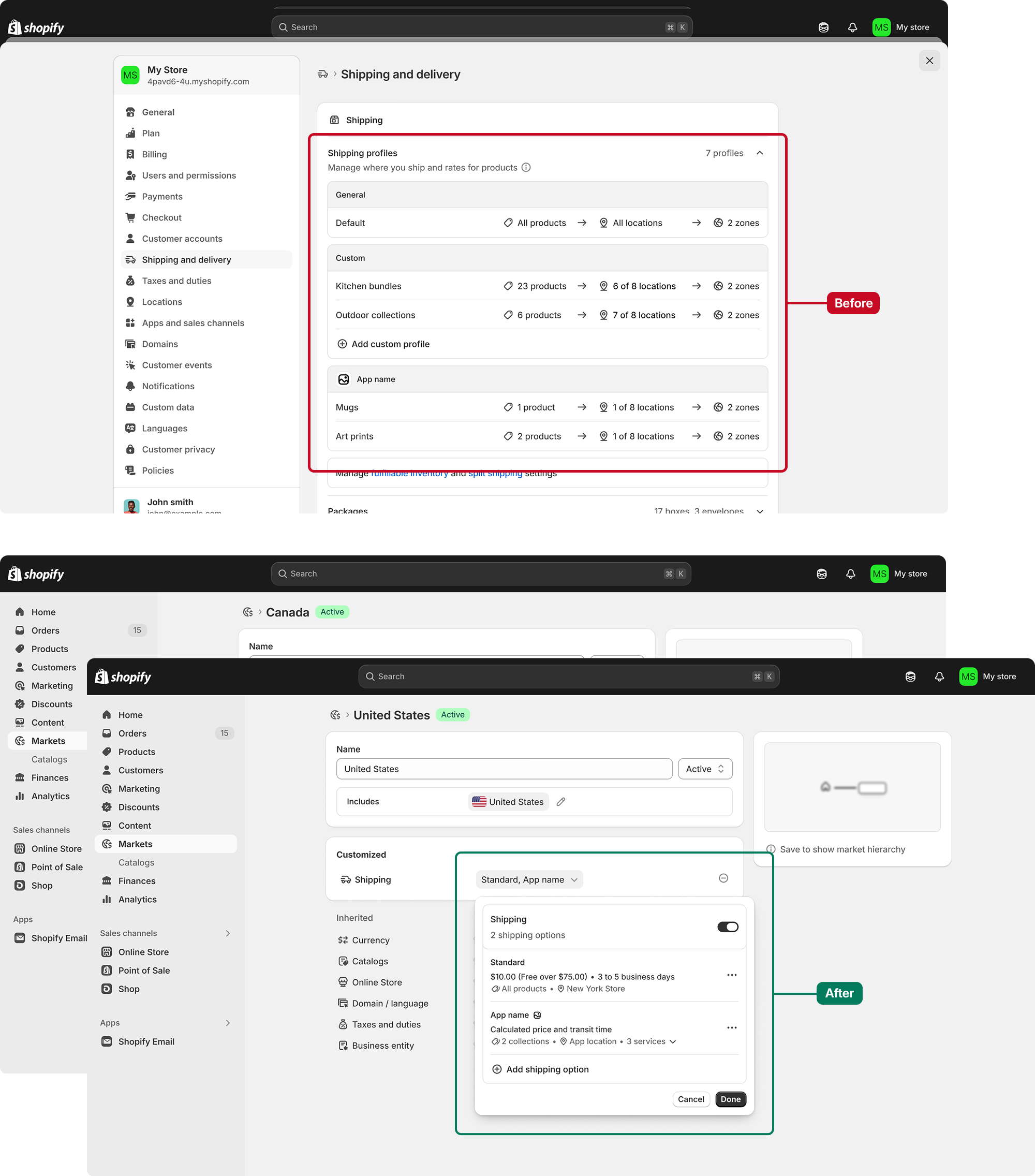
This means merchants can start from the market they care about, then answer:
- What shipping options should buyers in this market see?
- Which products should each rate apply to?
- Which fulfillment locations should each rate apply to?
- Which app-provided rates will buyers see alongside merchant-created rates?
Anchor to How market-driven shipping worksHow market-driven shipping works
A merchant's shipping setup is now centered on Markets.
For each market, a merchant can add shipping options such as:
- A flat rate, like Standard or Express.
- A weight-based or order-value-based rate.
- A carrier-calculated rate.
Within a shipping option, rates can vary by product and location conditions. For example, a merchant can have one Standard shipping option with different prices or transit times for:
- Products fulfilled from a warehouse in Los Angeles.
- Products fulfilled from a warehouse in Toronto.
- Products in their Fragile collection.
Anchor to Product conditionsProduct conditions
Product conditions define which products a rate applies to.
In market-driven shipping, a rate can apply to either:
- All products in the store.
- Specific collections.
Rates aren't assigned directly to individual products or variants. To apply a rate to a specific set of variants, those variants need to be grouped together in a collection. Using collections makes product conditions easier for partners to manage, simpler for merchants to understand, and more maintainable because rates automatically adapt as collection membership changes.
As part of the upgrade to market-driven shipping, Shopify will automatically create collections that reflect the merchant's existing product groupings from their current delivery profiles.

Anchor to Location conditionsLocation conditions
Location conditions define which fulfillment locations a rate applies to. This helps merchants control which rates are available when an order is fulfilled from different warehouses, retail locations, or other inventory locations.
For example, a merchant can use location conditions to offer a different Standard rate for items fulfilled from a Canadian warehouse than for items fulfilled from a United States warehouse.
Anchor to Predictable flat rates across products and locationsPredictable flat rates across products and locations
Market-driven shipping ensures a single flat rate can be charged across products and locations at checkout.
In today's product-driven system, shipping rates for carts that contain products from different delivery profiles or location groups are always summed at checkout. This can lead to buyers seeing shipping prices that are higher than the merchant intended.
With market-driven shipping, related rates can live inside the same shipping option. When multiple product or location conditions inside the same shipping option apply to a cart, Shopify can apply the highest matching rate instead of adding those rates together.
For example:
| Cart contents | Matching rates inside Standard | Buyer sees |
|---|---|---|
| Product A from warehouse 1 | Standard, $5 | Standard, $5 |
| Product B from warehouse 2 | Standard, $8 | Standard, $8 |
| Product A and Product B | Standard, $5 and Standard, $8 | Standard, $8 |
Anchor to What merchants see in Shopify adminWhat merchants see in Shopify admin
Merchants use Markets as the main place to review and edit shipping options for a market.
From a market, merchants can:
- Turn shipping on or off for that market.
- Add, edit, or remove shipping options.
- Edit which products and locations each rate applies to.
- See app-provided shipping options alongside their own shipping options.
- Enable or disable app-provided rates.
Merchants can also see an overview of which markets have customized shipping from the shipping and delivery settings page.
Anchor to App-provided rates in MarketsApp-provided rates in Markets
Apps can still provide shipping rates in the market-driven experience. App-owned delivery profiles continue to use the existing DeliveryProfile API, including deliveryProfileCreate and deliveryProfileUpdate. Those app-provided rates appear in Markets so merchants can understand the full set of shipping options their buyers might see at checkout.
Merchants can't edit app-owned rate details directly, which avoids conflicts where both the app and the merchant try to edit the same rate configuration. Merchants can enable or disable app-provided rates from the market-driven shipping experience.
Different apps use Shopify shipping APIs in different ways. Some apps might not need to change. Other apps need to upgrade because merchant-owned shipping configuration is moving to Markets.
For the detailed app upgrade paths, see Upgrade your app for market-driven shipping.
Anchor to Enable the feature previewEnable the feature preview
Get early access to the changes by enabling the market-driven shipping feature preview on a development store.
Use the feature preview to:
- See how shipping appears in Markets.
- Test how your app's rates appear with merchant-created shipping options.
- Validate any changes your app needs before merchant rollout begins.
Anchor to TimelineTimeline
The following timeline is subject to change.
| Date | Milestone |
|---|---|
| July 2026 | Feature preview and stable APIs available. |
| October 2026 | Merchant rollout begins. |
| July 2027 | All shops are on market-driven shipping. |
For more detail, see Upgrade your app for market-driven shipping.