Pixel Privacy
In order to comply with international privacy regulations, Shopify provides a way for merchants to manage their pixels and the data they collect. This guide will help you understand how to set up customer privacy settings for App and Custom pixels, and how to use the customerPrivacy API to manually handle pixel privacy behavior.
Anchor to App Pixels Privacy SettingsApp Pixels Privacy Settings
When creating app pixels, you can define the customer privacy settings that your pixel requires within your shopify.extension.toml file. Shopify's pixel manager will only load your pixel if there is visitor permission for all of the settings that your pixels declares as required. For more information, visit the App Pixel Tutorial documentation.


App Pixels Privacy Settings
Shopify.extension.toml
Anchor to Custom Pixels Privacy SettingsCustom Pixels Privacy Settings
When creating custom pixels, you can define the customer privacy settings that your pixel requires directly within the user interface. For more information please visit the Custom Pixel documentation.
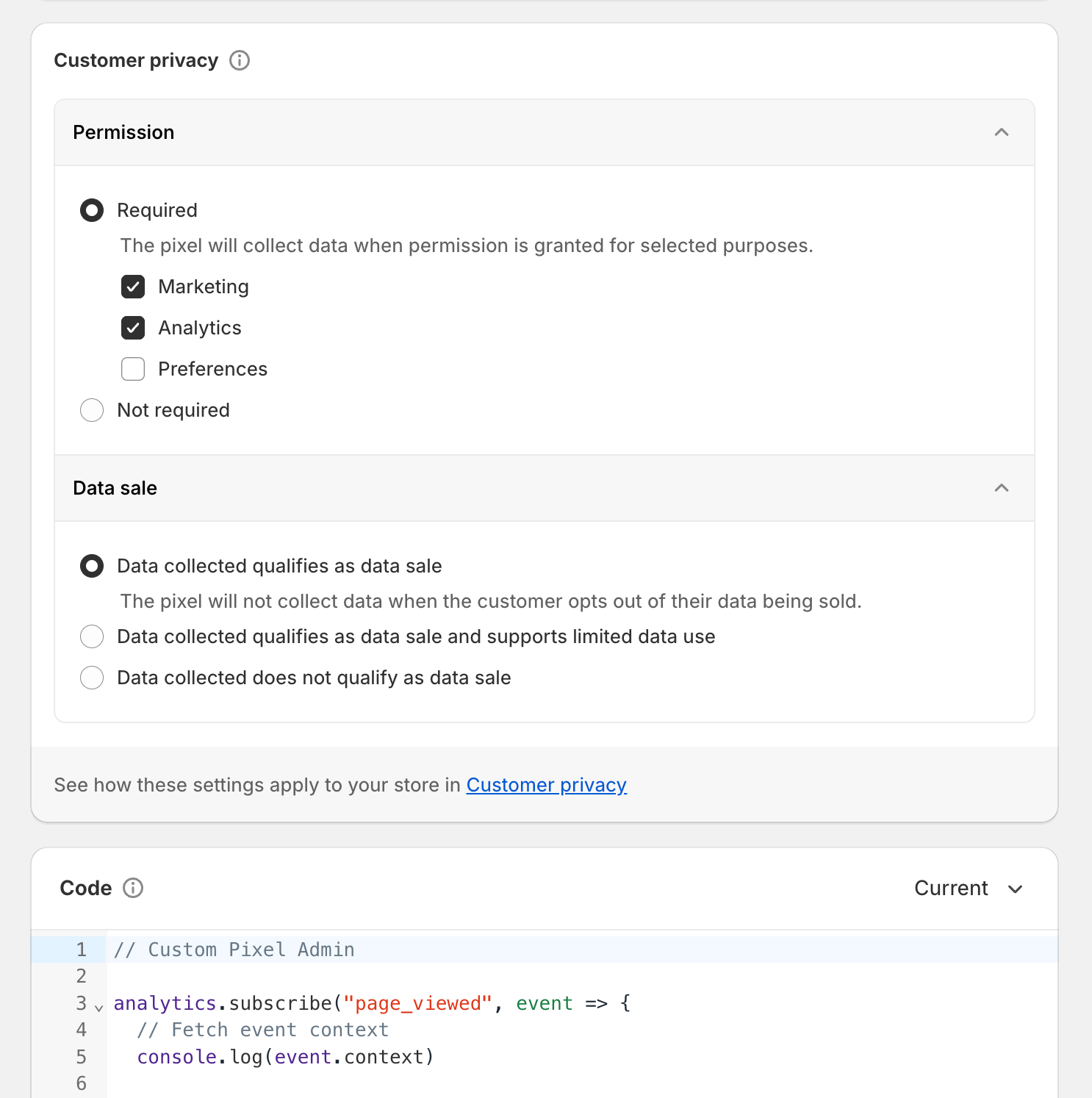
Anchor to Customer Privacy APICustomer Privacy API
Shopify provides Standard APIs to allow pixels to query the initial customer privacy permissions on a page and listen to any subsequent updates to consent. To query the initial customer privacy permissions, use the init.customerPrivacy API. You may assign this value to a variable to keep track of it throughout the lifecycle of your pixel. If consent changes without a page refresh (i.e. customer provides consent through a banner), you can adjust this value using the customerPrivacy Standard API. This API allows you to subscribe to the visitorConsentCollected event and apply any changes when consent is given. Using these APIs, you can manually handle any privacy related behavior inside a pixel sandbox.
Presently, the only event available for the customerPrivacy.subscribe() API is visitorConsentCollected. This is the only string that will be accepted for now.
Presently, the only event available for the customerPrivacy.subscribe() API is visitorConsentCollected. This is the only string that will be accepted for now.
Customer Privacy API
App Pixels
import {register} from '@shopify/web-pixels-extension';

register(({analytics, init, customerPrivacy}) => {
  // Use the init.customerPrivacy object to get the initial customer privacy status
  let customerPrivacyStatus = init.customerPrivacy;

  // Use the customerPrivacy Standard API to subscribe to consent collected events and update the status
  customerPrivacy.subscribe('visitorConsentCollected', (event) => {
    customerPrivacyStatus = event.customerPrivacy;
    /**
     * {
     *   "analyticsProcessingAllowed": boolean,
     *   "marketingAllowed": boolean,
     *   "preferencesProcessingAllowed": boolean,
     *   "saleOfDataAllowed": boolean,
     * }
     */
  })

  // Every product added to cart event will have the most up to date customer privacy status
  analytics.subscribe("product_added_to_cart", event => {
    const payload = {
      eventName: event.name,
      customerPrivacyStatus: customerPrivacyStatus,
    };

    fetch('https://example.com/pixel', {
      method: 'POST',
      body: JSON.stringify(payload),
      keepalive: true,
    });
  });
});
Custom Pixels
let customerPrivacyStatus = init.customerPrivacy;

// Use the customerPrivacy Standard API to subscribe to consent collected events and update the status
api.customerPrivacy.subscribe('visitorConsentCollected', (event) => {
  customerPrivacyStatus = event.customerPrivacy;
  /**
   * {
   *   "analyticsProcessingAllowed": boolean,
   *   "marketingAllowed": boolean,
   *   "preferencesProcessingAllowed": boolean,
   *   "saleOfDataAllowed": boolean,
   * }
   */
})

// Every product added to cart event will have the most up to date customer privacy status
analytics.subscribe("product_added_to_cart", event => {
  const payload = {
    eventName: event.name,
    customerPrivacyStatus: customerPrivacyStatus,
  };

  fetch('https://example.com/pixel', {
    method: 'POST',
    body: JSON.stringify(payload),
    keepalive: true,
  });
});