---
title: Announcement
description: >-
The announcement target renders a dismissable banner at the top of the Thank
you page. Extensions here communicate high-priority content you want buyers to
act on, such as surveys, promotions, and referral programs.
api_version: 2026-04
api_name: checkout-ui-extensions
source_url:
html: >-
https://shopify.dev/docs/api/checkout-ui-extensions/latest/targets/thank-you/announcement
md: >-
https://shopify.dev/docs/api/checkout-ui-extensions/latest/targets/thank-you/announcement.md
---
# Announcement
**Requires access to \[protected customer data]\(/docs/apps/store/data-protection/protected-customer-data) for some properties.:**
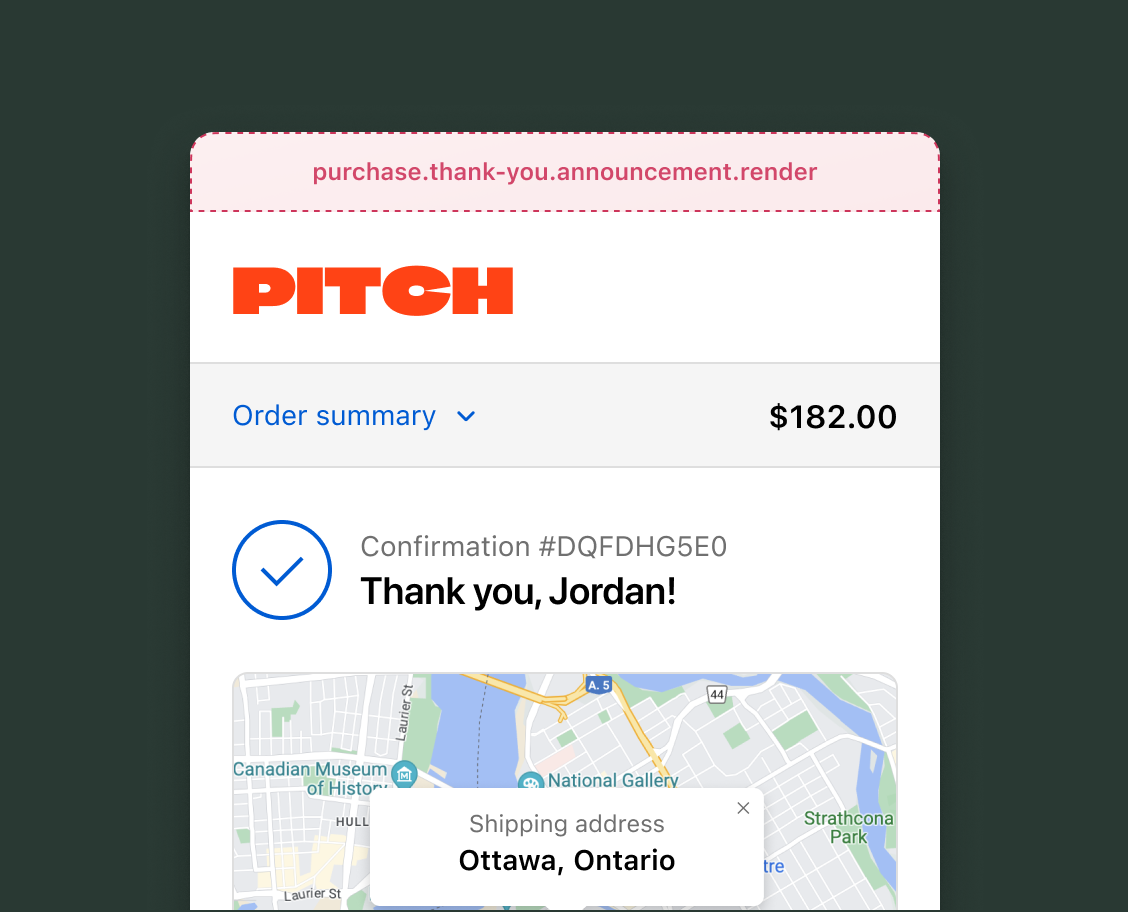
The announcement target renders a dismissable banner at the top of the Thank you page. Extensions here communicate high-priority content you want buyers to act on, such as surveys, promotions, and referral programs. Only one extension renders at this target. If multiple apps target this location, only one is displayed, so design your extension with the expectation it may not render.
Order data through the [Order API](https://shopify.dev/docs/api/checkout-ui-extensions/latest/target-apis/checkout-apis/order-api#order-confirmation-properties) at this target is limited to the order ID, order number, and whether it's the buyer's first order. For additional order details, query the [GraphQL Admin API's `order`](https://shopify.dev/docs/api/admin-graphql/latest/queries/order) from your app backend.
### Use cases
* **Exclusive offers and promotions**: Display special offers, discount codes, or loyalty program enrollment opportunities to returning buyers.
* **Buyer surveys and feedback**: Prompt buyers to complete a survey or provide feedback about their shopping experience.
* **Referral programs**: Promote referral programs and provide a direct link for buyer participation.
* **Localized messaging**: Show market-specific announcements based on the buyer's country, language, or currency, such as customs information for international orders or region-specific promotions.
***
## Announcement target
Use this [static](https://shopify.dev/docs/api/checkout-ui-extensions/latest/targets#static-extension-targets) target to display time-sensitive announcements to buyers immediately after their purchase.
Extensions must wrap all content inside the [announcement](https://shopify.dev/docs/api/checkout-ui-extensions/latest/polaris-web-components/feedback-and-status-indicators/announcement) component. The examples demonstrate using the [Order API](https://shopify.dev/docs/api/checkout-ui-extensions/latest/target-apis/checkout-apis/order-api#order-confirmation-properties) for order data and API properties for authenticated backend calls, [Storefront API](https://shopify.dev/docs/api/storefront) queries, and merchant settings.
### Thank you announcement target
`purchase.thank-you.announcement.render`
Renders a dismissable announcement banner above all other content on the Thank you page. Use this target to capture the buyer's attention with time-sensitive content that links to a modal for longer interactions.
Extensions at this target can access order information through the [Order API](https://shopify.dev/docs/api/checkout-ui-extensions/latest/target-apis/checkout-apis/order-api#order-confirmation-properties), including whether it's the buyer's first order. The announcement renders as a banner with built-in expand and collapse behavior.
### Support Components (56) APIs (24)
### Supported components
* [Abbreviation](https://shopify.dev/docs/api/checkout-ui-extensions/2026-04/web-components/typography-and-content/abbreviation)
* [Announcement](https://shopify.dev/docs/api/checkout-ui-extensions/2026-04/web-components/feedback-and-status-indicators/announcement)
* [Badge](https://shopify.dev/docs/api/checkout-ui-extensions/2026-04/web-components/feedback-and-status-indicators/badge)
* [Banner](https://shopify.dev/docs/api/checkout-ui-extensions/2026-04/web-components/feedback-and-status-indicators/banner)
* [Box](https://shopify.dev/docs/api/checkout-ui-extensions/2026-04/web-components/layout-and-structure/box)
* [Button](https://shopify.dev/docs/api/checkout-ui-extensions/2026-04/web-components/actions/button)
* [Checkbox](https://shopify.dev/docs/api/checkout-ui-extensions/2026-04/web-components/forms/checkbox)
* [Chip](https://shopify.dev/docs/api/checkout-ui-extensions/2026-04/web-components/typography-and-content/chip)
* [Choice list](https://shopify.dev/docs/api/checkout-ui-extensions/2026-04/web-components/forms/choice-list)
* [Clickable](https://shopify.dev/docs/api/checkout-ui-extensions/2026-04/web-components/actions/clickable)
* [Clickable chip](https://shopify.dev/docs/api/checkout-ui-extensions/2026-04/web-components/actions/clickable-chip)
* [Clipboard item](https://shopify.dev/docs/api/checkout-ui-extensions/2026-04/web-components/actions/clipboard-item)
* [Consent checkbox](https://shopify.dev/docs/api/checkout-ui-extensions/2026-04/web-components/forms/consent-checkbox)
* [Consent phone field](https://shopify.dev/docs/api/checkout-ui-extensions/2026-04/web-components/forms/consent-phone-field)
* [Date field](https://shopify.dev/docs/api/checkout-ui-extensions/2026-04/web-components/forms/date-field)
* [Date picker](https://shopify.dev/docs/api/checkout-ui-extensions/2026-04/web-components/forms/date-picker)
* [Details](https://shopify.dev/docs/api/checkout-ui-extensions/2026-04/web-components/typography-and-content/details)
* [Divider](https://shopify.dev/docs/api/checkout-ui-extensions/2026-04/web-components/layout-and-structure/divider)
* [Drop zone](https://shopify.dev/docs/api/checkout-ui-extensions/2026-04/web-components/forms/drop-zone)
* [Email field](https://shopify.dev/docs/api/checkout-ui-extensions/2026-04/web-components/forms/email-field)
* [Form](https://shopify.dev/docs/api/checkout-ui-extensions/2026-04/web-components/forms/form)
* [Grid](https://shopify.dev/docs/api/checkout-ui-extensions/2026-04/web-components/layout-and-structure/grid)
* [Heading](https://shopify.dev/docs/api/checkout-ui-extensions/2026-04/web-components/typography-and-content/heading)
* [Icon](https://shopify.dev/docs/api/checkout-ui-extensions/2026-04/web-components/media-and-visuals/icon)
* [Image](https://shopify.dev/docs/api/checkout-ui-extensions/2026-04/web-components/media-and-visuals/image)
* [Link](https://shopify.dev/docs/api/checkout-ui-extensions/2026-04/web-components/actions/link)
* [Map](https://shopify.dev/docs/api/checkout-ui-extensions/2026-04/web-components/media-and-visuals/map)
* [Modal](https://shopify.dev/docs/api/checkout-ui-extensions/2026-04/web-components/overlays/modal)
* [Money field](https://shopify.dev/docs/api/checkout-ui-extensions/2026-04/web-components/forms/money-field)
* [Number field](https://shopify.dev/docs/api/checkout-ui-extensions/2026-04/web-components/forms/number-field)
* [Ordered list](https://shopify.dev/docs/api/checkout-ui-extensions/2026-04/web-components/typography-and-content/ordered-list)
* [Paragraph](https://shopify.dev/docs/api/checkout-ui-extensions/2026-04/web-components/typography-and-content/paragraph)
* [Password field](https://shopify.dev/docs/api/checkout-ui-extensions/2026-04/web-components/forms/password-field)
* [Payment icon](https://shopify.dev/docs/api/checkout-ui-extensions/2026-04/web-components/media-and-visuals/payment-icon)
* [Phone field](https://shopify.dev/docs/api/checkout-ui-extensions/2026-04/web-components/forms/phone-field)
* [Popover](https://shopify.dev/docs/api/checkout-ui-extensions/2026-04/web-components/overlays/popover)
* [Press button](https://shopify.dev/docs/api/checkout-ui-extensions/2026-04/web-components/actions/press-button)
* [Product thumbnail](https://shopify.dev/docs/api/checkout-ui-extensions/2026-04/web-components/media-and-visuals/product-thumbnail)
* [Progress](https://shopify.dev/docs/api/checkout-ui-extensions/2026-04/web-components/feedback-and-status-indicators/progress)
* [Qr code](https://shopify.dev/docs/api/checkout-ui-extensions/2026-04/web-components/media-and-visuals/qr-code)
* [Query container](https://shopify.dev/docs/api/checkout-ui-extensions/2026-04/web-components/layout-and-structure/query-container)
* [Scroll box](https://shopify.dev/docs/api/checkout-ui-extensions/2026-04/web-components/layout-and-structure/scroll-box)
* [Section](https://shopify.dev/docs/api/checkout-ui-extensions/2026-04/web-components/layout-and-structure/section)
* [Select](https://shopify.dev/docs/api/checkout-ui-extensions/2026-04/web-components/forms/select)
* [Sheet](https://shopify.dev/docs/api/checkout-ui-extensions/2026-04/web-components/overlays/sheet)
* [Skeleton paragraph](https://shopify.dev/docs/api/checkout-ui-extensions/2026-04/web-components/typography-and-content/skeleton-paragraph)
* [Spinner](https://shopify.dev/docs/api/checkout-ui-extensions/2026-04/web-components/feedback-and-status-indicators/spinner)
* [Stack](https://shopify.dev/docs/api/checkout-ui-extensions/2026-04/web-components/layout-and-structure/stack)
* [Switch](https://shopify.dev/docs/api/checkout-ui-extensions/2026-04/web-components/forms/switch)
* [Text](https://shopify.dev/docs/api/checkout-ui-extensions/2026-04/web-components/typography-and-content/text)
* [Text area](https://shopify.dev/docs/api/checkout-ui-extensions/2026-04/web-components/forms/text-area)
* [Text field](https://shopify.dev/docs/api/checkout-ui-extensions/2026-04/web-components/forms/text-field)
* [Time](https://shopify.dev/docs/api/checkout-ui-extensions/2026-04/web-components/typography-and-content/time)
* [Tooltip](https://shopify.dev/docs/api/checkout-ui-extensions/2026-04/web-components/overlays/tooltip)
* [Unordered list](https://shopify.dev/docs/api/checkout-ui-extensions/2026-04/web-components/typography-and-content/unordered-list)
* [Url field](https://shopify.dev/docs/api/checkout-ui-extensions/2026-04/web-components/forms/url-field)
### Available APIs
* [Addresses API](https://shopify.dev/docs/api/checkout-ui-extensions/2026-04/target-apis/checkout-apis/addresses-api)
* [Analytics API](https://shopify.dev/docs/api/checkout-ui-extensions/2026-04/target-apis/platform-apis/analytics-api)
* [Attributes API](https://shopify.dev/docs/api/checkout-ui-extensions/2026-04/target-apis/checkout-apis/attributes-api)
* [Buyer Identity API](https://shopify.dev/docs/api/checkout-ui-extensions/2026-04/target-apis/checkout-apis/buyer-identity-api)
* [Buyer Journey API](https://shopify.dev/docs/api/checkout-ui-extensions/2026-04/target-apis/checkout-apis/buyer-journey-api)
* [Cart Instructions API](https://shopify.dev/docs/api/checkout-ui-extensions/2026-04/target-apis/checkout-apis/cart-instructions-api)
* [Cart Lines API](https://shopify.dev/docs/api/checkout-ui-extensions/2026-04/target-apis/checkout-apis/cart-lines-api)
* [Checkout Token API](https://shopify.dev/docs/api/checkout-ui-extensions/2026-04/target-apis/checkout-apis/checkout-token-api)
* [Cost API](https://shopify.dev/docs/api/checkout-ui-extensions/2026-04/target-apis/checkout-apis/cost-api)
* [Customer Privacy API](https://shopify.dev/docs/api/checkout-ui-extensions/2026-04/target-apis/checkout-apis/customer-privacy-api)
* [Delivery API](https://shopify.dev/docs/api/checkout-ui-extensions/2026-04/target-apis/checkout-apis/delivery-api)
* [Discounts API](https://shopify.dev/docs/api/checkout-ui-extensions/2026-04/target-apis/checkout-apis/discounts-api)
* [Extension API](https://shopify.dev/docs/api/checkout-ui-extensions/2026-04/target-apis/platform-apis/extension-api)
* [Gift Cards API](https://shopify.dev/docs/api/checkout-ui-extensions/2026-04/target-apis/checkout-apis/gift-cards-api)
* [Localization API](https://shopify.dev/docs/api/checkout-ui-extensions/2026-04/target-apis/platform-apis/localization-api)
* [Localized Fields API](https://shopify.dev/docs/api/checkout-ui-extensions/2026-04/target-apis/checkout-apis/localized-fields-api)
* [Metafields API](https://shopify.dev/docs/api/checkout-ui-extensions/2026-04/target-apis/platform-apis/metafields-api)
* [Note API](https://shopify.dev/docs/api/checkout-ui-extensions/2026-04/target-apis/checkout-apis/note-api)
* [Payments API](https://shopify.dev/docs/api/checkout-ui-extensions/2026-04/target-apis/checkout-apis/payments-api)
* [Session Token API](https://shopify.dev/docs/api/checkout-ui-extensions/2026-04/target-apis/platform-apis/session-token-api)
* [Settings API](https://shopify.dev/docs/api/checkout-ui-extensions/2026-04/target-apis/platform-apis/settings-api)
* [Shop API](https://shopify.dev/docs/api/checkout-ui-extensions/2026-04/target-apis/platform-apis/shop-api)
* [Storage API](https://shopify.dev/docs/api/checkout-ui-extensions/2026-04/target-apis/platform-apis/storage-api)
* [Storefront API](https://shopify.dev/docs/api/checkout-ui-extensions/2026-04/target-apis/platform-apis/storefront-api)
Examples
### Examples
* ####
##### Description
Add a dismissable announcement to the Thank you page that prompts buyers to fill out a survey. This example uses the announcement component with a modal to collect feedback about the shopping experience.
##### jsx
```jsx
import '@shopify/ui-extensions/preact';
import {render} from 'preact';
export default function extension() {
render(, document.body);
}
function Extension() {
return (
How was your shopping experience?
Take a quick survey
Submit
No thanks
);
}
```
* ####
##### Description
Display a referral program offer as an announcement banner. This example reads the order confirmation to personalize the message for first-time buyers.
##### jsx
```jsx
import '@shopify/ui-extensions/preact';
import {render} from 'preact';
export default function extension() {
render(, document.body);
}
function Extension() {
const isFirstOrder =
shopify.orderConfirmation.value?.isFirstOrder;
const message = isFirstOrder
? 'Welcome! Refer a friend and you both get 15% off.'
: 'Share the love — refer a friend for 15% off.';
return (
{message}
Get your referral link
);
}
```
***
## Best practices
* **Prioritize the default state**: The announcement is most effective when content is short enough to display entirely in its default state, with no need for expansion. Keep text concise and scannable, because buyers are focused on their order confirmation.
* **Handle content truncation**: The announcement component has a strict maximum height. Content that exceeds the expanded state's height is cut off with no scrolling capability. Make sure your extension handles long content gracefully to prevent truncation.
* **Provide a modal alternative**: If your extension needs to display more than a few lines of content, don't cram it into the announcement bar. Instead, use the bar as a teaser that links to a modal. This is the recommended pattern for displaying surveys, detailed offers, or other longer-form content.
***