Filter webhook deliveries
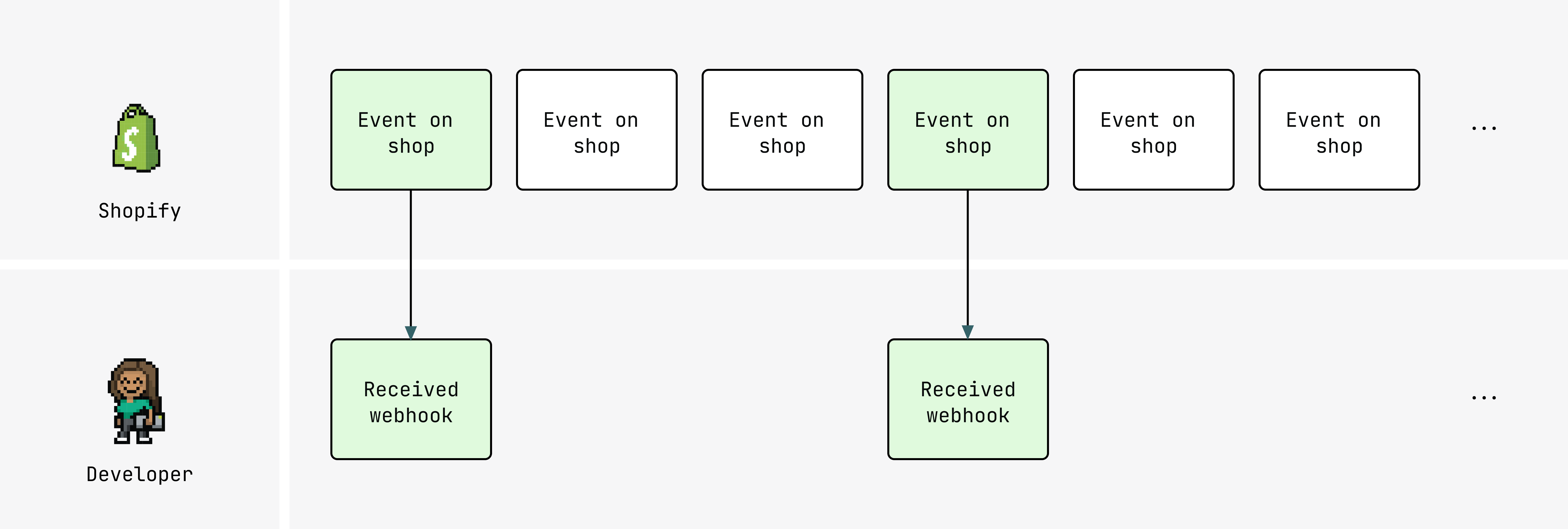
By default, a subscription fires for every event that matches its topic. Delivery filtering lets you narrow that without changing your topic or subscription configuration.
filter is an optional expression on a webhook subscription that evaluates against the payload and suppresses the delivery if the expression resolves to false.
Anchor to FiltersFilters
Shopify evaluates the expression against the payload after the event occurs, using current field values at the time of delivery. Without it, every matching event fires a delivery regardless of its payload values:
Without filter
shopify.app.toml
[webhooks]
api_version = "2026-10"

[[webhooks.subscriptions]]
topics = ["products/update"]
uri = "https://example.com/webhooks"
{} Response
{
  "id": 9554194432293,
  "title": "T-Shirt",
  "status": "active",
  "vendor": "My Store",
  "product_type": "Shirts",
  "variants": [
    {
      "id": 123456789,
      "title": "Default Title",
      "price": "29.99",
      "taxable": true,
      "weight": 0.2
    }
  ],
  "tags": "cotton"
}
Adding filter suppresses deliveries where the expression evaluates to false.
You can set it in your app configuration file using the filter argument, or with the filter input field in the webhookSubscription argument using the GraphQL Admin API:
Filter products/update webhooks
Filter definition
shopify.app.toml
[webhooks]
api_version = "2026-10"

[[webhooks.subscriptions]]
topics = ["products/update"]
uri = "https://example.com/webhooks"
filter = "id:* AND status:active AND (product_type:Music OR product_type:Movies) AND variants.taxable:true AND variants.weight:<5 AND variants.price:>=100 AND variants.title:Album*"
GraphQL
mutation subscribeToWebhook {
  webhookSubscriptionCreate(
    topic: PRODUCTS_UPDATE,
    webhookSubscription: {
      uri: "https://example.com/webhooks"
      filter: "id:* AND status:active AND (product_type:Music OR product_type:Movies) AND variants.taxable:true AND variants.weight:<5 AND variants.price:>=100 AND variants.title:Album*"
    }
  ) {
    webhookSubscription {
      id
      createdAt
      uri
      filter
    }
    userErrors {
      field
      message
    }
  }
}
{} Response
{
  "id": 9554194432293,
  "title": "Greatest Hits Collection",
  "status": "active",
  "product_type": "Music",
  "vendor": "My Store",
  "variants": [
    {
      "id": 123456789,
      "title": "Album Edition",
      "price": "129.99",
      "taxable": true,
      "weight": 0.2,
      "sku": "GHC-001"
    }
  ],
  "tags": "music, vinyl"
}
Anchor to SyntaxSyntax
filter uses Shopify API search syntax.
You can combine conditions with AND, OR, and parentheses:
shopify.app.toml
You denote nested fields using a period:
Nested field notation
Anchor to Differences from searchDifferences from search
filter shares Shopify's search syntax but behaves differently in several cases:
filter | Search | |
|---|---|---|
| Invalid field | No deliveries sent | All documents returned |
: operator | Equality | Fuzzy match when fields are tokenized |
| Field specification | Must be explicit | Term searches supported |
| Case sensitivity | Case-sensitive | Case-insensitive |
Anchor to Array fieldsArray fields
For fields that contain arrays of objects, the filter matches if at least one object in the array meets the condition.
For example, given a payload with a line_items array:
Example payload
The following delivers because at least one item in line_items contains a property where name is _your_custom_property:
Array field filter
This means that if any line_items has at least one matching object in its properties array, Shopify delivers the webhook.
Anchor to Tag fieldsTag fields
Tags are arrays in the data model but are serialized as a string in the webhook payload for topics like products/update and orders/updated.
Treat each tag as a keyword in a string rather than a distinct array value.
Anchor to Variant fieldsVariant fields
variants is a top-level payload field.
If any one variant satisfies the filter condition, the webhook fires on any product update, including unrelated changes like a title edit.
Filter products/update webhooks
Filter definition
shopify.app.config-name.toml
[webhooks]
api_version = "2026-10"

[[webhooks.subscriptions]]
topics = ["products/update"]
uri = "https://example.com/webhooks"
filter = "id:* AND status:active AND (product_type:Music OR product_type:Movies) AND -invalid_field:* AND variants.taxable:true AND variants.weight:<5 AND variants.price:>=100 AND variants.title:Album*"
GraphQL
mutation subscribeToWebhook {
  webhookSubscriptionCreate(
    topic: PRODUCTS_UPDATE,
    webhookSubscription: {
      uri: "https://example.com/webhooks"
      filter: "id:* AND status:active AND (product_type:Music OR product_type:Movies) AND -invalid_field:* AND variants.taxable:true AND variants.weight:<5 AND variants.price:>=100 AND variants.title:Album*"
    }
  ) {
    webhookSubscription {
      id
      createdAt
      uri
      filter
    }
    userErrors {
      field
      message
    }
  }
}
{} Response
{
  "id": 9554194432293,
  "title": "Greatest Hits Collection",
  "status": "active",
  "product_type": "Music",
  "vendor": "My Store",
  "variants": [
    {
      "id": 123456789,
      "title": "Album Edition",
      "price": "129.99",
      "taxable": true,
      "weight": 0.2,
      "sku": "GHC-001"
    }
  ],
  "tags": "music, vinyl"
}
Anchor to ConstraintsConstraints
Filters are available as of the 2024-07 API version.
filter expressions are validated when the subscription is created or updated, and must reference valid payload fields:
- Validation: An invalid field or type mismatch allows the subscription to be created but suppresses all deliveries. Incorrect syntax prevents the subscription from being created entirely.
include_fieldsdependency: Ifinclude_fieldsis set, all fields referenced in the filter must also appear ininclude_fields. See Delivery structure.
Some topics require a filter.
The metaobjects/create, metaobjects/update, and metaobjects/delete topics require a filter using type:{type} where {type} is the metaobject definition's type:
shopify.app.toml
To subscribe to multiple types, specify each explicitly:
shopify.app.toml
Wildcards like type:* aren't supported.
For app-owned definitions, use the full type value (app--{your-app-id}--{some-namespace}); the $app:{some-namespace} shorthand isn't supported.
Anchor to ExampleExample
Suppose you want your app notified only when a products/update event includes a variant priced at or above $10.00.
Without filtering, your subscription fires for every product update regardless of price.
The following subscription adds a filter to gate deliveries to that condition:
Filter by variant price
shopify.app.toml
[[webhooks.subscriptions]]
topics = ["products/update"]
uri = "https://example.com/webhooks"
filter = "variants.price:>=10.00"
{} Response
{
  "id": 9554194432293,
  "title": "Widget",
  "status": "active",
  "vendor": "My Store",
  "product_type": "Gadgets",
  "variants": [
    {
      "id": 123456789,
      "title": "Default Title",
      "price": "29.99",
      "sku": "WIDGET-001"
    }
  ]
}
After you apply this filter, your app receives products/update webhooks for updates to products where at least one variant's price is at least $10.00.
Anchor to Next stepsNext steps
- Delivery structure: Payload fields,
include_fields, and howfilterandinclude_fieldsinteract. - Verify deliveries: HMAC validation and deduplication.