Version 2025-07 is the last API version to support React-based UI components. Later versions use web components, native UI elements with built-in accessibility, better performance, and consistent styling with Shopify's design system. Check out the upgrade guide to upgrade your extension.
Catalogs
Catalog details pages display information about a specific catalog, including its products, pricing rules, and buyer associations. Extensions on these pages help merchants manage B2B product offerings and customize catalog workflows.
Anchor to Use casesUse cases
- Export and sync workflows: Enable merchants to export catalog data to external systems, sync pricing with ERP platforms, or generate product feeds for third-party marketplaces.
- Pricing insights: Display analytics and recommendations for catalog pricing strategies, showing profit margins, competitive analysis, or price optimization suggestions.
- Catalog validation: Show real-time validation results for catalog configurations, highlighting missing product information, pricing conflicts, or incomplete buyer assignments.
- Third-party integrations: Connect catalog data with inventory management systems, accounting platforms, or B2B commerce tools to streamline catalog operations.
- Custom analytics: Display specialized metrics such as catalog performance by buyer group, product adoption rates, or pricing effectiveness across different market segments.
Anchor to Catalogs targetsCatalogs targets
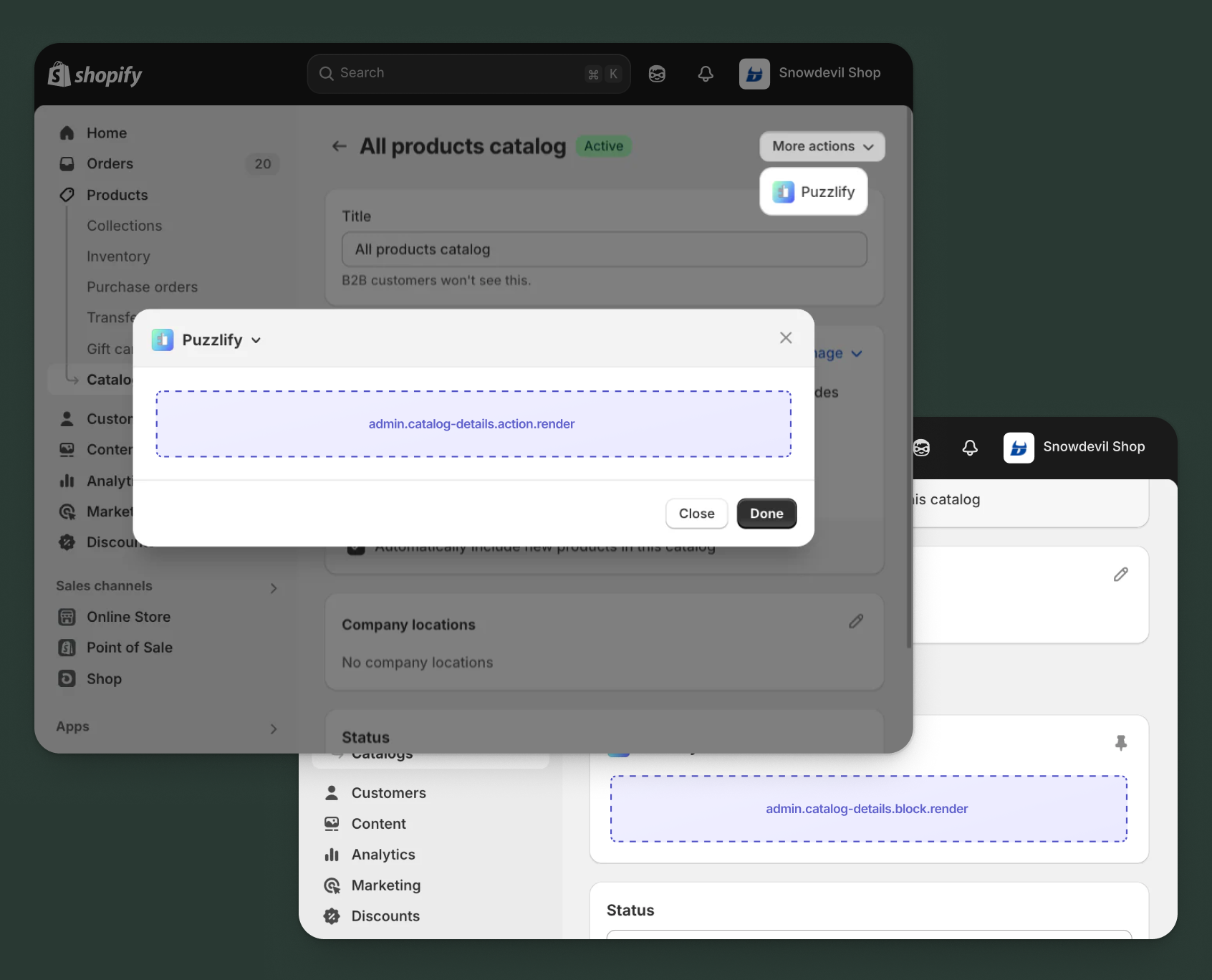
Use action and block targets to extend the catalog details page with workflows and contextual information that help merchants manage their B2B product offerings and pricing strategies.
Action targets open as modal overlays from the More actions menu, while block targets display as inline cards. The examples demonstrate fetching data from Shopify's direct API or your app's backend.
Anchor to Catalog details action ,[object Object]Catalog details action target
admin.catalog-details.action.render
Renders an admin action extension on the catalog details page. Merchants can access this extension from the More actions menu. Use this target to provide workflows that operate on the catalog data, such as exporting product lists, syncing pricing with external systems, or generating catalog reports.
Extensions at this target can access information about the catalog through the data property in the Action Extension API. The action renders in a modal overlay, providing space for multi-step workflows, forms, and confirmations.
Supported components
- Admin
Action - Admin
Block - Admin
Print Action - Badge
- Banner
- Block
Stack - Box
- Button
- Checkbox
- Choice
List - Color
Picker - Date
Field - Date
Picker - Divider
- Email
Field - Form
- Function
Settings - Heading
- Heading
Group - Icon
- Image
- Inline
Stack - Link
- Money
Field - Number
Field - Paragraph
- Password
Field - Pressable
- Progress
Indicator - Section
- Select
- Text
- Text
Area - Text
Field - URLField
Available APIs
Supported components
- Admin
Action - Admin
Block - Admin
Print Action - Badge
- Banner
- Block
Stack - Box
- Button
- Checkbox
- Choice
List - Color
Picker - Date
Field - Date
Picker - Divider
- Email
Field - Form
- Function
Settings - Heading
- Heading
Group - Icon
- Image
- Inline
Stack - Link
- Money
Field - Number
Field - Paragraph
- Password
Field - Pressable
- Progress
Indicator - Section
- Select
- Text
- Text
Area - Text
Field - URLField
Available APIs
Examples
Description
Add an action extension that exports catalog products and pricing to a CSV file. This example shows how to create a modal workflow that fetches catalog data and generates a downloadable export file.
React
import React from 'react';
import {useState} from 'react';
import {
  reactExtension,
  useApi,
  AdminAction,
  Banner,
  Section,
  BlockStack,
  Checkbox,
  Button,
} from '@shopify/ui-extensions-react/admin';

const TARGET = 'admin.catalog-details.action.render';

export default reactExtension(TARGET, () => <App />);

function App() {
  const {data, close} = useApi(TARGET);
  const [loading, setLoading] = useState(false);
  const [includeVariants, setIncludeVariants] = useState(true);
  const [includePricing, setIncludePricing] = useState(true);
  const [success, setSuccess] = useState(false);
  const [error, setError] = useState(false);

  const handleExport = async () => {
    setLoading(true);
    setSuccess(false);
    setError(false);
    const catalogId = data.selected[0].id;

    try {
      // Export catalog data through your app's backend
      const response = await fetch('https://your-app.com/api/export-catalog', {
        method: 'POST',
        headers: {'Content-Type': 'application/json'},
        body: JSON.stringify({
          catalogId,
          includeVariants,
          includePricing,
        }),
      });

      if (response.ok) {
        const blob = await response.blob();
        const url = window.URL.createObjectURL(blob);
        const a = document.createElement('a');
        a.href = url;
        a.download = 'catalog-export.csv';
        a.click();
        setSuccess(true);
        close();
      } else {
        setError(true);
      }
    } catch (err) {
      setError(true);
    } finally {
      setLoading(false);
    }
  };

  return (
    <AdminAction
      title="Export Catalog"
      primaryAction={
        <Button
          onPress={handleExport}
          disabled={loading || success}
        >
          {loading ? 'Exporting...' : 'Export to CSV'}
        </Button>
      }
      secondaryAction={
        <Button onPress={close}>
          Cancel
        </Button>
      }
    >
      {success && (
        <Banner tone="success" dismissible>
          Catalog exported successfully!
        </Banner>
      )}
      {error && (
        <Banner tone="critical" dismissible>
          Failed to export catalog. Please try again.
        </Banner>
      )}

      <Section heading="Export options">
        <BlockStack>
          <Checkbox
            checked={includeVariants}
            onChange={setIncludeVariants}
          >
            Include product variants
          </Checkbox>
          <Checkbox
            checked={includePricing}
            onChange={setIncludePricing}
          >
            Include pricing rules
          </Checkbox>
        </BlockStack>
      </Section>
    </AdminAction>
  );
}
TS
import {
  extension,
  AdminAction,
  Banner,
  Section,
  BlockStack,
  Checkbox,
  Button,
} from '@shopify/ui-extensions/admin';

export default extension(
  'admin.catalog-details.action.render',
  (root, api) => {
    let loading = false;
    let includeVariants = true;
    let includePricing = true;
    let success = false;
    let error = false;

    const handleExport = async () => {
      loading = true;
      success = false;
      error = false;
      updateUI();

      const catalogId = api.data.selected[0].id;

      try {
        // Export catalog data through your app's backend
        const response = await fetch('https://your-app.com/api/export-catalog', {
          method: 'POST',
          headers: {'Content-Type': 'application/json'},
          body: JSON.stringify({
            catalogId,
            includeVariants,
            includePricing,
          }),
        });

        if (response.ok) {
          const blob = await response.blob();
          const url = window.URL.createObjectURL(blob);
          const a = document.createElement('a');
          a.href = url;
          a.download = 'catalog-export.csv';
          a.click();
          success = true;
          updateUI();
          api.close();
        } else {
          error = true;
          updateUI();
        }
      } catch (err) {
        error = true;
        updateUI();
      } finally {
        loading = false;
        updateUI();
      }
    };

    const primaryAction = root.createFragment();
    const secondaryAction = root.createFragment();
    const content = root.createFragment();

    const updateUI = () => {
      content.replaceChildren();

      if (success) {
        content.appendChild(
          root.createComponent(
            Banner,
            {tone: 'success', dismissible: true},
            'Catalog exported successfully!'
          )
        );
      }

      if (error) {
        content.appendChild(
          root.createComponent(
            Banner,
            {tone: 'critical', dismissible: true},
            'Failed to export catalog. Please try again.'
          )
        );
      }

      const section = root.createComponent(Section, {heading: 'Export options'});
      const blockStack = root.createComponent(BlockStack);

      blockStack.appendChild(
        root.createComponent(
          Checkbox,
          {
            checked: includeVariants,
            onChange: (value) => {
              includeVariants = value;
            },
          },
          'Include product variants'
        )
      );

      blockStack.appendChild(
        root.createComponent(
          Checkbox,
          {
            checked: includePricing,
            onChange: (value) => {
              includePricing = value;
            },
          },
          'Include pricing rules'
        )
      );

      section.appendChild(blockStack);
      content.appendChild(section);
    };

    primaryAction.appendChild(
      root.createComponent(
        Button,
        {
          onPress: handleExport,
          disabled: loading || success,
        },
        loading ? 'Exporting...' : 'Export to CSV'
      )
    );

    secondaryAction.appendChild(
      root.createComponent(Button, {onPress: () => api.close()}, 'Cancel')
    );

    updateUI();

    const adminAction = root.createComponent(
      AdminAction,
      {
        title: 'Export Catalog',
        primaryAction,
        secondaryAction,
      }
    );

    adminAction.appendChild(content);
    root.appendChild(adminAction);
    root.mount();
  }
);
Description
Add an action extension that synchronizes catalog pricing with an external ERP system. This example demonstrates how to use the [GraphQL Admin API](/docs/api/admin-graphql) to fetch catalog details and push updates to an external system.
React
import React from 'react';
import {useState} from 'react';
import {
  reactExtension,
  useApi,
  AdminAction,
  Banner,
  Section,
  ChoiceList,
  Button,
} from '@shopify/ui-extensions-react/admin';

const TARGET = 'admin.catalog-details.action.render';

export default reactExtension(TARGET, () => <App />);

function App() {
  const {data, close, query} = useApi(TARGET);
  const [loading, setLoading] = useState(false);
  const [syncDirection, setSyncDirection] = useState('push');
  const [success, setSuccess] = useState(false);
  const [error, setError] = useState(false);

  const handleSync = async () => {
    setLoading(true);
    setSuccess(false);
    setError(false);
    const catalogId = data.selected[0].id;

    try {
      // Fetch catalog details from GraphQL Admin API
      const {data: catalogData} = await query(
        `
          query GetCatalog($id: ID!) {
            catalog(id: $id) {
              id
              title
              priceList {
                id
                name
                prices(first: 250) {
                  edges {
                    node {
                      variant {
                        id
                      }
                      price {
                        amount
                        currencyCode
                      }
                    }
                  }
                }
              }
            }
          }
        `,
        {variables: {id: catalogId}}
      );

      // Sync catalog pricing through your app's backend
      const response = await fetch('https://your-app.com/api/sync-pricing', {
        method: 'POST',
        headers: {'Content-Type': 'application/json'},
        body: JSON.stringify({
          catalog: catalogData.catalog,
          direction: syncDirection,
        }),
      });

      if (response.ok) {
        setSuccess(true);
        close();
      } else {
        setError(true);
      }
    } catch (err) {
      setError(true);
    } finally {
      setLoading(false);
    }
  };

  return (
    <AdminAction
      title="Sync Pricing with ERP"
      primaryAction={
        <Button
          onPress={handleSync}
          disabled={loading || success}
        >
          {loading ? 'Syncing...' : 'Sync Pricing'}
        </Button>
      }
      secondaryAction={
        <Button onPress={close}>
          Cancel
        </Button>
      }
    >
      {success && (
        <Banner tone="success" dismissible>
          Pricing synchronized successfully!
        </Banner>
      )}
      {error && (
        <Banner tone="critical" dismissible>
          Failed to sync pricing. Please try again.
        </Banner>
      )}

      <Section heading="Sync settings">
        <ChoiceList
          name="sync-direction"
          value={syncDirection}
          onChange={setSyncDirection}
          choices={[
            {
              label: 'Push to ERP (Shopify → ERP)',
              id: 'push',
            },
            {
              label: 'Pull from ERP (ERP → Shopify)',
              id: 'pull',
            },
          ]}
        />
      </Section>
    </AdminAction>
  );
}
TS
import {
  extension,
  AdminAction,
  Banner,
  Section,
  ChoiceList,
  Button,
} from '@shopify/ui-extensions/admin';

export default extension(
  'admin.catalog-details.action.render',
  (root, api) => {
    let loading = false;
    let syncDirection = 'push';
    let success = false;
    let error = false;

    const handleSync = async () => {
      loading = true;
      success = false;
      error = false;
      updateUI();

      const catalogId = api.data.selected[0].id;

      try {
        // Fetch catalog details from GraphQL Admin API
        const {data: catalogData} = await api.query(
          `
            query GetCatalog($id: ID!) {
              catalog(id: $id) {
                id
                title
                priceList {
                  id
                  name
                  prices(first: 250) {
                    edges {
                      node {
                        variant {
                          id
                        }
                        price {
                          amount
                          currencyCode
                        }
                      }
                    }
                  }
                }
              }
            }
          `,
          {variables: {id: catalogId}}
        );

        // Sync catalog pricing through your app's backend
        const response = await fetch('https://your-app.com/api/sync-pricing', {
          method: 'POST',
          headers: {'Content-Type': 'application/json'},
          body: JSON.stringify({
            catalog: catalogData.catalog,
            direction: syncDirection,
          }),
        });

        if (response.ok) {
          success = true;
          updateUI();
          api.close();
        } else {
          error = true;
          updateUI();
        }
      } catch (err) {
        error = true;
        updateUI();
      } finally {
        loading = false;
        updateUI();
      }
    };

    const primaryAction = root.createFragment();
    const secondaryAction = root.createFragment();
    const content = root.createFragment();

    const updateUI = () => {
      content.replaceChildren();

      if (success) {
        content.appendChild(
          root.createComponent(
            Banner,
            {tone: 'success', dismissible: true},
            'Pricing synchronized successfully!'
          )
        );
      }

      if (error) {
        content.appendChild(
          root.createComponent(
            Banner,
            {tone: 'critical', dismissible: true},
            'Failed to sync pricing. Please try again.'
          )
        );
      }

      const section = root.createComponent(Section, {heading: 'Sync settings'});
      const choiceList = root.createComponent(ChoiceList, {
        name: 'sync-direction',
        value: syncDirection,
        onChange: (value) => {
          syncDirection = value;
        },
        choices: [
          {
            label: 'Push to ERP (Shopify → ERP)',
            id: 'push',
          },
          {
            label: 'Pull from ERP (ERP → Shopify)',
            id: 'pull',
          },
        ],
      });

      section.appendChild(choiceList);
      content.appendChild(section);
    };

    primaryAction.appendChild(
      root.createComponent(
        Button,
        {
          onPress: handleSync,
          disabled: loading || success,
        },
        loading ? 'Syncing...' : 'Sync Pricing'
      )
    );

    secondaryAction.appendChild(
      root.createComponent(Button, {onPress: () => api.close()}, 'Cancel')
    );

    updateUI();

    const adminAction = root.createComponent(
      AdminAction,
      {
        title: 'Sync Pricing with ERP',
        primaryAction,
        secondaryAction,
      }
    );

    adminAction.appendChild(content);
    root.appendChild(adminAction);
    root.mount();
  }
);
Anchor to Catalog details action (should render) ,[object Object]Catalog details action (should render) target
admin.catalog-details.action.should-render
Controls the render state of an admin action extension on the catalog details page. Use this target to conditionally show or hide your action extension based on the catalog's properties, such as publication status, product count, or specific business requirements.
This target returns a boolean value that determines whether the corresponding action extension appears in the More actions menu. The extension is evaluated each time the page loads.
Supported components
Available APIs
Supported components
Available APIs
Examples
Description
Conditionally display an export action only for catalogs that are currently published. This example demonstrates how to use the `should-render` target to control extension visibility based on catalog status.
React
import {extension} from '@shopify/ui-extensions/admin';

export default extension(
  'admin.catalog-details.action.should-render',
  async ({data}) => {
    const catalogId = data.selected[0].id;

    try {
      // Fetch catalog details from GraphQL Admin API
      const response = await fetch(
        'shopify:admin/api/graphql.json',
        {
          method: 'POST',
          headers: {'Content-Type': 'application/json'},
          body: JSON.stringify({
            query: `
              query GetCatalog($id: ID!) {
                catalog(id: $id) {
                  status
                }
              }
            `,
            variables: {id: catalogId},
          }),
        }
      );

      const {data: responseData} = await response.json();
      const status = responseData.catalog.status;

      // Only show action for published catalogs
      return {display: status === 'ACTIVE'};
    } catch (err) {
      console.error('Error fetching catalog:', err);
      return {display: false};
    }
  }
);
TS
import {extension} from '@shopify/ui-extensions/admin';

export default extension(
  'admin.catalog-details.action.should-render',
  async ({data}) => {
    const catalogId = data.selected[0].id;

    try {
      // Fetch catalog details from GraphQL Admin API
      const response = await fetch(
        'shopify:admin/api/graphql.json',
        {
          method: 'POST',
          headers: {'Content-Type': 'application/json'},
          body: JSON.stringify({
            query: `
              query GetCatalog($id: ID!) {
                catalog(id: $id) {
                  status
                }
              }
            `,
            variables: {id: catalogId},
          }),
        }
      );

      const {data: responseData} = await response.json();
      const status = responseData.catalog.status;

      // Only show action for published catalogs
      return {display: status === 'ACTIVE'};
    } catch (err) {
      console.error('Error fetching catalog:', err);
      return {display: false};
    }
  }
);
Description
Conditionally display the sync action only for catalogs that contain products. This example demonstrates filtering based on catalog content using the [GraphQL Admin API](/docs/api/admin-graphql).
React
import {extension} from '@shopify/ui-extensions/admin';

export default extension(
  'admin.catalog-details.action.should-render',
  async ({data, query}) => {
    const catalogId = data.selected[0].id;

    try {
      // Fetch catalog product count
      const {data: responseData} = await query(
        `
          query GetCatalog($id: ID!) {
            catalog(id: $id) {
              products(first: 1) {
                edges {
                  node {
                    id
                  }
                }
              }
            }
          }
        `,
        {variables: {id: catalogId}}
      );

      const hasProducts = responseData.catalog.products.edges.length > 0;

      // Only show action for catalogs with products
      return {display: hasProducts};
    } catch (err) {
      console.error('Error fetching catalog:', err);
      return {display: false};
    }
  }
);
TS
import {extension} from '@shopify/ui-extensions/admin';

export default extension(
  'admin.catalog-details.action.should-render',
  async ({data, query}) => {
    const catalogId = data.selected[0].id;

    try {
      // Fetch catalog product count
      const {data: responseData} = await query(
        `
          query GetCatalog($id: ID!) {
            catalog(id: $id) {
              products(first: 1) {
                edges {
                  node {
                    id
                  }
                }
              }
            }
          }
        `,
        {variables: {id: catalogId}}
      );

      const hasProducts = responseData.catalog.products.edges.length > 0;

      // Only show action for catalogs with products
      return {display: hasProducts};
    } catch (err) {
      console.error('Error fetching catalog:', err);
      return {display: false};
    }
  }
);
Anchor to Catalog details block ,[object Object]Catalog details block target
admin.catalog-details.block.render
Renders an admin block extension inline on the catalog details page. Use this target to display contextual information, analytics, or status updates related to the catalog without requiring merchants to open a modal.
Extensions at this target appear as cards on the page and can show real-time data, insights, or quick actions. Blocks provide persistent visibility and are ideal for displaying information merchants need to see at a glance.
Supported components
- Admin
Action - Admin
Block - Admin
Print Action - Badge
- Banner
- Block
Stack - Box
- Button
- Checkbox
- Choice
List - Color
Picker - Date
Field - Date
Picker - Divider
- Email
Field - Form
- Function
Settings - Heading
- Heading
Group - Icon
- Image
- Inline
Stack - Link
- Money
Field - Number
Field - Paragraph
- Password
Field - Pressable
- Progress
Indicator - Section
- Select
- Text
- Text
Area - Text
Field - URLField
Available APIs
Supported components
- Admin
Action - Admin
Block - Admin
Print Action - Badge
- Banner
- Block
Stack - Box
- Button
- Checkbox
- Choice
List - Color
Picker - Date
Field - Date
Picker - Divider
- Email
Field - Form
- Function
Settings - Heading
- Heading
Group - Icon
- Image
- Inline
Stack - Link
- Money
Field - Number
Field - Paragraph
- Password
Field - Pressable
- Progress
Indicator - Section
- Select
- Text
- Text
Area - Text
Field - URLField
Available APIs
Examples
Description
Create a block extension that shows key performance metrics for the catalog, such as product count, total value, and buyer associations. This example demonstrates how to present valuable insights inline on the page.
React
import React from 'react';
import {useState, useEffect} from 'react';
import {
  reactExtension,
  useApi,
  AdminBlock,
  BlockStack,
  Box,
  Heading,
  InlineStack,
  Text,
  Divider,
  ProgressIndicator,
} from '@shopify/ui-extensions-react/admin';

const TARGET = 'admin.catalog-details.block.render';

export default reactExtension(TARGET, () => <App />);

function App() {
  const {data} = useApi(TARGET);
  const [metrics, setMetrics] = useState(null);
  const [loading, setLoading] = useState(true);

  useEffect(() => {
    const fetchMetrics = async () => {
      const catalogId = data.selected[0].id;

      try {
        // Fetch metrics from your app's backend
        const response = await fetch(
          `https://your-app.com/api/catalog-metrics?id=${catalogId}`
        );
        const metricsData = await response.json();
        setMetrics(metricsData);
      } catch (err) {
        console.error('Error fetching metrics:', err);
      } finally {
        setLoading(false);
      }
    };

    fetchMetrics();
  }, [data]);

  if (loading) {
    return (
      <AdminBlock title="Catalog Performance">
        <BlockStack>
          <ProgressIndicator size="small-100" />
          <Text>Loading metrics...</Text>
        </BlockStack>
      </AdminBlock>
    );
  }

  if (!metrics) {
    return (
      <AdminBlock title="Catalog Performance">
        <Text>Unable to load metrics</Text>
      </AdminBlock>
    );
  }

  return (
    <AdminBlock title="Catalog Performance">
      <BlockStack>
        <Box>
          <Heading>Product Count</Heading>
          <InlineStack>
            <Text>{metrics.productCount}</Text>
            <Text>products</Text>
          </InlineStack>
        </Box>

        <Divider />

        <Box>
          <Heading>Total Catalog Value</Heading>
          <Text>${metrics.totalValue.toLocaleString()}</Text>
        </Box>

        <Divider />

        <Box>
          <Heading>Buyer Associations</Heading>
          <BlockStack>
            <Text>
              {metrics.companyCount} companies
            </Text>
            <Text>
              {metrics.locationCount} locations
            </Text>
          </BlockStack>
        </Box>

        <Divider />

        <Box>
          <Heading>Last Sync</Heading>
          <Text>{metrics.lastSync}</Text>
        </Box>
      </BlockStack>
    </AdminBlock>
  );
}
TS
import {
  extension,
  AdminBlock,
  BlockStack,
  Box,
  Heading,
  InlineStack,
  Text,
  Divider,
  ProgressIndicator,
} from '@shopify/ui-extensions/admin';

export default extension(
  'admin.catalog-details.block.render',
  async (root, api) => {
    const catalogId = api.data.selected[0].id;
    const adminBlock = root.createComponent(AdminBlock, {title: 'Catalog Performance'});

    // Show loading state
    const loadingStack = root.createComponent(BlockStack);
    loadingStack.appendChild(root.createComponent(ProgressIndicator, {size: 'small-100'}));
    loadingStack.appendChild(root.createComponent(Text, {}, 'Loading metrics...'));
    adminBlock.appendChild(loadingStack);
    root.appendChild(adminBlock);
    root.mount();

    try {
      // Fetch metrics from your app's backend
      const response = await fetch(
        `https://your-app.com/api/catalog-metrics?id=${catalogId}`
      );
      const metrics = await response.json();

      // Clear loading state and show metrics
      adminBlock.replaceChildren();

      const blockStack = root.createComponent(BlockStack);

      // Product Count section
      const productCountBox = root.createComponent(Box);
      productCountBox.appendChild(root.createComponent(Heading, {}, 'Product Count'));
      const productCountStack = root.createComponent(InlineStack);
      productCountStack.appendChild(root.createComponent(Text, {}, metrics.productCount));
      productCountStack.appendChild(root.createComponent(Text, {}, 'products'));
      productCountBox.appendChild(productCountStack);
      blockStack.appendChild(productCountBox);

      blockStack.appendChild(root.createComponent(Divider));

      // Total Catalog Value section
      const valueBox = root.createComponent(Box);
      valueBox.appendChild(root.createComponent(Heading, {}, 'Total Catalog Value'));
      valueBox.appendChild(
        root.createComponent(Text, {}, `$${metrics.totalValue.toLocaleString()}`)
      );
      blockStack.appendChild(valueBox);

      blockStack.appendChild(root.createComponent(Divider));

      // Buyer Associations section
      const buyerBox = root.createComponent(Box);
      buyerBox.appendChild(root.createComponent(Heading, {}, 'Buyer Associations'));
      const buyerStack = root.createComponent(BlockStack);
      buyerStack.appendChild(
        root.createComponent(Text, {}, `${metrics.companyCount} companies`)
      );
      buyerStack.appendChild(
        root.createComponent(Text, {}, `${metrics.locationCount} locations`)
      );
      buyerBox.appendChild(buyerStack);
      blockStack.appendChild(buyerBox);

      blockStack.appendChild(root.createComponent(Divider));

      // Last Sync section
      const syncBox = root.createComponent(Box);
      syncBox.appendChild(root.createComponent(Heading, {}, 'Last Sync'));
      syncBox.appendChild(root.createComponent(Text, {}, metrics.lastSync));
      blockStack.appendChild(syncBox);

      adminBlock.appendChild(blockStack);
    } catch (err) {
      console.error('Error fetching metrics:', err);
      adminBlock.replaceChildren(
        root.createComponent(Text, {}, 'Unable to load metrics')
      );
    }
  }
);
Description
Create a block extension that shows real-time validation results for catalog pricing rules. This example demonstrates how to highlight pricing issues that need merchant attention.
React
import React from 'react';
import {useState, useEffect} from 'react';
import {
  reactExtension,
  useApi,
  AdminBlock,
  BlockStack,
  Box,
  Banner,
  Text,
  Button,
  ProgressIndicator,
} from '@shopify/ui-extensions-react/admin';

const TARGET = 'admin.catalog-details.block.render';

export default reactExtension(TARGET, () => <App />);

function App() {
  const {data, navigation} = useApi(TARGET);
  const [validation, setValidation] = useState(null);
  const [loading, setLoading] = useState(true);

  useEffect(() => {
    const fetchValidation = async () => {
      const catalogId = data.selected[0].id;

      try {
        // Fetch validation results from your app's backend
        const response = await fetch(
          `https://your-app.com/api/validate-pricing?catalogId=${catalogId}`
        );
        const validationData = await response.json();
        setValidation(validationData);
      } catch (err) {
        console.error('Error fetching validation:', err);
      } finally {
        setLoading(false);
      }
    };

    fetchValidation();
  }, [data]);

  if (loading) {
    return (
      <AdminBlock title="Pricing Validation">
        <ProgressIndicator size="small-100" />
      </AdminBlock>
    );
  }

  if (!validation) {
    return (
      <AdminBlock title="Pricing Validation">
        <Text>Unable to load validation results</Text>
      </AdminBlock>
    );
  }

  const hasIssues = validation.errors.length > 0 || validation.warnings.length > 0;

  return (
    <AdminBlock title="Pricing Validation">
      <BlockStack>
        {!hasIssues && (
          <Banner tone="success">
            All pricing rules are valid
          </Banner>
        )}

        {validation.errors.length > 0 && (
          <BlockStack>
            <Banner tone="critical">
              {validation.errors.length} pricing errors found
            </Banner>
            <BlockStack>
              {validation.errors.map((error, index) => (
                <Box key={index}>
                  <BlockStack>
                    <Text fontWeight="bold">{error.product}</Text>
                    <Text>{error.message}</Text>
                  </BlockStack>
                </Box>
              ))}
            </BlockStack>
          </BlockStack>
        )}

        {validation.warnings.length > 0 && (
          <BlockStack>
            <Banner tone="warning">
              {validation.warnings.length} pricing warnings
            </Banner>
            <BlockStack>
              {validation.warnings.map((warning, index) => (
                <Box key={index}>
                  <BlockStack>
                    <Text fontWeight="bold">{warning.product}</Text>
                    <Text>{warning.message}</Text>
                  </BlockStack>
                </Box>
              ))}
            </BlockStack>
          </BlockStack>
        )}

        <Button
          onPress={() => navigation.navigate('extension://validate-pricing-action')}
        >
          View Detailed Report
        </Button>
      </BlockStack>
    </AdminBlock>
  );
}
TS
import {
  extension,
  AdminBlock,
  BlockStack,
  Box,
  Banner,
  Text,
  Button,
  ProgressIndicator,
} from '@shopify/ui-extensions/admin';

export default extension(
  'admin.catalog-details.block.render',
  async (root, api) => {
    const catalogId = api.data.selected[0].id;
    const adminBlock = root.createComponent(AdminBlock, {title: 'Pricing Validation'});

    // Show loading state
    adminBlock.appendChild(root.createComponent(ProgressIndicator, {size: 'small-100'}));
    root.appendChild(adminBlock);
    root.mount();

    try {
      // Fetch validation results from your app's backend
      const response = await fetch(
        `https://your-app.com/api/validate-pricing?catalogId=${catalogId}`
      );
      const validation = await response.json();

      // Clear loading state and show validation results
      adminBlock.replaceChildren();

      const blockStack = root.createComponent(BlockStack);
      const hasIssues = validation.errors.length > 0 || validation.warnings.length > 0;

      if (!hasIssues) {
        blockStack.appendChild(
          root.createComponent(Banner, {tone: 'success'}, 'All pricing rules are valid')
        );
      }

      if (validation.errors.length > 0) {
        const errorStack = root.createComponent(BlockStack);
        errorStack.appendChild(
          root.createComponent(
            Banner,
            {tone: 'critical'},
            `${validation.errors.length} pricing errors found`
          )
        );

        const errorsStack = root.createComponent(BlockStack);
        for (const error of validation.errors) {
          const errorBox = root.createComponent(Box);
          const errorBlockStack = root.createComponent(BlockStack);
          errorBlockStack.appendChild(
            root.createComponent(Text, {fontWeight: 'bold'}, error.product)
          );
          errorBlockStack.appendChild(root.createComponent(Text, {}, error.message));
          errorBox.appendChild(errorBlockStack);
          errorsStack.appendChild(errorBox);
        }
        errorStack.appendChild(errorsStack);
        blockStack.appendChild(errorStack);
      }

      if (validation.warnings.length > 0) {
        const warningStack = root.createComponent(BlockStack);
        warningStack.appendChild(
          root.createComponent(
            Banner,
            {tone: 'warning'},
            `${validation.warnings.length} pricing warnings`
          )
        );

        const warningsStack = root.createComponent(BlockStack);
        for (const warning of validation.warnings) {
          const warningBox = root.createComponent(Box);
          const warningBlockStack = root.createComponent(BlockStack);
          warningBlockStack.appendChild(
            root.createComponent(Text, {fontWeight: 'bold'}, warning.product)
          );
          warningBlockStack.appendChild(root.createComponent(Text, {}, warning.message));
          warningBox.appendChild(warningBlockStack);
          warningsStack.appendChild(warningBox);
        }
        warningStack.appendChild(warningsStack);
        blockStack.appendChild(warningStack);
      }

      blockStack.appendChild(
        root.createComponent(
          Button,
          {onPress: () => api.navigation.navigate('extension://validate-pricing-action')},
          'View Detailed Report'
        )
      );

      adminBlock.appendChild(blockStack);
    } catch (err) {
      console.error('Error fetching validation:', err);
      adminBlock.replaceChildren(
        root.createComponent(Text, {}, 'Unable to load validation results')
      );
    }
  }
);
Anchor to Best practicesBest practices
- Focus on B2B workflows: Catalogs are primarily used for B2B commerce, so design your extensions to support wholesale pricing, bulk operations, and company-specific product offerings that align with B2B merchant needs.
- Handle large product sets with pagination: Catalogs can contain thousands of products. When fetching catalog data, use cursor-based pagination to stay within the GraphQL query cost limits. For exports of catalogs with 500+ products, process them as background jobs rather than synchronous operations.
- Validate pricing rules: When displaying or manipulating catalog pricing, validate that custom pricing rules don't conflict with base prices.
- Show buyer context: Display information about which companies or locations have access to the catalog to help merchants understand the reach and impact of their pricing changes.
- Consider price list inheritance: Catalog pricing is generated from price lists that have context rules (markets, buyer tags, company locations). When displaying prices, show which rule determined the price to help merchants troubleshoot unexpected pricing.
Anchor to LimitationsLimitations
- Single target per module: Each
[[extensions.targeting]]entry in your TOML configuration maps one target to one module file. - Price list pagination: The catalog price lists query returns a maximum of 250 entries per request.
- Block target visibility: Block extensions must be manually added and pinned by merchants before they appear.
- Block collapse behavior: Returning
nullfrom a block extension collapses the block rather than removing it from the page. Blocks can't be fully hidden at runtime.