Version 2025-07 is the last API version to support React-based UI components. Later versions use web components, native UI elements with built-in accessibility, better performance, and consistent styling with Shopify's design system. Check out the upgrade guide to upgrade your extension.
Companies
The company details page displays information about a specific B2B company, including its profile, locations, contacts, and order history. Extensions on these pages help merchants manage B2B relationships and customize company workflows.
Anchor to Use casesUse cases
- CRM integration: Sync company data with external CRM systems, update contact information across platforms, or pull in additional customer intelligence to enrich merchant workflows.
- Credit management: Display real-time credit limits, outstanding balances, payment terms, or risk scores to help merchants make informed decisions about extending credit to B2B customers.
- Communication workflows: Initiate targeted email campaigns, send payment reminders, schedule follow-ups, or trigger notifications based on company activity and status changes.
- Compliance and verification: Show KYC (Know Your Customer) status, tax validation results, business license verification, or other compliance checks required for B2B transactions.
- Custom analytics: Display specialized metrics such as order frequency, average order value by location, product preferences, or seasonal purchasing patterns to inform sales strategies.
Anchor to Companies targetsCompanies targets
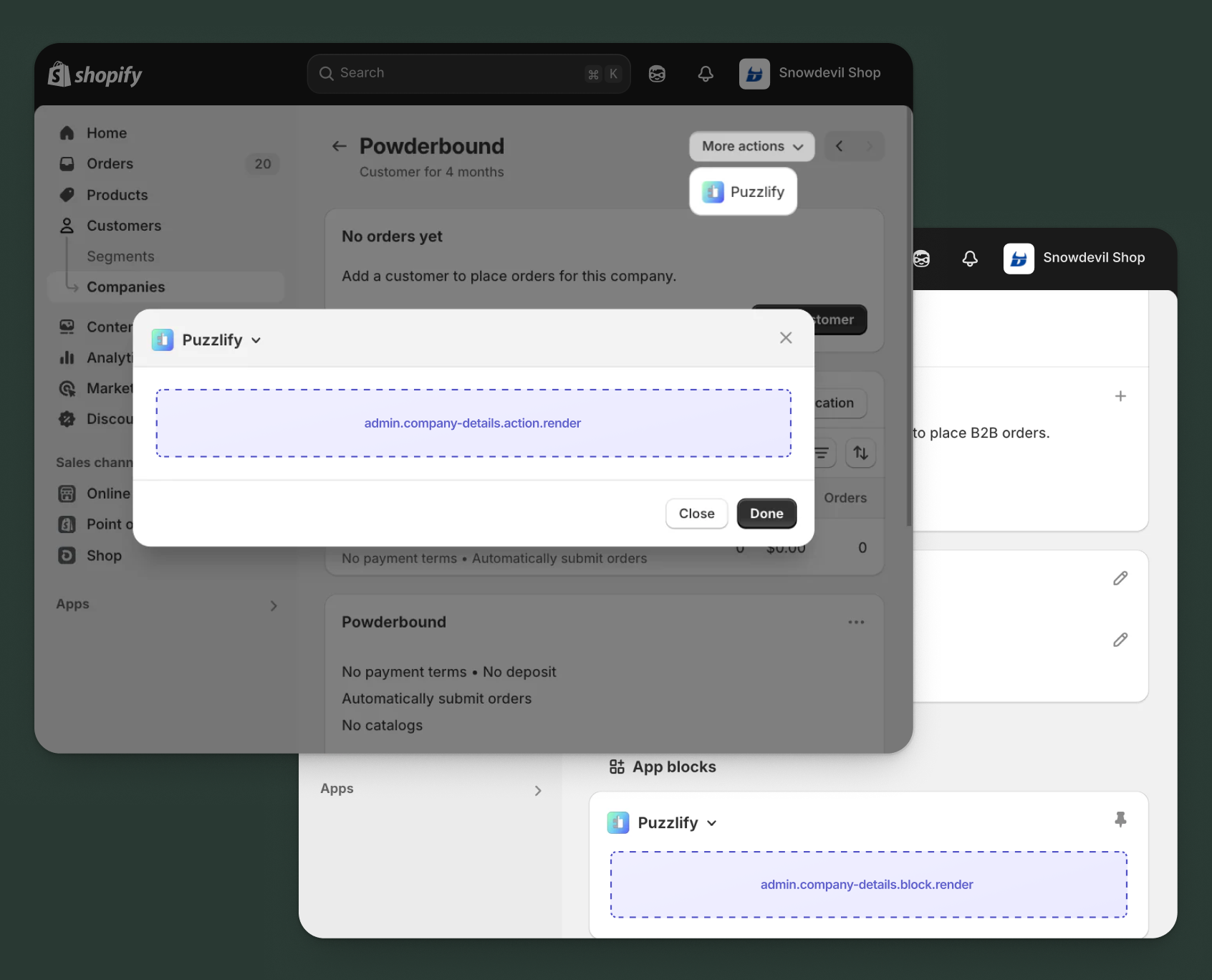
Use action and block targets to extend company pages with workflows and contextual information that help merchants manage their B2B relationships and company-specific operations.
Action targets open as modal overlays from the More actions menu, while block targets display as inline cards. The examples demonstrate fetching data from Shopify's direct API or your app's backend.
Anchor to Company details action ,[object Object]Company details action target
admin.company-details.action.render
Renders an admin action extension on the company details page. Merchants can access this extension from the More actions menu. Use this target to provide workflows that operate on company data, such as syncing with external systems, exporting company information, or managing credit terms.
Extensions at this target can access information about the company through the data property in the Action Extension API. The action renders in a modal overlay, providing space for multi-step workflows, forms, and confirmations.
Supported components
- Admin
Action - Admin
Block - Admin
Print Action - Badge
- Banner
- Block
Stack - Box
- Button
- Checkbox
- Choice
List - Color
Picker - Date
Field - Date
Picker - Divider
- Email
Field - Form
- Function
Settings - Heading
- Heading
Group - Icon
- Image
- Inline
Stack - Link
- Money
Field - Number
Field - Paragraph
- Password
Field - Pressable
- Progress
Indicator - Section
- Select
- Text
- Text
Area - Text
Field - URLField
Available APIs
Supported components
- Admin
Action - Admin
Block - Admin
Print Action - Badge
- Banner
- Block
Stack - Box
- Button
- Checkbox
- Choice
List - Color
Picker - Date
Field - Date
Picker - Divider
- Email
Field - Form
- Function
Settings - Heading
- Heading
Group - Icon
- Image
- Inline
Stack - Link
- Money
Field - Number
Field - Paragraph
- Password
Field - Pressable
- Progress
Indicator - Section
- Select
- Text
- Text
Area - Text
Field - URLField
Available APIs
Examples
Description
Add an action extension that exports company information to an external CRM system. This example shows how to fetch company details and push them to your app's backend for processing.
React
import React from 'react';
import {useState} from 'react';
import {
  reactExtension,
  useApi,
  AdminAction,
  Banner,
  Section,
  BlockStack,
  Checkbox,
  Button,
} from '@shopify/ui-extensions-react/admin';

const TARGET = 'admin.company-details.action.render';

export default reactExtension(TARGET, () => <App />);

function App() {
  const {data, close} = useApi(TARGET);
  const [loading, setLoading] = useState(false);
  const [includeLocations, setIncludeLocations] = useState(true);
  const [includeContacts, setIncludeContacts] = useState(true);
  const [includeOrders, setIncludeOrders] = useState(false);
  const [success, setSuccess] = useState(false);
  const [error, setError] = useState(false);

  const handleExport = async () => {
    setLoading(true);
    setSuccess(false);
    setError(false);
    const companyId = data.selected[0].id;

    try {
      // Fetch company details from GraphQL Admin API
      const companyResponse = await fetch('shopify:admin/api/graphql.json', {
        method: 'POST',
        headers: {'Content-Type': 'application/json'},
        body: JSON.stringify({
          query: `
            query GetCompany($id: ID!) {
              company(id: $id) {
                id
                name
                externalId
                mainContact {
                  firstName
                  lastName
                  email
                }
                locations(first: 10) {
                  edges {
                    node {
                      id
                      name
                      shippingAddress {
                        address1
                        city
                        province
                        country
                        zip
                      }
                    }
                  }
                }
              }
            }
          `,
          variables: {id: companyId},
        }),
      });

      const {data: companyData} = await companyResponse.json();

      // Export to CRM through your app's backend
      const response = await fetch('https://your-app.com/api/export-to-crm', {
        method: 'POST',
        headers: {'Content-Type': 'application/json'},
        body: JSON.stringify({
          company: companyData.company,
          includeLocations,
          includeContacts,
          includeOrders,
        }),
      });

      if (response.ok) {
        setSuccess(true);
        close();
      } else {
        setError(true);
      }
    } catch (err) {
      setError(true);
    } finally {
      setLoading(false);
    }
  };

  return (
    <AdminAction
      title="Export to CRM"
      primaryAction={
        <Button
          onPress={handleExport}
          disabled={loading || success}
        >
          {loading ? 'Exporting...' : 'Export to CRM'}
        </Button>
      }
      secondaryAction={
        <Button onPress={close}>
          Cancel
        </Button>
      }
    >
      {success && (
        <Banner tone="success" dismissible>
          Company exported to CRM successfully!
        </Banner>
      )}
      {error && (
        <Banner tone="critical" dismissible>
          Failed to export company. Please try again.
        </Banner>
      )}

      <Section heading="Export options">
        <BlockStack>
          <Checkbox
            checked={includeLocations}
            onChange={setIncludeLocations}
          >
            Include locations
          </Checkbox>
          <Checkbox
            checked={includeContacts}
            onChange={setIncludeContacts}
          >
            Include contacts
          </Checkbox>
          <Checkbox
            checked={includeOrders}
            onChange={setIncludeOrders}
          >
            Include order history
          </Checkbox>
        </BlockStack>
      </Section>
    </AdminAction>
  );
}
TS
import {
  extension,
  AdminAction,
  Banner,
  Section,
  BlockStack,
  Checkbox,
  Button,
} from '@shopify/ui-extensions/admin';

export default extension(
  'admin.company-details.action.render',
  (root, api) => {
    let loading = false;
    let includeLocations = true;
    let includeContacts = true;
    let includeOrders = false;
    let success = false;
    let error = false;

    const handleExport = async () => {
      loading = true;
      success = false;
      error = false;
      updateUI();

      const companyId = api.data.selected[0].id;

      try {
        // Fetch company details from GraphQL Admin API
        const companyResponse = await fetch('shopify:admin/api/graphql.json', {
          method: 'POST',
          headers: {'Content-Type': 'application/json'},
          body: JSON.stringify({
            query: `
              query GetCompany($id: ID!) {
                company(id: $id) {
                  id
                  name
                  externalId
                  mainContact {
                    firstName
                    lastName
                    email
                  }
                  locations(first: 10) {
                    edges {
                      node {
                        id
                        name
                        shippingAddress {
                          address1
                          city
                          province
                          country
                          zip
                        }
                      }
                    }
                  }
                }
              }
            `,
            variables: {id: companyId},
          }),
        });

        const {data: companyData} = await companyResponse.json();

        // Export to CRM through your app's backend
        const response = await fetch('https://your-app.com/api/export-to-crm', {
          method: 'POST',
          headers: {'Content-Type': 'application/json'},
          body: JSON.stringify({
            company: companyData.company,
            includeLocations,
            includeContacts,
            includeOrders,
          }),
        });

        if (response.ok) {
          success = true;
          updateUI();
          api.close();
        } else {
          error = true;
          updateUI();
        }
      } catch (err) {
        error = true;
        updateUI();
      } finally {
        loading = false;
        updateUI();
      }
    };

    const primaryAction = root.createFragment();
    const secondaryAction = root.createFragment();
    const content = root.createFragment();

    const updateUI = () => {
      content.replaceChildren();

      if (success) {
        content.appendChild(
          root.createComponent(
            Banner,
            {tone: 'success', dismissible: true},
            'Company exported to CRM successfully!'
          )
        );
      }

      if (error) {
        content.appendChild(
          root.createComponent(
            Banner,
            {tone: 'critical', dismissible: true},
            'Failed to export company. Please try again.'
          )
        );
      }

      const section = root.createComponent(Section, {heading: 'Export options'});
      const blockStack = root.createComponent(BlockStack);

      blockStack.appendChild(
        root.createComponent(
          Checkbox,
          {
            checked: includeLocations,
            onChange: (value) => {
              includeLocations = value;
            },
          },
          'Include locations'
        )
      );

      blockStack.appendChild(
        root.createComponent(
          Checkbox,
          {
            checked: includeContacts,
            onChange: (value) => {
              includeContacts = value;
            },
          },
          'Include contacts'
        )
      );

      blockStack.appendChild(
        root.createComponent(
          Checkbox,
          {
            checked: includeOrders,
            onChange: (value) => {
              includeOrders = value;
            },
          },
          'Include order history'
        )
      );

      section.appendChild(blockStack);
      content.appendChild(section);
    };

    primaryAction.appendChild(
      root.createComponent(
        Button,
        {
          onPress: handleExport,
          disabled: loading || success,
        },
        loading ? 'Exporting...' : 'Export to CRM'
      )
    );

    secondaryAction.appendChild(
      root.createComponent(Button, {onPress: () => api.close()}, 'Cancel')
    );

    updateUI();

    const adminAction = root.createComponent(
      AdminAction,
      {
        title: 'Export to CRM',
        primaryAction,
        secondaryAction,
      }
    );

    adminAction.appendChild(content);
    root.appendChild(adminAction);
    root.mount();
  }
);
Description
Add an action extension that allows merchants to update credit terms for a company. This example demonstrates a multi-step workflow with form validation and confirmation.
React
import React from 'react';
import {useState} from 'react';
import {
  reactExtension,
  useApi,
  AdminAction,
  Banner,
  Section,
  BlockStack,
  TextField,
  Select,
  Button,
} from '@shopify/ui-extensions-react/admin';

const TARGET = 'admin.company-details.action.render';

export default reactExtension(TARGET, () => <App />);

function App() {
  const {data, close, query} = useApi(TARGET);
  const [loading, setLoading] = useState(false);
  const [creditLimit, setCreditLimit] = useState('');
  const [paymentTerms, setPaymentTerms] = useState('30');
  const [success, setSuccess] = useState(false);
  const [error, setError] = useState(false);

  const handleUpdate = async () => {
    if (!creditLimit || isNaN(parseFloat(creditLimit))) {
      setError(true);
      return;
    }

    setLoading(true);
    setSuccess(false);
    setError(false);
    const companyId = data.selected[0].id;

    try {
      // Fetch company details from GraphQL Admin API
      const {data: responseData} = await query(
        `
          query GetCompany($id: ID!) {
            company(id: $id) {
              id
              name
            }
          }
        `,
        {variables: {id: companyId}}
      );

      // Update credit terms through your app's backend
      const response = await fetch('https://your-app.com/api/update-credit', {
        method: 'POST',
        headers: {'Content-Type': 'application/json'},
        body: JSON.stringify({
          companyId: responseData.company.id,
          companyName: responseData.company.name,
          creditLimit: parseFloat(creditLimit),
          paymentTerms: parseInt(paymentTerms),
        }),
      });

      if (response.ok) {
        setSuccess(true);
        close();
      } else {
        setError(true);
      }
    } catch (err) {
      setError(true);
    } finally {
      setLoading(false);
    }
  };

  return (
    <AdminAction
      title="Update Credit Terms"
      primaryAction={
        <Button
          onPress={handleUpdate}
          disabled={loading || success || !creditLimit}
        >
          {loading ? 'Updating...' : 'Update Terms'}
        </Button>
      }
      secondaryAction={
        <Button onPress={close}>
          Cancel
        </Button>
      }
    >
      {success && (
        <Banner tone="success" dismissible>
          Credit terms updated successfully!
        </Banner>
      )}
      {error && (
        <Banner tone="critical" dismissible>
          Failed to update credit terms. Please check your input.
        </Banner>
      )}

      <Section heading="Credit settings">
        <BlockStack>
          <TextField
            label="Credit limit"
            type="number"
            prefix="$"
            value={creditLimit}
            onChange={setCreditLimit}
            helpText="Maximum credit available to this company"
          />
          <Select
            label="Payment terms (days)"
            value={paymentTerms}
            onChange={setPaymentTerms}
            options={[
              {label: 'Net 15', value: '15'},
              {label: 'Net 30', value: '30'},
              {label: 'Net 60', value: '60'},
              {label: 'Net 90', value: '90'},
            ]}
          />
        </BlockStack>
      </Section>
    </AdminAction>
  );
}
TS
import {
  extension,
  AdminAction,
  Banner,
  Section,
  BlockStack,
  TextField,
  Select,
  Button,
} from '@shopify/ui-extensions/admin';

export default extension(
  'admin.company-details.action.render',
  (root, api) => {
    let loading = false;
    let creditLimit = '';
    let paymentTerms = '30';
    let success = false;
    let error = false;

    const handleUpdate = async () => {
      if (!creditLimit || isNaN(parseFloat(creditLimit))) {
        error = true;
        updateUI();
        return;
      }

      loading = true;
      success = false;
      error = false;
      updateUI();

      const companyId = api.data.selected[0].id;

      try {
        // Fetch company details from GraphQL Admin API
        const {data: responseData} = await api.query(
          `
            query GetCompany($id: ID!) {
              company(id: $id) {
                id
                name
              }
            }
          `,
          {variables: {id: companyId}}
        );

        // Update credit terms through your app's backend
        const response = await fetch('https://your-app.com/api/update-credit', {
          method: 'POST',
          headers: {'Content-Type': 'application/json'},
          body: JSON.stringify({
            companyId: responseData.company.id,
            companyName: responseData.company.name,
            creditLimit: parseFloat(creditLimit),
            paymentTerms: parseInt(paymentTerms),
          }),
        });

        if (response.ok) {
          success = true;
          updateUI();
          api.close();
        } else {
          error = true;
          updateUI();
        }
      } catch (err) {
        error = true;
        updateUI();
      } finally {
        loading = false;
        updateUI();
      }
    };

    const primaryAction = root.createFragment();
    const secondaryAction = root.createFragment();
    const content = root.createFragment();

    const updateUI = () => {
      content.replaceChildren();

      if (success) {
        content.appendChild(
          root.createComponent(
            Banner,
            {tone: 'success', dismissible: true},
            'Credit terms updated successfully!'
          )
        );
      }

      if (error) {
        content.appendChild(
          root.createComponent(
            Banner,
            {tone: 'critical', dismissible: true},
            'Failed to update credit terms. Please check your input.'
          )
        );
      }

      const section = root.createComponent(Section, {heading: 'Credit settings'});
      const blockStack = root.createComponent(BlockStack);

      blockStack.appendChild(
        root.createComponent(TextField, {
          label: 'Credit limit',
          type: 'number',
          prefix: '$',
          value: creditLimit,
          onChange: (value) => {
            creditLimit = value;
          },
          helpText: 'Maximum credit available to this company',
        })
      );

      blockStack.appendChild(
        root.createComponent(Select, {
          label: 'Payment terms (days)',
          value: paymentTerms,
          onChange: (value) => {
            paymentTerms = value;
          },
          options: [
            {label: 'Net 15', value: '15'},
            {label: 'Net 30', value: '30'},
            {label: 'Net 60', value: '60'},
            {label: 'Net 90', value: '90'},
          ],
        })
      );

      section.appendChild(blockStack);
      content.appendChild(section);
    };

    primaryAction.appendChild(
      root.createComponent(
        Button,
        {
          onPress: handleUpdate,
          disabled: loading || success || !creditLimit,
        },
        loading ? 'Updating...' : 'Update Terms'
      )
    );

    secondaryAction.appendChild(
      root.createComponent(Button, {onPress: () => api.close()}, 'Cancel')
    );

    updateUI();

    const adminAction = root.createComponent(
      AdminAction,
      {
        title: 'Update Credit Terms',
        primaryAction,
        secondaryAction,
      }
    );

    adminAction.appendChild(content);
    root.appendChild(adminAction);
    root.mount();
  }
);
Anchor to Company details action (should render) ,[object Object]Company details action (should render) target
admin.company-details.action.should-render
Controls the render state of an admin action extension on the company details page. Use this target to conditionally show or hide your action extension based on the company's properties, such as status, order count, or specific business requirements.
This target returns a boolean value that determines whether the corresponding action extension appears in the More actions menu. The extension is evaluated each time the page loads.
Supported components
Available APIs
Supported components
Available APIs
Examples
Description
Conditionally display an action only for companies that have been active for at least 30 days. This example demonstrates how to use the `should-render` target to control extension visibility based on company age.
React
import {extension} from '@shopify/ui-extensions/admin';

export default extension(
  'admin.company-details.action.should-render',
  async ({data}) => {
    const companyId = data.selected[0].id;

    try {
      // Fetch company details from GraphQL Admin API
      const response = await fetch(
        'shopify:admin/api/graphql.json',
        {
          method: 'POST',
          headers: {'Content-Type': 'application/json'},
          body: JSON.stringify({
            query: `
              query GetCompany($id: ID!) {
                company(id: $id) {
                  id
                  name
                  createdAt
                }
              }
            `,
            variables: {id: companyId},
          }),
        }
      );

      const {data: responseData} = await response.json();

      // Check if company has been active for at least 30 days
      const createdDate = new Date(responseData.company.createdAt);
      const daysSinceCreation = (Date.now() - createdDate.getTime()) / (1000 * 60 * 60 * 24);

      // Only show action for established companies
      return {display: daysSinceCreation >= 30};
    } catch (err) {
      console.error('Error fetching company:', err);
      return {display: false};
    }
  }
);
TS
import {extension} from '@shopify/ui-extensions/admin';

export default extension(
  'admin.company-details.action.should-render',
  async ({data}) => {
    const companyId = data.selected[0].id;

    try {
      // Fetch company details from GraphQL Admin API
      const response = await fetch(
        'shopify:admin/api/graphql.json',
        {
          method: 'POST',
          headers: {'Content-Type': 'application/json'},
          body: JSON.stringify({
            query: `
              query GetCompany($id: ID!) {
                company(id: $id) {
                  id
                  name
                  createdAt
                }
              }
            `,
            variables: {id: companyId},
          }),
        }
      );

      const {data: responseData} = await response.json();

      // Check if company has been active for at least 30 days
      const createdDate = new Date(responseData.company.createdAt);
      const daysSinceCreation = (Date.now() - createdDate.getTime()) / (1000 * 60 * 60 * 24);

      // Only show action for established companies
      return {display: daysSinceCreation >= 30};
    } catch (err) {
      console.error('Error fetching company:', err);
      return {display: false};
    }
  }
);
Description
Conditionally display the action based on app-specific settings or merchant permissions. This example demonstrates checking app configuration before showing the action.
React
import {extension} from '@shopify/ui-extensions/admin';

export default extension(
  'admin.company-details.action.should-render',
  async ({data}) => {
    const companyId = data.selected[0].id;

    try {
      // Check app configuration through your backend
      const configResponse = await fetch(
        'https://your-app.com/api/check-feature-access',
        {
          method: 'POST',
          headers: {'Content-Type': 'application/json'},
          body: JSON.stringify({
            feature: 'crm-export',
            companyId,
          }),
        }
      );

      const {hasAccess} = await configResponse.json();

      // Only show action if merchant has enabled this feature
      return {display: hasAccess};
    } catch (err) {
      console.error('Error checking feature access:', err);
      return {display: false};
    }
  }
);
TS
import {extension} from '@shopify/ui-extensions/admin';

export default extension(
  'admin.company-details.action.should-render',
  async ({data}) => {
    const companyId = data.selected[0].id;

    try {
      // Check app configuration through your backend
      const configResponse = await fetch(
        'https://your-app.com/api/check-feature-access',
        {
          method: 'POST',
          headers: {'Content-Type': 'application/json'},
          body: JSON.stringify({
            feature: 'crm-export',
            companyId,
          }),
        }
      );

      const {hasAccess} = await configResponse.json();

      // Only show action if merchant has enabled this feature
      return {display: hasAccess};
    } catch (err) {
      console.error('Error checking feature access:', err);
      return {display: false};
    }
  }
);
Anchor to Company details block ,[object Object]Company details block target
admin.company-details.block.render
Renders an admin block extension inline on the company details page. Use this target to display contextual information, analytics, or status updates related to the company without requiring merchants to open a modal.
Extensions at this target can access information about the company through the data property in the Block Extension API. Blocks appear as cards on the page and can show real-time data, insights, or quick actions, providing persistent visibility for information merchants need to see at a glance.
Supported components
- Admin
Action - Admin
Block - Admin
Print Action - Badge
- Banner
- Block
Stack - Box
- Button
- Checkbox
- Choice
List - Color
Picker - Date
Field - Date
Picker - Divider
- Email
Field - Form
- Function
Settings - Heading
- Heading
Group - Icon
- Image
- Inline
Stack - Link
- Money
Field - Number
Field - Paragraph
- Password
Field - Pressable
- Progress
Indicator - Section
- Select
- Text
- Text
Area - Text
Field - URLField
Available APIs
Supported components
- Admin
Action - Admin
Block - Admin
Print Action - Badge
- Banner
- Block
Stack - Box
- Button
- Checkbox
- Choice
List - Color
Picker - Date
Field - Date
Picker - Divider
- Email
Field - Form
- Function
Settings - Heading
- Heading
Group - Icon
- Image
- Inline
Stack - Link
- Money
Field - Number
Field - Paragraph
- Password
Field - Pressable
- Progress
Indicator - Section
- Select
- Text
- Text
Area - Text
Field - URLField
Available APIs
Examples
Description
Create a block extension that shows key financial metrics for the company, such as credit limit, outstanding balance, and payment history. This example demonstrates how to present valuable insights inline on the page.
React
import React from 'react';
import {useState, useEffect} from 'react';
import {
  reactExtension,
  useApi,
  AdminBlock,
  BlockStack,
  Box,
  Heading,
  InlineStack,
  Text,
  Badge,
  Divider,
  Banner,
  ProgressIndicator,
} from '@shopify/ui-extensions-react/admin';

const TARGET = 'admin.company-details.block.render';

export default reactExtension(TARGET, () => <App />);

function App() {
  const {data} = useApi(TARGET);
  const [metrics, setMetrics] = useState(null);
  const [loading, setLoading] = useState(true);

  useEffect(() => {
    const fetchMetrics = async () => {
      const companyId = data.selected[0].id;

      try {
        // Fetch financial metrics from your app's backend
        const response = await fetch(
          `https://your-app.com/api/company-financials?id=${companyId}`
        );
        const metricsData = await response.json();
        setMetrics(metricsData);
      } catch (err) {
        console.error('Error fetching metrics:', err);
      } finally {
        setLoading(false);
      }
    };

    fetchMetrics();
  }, [data]);

  if (loading) {
    return (
      <AdminBlock title="Credit & Payment Status">
        <BlockStack>
          <ProgressIndicator size="small-100" />
          <Text>Loading metrics...</Text>
        </BlockStack>
      </AdminBlock>
    );
  }

  if (!metrics) {
    return (
      <AdminBlock title="Credit & Payment Status">
        <Text>Unable to load financial metrics</Text>
      </AdminBlock>
    );
  }

  const utilizationPercent = (metrics.outstandingBalance / metrics.creditLimit) * 100;
  const utilizationTone = utilizationPercent > 90 ? 'critical' :
                          utilizationPercent > 75 ? 'warning' : 'success';

  return (
    <AdminBlock title="Credit & Payment Status">
      <BlockStack>
        <Box>
          <BlockStack>
            <Heading>Credit Limit</Heading>
            <Text fontWeight="bold">
              ${metrics.creditLimit.toLocaleString()}
            </Text>
          </BlockStack>
        </Box>

        <Divider />

        <Box>
          <BlockStack>
            <Heading>Outstanding Balance</Heading>
            <InlineStack>
              <Text fontWeight="bold">
                ${metrics.outstandingBalance.toLocaleString()}
              </Text>
              <Badge tone={utilizationTone}>
                {utilizationPercent.toFixed(0)}% utilized
              </Badge>
            </InlineStack>
          </BlockStack>
        </Box>

        <Divider />

        <Box>
          <BlockStack>
            <Heading>Payment History</Heading>
            <Text>
              Average payment time: {metrics.avgPaymentDays} days
            </Text>
            <Text>
              On-time payments: {metrics.onTimePaymentRate}%
            </Text>
          </BlockStack>
        </Box>

        <Divider />

        <Box>
          <BlockStack>
            <Heading>Terms</Heading>
            <Text>Net {metrics.paymentTerms} days</Text>
          </BlockStack>
        </Box>

        {metrics.pastDueAmount > 0 && (
          <>
            <Divider />
            <Banner tone="warning">
              Past due: ${metrics.pastDueAmount.toLocaleString()}
            </Banner>
          </>
        )}
      </BlockStack>
    </AdminBlock>
  );
}
TS
import {
  extension,
  AdminBlock,
  BlockStack,
  Box,
  Heading,
  InlineStack,
  Text,
  Badge,
  Divider,
  Banner,
  ProgressIndicator,
} from '@shopify/ui-extensions/admin';

export default extension(
  'admin.company-details.block.render',
  async (root, api) => {
    const companyId = api.data.selected[0].id;
    const adminBlock = root.createComponent(AdminBlock, {title: 'Credit & Payment Status'});

    // Show loading state
    const loadingStack = root.createComponent(BlockStack);
    loadingStack.appendChild(root.createComponent(ProgressIndicator, {size: 'small-100'}));
    loadingStack.appendChild(root.createComponent(Text, {}, 'Loading metrics...'));
    adminBlock.appendChild(loadingStack);
    root.appendChild(adminBlock);
    root.mount();

    try {
      // Fetch financial metrics from your app's backend
      const response = await fetch(
        `https://your-app.com/api/company-financials?id=${companyId}`
      );
      const metrics = await response.json();

      // Clear loading state and show metrics
      adminBlock.replaceChildren();

      const blockStack = root.createComponent(BlockStack);

      // Credit Limit section
      const creditLimitBox = root.createComponent(Box);
      const creditLimitStack = root.createComponent(BlockStack);
      creditLimitStack.appendChild(root.createComponent(Heading, {}, 'Credit Limit'));
      creditLimitStack.appendChild(
        root.createComponent(
          Text,
          {fontWeight: 'bold'},
          `$${metrics.creditLimit.toLocaleString()}`
        )
      );
      creditLimitBox.appendChild(creditLimitStack);
      blockStack.appendChild(creditLimitBox);

      blockStack.appendChild(root.createComponent(Divider));

      // Outstanding Balance section
      const utilizationPercent = (metrics.outstandingBalance / metrics.creditLimit) * 100;
      const utilizationTone = utilizationPercent > 90 ? 'critical' :
                              utilizationPercent > 75 ? 'warning' : 'success';

      const balanceBox = root.createComponent(Box);
      const balanceStack = root.createComponent(BlockStack);
      balanceStack.appendChild(root.createComponent(Heading, {}, 'Outstanding Balance'));
      const balanceInlineStack = root.createComponent(InlineStack);
      balanceInlineStack.appendChild(
        root.createComponent(
          Text,
          {fontWeight: 'bold'},
          `$${metrics.outstandingBalance.toLocaleString()}`
        )
      );
      balanceInlineStack.appendChild(
        root.createComponent(
          Badge,
          {tone: utilizationTone},
          `${utilizationPercent.toFixed(0)}% utilized`
        )
      );
      balanceStack.appendChild(balanceInlineStack);
      balanceBox.appendChild(balanceStack);
      blockStack.appendChild(balanceBox);

      blockStack.appendChild(root.createComponent(Divider));

      // Payment History section
      const historyBox = root.createComponent(Box);
      const historyStack = root.createComponent(BlockStack);
      historyStack.appendChild(root.createComponent(Heading, {}, 'Payment History'));
      historyStack.appendChild(
        root.createComponent(Text, {}, `Average payment time: ${metrics.avgPaymentDays} days`)
      );
      historyStack.appendChild(
        root.createComponent(Text, {}, `On-time payments: ${metrics.onTimePaymentRate}%`)
      );
      historyBox.appendChild(historyStack);
      blockStack.appendChild(historyBox);

      blockStack.appendChild(root.createComponent(Divider));

      // Terms section
      const termsBox = root.createComponent(Box);
      const termsStack = root.createComponent(BlockStack);
      termsStack.appendChild(root.createComponent(Heading, {}, 'Terms'));
      termsStack.appendChild(root.createComponent(Text, {}, `Net ${metrics.paymentTerms} days`));
      termsBox.appendChild(termsStack);
      blockStack.appendChild(termsBox);

      // Past Due section (if applicable)
      if (metrics.pastDueAmount > 0) {
        blockStack.appendChild(root.createComponent(Divider));
        blockStack.appendChild(
          root.createComponent(
            Banner,
            {tone: 'warning'},
            `Past due: $${metrics.pastDueAmount.toLocaleString()}`
          )
        );
      }

      adminBlock.appendChild(blockStack);
    } catch (err) {
      console.error('Error fetching metrics:', err);
      adminBlock.replaceChildren(
        root.createComponent(Text, {}, 'Unable to load financial metrics')
      );
    }
  }
);
Description
Create a block extension that shows the current synchronization status with an external CRM system. This example demonstrates how to display integration health and recent sync activity.
React
import React from 'react';
import {useState, useEffect} from 'react';
import {
  reactExtension,
  useApi,
  AdminBlock,
  BlockStack,
  Box,
  Heading,
  Text,
  Badge,
  Link,
  Button,
  Divider,
  ProgressIndicator,
} from '@shopify/ui-extensions-react/admin';

const TARGET = 'admin.company-details.block.render';

export default reactExtension(TARGET, () => <App />);

function App() {
  const {data} = useApi(TARGET);
  const [syncStatus, setSyncStatus] = useState(null);
  const [loading, setLoading] = useState(true);

  useEffect(() => {
    fetchSyncStatus();
  }, [data]);

  const fetchSyncStatus = async () => {
    const companyId = data.selected[0].id;
    setLoading(true);

    try {
      // Fetch CRM sync status from your app's backend
      const response = await fetch(
        `https://your-app.com/api/crm-sync-status?companyId=${companyId}`
      );
      const statusData = await response.json();
      setSyncStatus(statusData);
    } catch (err) {
      console.error('Error fetching sync status:', err);
    } finally {
      setLoading(false);
    }
  };

  const handleSync = async () => {
    const companyId = data.selected[0].id;
    setLoading(true);

    try {
      await fetch('https://your-app.com/api/trigger-sync', {
        method: 'POST',
        headers: {'Content-Type': 'application/json'},
        body: JSON.stringify({companyId}),
      });

      // Refresh sync status
      await fetchSyncStatus();
    } catch (err) {
      console.error('Error triggering sync:', err);
      setLoading(false);
    }
  };

  if (loading) {
    return (
      <AdminBlock title="CRM Integration">
        <ProgressIndicator size="small-100" />
      </AdminBlock>
    );
  }

  if (!syncStatus) {
    return (
      <AdminBlock title="CRM Integration">
        <Text>Unable to load sync status</Text>
      </AdminBlock>
    );
  }

  const getSyncTone = (status) => {
    switch (status) {
      case 'synced':
        return 'success';
      case 'pending':
        return 'info';
      case 'error':
        return 'critical';
      default:
        return 'subdued';
    }
  };

  return (
    <AdminBlock title="CRM Integration">
      <BlockStack>
        <Box>
          <BlockStack>
            <Heading>Sync Status</Heading>
            <Badge tone={getSyncTone(syncStatus.status)}>
              {syncStatus.status === 'synced' && 'Up to date'}
              {syncStatus.status === 'pending' && 'Sync in progress'}
              {syncStatus.status === 'error' && 'Sync failed'}
            </Badge>
          </BlockStack>
        </Box>

        <Divider />

        <Box>
          <BlockStack>
            <Heading>Last Sync</Heading>
            <Text>{syncStatus.lastSyncTime}</Text>
            {syncStatus.lastSyncError && (
              <Text>{syncStatus.lastSyncError}</Text>
            )}
          </BlockStack>
        </Box>

        <Divider />

        <Box>
          <BlockStack>
            <Heading>CRM Record</Heading>
            {syncStatus.crmUrl ? (
              <Link href={syncStatus.crmUrl} target="_blank">
                View in CRM
              </Link>
            ) : (
              <Text>Not yet synced</Text>
            )}
          </BlockStack>
        </Box>

        <Button
          onPress={handleSync}
          disabled={loading || syncStatus.status === 'pending'}
        >
          {syncStatus.status === 'pending' ? 'Syncing...' : 'Sync Now'}
        </Button>
      </BlockStack>
    </AdminBlock>
  );
}
TS
import {
  extension,
  AdminBlock,
  BlockStack,
  Box,
  Heading,
  Text,
  Badge,
  Link,
  Button,
  Divider,
  ProgressIndicator,
} from '@shopify/ui-extensions/admin';

export default extension(
  'admin.company-details.block.render',
  async (root, api) => {
    const companyId = api.data.selected[0].id;
    const adminBlock = root.createComponent(AdminBlock, {title: 'CRM Integration'});

    // Show loading state
    adminBlock.appendChild(root.createComponent(ProgressIndicator, {size: 'small-100'}));
    root.appendChild(adminBlock);
    root.mount();

    const fetchAndDisplaySync = async () => {
      adminBlock.replaceChildren(root.createComponent(ProgressIndicator, {size: 'small-100'}));

      try {
        // Fetch CRM sync status from your app's backend
        const response = await fetch(
          `https://your-app.com/api/crm-sync-status?companyId=${companyId}`
        );
        const syncStatus = await response.json();

        // Clear loading state and show sync status
        adminBlock.replaceChildren();

        const blockStack = root.createComponent(BlockStack);

        const getSyncTone = (status) => {
          switch (status) {
            case 'synced':
              return 'success';
            case 'pending':
              return 'info';
            case 'error':
              return 'critical';
            default:
              return 'subdued';
          }
        };

        // Sync Status section
        const statusBox = root.createComponent(Box);
        const statusStack = root.createComponent(BlockStack);
        statusStack.appendChild(root.createComponent(Heading, {}, 'Sync Status'));

        let statusText = 'Unknown';
        if (syncStatus.status === 'synced') statusText = 'Up to date';
        if (syncStatus.status === 'pending') statusText = 'Sync in progress';
        if (syncStatus.status === 'error') statusText = 'Sync failed';

        statusStack.appendChild(
          root.createComponent(Badge, {tone: getSyncTone(syncStatus.status)}, statusText)
        );
        statusBox.appendChild(statusStack);
        blockStack.appendChild(statusBox);

        blockStack.appendChild(root.createComponent(Divider));

        // Last Sync section
        const lastSyncBox = root.createComponent(Box);
        const lastSyncStack = root.createComponent(BlockStack);
        lastSyncStack.appendChild(root.createComponent(Heading, {}, 'Last Sync'));
        lastSyncStack.appendChild(root.createComponent(Text, {}, syncStatus.lastSyncTime));
        if (syncStatus.lastSyncError) {
          lastSyncStack.appendChild(
            root.createComponent(Text, {}, syncStatus.lastSyncError)
          );
        }
        lastSyncBox.appendChild(lastSyncStack);
        blockStack.appendChild(lastSyncBox);

        blockStack.appendChild(root.createComponent(Divider));

        // CRM Record section
        const crmBox = root.createComponent(Box);
        const crmStack = root.createComponent(BlockStack);
        crmStack.appendChild(root.createComponent(Heading, {}, 'CRM Record'));
        if (syncStatus.crmUrl) {
          crmStack.appendChild(
            root.createComponent(Link, {href: syncStatus.crmUrl, target: '_blank'}, 'View in CRM')
          );
        } else {
          crmStack.appendChild(root.createComponent(Text, {}, 'Not yet synced'));
        }
        crmBox.appendChild(crmStack);
        blockStack.appendChild(crmBox);

        // Sync button
        const handleSync = async () => {
          try {
            await fetch('https://your-app.com/api/trigger-sync', {
              method: 'POST',
              headers: {'Content-Type': 'application/json'},
              body: JSON.stringify({companyId}),
            });
            await fetchAndDisplaySync();
          } catch (err) {
            console.error('Error triggering sync:', err);
          }
        };

        blockStack.appendChild(
          root.createComponent(
            Button,
            {
              onPress: handleSync,
              disabled: syncStatus.status === 'pending',
            },
            syncStatus.status === 'pending' ? 'Syncing...' : 'Sync Now'
          )
        );

        adminBlock.appendChild(blockStack);
      } catch (err) {
        console.error('Error fetching sync status:', err);
        adminBlock.replaceChildren(
          root.createComponent(Text, {}, 'Unable to load sync status')
        );
      }
    };

    await fetchAndDisplaySync();
  }
);
Anchor to Company location details block ,[object Object]Company location details block target
admin.company-location-details.block.render
Renders an admin block extension inline on the company location details page. Use this target to display location-specific information, such as shipping preferences, inventory availability, or delivery schedules for a particular company location.
Extensions at this target can access information about the company location through the data property in the Block Extension API. Blocks appear as cards on the location page and can show data relevant to that specific location rather than the entire company. This is particularly useful for companies with multiple locations that require different handling or have unique attributes.
Supported components
- Admin
Action - Admin
Block - Admin
Print Action - Badge
- Banner
- Block
Stack - Box
- Button
- Checkbox
- Choice
List - Color
Picker - Date
Field - Date
Picker - Divider
- Email
Field - Form
- Function
Settings - Heading
- Heading
Group - Icon
- Image
- Inline
Stack - Link
- Money
Field - Number
Field - Paragraph
- Password
Field - Pressable
- Progress
Indicator - Section
- Select
- Text
- Text
Area - Text
Field - URLField
Available APIs
Supported components
- Admin
Action - Admin
Block - Admin
Print Action - Badge
- Banner
- Block
Stack - Box
- Button
- Checkbox
- Choice
List - Color
Picker - Date
Field - Date
Picker - Divider
- Email
Field - Form
- Function
Settings - Heading
- Heading
Group - Icon
- Image
- Inline
Stack - Link
- Money
Field - Number
Field - Paragraph
- Password
Field - Pressable
- Progress
Indicator - Section
- Select
- Text
- Text
Area - Text
Field - URLField
Available APIs
Examples
Description
Create a block extension that shows delivery preferences and scheduling information for a specific company location. This example demonstrates how to present location-specific operational details.
React
import React from 'react';
import {useState, useEffect} from 'react';
import {
  reactExtension,
  useApi,
  AdminBlock,
  BlockStack,
  Box,
  Heading,
  Text,
  Banner,
  Button,
  Divider,
  ProgressIndicator,
} from '@shopify/ui-extensions-react/admin';

const TARGET = 'admin.company-location-details.block.render';

export default reactExtension(TARGET, () => <App />);

function App() {
  const {data, query, navigation} = useApi(TARGET);
  const [locationData, setLocationData] = useState(null);
  const [loading, setLoading] = useState(true);

  useEffect(() => {
    const fetchLocationData = async () => {
      const locationId = data.selected[0].id;

      try {
        // Fetch location details from GraphQL Admin API
        const {data: responseData} = await query(
          `
            query GetCompanyLocation($id: ID!) {
              companyLocation(id: $id) {
                id
                name
                shippingAddress {
                  address1
                  city
                  province
                  zip
                }
                company {
                  id
                  name
                }
              }
            }
          `,
          {variables: {id: locationId}}
        );

        // Fetch custom delivery preferences from your app's backend
        const preferencesResponse = await fetch(
          `https://your-app.com/api/location-preferences?id=${locationId}`
        );
        const preferences = await preferencesResponse.json();

        setLocationData({
          location: responseData.companyLocation,
          preferences,
        });
      } catch (err) {
        console.error('Error fetching location data:', err);
      } finally {
        setLoading(false);
      }
    };

    fetchLocationData();
  }, [data, query]);

  if (loading) {
    return (
      <AdminBlock title="Delivery Preferences">
        <BlockStack>
          <ProgressIndicator size="small-100" />
          <Text>Loading preferences...</Text>
        </BlockStack>
      </AdminBlock>
    );
  }

  if (!locationData) {
    return (
      <AdminBlock title="Delivery Preferences">
        <Text>Unable to load delivery preferences</Text>
      </AdminBlock>
    );
  }

  const {location, preferences} = locationData;

  return (
    <AdminBlock title="Delivery Preferences">
      <BlockStack>
        <Box>
          <BlockStack>
            <Heading>Preferred Delivery Days</Heading>
            <Text>{preferences.deliveryDays.join(', ')}</Text>
          </BlockStack>
        </Box>

        <Divider />

        <Box>
          <BlockStack>
            <Heading>Delivery Window</Heading>
            <Text>
              {preferences.deliveryWindowStart} - {preferences.deliveryWindowEnd}
            </Text>
          </BlockStack>
        </Box>

        <Divider />

        <Box>
          <BlockStack>
            <Heading>Special Instructions</Heading>
            <Text>
              {preferences.specialInstructions || 'No special instructions'}
            </Text>
          </BlockStack>
        </Box>

        <Divider />

        <Box>
          <BlockStack>
            <Heading>Receiving Contact</Heading>
            <Text>{preferences.receivingContact.name}</Text>
            <Text>{preferences.receivingContact.phone}</Text>
          </BlockStack>
        </Box>

        {preferences.requiresAppointment && (
          <>
            <Divider />
            <Banner tone="info">
              Appointment required for delivery
            </Banner>
          </>
        )}

        <Button
          onPress={() => navigation.navigate('extension://edit-preferences-action')}
        >
          Edit Preferences
        </Button>
      </BlockStack>
    </AdminBlock>
  );
}
TS
import {
  extension,
  AdminBlock,
  BlockStack,
  Box,
  Heading,
  Text,
  Banner,
  Button,
  Divider,
  ProgressIndicator,
} from '@shopify/ui-extensions/admin';

export default extension(
  'admin.company-location-details.block.render',
  async (root, api) => {
    const locationId = api.data.selected[0].id;
    const adminBlock = root.createComponent(AdminBlock, {title: 'Delivery Preferences'});

    // Show loading state
    const loadingStack = root.createComponent(BlockStack);
    loadingStack.appendChild(root.createComponent(ProgressIndicator, {size: 'small-100'}));
    loadingStack.appendChild(root.createComponent(Text, {}, 'Loading preferences...'));
    adminBlock.appendChild(loadingStack);
    root.appendChild(adminBlock);
    root.mount();

    try {
      // Fetch location details from GraphQL Admin API
      const {data: responseData} = await api.query(
        `
          query GetCompanyLocation($id: ID!) {
            companyLocation(id: $id) {
              id
              name
              shippingAddress {
                address1
                city
                province
                zip
              }
              company {
                id
                name
              }
            }
          }
        `,
        {variables: {id: locationId}}
      );

      // Fetch custom delivery preferences from your app's backend
      const preferencesResponse = await fetch(
        `https://your-app.com/api/location-preferences?id=${locationId}`
      );
      const preferences = await preferencesResponse.json();

      // Clear loading state and show preferences
      adminBlock.replaceChildren();

      const blockStack = root.createComponent(BlockStack);

      // Preferred Delivery Days section
      const daysBox = root.createComponent(Box);
      const daysStack = root.createComponent(BlockStack);
      daysStack.appendChild(root.createComponent(Heading, {}, 'Preferred Delivery Days'));
      daysStack.appendChild(root.createComponent(Text, {}, preferences.deliveryDays.join(', ')));
      daysBox.appendChild(daysStack);
      blockStack.appendChild(daysBox);

      blockStack.appendChild(root.createComponent(Divider));

      // Delivery Window section
      const windowBox = root.createComponent(Box);
      const windowStack = root.createComponent(BlockStack);
      windowStack.appendChild(root.createComponent(Heading, {}, 'Delivery Window'));
      windowStack.appendChild(
        root.createComponent(
          Text,
          {},
          `${preferences.deliveryWindowStart} - ${preferences.deliveryWindowEnd}`
        )
      );
      windowBox.appendChild(windowStack);
      blockStack.appendChild(windowBox);

      blockStack.appendChild(root.createComponent(Divider));

      // Special Instructions section
      const instructionsBox = root.createComponent(Box);
      const instructionsStack = root.createComponent(BlockStack);
      instructionsStack.appendChild(root.createComponent(Heading, {}, 'Special Instructions'));
      instructionsStack.appendChild(
        root.createComponent(
          Text,
          {},
          preferences.specialInstructions || 'No special instructions'
        )
      );
      instructionsBox.appendChild(instructionsStack);
      blockStack.appendChild(instructionsBox);

      blockStack.appendChild(root.createComponent(Divider));

      // Receiving Contact section
      const contactBox = root.createComponent(Box);
      const contactStack = root.createComponent(BlockStack);
      contactStack.appendChild(root.createComponent(Heading, {}, 'Receiving Contact'));
      contactStack.appendChild(root.createComponent(Text, {}, preferences.receivingContact.name));
      contactStack.appendChild(root.createComponent(Text, {}, preferences.receivingContact.phone));
      contactBox.appendChild(contactStack);
      blockStack.appendChild(contactBox);

      // Appointment notice (if required)
      if (preferences.requiresAppointment) {
        blockStack.appendChild(root.createComponent(Divider));
        blockStack.appendChild(
          root.createComponent(Banner, {tone: 'info'}, 'Appointment required for delivery')
        );
      }

      // Edit button
      blockStack.appendChild(
        root.createComponent(
          Button,
          {onPress: () => api.navigation.navigate('extension://edit-preferences-action')},
          'Edit Preferences'
        )
      );

      adminBlock.appendChild(blockStack);
    } catch (err) {
      console.error('Error fetching location data:', err);
      adminBlock.replaceChildren(
        root.createComponent(Text, {}, 'Unable to load delivery preferences')
      );
    }
  }
);
Description
Create a block extension that shows product inventory allocated to this specific location based on custom allocation rules. This example demonstrates location-specific inventory management.
React
import React from 'react';
import {useState, useEffect} from 'react';
import {
  reactExtension,
  useApi,
  AdminBlock,
  BlockStack,
  Box,
  Heading,
  InlineStack,
  Text,
  Banner,
  Button,
  Divider,
  ProgressIndicator,
} from '@shopify/ui-extensions-react/admin';

const TARGET = 'admin.company-location-details.block.render';

export default reactExtension(TARGET, () => <App />);

function App() {
  const {data, navigation} = useApi(TARGET);
  const [inventory, setInventory] = useState(null);
  const [loading, setLoading] = useState(true);

  useEffect(() => {
    const fetchInventory = async () => {
      const locationId = data.selected[0].id;

      try {
        // Fetch inventory allocation from your app's backend
        const response = await fetch(
          `https://your-app.com/api/location-inventory?id=${locationId}`
        );
        const inventoryData = await response.json();
        setInventory(inventoryData);
      } catch (err) {
        console.error('Error fetching inventory:', err);
      } finally {
        setLoading(false);
      }
    };

    fetchInventory();
  }, [data]);

  if (loading) {
    return (
      <AdminBlock title="Allocated Inventory">
        <ProgressIndicator size="small-100" />
      </AdminBlock>
    );
  }

  if (!inventory || !inventory.items || inventory.items.length === 0) {
    return (
      <AdminBlock title="Allocated Inventory">
        <Text>No inventory allocated to this location</Text>
      </AdminBlock>
    );
  }

  return (
    <AdminBlock title="Allocated Inventory">
      <BlockStack>
        <Box>
          <BlockStack>
            <Heading>Total Items Allocated</Heading>
            <Text fontWeight="bold">
              {inventory.totalItems}
            </Text>
            <Text>
              Across {inventory.items.length} product types
            </Text>
          </BlockStack>
        </Box>

        <Divider />

        <Box>
          <Heading>Top Allocated Products</Heading>
          <BlockStack>
            {inventory.items.slice(0, 5).map((item) => (
              <Box key={item.productId}>
                <InlineStack>
                  <Text>{item.productName}</Text>
                  <Text fontWeight="bold">{item.quantity} units</Text>
                </InlineStack>
              </Box>
            ))}
          </BlockStack>
        </Box>

        {inventory.lowStockItems > 0 && (
          <>
            <Divider />
            <Banner tone="warning">
              {inventory.lowStockItems} items below minimum threshold
            </Banner>
          </>
        )}

        <Button
          onPress={() => navigation.navigate('extension://manage-allocation-action')}
        >
          Manage Allocation
        </Button>
      </BlockStack>
    </AdminBlock>
  );
}
TS
import {
  extension,
  AdminBlock,
  BlockStack,
  Box,
  Heading,
  InlineStack,
  Text,
  Banner,
  Button,
  Divider,
  ProgressIndicator,
} from '@shopify/ui-extensions/admin';

export default extension(
  'admin.company-location-details.block.render',
  async (root, api) => {
    const locationId = api.data.selected[0].id;
    const adminBlock = root.createComponent(AdminBlock, {title: 'Allocated Inventory'});

    // Show loading state
    adminBlock.appendChild(root.createComponent(ProgressIndicator, {size: 'small-100'}));
    root.appendChild(adminBlock);
    root.mount();

    try {
      // Fetch inventory allocation from your app's backend
      const response = await fetch(
        `https://your-app.com/api/location-inventory?id=${locationId}`
      );
      const inventory = await response.json();

      // Check if there's no inventory
      if (!inventory || !inventory.items || inventory.items.length === 0) {
        adminBlock.replaceChildren(
          root.createComponent(Text, {}, 'No inventory allocated to this location')
        );
        return;
      }

      // Clear loading state and show inventory
      adminBlock.replaceChildren();

      const blockStack = root.createComponent(BlockStack);

      // Total Items section
      const totalBox = root.createComponent(Box);
      const totalStack = root.createComponent(BlockStack);
      totalStack.appendChild(root.createComponent(Heading, {}, 'Total Items Allocated'));
      totalStack.appendChild(
        root.createComponent(
          Text,
          {fontWeight: 'bold'},
          inventory.totalItems.toString()
        )
      );
      totalStack.appendChild(
        root.createComponent(Text, {}, `Across ${inventory.items.length} product types`)
      );
      totalBox.appendChild(totalStack);
      blockStack.appendChild(totalBox);

      blockStack.appendChild(root.createComponent(Divider));

      // Top Products section
      const productsBox = root.createComponent(Box);
      productsBox.appendChild(root.createComponent(Heading, {}, 'Top Allocated Products'));
      const productsStack = root.createComponent(BlockStack);

      for (const item of inventory.items.slice(0, 5)) {
        const itemBox = root.createComponent(Box);
        const itemInlineStack = root.createComponent(InlineStack);
        itemInlineStack.appendChild(root.createComponent(Text, {}, item.productName));
        itemInlineStack.appendChild(
          root.createComponent(Text, {fontWeight: 'bold'}, `${item.quantity} units`)
        );
        itemBox.appendChild(itemInlineStack);
        productsStack.appendChild(itemBox);
      }

      productsBox.appendChild(productsStack);
      blockStack.appendChild(productsBox);

      // Low Stock warning (if applicable)
      if (inventory.lowStockItems > 0) {
        blockStack.appendChild(root.createComponent(Divider));
        blockStack.appendChild(
          root.createComponent(
            Banner,
            {tone: 'warning'},
            `${inventory.lowStockItems} items below minimum threshold`
          )
        );
      }

      // Manage button
      blockStack.appendChild(
        root.createComponent(
          Button,
          {onPress: () => api.navigation.navigate('extension://manage-allocation-action')},
          'Manage Allocation'
        )
      );

      adminBlock.appendChild(blockStack);
    } catch (err) {
      console.error('Error fetching inventory:', err);
      adminBlock.replaceChildren(
        root.createComponent(Text, {}, 'Unable to load inventory allocation')
      );
    }
  }
);
Anchor to Best practicesBest practices
- Focus on B2B workflows: Companies are used for B2B commerce, so design your extensions to support wholesale operations, multi-location management, and credit-based purchasing that align with merchant needs.
- Handle multi-location scenarios: Companies often have multiple locations with different needs. Design your extensions to work effectively when dealing with company hierarchies and location-specific data.
- Display financial context clearly: When showing credit limits or outstanding balances, include context like credit utilization percentage, payment history metrics (on-time payment rate, average days to payment), and aging of receivables. Raw numbers without context don't help merchants make credit decisions.
Anchor to LimitationsLimitations
- Single target per module: Each
[[extensions.targeting]]entry in your TOML configuration maps one target to one module file. - Location context access: Extensions on the
admin.company-location-details.block.rendertarget receive a location ID, not the parent company ID. To access company information, query the location ID and access thecompanyfield on theCompanyLocationobject. - B2B requirement: The GraphQL
Companyobject requires the store to be on a plan that supports B2B capabilities. - Block target visibility: Block extensions must be manually added and pinned by merchants before they appear.
- Block collapse behavior: Returning
nullfrom a block extension collapses the block rather than removing it from the page. Blocks can't be fully hidden at runtime.