Block
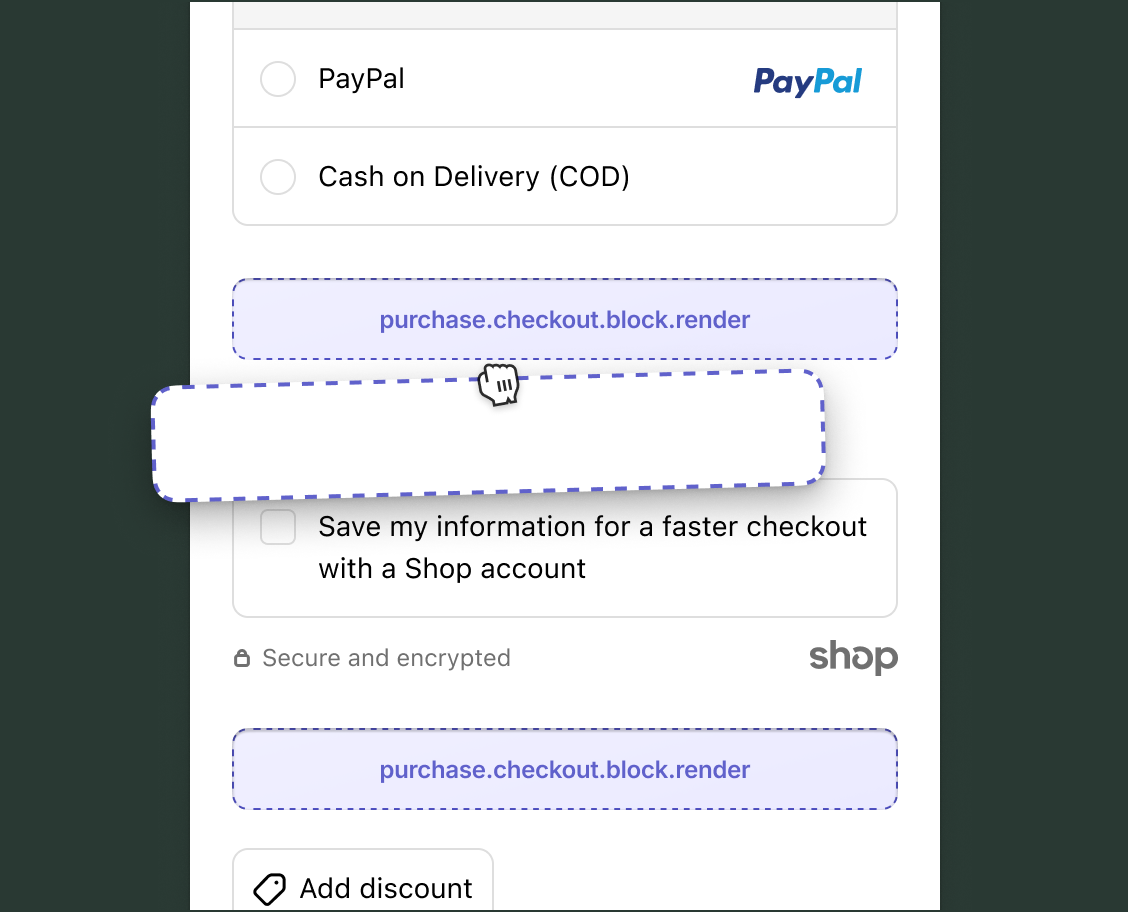
Use block targets to build general-purpose extensions that merchants can reposition using the checkout and accounts editor.
Anchor to Use casesUse cases
- Product upsell: Read cart contents and display recommendations for complementary products that buyers can add at checkout.
- Trust badges: Show security seals, money-back guarantees, or satisfaction badges to build buyer confidence.
- Loyalty program: Display the buyer's loyalty points balance, and encourage checkout completion by showing how many points the current order would earn.
- Brand messaging: Add custom banners that the merchant controls through the checkout and accounts editor to reflect their store's look and feel.
- Custom fields: Collect additional information from buyers, such as gift-wrap preferences or delivery instructions, and store the data as cart metafields.
Anchor to Block targetBlock target
Block targets can be displayed across different areas of checkout, unlike static extension targets, which render at fixed locations.
Anchor to Render block ,[object Object]Render block target
purchase.checkout.block.render
A block extension target that isn't tied to a specific checkout section or feature. Merchants control the placement using the checkout and accounts editor.
During development, you can preview the target at different locations by using a URL parameter.
During development, you can preview the target at different locations by using a URL parameter.
API properties provide read access to cart contents, buyer identity, and delivery details. To store custom data, use the Metafields API to write cart metafields. Use cart instructions to check which mutations are available before making API calls.
Supported components
- Abbreviation
- Badge
- Banner
- Box
- Button
- Chat
- Checkbox
- Chip
- Choice list
- Clickable
- Clickable chip
- Clipboard item
- Consent checkbox
- Consent phone field
- Date field
- Date picker
- Details
- Divider
- Drop zone
- Email field
- Form
- Grid
- Heading
- Icon
- Image
- Link
- Map
- Modal
- Money field
- Number field
- Ordered list
- Paragraph
- Password field
- Payment icon
- Phone field
- Popover
- Press button
- Product thumbnail
- Progress
- Qr code
- Query container
- Scroll box
- Section
- Select
- Sheet
- Skeleton paragraph
- Spinner
- Stack
- Switch
- Text
- Text area
- Text field
- Time
- Tooltip
- Unordered list
- Url field
Available APIs
- Addresses API
- Analytics API
- Attributes API
- Buyer Identity API
- Buyer Journey API
- Cart Instructions API
- Cart Lines API
- Checkout Token API
- Cost API
- Customer Privacy API
- Delivery API
- Discounts API
- Extension API
- Gift Cards API
- Localization API
- Localized Fields API
- Metafields API
- Note API
- Payments API
- Session Token API
- Settings API
- Shop API
- Storage API
- Storefront API
Supported components
- Abbreviation
- Badge
- Banner
- Box
- Button
- Chat
- Checkbox
- Chip
- Choice list
- Clickable
- Clickable chip
- Clipboard item
- Consent checkbox
- Consent phone field
- Date field
- Date picker
- Details
- Divider
- Drop zone
- Email field
- Form
- Grid
- Heading
- Icon
- Image
- Link
- Map
- Modal
- Money field
- Number field
- Ordered list
- Paragraph
- Password field
- Payment icon
- Phone field
- Popover
- Press button
- Product thumbnail
- Progress
- Qr code
- Query container
- Scroll box
- Section
- Select
- Sheet
- Skeleton paragraph
- Spinner
- Stack
- Switch
- Text
- Text area
- Text field
- Time
- Tooltip
- Unordered list
- Url field
Available APIs
- Addresses API
- Analytics API
- Attributes API
- Buyer Identity API
- Buyer Journey API
- Cart Instructions API
- Cart Lines API
- Checkout Token API
- Cost API
- Customer Privacy API
- Delivery API
- Discounts API
- Extension API
- Gift Cards API
- Localization API
- Localized Fields API
- Metafields API
- Note API
- Payments API
- Session Token API
- Settings API
- Shop API
- Storage API
- Storefront API
Preact
Examples
Add a gift wrap option
Description
Let buyers request gift wrapping by toggling a checkbox that saves an order note. This example checks cart instructions to verify the note can be updated before rendering.
Preact
import '@shopify/ui-extensions/preact';
import {render} from 'preact';

export default function extension() {
  render(<Extension />, document.body);
}

function Extension() {
  const canUpdateNote =
    shopify.instructions.value.notes
      .canUpdateNote;

  if (!canUpdateNote) return null;

  return (
    <s-checkbox
      onChange={(e) =>
        shopify.applyNoteChange({
          type: 'updateNote',
          note: e.target.checked
            ? 'Gift wrap requested'
            : '',
        })
      }
    >
      Add gift wrapping to this order
    </s-checkbox>
  );
}
Add a free sample for large orders
Description
Offer a free product sample when the cart exceeds a spending threshold. This example checks `shopify.instructions` for cart line permissions and uses `shopify.applyCartLinesChange` to add a variant.
Preact
import '@shopify/ui-extensions/preact';
import {render} from 'preact';
import {useState} from 'preact/hooks';

export default function extension() {
  render(<Extension />, document.body);
}

const SAMPLE_VARIANT_ID =
  'gid://shopify/ProductVariant/1234567890';
const MINIMUM_AMOUNT = 50;

function Extension() {
  const [added, setAdded] = useState(false);
  const canAdd =
    shopify.instructions.value.lines
      .canAddCartLine;
  const subtotal =
    shopify.cost.subtotalAmount.value;

  if (
    !canAdd ||
    subtotal.amount < MINIMUM_AMOUNT ||
    added
  ) {
    return null;
  }

  async function handleAdd() {
    const result =
      await shopify.applyCartLinesChange({
        type: 'addCartLine',
        merchandiseId: SAMPLE_VARIANT_ID,
        quantity: 1,
      });
    if (result.type === 'success') {
      setAdded(true);
    }
  }

  return (
    <s-banner heading="Free sample available">
      <s-text>
        Orders over {subtotal.currencyCode}{' '}
        {MINIMUM_AMOUNT} qualify for a free
        product sample.
      </s-text>
      <s-button onClick={handleAdd}>
        Add free sample
      </s-button>
    </s-banner>
  );
}
Anchor to Best practicesBest practices
- Design for flexible placement: The merchant controls where block extensions appear, so avoid assumptions about surrounding content. Test the extension in multiple supported locations to confirm it renders well in each.
Anchor to Placement referencesPlacement references
During development, preview each supported placement by appending ?placement-reference={name} to the checkout URL printed by Shopify CLI. For example, ?placement-reference=INFORMATION1 previews the extension above the contact information section.
You can also set default_placement in your extension's TOML configuration file to recommend an initial placement to merchants in the checkout and accounts editor.
Anchor to Multi-page checkoutMulti-page checkout
| Reference | Location |
|---|---|
WALLETS1 | Above the express checkout buttons (Shop Pay, Apple Pay, and Google Pay). Disabled when express checkout isn't shown. |
INFORMATION1 | Above the contact information section, as the first element on the Information step. |
INFORMATION2 | Below the contact information section and its purchase.checkout.contact.render-after static extensions, above the shipping or delivery address. |
INFORMATION3 | Below the delivery method selector. Renders in place of the delivery method selector when shipping isn't required (for example, for digital goods). |
DELIVERY1 | Above the shipping methods section, as the first element on the Shipping step. |
DELIVERY2 | Below the shipping methods section. |
PAYMENT1 | Above the payment section, as the first element on the Payment step (before error banners, tips, and payment methods). |
ORDER_SUMMARY1 | Above the line items in the order summary sidebar. |
ORDER_SUMMARY2 | Below the line items in the order summary sidebar, after the purchase.checkout.cart-line-list.render-after static target. |
ORDER_SUMMARY3 | Above the money lines (subtotal, shipping, taxes, and total) in the order summary sidebar. |
ORDER_SUMMARY4 | Below the money lines in the order summary sidebar. |
PAYMENT2, PAYMENT3, and PAYMENT4 shift depending on whether tips are enabled:
| Reference | With tips enabled | Without tips |
|---|---|---|
PAYMENT2 | After the tips section. | After payment methods and gift card redemption. |
PAYMENT3 | After payment methods and gift card redemption. | After the billing address selector. |
PAYMENT4 | After the billing address selector. | After the Remember me section. |
Anchor to One-page checkoutOne-page checkout
Placement behavior changes in one-page checkout:
INFORMATION3is disabled.DELIVERY2is disabled and swaps to the nearest valid placement.DELIVERY1renders after the delivery methods section instead of before it.PAYMENT3andPAYMENT4might be disabled depending on tip payments and shipping requirements.ORDER_SUMMARY4renders below the Pay button on mobile only.