Get started with Shop Pay Wallet
Use Shop Pay Wallet to offer Shop Pay in your existing checkout. In this tutorial, you'll configure Shopify, add the Shop Pay frontend components, create and submit payment request sessions, and test the core flow with Shopify Payments test mode.
You'll also map the production work that happens around checkout, including event handling, order reconciliation, fulfillment tracking, refunds, disputes, and monitoring.
You can't use the Shop Pay Wallet API on an existing Shopify store. To get started, create a new store for Shop Pay Wallet.
You can't use the Shop Pay Wallet API on an existing Shopify store. To get started, create a new store for Shop Pay Wallet.
Anchor to GlossaryGlossary
| Term | Definition |
|---|---|
| Shop Pay login | Logging in to a Shop Pay account. This occurs directly between a customer and Shopify. |
| Payment request | A payment request includes line items, applied discounts, tax calculations, and available shipping methods. |
| Authentication modal | When a Shop Pay user's email is recognized, the customer sees an interface to enter a one-time password (OTP) for authentication. |
| Shop Pay popup | Most interactions in Shop Pay checkout happen within the context of a Shopify-hosted popup window. |
Anchor to What you'll learnWhat you'll learn
In this tutorial, you'll learn how to do the following tasks:
- Configure the Shopify account and Shop settings that Shop Pay Wallet requires.
- Add the Shop Pay frontend components to your checkout.
- Create payment request sessions and respond to Shop Pay checkout events.
- Submit payment requests and reconcile asynchronous order creation.
- Test the integration and prepare for production.
Anchor to RequirementsRequirements
- Create a new Shopify store for the integration.
- Complete the full Shopify Payments sign-up, then activate test mode for development.
- Add the allowed origins where the Shop Pay Wallet JavaScript SDK loads.
- Have access to the frontend and backend systems that power your checkout.
- Configure API access for the Storefront API and the GraphQL Admin API.
- Configure your content security policy to allow
cdn.shopifycloud.com,cdn.shopify.com,shop.app,pay.shopify.com,*.shopifysvc.com, and*.stripe.com.
Anchor to Step 1: Configure ShopifyStep 1: Configure Shopify
Shop Pay Wallet uses Shopify for payment processing, Shop account data, Shop Pay checkout, and post-payment order actions. Configure Shopify before you start building so that your frontend can identify the shop and your backend can call the required APIs.
- Complete the Shop configuration guide.
- Complete the full Shopify Payments sign-up for your development shop, and keep test mode active while you build.
- Verify that the Shop sales channel is installed.
- Add the origins where the Shop Pay Wallet JavaScript SDK loads to the domain allow list in the Shop sales channel. This allow list is separate from the verified storefront domain in Settings > Domains and doesn't require DNS verification.
- Record your Shopify Shop ID and Shop Pay Client ID from the Shop sales channel.
- Configure the brand assets that appear in Shop Pay checkout and the Shop app.
- Configure the app and API credentials that your backend needs for the Storefront API and the GraphQL Admin API.
If you can't access the Shop Pay Wallet configuration, then the Shop sales channel might have been uninstalled. Reinstall the Shop sales channel from the Shopify App Store.
If you can't access the Shop Pay Wallet configuration, then the Shop sales channel might have been uninstalled. Reinstall the Shop sales channel from the Shopify App Store.
Anchor to Step 2: Plan system responsibilitiesStep 2: Plan system responsibilities
Shop Pay Wallet extends your existing checkout. Your system remains the source of truth for the commerce data that it already owns, and Shopify is the source of truth for Shop Pay payment and order records.
Before you code, decide which system handles each responsibility:
| Responsibility | Source of truth | What to confirm |
|---|---|---|
| Cart contents | Your system | The payment request reflects the current cart before every event completion. |
| Discounts, rewards, and promotions | Your system | Discounts are validated and represented as positive discount amounts in the payment request. |
| Shipping methods and rates | Your system | Delivery options update when the customer changes their address or delivery method. |
| Pickup locations and rates | Your system | Pickup options update when the customer selects pickup or filters locations. |
| Taxes | Your system | Tax amounts recalculate when address, delivery, discount, or cart data changes. |
| Inventory | Your system | Inventory is reserved or validated before submitting the payment request. |
| Customer addresses and payment methods | Shopify | Shopify provides the Shop Pay customer data that's needed during checkout and post-payment flows. |
| Payment transaction | Shopify | Shopify processes the payment using Shop Pay and Shopify Payments. |
| Shopify order and fulfillment records | Shopify | Your system reconciles the order and updates fulfillment tracking in Shopify. |
This planning step should also cover checkout features that Shop Pay Wallet doesn't handle directly. For example, make sure customers select rewards, gift cards, gift wrapping, engraving, upsells, or other checkout add-ons before they enter Shop Pay checkout.
Anchor to Step 3: Add the frontend componentsStep 3: Add the frontend components
Add the Shop Pay button and email recognition component to your checkout. These components help customers start Shop Pay checkout from the cart, guest checkout, or product detail page.
- Load the Shop Pay Wallet JavaScript SDK on pages where Shop Pay components appear.
- Configure the SDK with your
shopIdandclientId. - Use
debug: truewhile you build, and remove it or set it tofalsebefore production. - Render the Shop Pay button where customers can choose Shop Pay as a payment option.
- Render the Shop Pay login component near the email field so recognized customers can authenticate early.
- Update your content security policy to allow the required Shopify, Shop, and payment domains.
- Follow the Shop Pay UX guidelines for button placement and checkout presentation.
For SDK parameters, component methods, and examples, refer to the JavaScript SDK reference.
Anchor to Step 4: Create sessions and handle checkout eventsStep 4: Create sessions and handle checkout events
Shop Pay checkout sends events to your frontend when the customer takes actions that can change the payment request. Your frontend sends those events to your backend, your backend validates and recalculates the payment request, and your frontend completes the event with the updated data.
- Build an initial payment request with the customer's cart, discounts, delivery options, taxes, and totals.
- Create a payment request session from your backend using the Storefront API's
ShopPayPaymentRequestSessionCreatemutation. - Return the session
token,checkoutUrl, andsourceIdentifierto the frontend. - Attach event listeners for changes to shipping address, delivery method type, delivery method, pickup location, pickup location filters, and discount codes.
- For each event, validate the change in your backend and return an updated payment request or errors.
- Call the matching completion method for each event exactly one time.
Each completed event replaces the previous payment request in Shop Pay, so return a complete updated payment request instead of only the changed fields. Your system should respond to each event within 15 seconds. For event names, completion methods, and examples, refer to Sessions and events.
If your cart stays visible while the Shop Pay popup is open, then keep the cart total in sync with the selected delivery methods, discounts, taxes, and totals in Shop Pay. If you can't update the cart total immediately, then show a pending state such as Calculating....
Anchor to Step 5: Submit payment and reconcile order creationStep 5: Submit payment and reconcile order creation
When the customer clicks Pay now, Shop Pay emits the paymentconfirmationrequested event with the one-time-use payment token. Your backend should validate the final payment request before it asks Shopify to process the payment.
- Validate the final payment request in your backend.
- Reserve inventory or create the order record in your ecommerce system.
- Submit the payment request using the Storefront API's
ShopPayPaymentRequestSessionSubmitmutation. - Use an
idempotencyKeyso that retries for the same customer payment attempt don't create duplicate charges. - Complete the payment confirmation request from the frontend.
- After the
paymentcompleteevent, redirect the customer to your order confirmation or thank-you page.
Shopify creates orders asynchronously. Don't rely only on the client-side paymentcomplete event to confirm order creation, because the customer can close the popup or lose network connectivity. Use webhooks and a reconciliation job to retrieve the Shopify order, transaction, and fulfillment records that your systems need.
For Storefront API examples, refer to GraphQL pre-payment. For reconciliation, webhooks, and recovery paths, refer to Monitoring and resiliency.
Anchor to Step 6: Test the integrationStep 6: Test the integration
Test with Shopify Payments test mode before you prepare for production. At minimum, test the scenarios that your checkout supports:
- A successful payment with a Shopify Payments test card.
- A declined card and payment retry inside the Shop Pay checkout.
- Shop Pay button checkout.
- Email recognition checkout.
- Shipping address changes.
- Delivery method changes.
- Discount code entry and removal.
- Pickup location selection, if you support pickup.
- Popup close before the
paymentcompleteevent. - Missing or delayed webhook delivery, recovered by reconciliation.
- Fulfillment tracking updates in Shopify.
- Refunds, captures, voids, and authorization replacement, if your operations require them.
- Locale, currency, and installments behavior, if you support those features.
For test card setup and payment test data, refer to Test Shop Pay.
Anchor to Step 7: Prepare for productionStep 7: Prepare for production
Before you launch, complete a production readiness pass:
- Deactivate
debuglogging in production. - Add production domains to the domain allow list.
- Complete production Shopify Payments setup.
- Confirm that Shop Pay appears only in supported checkout flows.
- Verify that your content security policy includes the required Shopify, Shop, and payment domains.
- Subscribe to required webhook topics, including
ORDERS_CREATEandORDER_TRANSACTIONS_CREATE. - Implement a reconciliation job that can recover missed client events or webhook deliveries.
- Confirm that fulfillment tracking updates reach Shopify so customers can track packages in the Shop app.
- Confirm how your team handles captures, refunds, cancellations, disputes, and order risks.
- Configure monitoring and alerts for failed event handlers, failed API calls, webhook processing failures, and reconciliation failures.
- Document which team owns customer support, order operations, fulfillment operations, and payment operations.
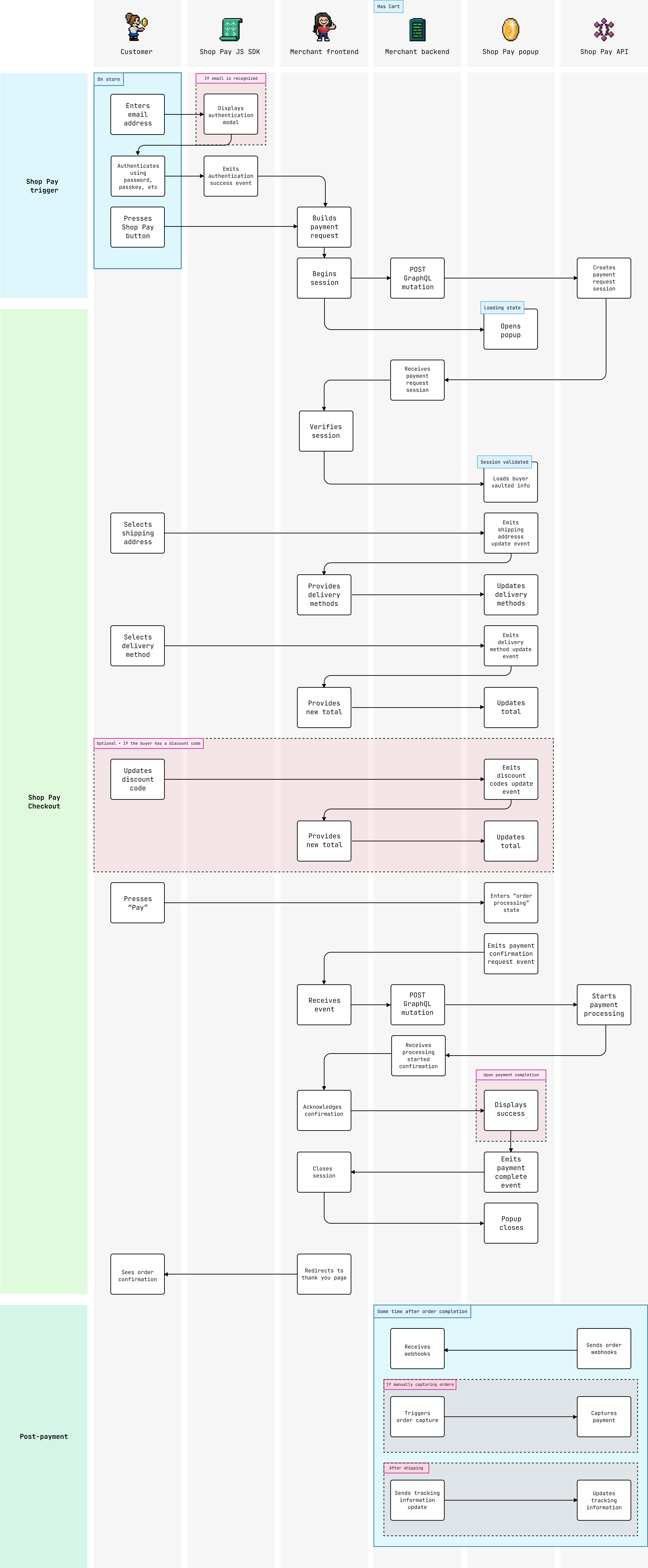
Anchor to Sequence diagramSequence diagram
This diagram reflects a successful checkout. For simplicity, it bypasses the Shop Pay login flow, assuming a customer is already logged in to Shop Pay.