Frontend API reference
Anchor to [object Object]ShopPayPaymentRequestSession
ShopPayPaymentRequestSessionShopify emits these events as the user interacts with Shop Pay. Listen for the events, and respond accordingly. For examples of attaching event listeners, refer to the sessions and events documentation.
The following interface defines the events and completion methods available on a ShopPayPaymentRequestSession:
| Field name | Type | Description |
|---|---|---|
sessionrequested | Event handler | This event handler is triggered when a new Shop Pay session is requested. The listener must make a server-to-server call from your backend to Shop Pay's servers, and then call completeSessionRequest() from your frontend with the response. |
completeSessionRequest | (args: {token: string, checkoutUrl: string, sourceIdentifier: string} & ShopPayPaymentRequestUpdate) => void | This function completes the session request. It must be invoked with the token, checkoutUrl, and sourceIdentifier from response of the ShopPayPaymentRequestSessionCreate mutation. You can optionally include an updated payment request. |
deliverymethodtypechanged | Event handler | This event handler is triggered when a customer changes their preferred delivery method. When this event is triggered, completeDeliveryMethodTypeChange() must be called with the updated payment request. |
completeDeliveryMethodTypeChange | (args: ShopPayPaymentRequestUpdate) => void | This function must be called when the delivery method type changes. |
pickuplocationchanged | Event handler | This event handler is triggered when a customer changes the selected pickup location. completePickupLocationChange() must be called with the updated payment request. |
completePickupLocationChange | (args: ShopPayPaymentRequestUpdate) => void) | This function must be called when the selected pickup location changes. |
pickuplocationfilterchanged | Event handler | This event handler is triggered when the pickup location filter changes. completePickupLocationFilterChange() must be called with an updated payment request containing a filtered set of pickup locations. |
completePickupLocationFilterChange | (args: ShopPayPaymentRequestUpdate) => void | This function must be called when the pickup location filter changes. |
shippingaddresschanged | Event handler | This event handler is triggered when a customer changes their preferred shipping address. When this event is triggered, completeShippingAddressChange() must be called with the updated payment request. |
completeShippingAddressChange | (args: ShopPayPaymentRequestUpdate) => void | This function must be called when the shipping address changes. |
deliverymethodchanged | Event handler | This event handler is triggered when a customer changes their preferred delivery method. When this event is triggered, completeDeliveryMethodChange() must be called with the updated payment request. |
completeDeliveryMethodChange | (args: ShopPayPaymentRequestUpdate) => void | This function must be called with the updated payment request. |
discountcodechanged | Event handler | This event handler is triggered when the discount code changes. When this event is triggered, completeDiscountCodeChange() must be called with the updated payment request. |
completeDiscountCodeChange | (args: ShopPayPaymentRequestUpdate) => void | This function updates the payment request after discount codes are changed by providing an updated payment request. |
paymentconfirmationrequested | Event handler | This event handler is triggered after a customer clicks the Pay button. The event includes the customer's billingAddress as a ShopPayContactField object. The ShopPayPaymentRequestSessionSubmit mutation must be invoked, then completePaymentConfirmationRequest() must be called afterwards. |
completePaymentConfirmationRequest | (args: ShopPayPaymentRequestUpdate) => void | This function is used to confirm that Shopify must proceed with payment. If there are any errors, they must be provided in the errors field. If updatedPaymentRequest is given, errors must also be given. |
paymentcomplete | Event handler | This event handler is triggered after Shopify successfully processes a payment. The event payload has a .processingStatus field of type ShopPayPaymentRequestReceiptCompleted. |
paymentattemptfailed | Event handler | This event handler is triggered when a payment attempt has failed. The event payload has a .error field with details about why the payment attempt failed. |
close | () => void | This function cancels the session and closes the popup. |
windowclosed | Event handler | This event handler is triggered after the checkout window is closed. |
Anchor to [object Object]ShopPayPaymentRequest
ShopPayPaymentRequestA payment request is the primary means of communication between your system and Shop Pay.

The frontend ShopPayPaymentRequest, used to display the payment request in the Shop Pay popup, is different from the backend ShopPayPaymentRequestInput, used in mutations as part of payment processing. Make sure to use the correct type for each context.
The frontend ShopPayPaymentRequest, used to display the payment request in the Shop Pay popup, is different from the backend ShopPayPaymentRequestInput, used in mutations as part of payment processing. Make sure to use the correct type for each context.
The following interface defines the properties of a ShopPayPaymentRequest:
| Field name | Type | Description |
|---|---|---|
supportedDeliveryMethodTypesoptional | ShopPayDeliveryMethodType[] | The supported delivery method types for this checkout. Defaults to ["SHIPPING"]. |
selectedDeliveryMethodTypeoptional | ShopPayDeliveryMethodType | The selected delivery method type. |
pickupLocationsoptional | ShopPayPickupLocation[] | The available pickup locations when the selected delivery method type is PICKUP. |
paymentMethodoptional | string | The one-time-use payment token, included only in the paymentconfirmationrequested event. |
discountCodesrequired | string[] | All applied discount codes, displayed under the discount code field as tags. |
lineItemsrequired | ShopPayLineItem[] | The line items to display. |
shippingLinesrequired | ShopPayShippingLine[] | The shipping line items to display. |
deliveryMethodsrequired | ShopPayDeliveryMethod[] | The available delivery methods. |
localerequired | ShopPayLocale | An ISO 639-1 language code, such as en, used to inform the display of instructions and amounts. |
presentmentCurrencyrequired | ShopPayCurrencyCode | An ISO 4217 currency code for the transaction, including legacy and non-standard codes. |
subtotalrequired | ShopPayMoney | The subtotal of the line items, calculated as the sum of the finalLinePrice from all lines. |
discountsoptional | ShopPayDiscountLine[] | All discounts applied to the subtotal. These must be positive values. |
totalShippingPriceoptional | ShopPayTotalShippingPrice | The total shipping price after all applicable discounts, not including tax. |
totalTaxoptional | ShopPayMoney | The total tax from all line items and shipping charges. |
totalrequired | ShopPayMoney | The grand total includes all applicable discounts, shipping charges, and taxes. The customer is charged this amount. |
Anchor to [object Object]ShopPayDeliveryMethodType
ShopPayDeliveryMethodTypeThe ShopPayDeliveryMethodType can be one of the following values:
PICKUP: The customer buys online and picks up the order.SHIPPING: The customer's order is shipped.
Anchor to [object Object]ShopPayLineItem
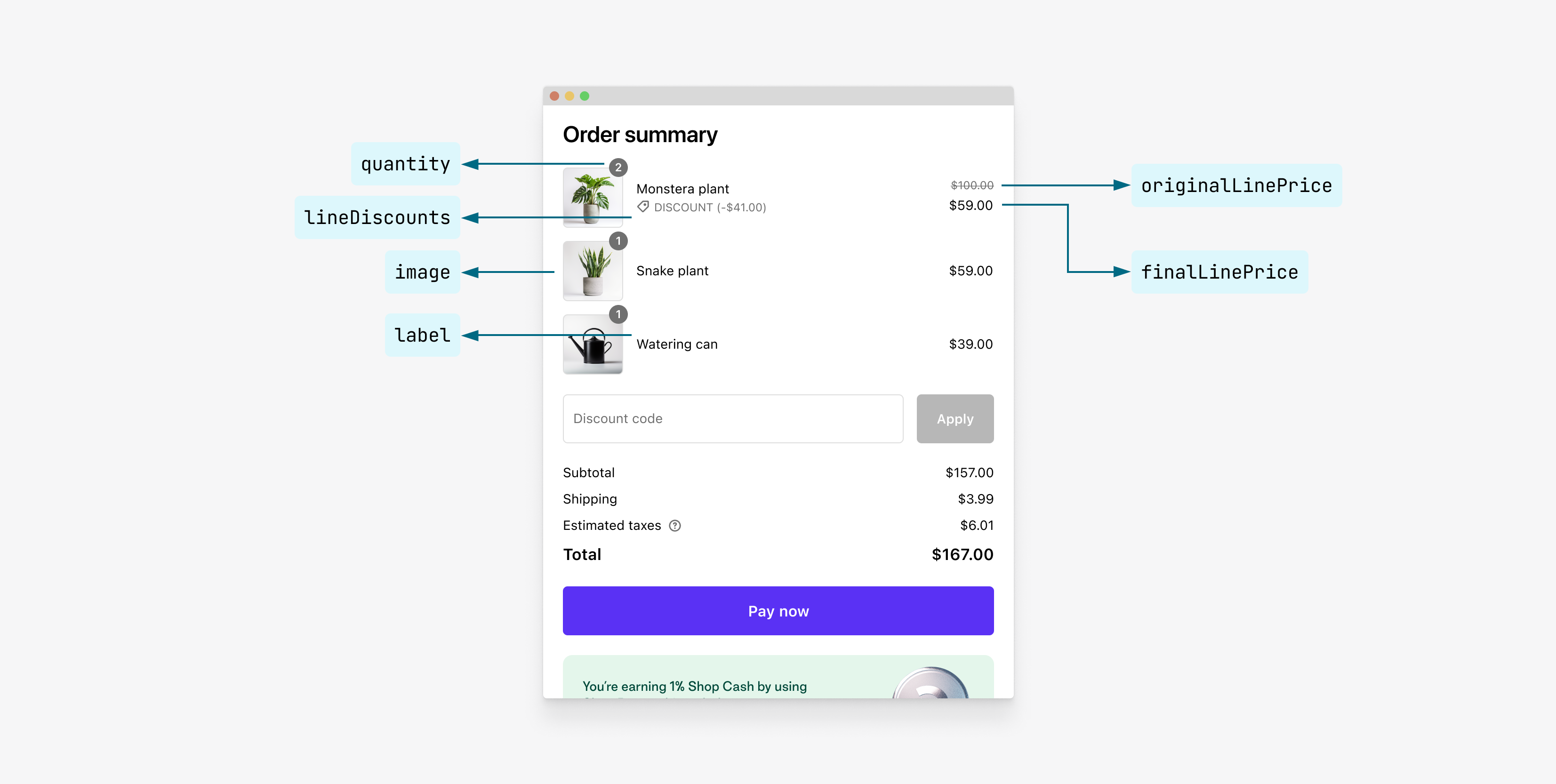
ShopPayLineItemRepresents line items in a payment request. Includes cart line items, order-level line items such as discounts and taxes, and the grand total.
| Field name | Type | Description |
|---|---|---|
labelrequired | string | The label for the line item. |
quantityrequired | number | The quantity of the line item. |
skuoptional | string | The merchandise SKU if needed for inventory tracking and reporting. |
requiresShippingoptional | boolean | Whether the line item requires shipping. Defaults to true. |
imageoptional | ShopPayLineItemImage | The image associated with the line item. |
originalItemPricerequired | ShopPayMoney | The original price of the item before any applicable discounts. |
itemDiscountsoptional | ShopPayDiscountLine[] | All discounts applied to the item. These must be positive values. |
finalItemPricerequired | ShopPayMoney | The final price of the item after all applicable discounts. |
originalLinePricerequired | ShopPayMoney | The original line price before any applicable discounts, calculated as the original item price multiplied by quantity. |
lineDiscountsoptional | ShopPayDiscountLine[] | All discounts applied to the line item. |
finalLinePricerequired | ShopPayMoney | The final price of the line item based on quantity * item price including all applicable discounts. |
Anchor to [object Object]ShopPayLineItemImage
ShopPayLineItemImageThe image associated with the line item.
| Field name | Type | Description |
|---|---|---|
urlrequired | string | The URL of the image. Recommended: 128x128px, 1:1 ratio image. |
altoptional | string | The alt text associated with the image. |
Anchor to [object Object]ShopPayTotalShippingPrice
ShopPayTotalShippingPriceRepresents the total shipping price in a payment request.

| Field name | Type | Description |
|---|---|---|
discountsoptional | ShopPayDiscountLine[] | All discounts applied to the shipping price. These must be positive values. |
originalTotaloptional | ShopPayMoney | The original total shipping price. Used to show shipping price before any applicable discounts are applied, and must be included for all non-free shipping methods. |
finalTotalrequired | ShopPayMoney | The final total shipping price. Price after all applicable discounts. |
Anchor to [object Object]ShopPayDiscountLine
ShopPayDiscountLineRepresents discount lines in a payment request.
| Field name | Type | Description |
|---|---|---|
labelrequired | string | The label for the discount line. |
amountrequired | ShopPayMoney | The amount of the discount as a positive value. |
Anchor to [object Object]ShopPayShippingLine
ShopPayShippingLineRepresents shipping line items in a payment request.
| Field name | Type | Description |
|---|---|---|
labelrequired | string | The label for the shipping line item. |
amountrequired | ShopPayMoney | The amount of the shipping line item. |
coderequired | string | The service code of the shipping rate. Corresponds to ShopPayDeliveryMethod#code. |
Anchor to [object Object]ShopPayMoney
ShopPayMoneyRepresents an amount and the associated currency.
| Field name | Type | Description |
|---|---|---|
amountrequired | number | |
currencyCoderequired | ShopPayCurrencyCode |
Anchor to [object Object]ShopPayContactField
ShopPayContactFieldRepresents contact information for shipping or billing addresses. This interface is used to capture customer shipping and contact details during the checkout process.
| Field name | Type | Description |
|---|---|---|
countryCoderequired | string | The country ISO-3166 code of the contact. |
postalCodeoptional | string | The postal code of the contact. |
provinceCodeoptional | string | The province (or state) ISO-3166 code of the contact. |
cityrequired | string | The city of the contact. |
firstNameoptional | string | The first name of the contact. |
lastNamerequired | string | The last name of the contact. |
address1required | string | The address of the contact. |
address2optional | string | The address2 of the contact. |
phoneoptional | string | The phone number of the contact. |
emailoptional | string | The email address of the contact. |
companyNameoptional | string | The company name of the contact. |
Anchor to [object Object]ShopPayPickupLocation
ShopPayPickupLocationRepresents an available order pickup location. Pickup locations are displayed to a customer if they select PICKUP as the delivery method type.
| Field name | Type | Description |
|---|---|---|
labelrequired | string | The label for the pickup location. |
detailrequired | string | The detail describing the pickup location. |
coderequired | string | The code for the pickup location used to uniquely identify it. |
amountrequired | ShopPayMoney | The amount of the pickup. |
readyExpectationLabeloptional | string | The description of when the order is ready for pickup. |
proximityLabeloptional | string | The description for the proximity of the pickup location relative to the customer. |
Anchor to [object Object]ShopPayDeliveryMethod
ShopPayDeliveryMethod
| Field name | Type | Description |
|---|---|---|
coderequired | string | The service code of the shipping rate. |
labelrequired | string | The service name of the shipping rate. |
detailoptional | string | The description of the shipping rate. |
amountrequired | ShopPayMoney | The total price amount of the shipping rate. |
minDeliveryDateoptional | ISO8601Date | The minimum delivery date. ISO 8601-encoded date string. Required unless deliveryExpectationLabel is provided. |
maxDeliveryDateoptional | ISO8601Date | The maximum delivery date. ISO 8601-encoded date string. Required unless deliveryExpectationLabel is provided. |
deliveryExpectationLabeloptional | string | If provided, is displayed as further detail for expected delivery, replacing the calculated delivery estimate. |
Anchor to [object Object]ShopPayPaymentRequestUpdate
ShopPayPaymentRequestUpdateRepresents an updated state of the checkout. At least one of an updated payment request and an array of errors should be provided.
| Field name | Type | Description |
|---|---|---|
updatedPaymentRequestoptional | ShopPayPaymentRequest | The updated payment request. If not provided, the current payment request continues to be used. |
errorsoptional | ShopPayUserError[] | An array of errors. |
Anchor to [object Object]PickupLocationChangedEvent
PickupLocationChangedEventDispatched when a customer changes their pickup location.
| Field name | Type | Description |
|---|---|---|
pickupLocationrequired | ShopPayPickupLocation | The customer's pick up location. |
Anchor to [object Object]PickupLocationFilterChangedEvent
PickupLocationFilterChangedEventDispatched when a customer changes their pickup location filter.
| Field name | Type | Description |
|---|---|---|
buyerLocationrequired | ShopPayBuyerLocation | The customer's location used to filter pickup locations. |
Anchor to [object Object]DeliveryMethodTypeChangedEvent
DeliveryMethodTypeChangedEventDispatched when a customer changes their delivery method type.
| Field name | Type | Description |
|---|---|---|
deliveryMethodTyperequired | ShopPayDeliveryMethodType | The delivery method type selected by the user. |
Anchor to [object Object]ShopPayBuyerLocation
ShopPayBuyerLocationRepresents a customer's location. Use this to set the available pickup locations.
| Field name | Type | Description |
|---|---|---|
address1optional | string | The address of the contact. |
address2optional | string | The address2 of the contact. |
cityoptional | string | The city of the contact. |
provinceCodeoptional | string | The province (or state) ISO-3166 code of the contact. |
countryCodeoptional | string | The country ISO-3166 code of the contact. |
postalCodeoptional | string | The postal code of the contact. |
coordinates.latitudeoptional | number | The latitude of the customer's location. |
coordinates.longitudeoptional | number | The longitude of the customer's location. |
Anchor to [object Object]ShopPayPaymentConfirmationRequestedEvent
ShopPayPaymentConfirmationRequestedEventDispatched when a customer clicks Pay now to confirm their payment. This event includes the customer's billing address.
| Field name | Type | Description |
|---|---|---|
billingAddressrequired | ShopPayContactField | The customer's billing address and contact info. |
Anchor to [object Object]ShopPayPaymentRequestReceiptCompleted
ShopPayPaymentRequestReceiptCompletedA successful completed receipt. The status is completed. This event only occurs if the payment is successfully processed.
| Field name | Type | Description |
|---|---|---|
completedAtrequired | ISO8601Date | The date the receipt was completed. |
billingAddressoptional | ShopPayContactField | The billing address of the customer. When present, countryCode, city, lastName, and address1 are required. |
creditCardDetailsoptional | {brand?: string, lastDigits?: string} | The credit card details of the customer. |
paymentTyperequired | "SHOP_PAY" or "SHOPIFY_INSTALLMENTS" | The type of payment used. |
accountUrloptional | string | The URL to the customer's account. |
statusrequired | "completed" | The status of the receipt. |
Anchor to [object Object]ShopPayPaymentAttemptFailedEvent
ShopPayPaymentAttemptFailedEventDispatched when a payment attempt has failed. This can happen due to various reasons such as insufficient funds, invalid payment details, or other payment processing errors.
Buyers have the option to select a different payment method to retry their checkout after a failure. Don't call session.close() so that users can retry with a new payment method without disrupting their session.
Buyers have the option to select a different payment method to retry their checkout after a failure. Don't call session.close() so that users can retry with a new payment method without disrupting their session.
| Field name | Type | Description |
|---|---|---|
errorrequired | {errorCode: string, reason: string} | The reason why the payment attempt failed. |
Anchor to [object Object]ShopPayUserError
ShopPayUserErrorRepresents an error that's surfaced to the user during checkout.
The following images show how each error type appears in the Shop Pay dialog:
generalError:

discountCodeError:

shippingAddressError:

| Field name | Type | Description |
|---|---|---|
typerequired | 'generalError' or 'discountCodeError' or 'shippingAddressError' | The context of the error. |
messageoptional | string | The localized message shown to the user. |
generalError: These errors are shown at the top of the checkout. We recommend setting your own message. The default error text is "Something went wrong. Please close Shop Pay and try again".discountCodeError: These errors are shown near discount code entry, for example, to indicate that a discount code is expired. We recommend setting your own message. The default error text is "Enter a valid discount code".shippingAddressError: These errors are shown near shipping address selection, for example, to indicate that the selected shipping address can't be delivered to. We recommend setting your own message. The default error text is "Shipping not available for selected address".
A maximum of two errors can be displayed at any given time. If more than two errors are provided, only the first two are shown. Each error message has a character limit of 500; any message exceeding this limit is truncated. Only plain text is supported for error messages. Any HTML or other formatting is removed.
A maximum of two errors can be displayed at any given time. If more than two errors are provided, only the first two are shown. Each error message has a character limit of 500; any message exceeding this limit is truncated. Only plain text is supported for error messages. Any HTML or other formatting is removed.
Anchor to Confirmation flowConfirmation flow
After a customer clicks Pay, payment confirmation follows this sequence:
- The
paymentconfirmationrequestedevent is triggered on your frontend, containing thepaymentMethodtoken. - Your server runs the
ShopPayPaymentRequestSessionSubmitmutation to authorize payment processing. - Your system performs a final validation (for example, confirming the cart total and inventory) and your frontend calls
session.completePaymentConfirmationRequest()to continue. If validation fails, callcompletePaymentConfirmationRequest()with anerrorsarray to surface the error to the buyer in the Shop Pay popup. Refer to thepaymentconfirmationrequestedlistener example for the error-handling pattern. - The
paymentcompleteevent is dispatched after Shopify finishes processing.
Based on the payment capture configuration in the Shopify admin's Payments settings, the payment is processed as authorized or capture. If manual capture is configured, you must call the GraphQL Admin API's orderCapture mutation to finalize the payment.
When an order is created in Shopify, it might not be immediately available to query, and the orders/create webhook might not fire immediately. Don't rely on either for real-time functionality. Refer to Recovering from errors to make your app resilient to webhook delivery issues.