Fulfillment status
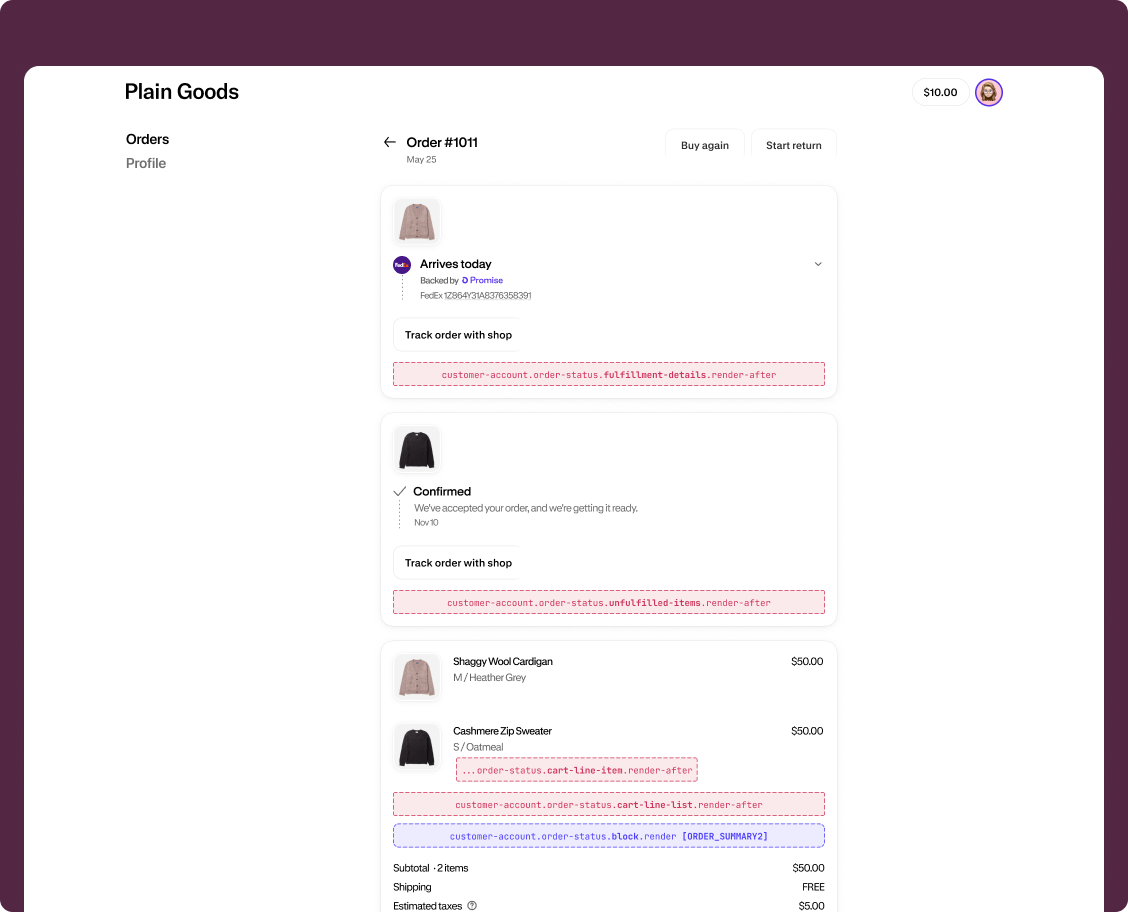
Fulfillment status extensions render inside the delivery status cards on the Order status page. These cards appear alongside Shopify's native fulfillment UI so customers see your extension content in direct context with their shipment details.
Anchor to Use casesUse cases
- Tracking notices: Display courier-specific information or tracking update delays for fulfilled shipments.
- Delivery instructions: Provide delivery preferences or special handling notes tied to a specific fulfillment.
- Processing updates: Show estimated processing times or preparation status for items that haven't shipped yet.
- Custom fulfillment details: Display supplementary fulfillment information from your app, such as warranty activation or installation scheduling.
- Order-specific messaging: Surface contextual messages related to the delivery or preparation of items in the order.
Anchor to Fulfillment status targetsFulfillment status targets
Fulfillment status targets render inside the delivery status cards on the Order status page. They're useful for adding contextual information about the delivery or preparation of order items.
Anchor to Fulfillment details (render after) ,[object Object]Fulfillment details (render after) target
customer-account.order-status.fulfillment-details.render-after
Renders after the fulfillment details in the delivery status card on the Order status page. A separate instance of this extension is rendered for each fulfillment.
Use this target to display tracking notices, delivery instructions, or supplementary shipment information for a specific fulfillment. This target provides shopify.fulfillmentId to identify the current fulfillment, and also gives you access to the Order API and the Cart Lines API.
Supported components
- Abbreviation
- Announcement
- Avatar
- Badge
- Banner
- Box
- Button
- Button group
- Checkbox
- Chip
- Choice list
- Clickable
- Clickable chip
- Clipboard item
- Customer account action
- Date field
- Date picker
- Details
- Divider
- Drop zone
- Email field
- Form
- Grid
- Heading
- Icon
- Image
- Image group
- Link
- Map
- Menu
- Modal
- Money field
- Number field
- Ordered list
- Page
- Paragraph
- Password field
- Payment icon
- Phone field
- Popover
- Press button
- Product thumbnail
- Progress
- Qr code
- Query container
- Scroll box
- Section
- Select
- Sheet
- Skeleton paragraph
- Spinner
- Stack
- Switch
- Text
- Text area
- Text field
- Time
- Tooltip
- Unordered list
- Url field
Available APIs
- Addresses API
- Analytics API
- Attributes API
- Authenticated Account API
- Authentication State API
- Buyer Identity API
- Cart Lines API
- Checkout Settings API
- Cost API
- Customer Account API
- Customer Privacy API
- Discounts API
- Extension API
- Gift Cards API
- Intents API
- Localization API
- Metafields API
- Navigation API
- Note API
- Order API
- Order Status Localization API
- Require Login API
- Session Token API
- Settings API
- Shop API
- Storage API
- Storefront API
- Toast API
- Version API
Supported components
- Abbreviation
- Announcement
- Avatar
- Badge
- Banner
- Box
- Button
- Button group
- Checkbox
- Chip
- Choice list
- Clickable
- Clickable chip
- Clipboard item
- Customer account action
- Date field
- Date picker
- Details
- Divider
- Drop zone
- Email field
- Form
- Grid
- Heading
- Icon
- Image
- Image group
- Link
- Map
- Menu
- Modal
- Money field
- Number field
- Ordered list
- Page
- Paragraph
- Password field
- Payment icon
- Phone field
- Popover
- Press button
- Product thumbnail
- Progress
- Qr code
- Query container
- Scroll box
- Section
- Select
- Sheet
- Skeleton paragraph
- Spinner
- Stack
- Switch
- Text
- Text area
- Text field
- Time
- Tooltip
- Unordered list
- Url field
Available APIs
- Addresses API
- Analytics API
- Attributes API
- Authenticated Account API
- Authentication State API
- Buyer Identity API
- Cart Lines API
- Checkout Settings API
- Cost API
- Customer Account API
- Customer Privacy API
- Discounts API
- Extension API
- Gift Cards API
- Intents API
- Localization API
- Metafields API
- Navigation API
- Note API
- Order API
- Order Status Localization API
- Require Login API
- Session Token API
- Settings API
- Shop API
- Storage API
- Storefront API
- Toast API
- Version API
jsx
Examples
Display a tracking notice
Description
Show a banner in the delivery status card informing customers about tracking update timing. This example reads order data from `shopify.order` to include the order name for context.
jsx
import '@shopify/ui-extensions/preact';
import {render} from 'preact';

export default async () => {
  render(<Extension />, document.body);
};

function Extension() {
  const order = shopify.order.value;

  if (!order) {
    return null;
  }

  return (
    <s-banner tone="info">
      Tracking updates for order {order.name} may take 24–48 hours to appear
      after shipment.
    </s-banner>
  );
}
Show delivery instructions
Description
Display delivery instructions specific to a fulfillment. This example uses `shopify.fulfillmentId` to reference the current fulfillment and provides contextual delivery information.
jsx
import '@shopify/ui-extensions/preact';
import {render} from 'preact';

export default async () => {
  render(<Extension />, document.body);
};

function Extension() {
  const order = shopify.order.value;
  const fulfillmentId = shopify.fulfillmentId;

  if (!order) {
    return null;
  }

  return (
    <s-stack direction="block" gap="base">
      <s-heading>Delivery instructions</s-heading>
      <s-text>
        If you're not home, your package will be left at the door. Contact our
        team with fulfillment reference {fulfillmentId} for assistance.
      </s-text>
      <s-text color="subdued">
        Order {order.name}
      </s-text>
    </s-stack>
  );
}
Anchor to Unfulfilled items (render after) ,[object Object]Unfulfilled items (render after) target
customer-account.order-status.unfulfilled-items.render-after
Renders after the unfulfilled items in the delivery status card on the Order status page. A single instance of this extension is rendered for all unfulfilled items in the order.
Use this target to display information about items that haven't been shipped yet, such as processing updates or estimated preparation times. This target gives you access to the Order API and the Cart Lines API.
Supported components
- Abbreviation
- Announcement
- Avatar
- Badge
- Banner
- Box
- Button
- Button group
- Checkbox
- Chip
- Choice list
- Clickable
- Clickable chip
- Clipboard item
- Customer account action
- Date field
- Date picker
- Details
- Divider
- Drop zone
- Email field
- Form
- Grid
- Heading
- Icon
- Image
- Image group
- Link
- Map
- Menu
- Modal
- Money field
- Number field
- Ordered list
- Page
- Paragraph
- Password field
- Payment icon
- Phone field
- Popover
- Press button
- Product thumbnail
- Progress
- Qr code
- Query container
- Scroll box
- Section
- Select
- Sheet
- Skeleton paragraph
- Spinner
- Stack
- Switch
- Text
- Text area
- Text field
- Time
- Tooltip
- Unordered list
- Url field
Available APIs
- Addresses API
- Analytics API
- Attributes API
- Authenticated Account API
- Authentication State API
- Buyer Identity API
- Cart Lines API
- Checkout Settings API
- Cost API
- Customer Account API
- Customer Privacy API
- Discounts API
- Extension API
- Gift Cards API
- Intents API
- Localization API
- Metafields API
- Navigation API
- Note API
- Order API
- Order Status Localization API
- Require Login API
- Session Token API
- Settings API
- Shop API
- Storage API
- Storefront API
- Toast API
- Version API
Supported components
- Abbreviation
- Announcement
- Avatar
- Badge
- Banner
- Box
- Button
- Button group
- Checkbox
- Chip
- Choice list
- Clickable
- Clickable chip
- Clipboard item
- Customer account action
- Date field
- Date picker
- Details
- Divider
- Drop zone
- Email field
- Form
- Grid
- Heading
- Icon
- Image
- Image group
- Link
- Map
- Menu
- Modal
- Money field
- Number field
- Ordered list
- Page
- Paragraph
- Password field
- Payment icon
- Phone field
- Popover
- Press button
- Product thumbnail
- Progress
- Qr code
- Query container
- Scroll box
- Section
- Select
- Sheet
- Skeleton paragraph
- Spinner
- Stack
- Switch
- Text
- Text area
- Text field
- Time
- Tooltip
- Unordered list
- Url field
Available APIs
- Addresses API
- Analytics API
- Attributes API
- Authenticated Account API
- Authentication State API
- Buyer Identity API
- Cart Lines API
- Checkout Settings API
- Cost API
- Customer Account API
- Customer Privacy API
- Discounts API
- Extension API
- Gift Cards API
- Intents API
- Localization API
- Metafields API
- Navigation API
- Note API
- Order API
- Order Status Localization API
- Require Login API
- Session Token API
- Settings API
- Shop API
- Storage API
- Storefront API
- Toast API
- Version API
jsx
Examples
Show a preparation notice
Description
Display a banner informing customers that their items are being prepared for shipment. This example reads order data from `shopify.order` to include the order name for context.
jsx
import '@shopify/ui-extensions/preact';
import {render} from 'preact';

export default async () => {
  render(<Extension />, document.body);
};

function Extension() {
  const order = shopify.order.value;

  if (!order) {
    return null;
  }

  return (
    <s-banner tone="info">
      Items from order {order.name} are being prepared. You'll receive tracking
      details once they ship.
    </s-banner>
  );
}
Display order line items with a processing notice
Description
Show a processing notice alongside order line items. This example reads line items from `shopify.lines` and order data from `shopify.order` to display contextual information about unfulfilled items.
jsx
import '@shopify/ui-extensions/preact';
import {render} from 'preact';

export default async () => {
  render(<Extension />, document.body);
};

function Extension() {
  const order = shopify.order.value;
  const lines = shopify.lines.value;

  if (!order) {
    return null;
  }

  return (
    <s-stack direction="block" gap="base">
      <s-banner tone="info">
        Items from order {order.name} typically take 1–3 business days to
        prepare for shipment.
      </s-banner>
      <s-stack direction="block" gap="small">
        {lines.map((line) => (
          <s-stack key={line.id} direction="inline" gap="base" alignItems="center">
            <s-text>{line.merchandise.title}</s-text>
            <s-text color="subdued">Qty: {line.quantity}</s-text>
          </s-stack>
        ))}
      </s-stack>
    </s-stack>
  );
}
Anchor to Best practicesBest practices
- Keep content contextual: Fulfillment status extensions render inside delivery status cards, so content should be directly relevant to the fulfillment or unfulfilled items being displayed.
- Guard against missing data: Always check that
shopify.order.valueis defined before rendering order-specific content. The order data loads asynchronously and may beundefinedon the initial render. - Avoid heavy rendering: These targets render inline within the Order status page. Avoid complex layouts or large data fetches that could cause layout shifts. Use banner or lightweight stack layouts for the best experience.