Authentication for apps built with Shopify CLI
This page is for apps scaffolded with Shopify CLI. A scaffolded app authenticates with the Shopify admin automatically. Installation and scope grants happen through Shopify managed installation, and the app template exchanges and refreshes access tokens, so you never implement OAuth directly. The following sections explain how that works, and what you customize as your app grows.
If you're building an embedded app with a custom frontend that doesn't use an app template, see Get access tokens without a template. To learn how authentication works for other common approaches, see About app authentication.
If you're building an embedded app with a custom frontend that doesn't use an app template, see Get access tokens without a template. To learn how authentication works for other common approaches, see About app authentication.
Anchor to How it worksHow it works
Your scaffolded app authenticates through token exchange:
- The merchant installs your app and approves the access scopes it requests.
- Shopify issues a short-lived ID token that proves the request comes from an authenticated Shopify user.
- Your app exchanges the ID token for an access token.
- Your app includes the access token in the
X-Shopify-Access-Tokenheader on every GraphQL Admin API request. - When the access token expires, the app template refreshes it without interrupting the merchant.
The app template performs steps 2 through 5 for you, so you never handle tokens directly. The access token stays on your backend and is never exposed to the browser.
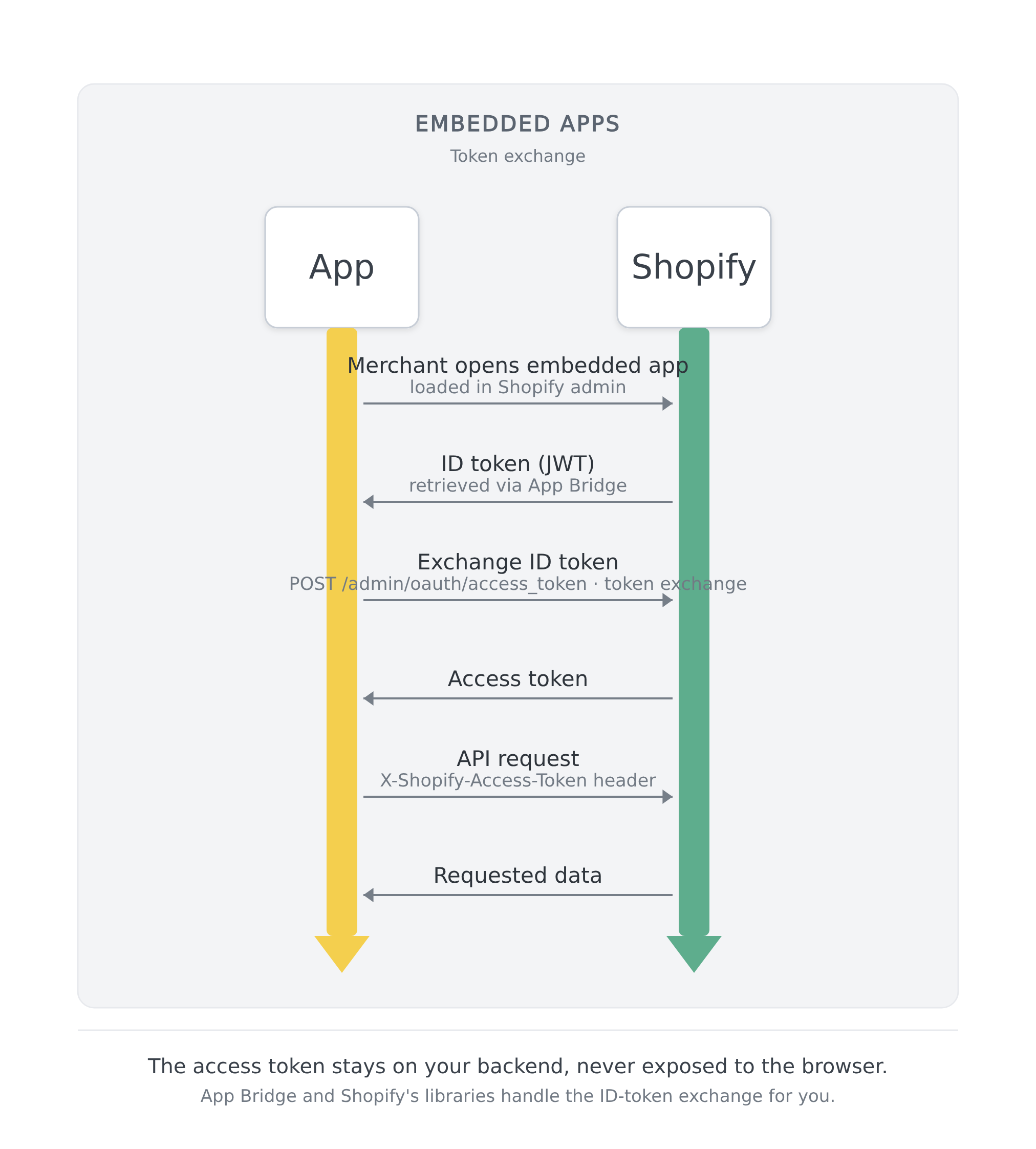
You don't have to implement token exchange yourself, but you can customize the access scopes your app requests, add the authenticate call to new routes that need store data, and choose whether your app uses offline or online access tokens.
Anchor to Customize your access scopesCustomize your access scopes
The template ships with a starter set of access scopes in shopify.app.toml. Tailor them to match the data your app reads and writes: add the scopes for the resources your app uses, and remove the ones it doesn't.
To know which scopes your app needs, check the Access scopes reference, and cross-reference the GraphQL Admin API docs for the specific fields and mutations your app uses.
Declare your scopes in your app's shopify.app.toml:
Then deploy:
Merchants approve these scopes when they install your app. If you add scopes later, merchants who already have your app installed approve the new ones the next time they open it.
Anchor to Authenticate requests in your routesAuthenticate requests in your routes
Your app authenticates each request by calling authenticate.admin(request). It validates the request's ID token, performs token exchange, and returns an authenticated admin client for the GraphQL Admin API. The template already includes this call in the routes it generates, so a freshly installed app can query the GraphQL Admin API right away. Add the same call to any new loader or action you write that needs it.
Anchor to Customize your access tokensCustomize your access tokens
Your app can use two kinds of access tokens: offline tokens, which it uses by default, and online tokens, which you enable when you need them.
Anchor to Offline access tokensOffline access tokens
Offline access tokens persist across user sessions. Because they survive beyond a merchant's active session, they're especially useful for background jobs, webhooks, and scheduled tasks. When a webhook fires, your app retrieves the offline token stored during installation and uses it to make authenticated API calls. See Create a webhook subscription to configure delivery.
Expiring offline access tokens are required for public apps that call the GraphQL Admin API. They're short-lived, and the app template refreshes them automatically. A newly scaffolded app already has them enabled through the future flag in shopify.server.ts:
If you're migrating an existing app that doesn't have this flag, see Migrate to expiring offline access tokens.
For exact token lifetimes, see Token lifetimes. For how Shopify refreshes and retires offline tokens, see Offline access tokens.
Anchor to Online access tokensOnline access tokens
Online access tokens are tied to the staff member who opened your app, and their lifespan is limited to that user's session. If your app needs to enforce per-user permissions or attribute actions to a specific staff member, enable them alongside your offline tokens, and the app template manages both.
Set useOnlineTokens: true in your shopifyApp() configuration:
When online access tokens are enabled, authenticate.admin(request) returns a session object scoped to the current user. The session.onlineAccessInfo field contains the authenticated user's details and associated_user_scope, which is the intersection of your app's scopes and that user's permissions. If a staff member lacks a scope your app has, it won't appear in associated_user_scope.
The app template refreshes online tokens before they expire, but your app should still handle a 401 Unauthorized (expired token) or 403 Forbidden (the user lacks a required permission) gracefully. For exact token lifetimes, see Token lifetimes. For the associated_user fields, see Online access tokens.
Anchor to Migrate from legacy OAuthMigrate from legacy OAuth
If your app currently implements the authorization code grant flow manually (redirecting merchants through /admin/oauth/authorize), you can migrate to managed installation:
- If your app isn't set up with Shopify CLI yet, create or link a configuration file.
- Declare your scopes in
shopify.app.toml. - Run
shopify app deploy.
For a worked example of the scope declaration and deploy, see Customize your access scopes.
After migration, Shopify handles installation and scope updates, and your app no longer needs OAuth callback routes for these operations. If you're not using an app template, see Get access tokens without a template to configure token exchange.
Anchor to Next stepsNext steps
- Learn how to build your app's main UI in App Home.
- Learn how to connect UI extensions to your app's backend, which wraps route responses in the
corshelper. - Learn how to query and mutate store data using the GraphQL Admin API.
- Learn how to manage access scopes after launch, including optional scopes you request only when a merchant uses the feature that needs them.
- Learn how to set up webhooks for background tasks that use your offline access token.