Manage access scopes
Access scopes control what your app can read and write. This guide covers where to declare scopes, whether to make them required or optional, and how to change them after your app is installed. For the full list of scopes, see the access scopes reference. For how your app gets the access token that carries these scopes, see About app authentication.
Anchor to Where you configure scopesWhere you configure scopes
Where you declare your app's scopes depends on how your app is set up:
| How your app is set up | Where you declare scopes |
|---|---|
| Built with Shopify CLI | The [access_scopes] section of your app's configuration TOML file. Run shopify app deploy to deploy the scopes you've modified. |
| Created in the Dev Dashboard | Your app's version in the Dev Dashboard. Release the version to deploy the scopes you've modified. |
| Implements the authorization code grant itself | The scope parameter of the authorization URL your app builds. |
However you declare them, your app can only use a scope once it's been approved on the store. If your app acts only on stores in your own organization, you or your staff approve new scopes, not an outside merchant, but you still approve them on each store after releasing the version.
Anchor to Choose your scopesChoose your scopes
Most apps start with a small set of scopes. The most frequently used GraphQL Admin API scopes are read_products, read_orders, read_customers, read_inventory, read_draft_orders, read_discounts, read_content, and read_themes, each with a write_ counterpart.
To find the scope a specific call needs, look up the field or mutation in the GraphQL Admin API reference. For the full list of scopes, including unauthenticated and customer scopes, see the access scopes reference.
Three things to know before you declare scopes:
- A write scope includes read.
write_productsgrantsread_products, so declare the write scope on its own when your app needs both. Declaring the read scope as optional while the write scope is required fails to deploy. See Moving a scope betweenscopesandoptional_scopes. - Orders are limited to the last 60 days.
read_ordersandwrite_orderscover that window. To reach older orders, requestread_all_ordersand declare it alongside them. - More scopes reach protected customer data than you'd expect. Customer scopes are the obvious case, but orders, draft orders, fulfillments, abandoned checkouts, and store comments all carry customer data too. You can declare any of them, but outside of dev stores the API redacts protected fields until your app meets the protected customer data requirements and is approved.
None of these choices are permanent. You can change which scopes you declare, and whether each one is required or optional, after your app is installed. See Modify declared scopes.
Anchor to Access scope configurationsAccess scope configurations
There are two ways you can configure your access scopes: scopes, which merchants grant when they install your app, and optional_scopes, which your app requests later and merchants can decline.
Required access scopes. Merchants must grant these when they install your app, so your app is guaranteed to have them after installation.
Define them in the scopes field of your app's TOML file:
Anchor to [object Object]optional_scopes
optional_scopesScopes your app requests after installation. Merchants can grant or decline them, and can revoke ones they've granted. Use optional scopes to offer features to some stores without requiring the same data access from every install.
Define scopes that your app can request dynamically in the optional_scopes field of your app's TOML file:
Your app requests these scopes after installation completes, if it needs them.
Anchor to Modify declared scopesModify declared scopes
To add or remove access scopes for your app, update your app's configuration TOML file and deploy the changes.
-
Modify the
scopesoroptional_scopesfields in your app's TOML file to include the access scopes you want. -
Deploy the changes by running the following Shopify CLI command:
Terminal
shopify app deploy -
Optionally, subscribe to the
app/scopes_updatetopic to receive webhooks when the granted scopes change.
If your app doesn't use Shopify CLI, the step you take instead depends on how it's set up. For an app created in the Dev Dashboard, release a new version with the scopes you want. For an app that implements the authorization code grant itself, send the merchant through the authorization URL again with the updated scope list. In every case, merchants are prompted to approve scopes you add.
Anchor to Modifying the ,[object Object], fieldModifying the scopes field
scopes fieldIf you modify the scopes field, then the following happens:
- Merchants are prompted to approve the updated access scopes when they open your app. The
app/scopes_updatewebhook fires when the merchant approves the changes. - If the change reduces scopes, the merchant isn't prompted and your app loses access to those scopes automatically when the merchant opens the app. The
app/scopes_updatewebhook fires when the merchant opens the app.
Anchor to Modifying the ,[object Object], fieldModifying the optional_scopes field
optional_scopes fieldIf you modify the optional_scopes field, then the following happens:
- Your app can start requesting the new access scopes.
- The granted scopes for your app installation don't change until your app requests the new scopes dynamically and the merchant grants access. The
app/scopes_updatewebhook fires when the merchant approves the changes.
Anchor to Moving a scope between ,[object Object], and ,[object Object]Moving a scope between scopes and optional_scopes
scopes and optional_scopesYou can change whether a scope is required or optional by moving its handle between the scopes and optional_scopes fields, then deploying the change.
If you move a scope from scopes to optional_scopes, then the following happens:
- Stores that already granted the scope while it was required keep it. The scope is retained as an approved optional scope, so the merchant isn't re-prompted and the scope isn't revoked when they open your app. You don't need to request the scope again for existing installations.
- New installations don't receive the scope until your app requests it dynamically, the same as any other optional scope.
A required scope can't implicitly grant an optional one. For example, write_products grants read_products, so if you declare read_products as optional while write_products is still required, then deploying fails with the following error:
To resolve this, remove the implicitly granted scope from optional_scopes. In this example, you'd remove read_products, because write_products already grants it. If you want read_products to genuinely be optional, then move or remove write_products instead.
Anchor to Query currently granted scopesQuery currently granted scopes
Use a GraphQL Admin API query to get the currently granted access scopes for your app installation.
Example request to retrieve currently granted access scopes using currentAppInstallation
POST https://{shop}.myshopify.com/admin/api/{api_version}/graphql.json
Response
Shopify's API libraries wrap this query in a helper method:
| Library | Method |
|---|---|
| App Bridge API | shopify.scopes.query() |
| React Router API | scopes.query() |
Anchor to Request new access scopes dynamicallyRequest new access scopes dynamically
You can only request additional access scopes dynamically if they're configured as optional_scopes in your app's TOML file, and the configuration changes have been deployed. Access scopes configured in the scopes field can't be requested dynamically.
You can only request additional access scopes dynamically if they're configured as optional_scopes in your app's TOML file, and the configuration changes have been deployed. Access scopes configured in the scopes field can't be requested dynamically.
Requesting a scope asks the merchant to grant or decline it. What the merchant sees depends on the mechanism: the App Bridge method opens a permission grant modal on top of your running app, while the request URL and the React Router method redirect the browser to the Shopify admin.
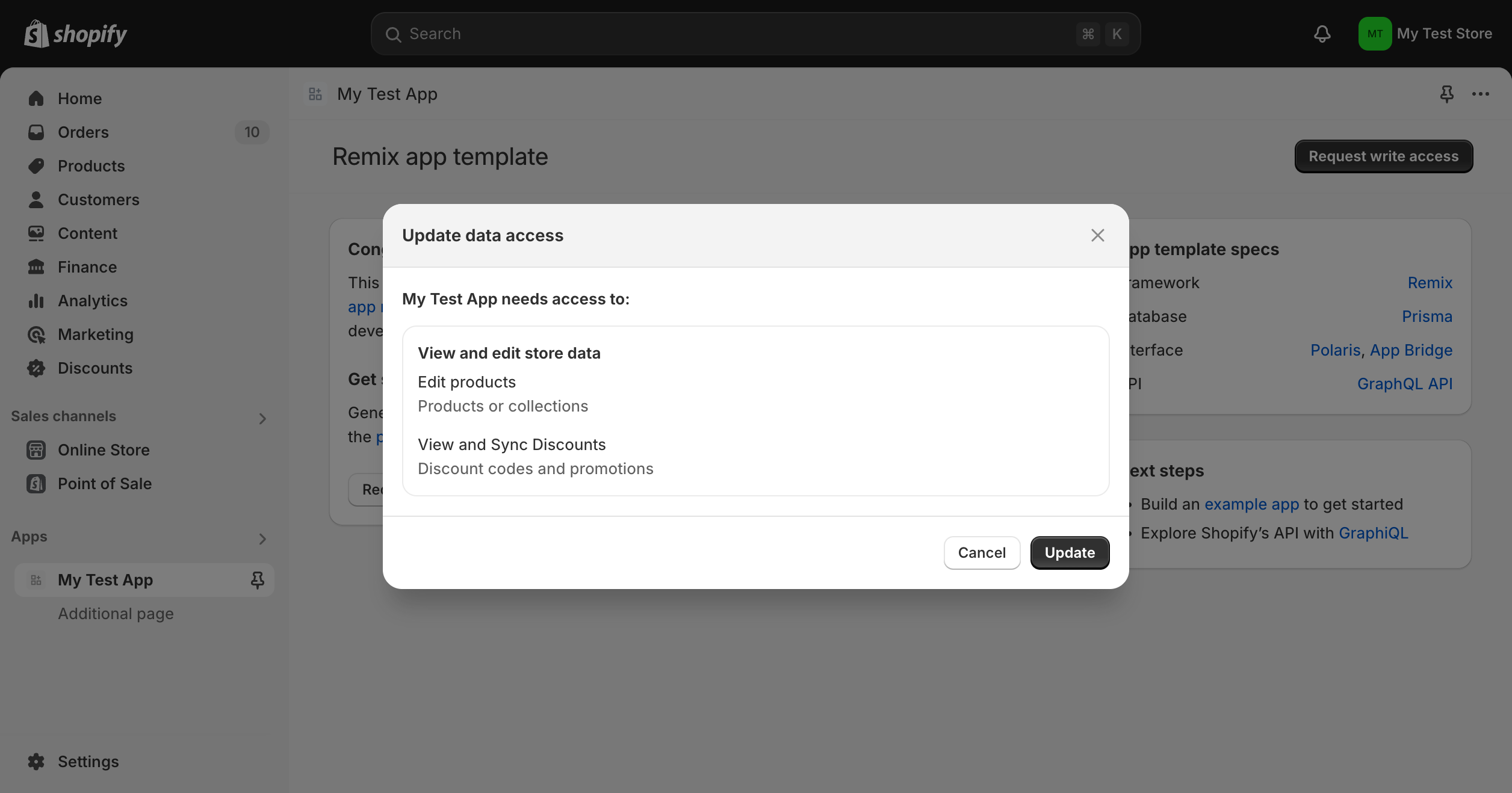
If you're not using one of Shopify's API libraries, request access scopes by directing the merchant to the request URL:
Browser redirect URL
| Query parameter | Description |
|---|---|
STORE_NAME | The name of the merchant's store. |
CLIENT_ID | The app's client ID. |
REQUESTED_SCOPES | A comma-separated list of access scopes to request. This must be a subset of the declared optional_scopes in your TOML file. |
For example:
Shopify's API libraries wrap this in a helper method, so you don't build the URL yourself:
| Library | Method |
|---|---|
| App Bridge API | shopify.scopes.request() |
| React Router API | scopes.request() |
The App Bridge method is client-side and asynchronous, so it doesn't redirect the browser:
The React Router method handles the request server-side. If the scopes aren't already granted, it performs a full-page redirect to the request URL:
Anchor to Revoke granted scopes dynamicallyRevoke granted scopes dynamically
You can only revoke scopes that are configured as optional_scopes and that were dynamically granted. Access scopes configured in the scopes field can't be revoked dynamically.
You can only revoke scopes that are configured as optional_scopes and that were dynamically granted. Access scopes configured in the scopes field can't be revoked dynamically.
If your app no longer needs certain access scopes from a merchant's store, then we recommend revoking them. This helps avoid a potential data leak if the access token is ever compromised.
Revoke access scopes with a GraphQL Admin API mutation:
Example request to revoke granted optional access scopes
POST https://{shop}.myshopify.com/admin/api/{api_version}/graphql.json
Response
Both libraries expose a revoke helper that wraps this mutation:
| Library | Method |
|---|---|
| App Bridge API | shopify.scopes.revoke() |
| React Router API | scopes.revoke() |
Anchor to Troubleshoot scope problemsTroubleshoot scope problems
What a scope failure looks like depends on what's blocking the call:
| Symptom | What it means | What to do |
|---|---|---|
A call returns ACCESS_DENIED in errors[n].extensions.code | The token making the call doesn't carry the scope that field or mutation needs. On the GraphQL Admin API the response is an HTTP 200 with data: null, so error handling that branches on the status code won't catch it. | When the requirement is a scope, the message names it, as in Access denied for shopifyqlQuery field. Required access: read_reports access scope. If you've already declared that scope, query the scopes you were actually granted: a declared scope takes effect only after you deploy the configuration and the merchant approves it. If it's declared and granted, then the gate isn't a scope you can declare, and the reference page for the field or mutation you're calling documents any other requirements. |
A bulk operation returns FAILED with errorCode: ACCESS_DENIED | A missing scope, but a bulk operation doesn't report which field needed it. | Run the same query as a normal, non-bulk request to get the field-level error. See Operation failures. |
| A call fails for one staff member but succeeds for another, or fails with an online access token and works with an offline one | Your app has the scope, but the staff member doesn't have the matching permission. Shopify applies that narrowing per request, so your app's own scopes still look correct. | Compare associated_user_scope from the grant response against the scopes your app declares. It's the intersection of your app's scopes and that user's permissions, narrowed to what the staff member can do. Remember that a granted write scope carries its read counterpart, so don't read an absent read_ handle as a missing permission. The merchant adjusts staff permissions in the Shopify admin. |
A protected customer field returns null and errors[n].message reads This app is not approved to access the Customer object. | Not a missing scope. Your app has the scope, and Shopify is withholding the field. Unlike ACCESS_DENIED, data is still populated: approved fields return values, only the protected ones come back null, and errors[n].path points at the field. | Select the customer data and fields your app uses in the Partner Dashboard. If your app is installed only on development stores, that's all you need. Every other app also has to meet the protected customer data requirements and be approved. |
| A scope is rejected when your app requests it | The scope needs Shopify's approval before your app can request it. | The OAuth error reads missing_shopify_permission: <scope>, and the same failure on the GraphQL path reads Shopify needs to approve the following access scopes: <names>. Follow Requesting specific permissions to request access. |
Deploying fails with Declared optional_scopes [read_products] cannot be implicit required scopes. | A read scope is declared as optional while its write_ counterpart is required. | Remove the read scope from optional_scopes. The write scope already grants it, so declaring it optional is redundant. If you want the read scope to genuinely be optional, the write scope can't stay required. See Moving a scope between scopes and optional_scopes. |
Anchor to Next stepsNext steps
- Look up the full list of scopes and what each one grants in the access scopes reference.
- Learn how to use the
scopesAPI in the App Bridge library or the React Router library. - Review how to declare access scopes in your app's configuration file.
- Understand how access tokens carry the scopes a merchant granted.