About Events
When your app needs information about specific changes that have occurred in a Shopify store, you can subscribe to Events topics as a mechanism for receiving near-real-time deliveries to cloud-based event handlers about these changes.
You declare which field changes can trigger a delivery, define GraphQL Admin queries to shape the delivered data, and optionally configure filters to modify or discard deliveries based on met conditions. The subscription carries much of the filtering that would otherwise live in your handler.
Anchor to What you can buildWhat you can build
Events move customized payloads and conditional processing of deliveries into your configuration, which simplifies a number of common use cases:
-
Sync prices with less noise: Subscribe to
product.variants.priceusingtriggers(and similar paths your app needs). Other edits never fire a delivery if you list only the paths you care about.shopify.app.toml
[[events.subscription]]handle = "price-sync"topic = "Product"actions = ["update"]triggers = ["product.variants.price"] -
Tag products without re-syncing the catalog: Subscribe to
product.tagswith aquery_filter, so tag automation runs on published products and ignores everything else.shopify.app.toml
[[events.subscription]]handle = "tag-automation"topic = "Product"actions = ["update"]triggers = ["product.tags"]query = """query tags_changed($productId: ID!) {product(id: $productId) {idtagsstatus}}"""query_filter = "product.status:'ACTIVE'" -
Include metafields with the delivery: Include the metafields your app stores on products in your
queryso external IDs, mappings, and any config you've saved arrive with each change, no follow-up GraphQL Admin API call needed.shopify.app.toml
[[events.subscription]]handle = "product-sync"topic = "Product"actions = ["update"]triggers = ["product.*"]uri = "https://your-app.example.com/events"query = """query product_with_metafields($productId: ID!) {product(id: $productId) {idtitlemetafield(namespace: "$app", key: "my_key") {namespacekeyvalue}}}"""
Anchor to How it worksHow it works
When a qualifying change happens in a merchant's store, Events sends a delivery. You subscribe to exactly the changes your app needs to respond to, and each delivery arrives with a JSON payload describing what changed.
You declare a subscription in shopify.app.toml to tell Events which resource to watch, which changes should trigger a delivery, and what data each delivery includes.
When actions includes update, you must specify triggers.
Only those Events that satisfy your configured conditions (matching triggers and query filters) result in a successful delivery.
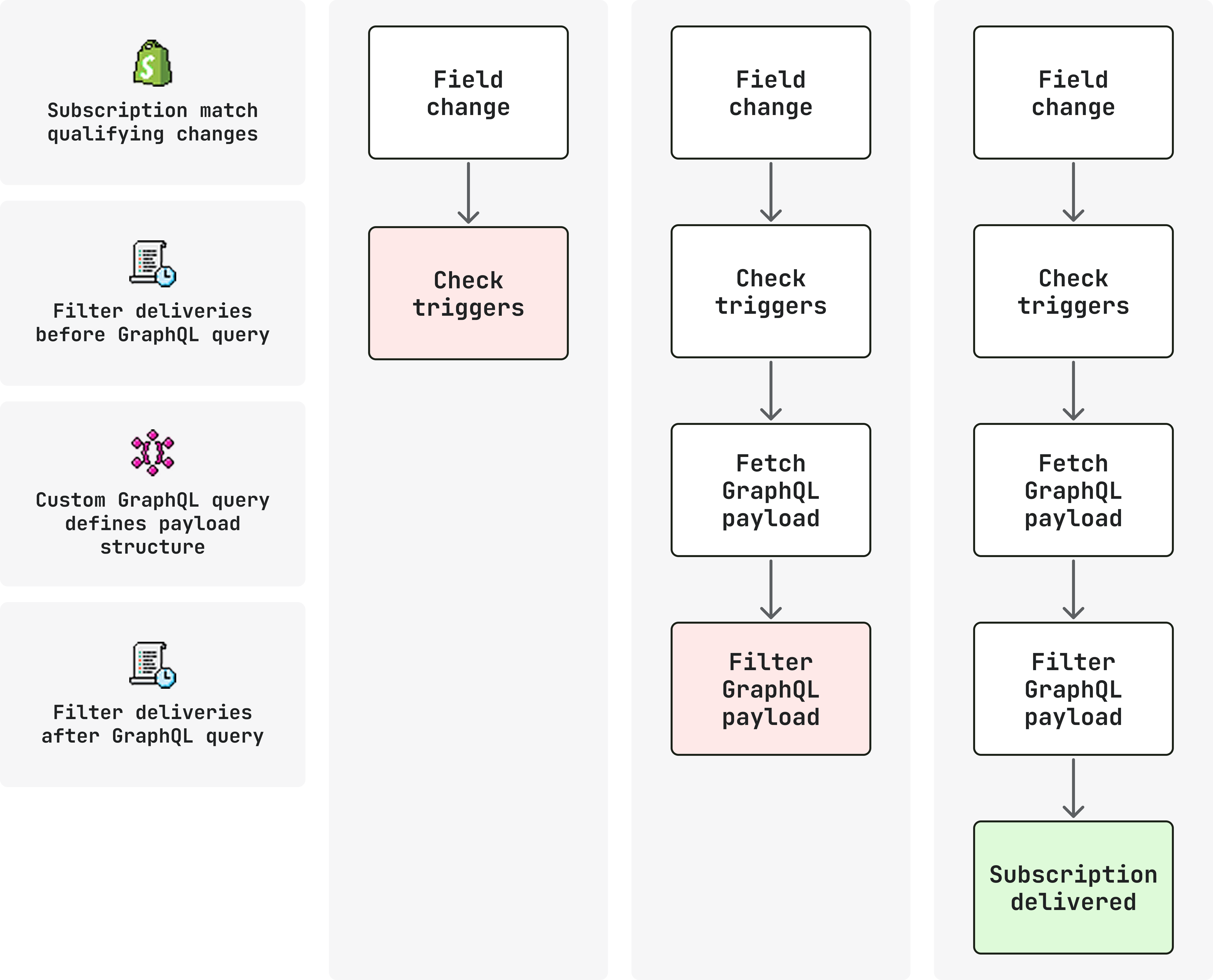
The four core concepts are:
- Manage subscriptions: Declare which resource and operations to watch, and where to send deliveries. Not all GraphQL Admin objects are supported yet. See the Events reference for available topics.
- Delivery filtering: Use
triggersto narrow which field changes result in deliveries, andquery_filterto suppress deliveries based on current data values. - Delivery structure: Shape the delivered payload with a GraphQL
queryand understand what each delivery contains. - Verify deliveries: Verify HMAC signatures and ignore duplicate deliveries using
Shopify-Webhook-Id.


