Manage Events subscriptions
An Events subscription tells Shopify which resources your app wants to track, which changes on those resources matter, and where to send the delivery.
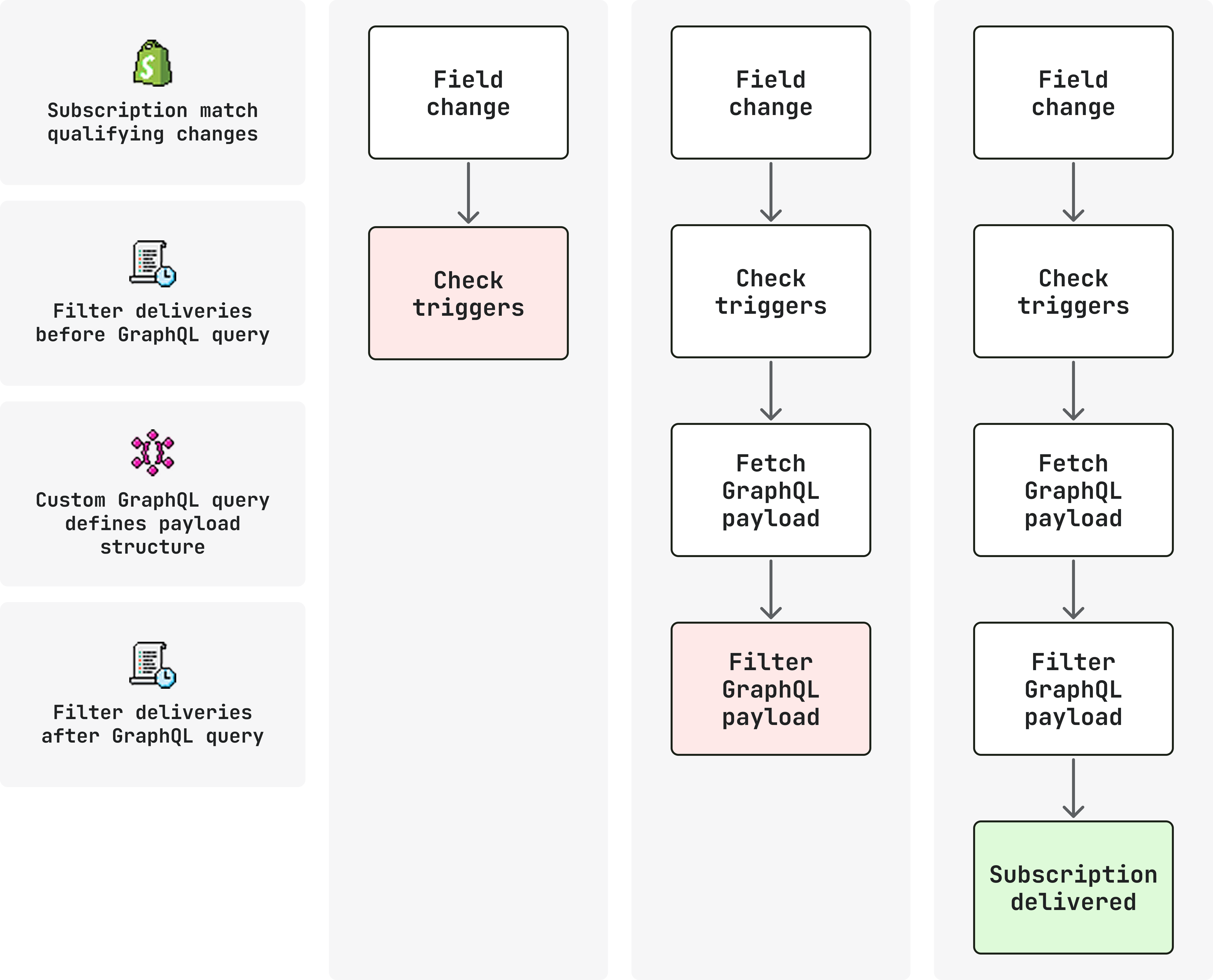
This page covers subscription configuration and the concepts that determine what qualifies a delivery. To narrow which changes trigger a delivery or shape what each delivery returns, see Filter Events deliveries and Events delivery structure.
Anchor to RequirementsRequirements
You need Shopify CLI 3.92 or higher to configure Events in shopify.app.toml.
Run shopify version to check your version, and upgrade Shopify CLI if needed.
Each topic you subscribe to has a required access scope. See the Events reference for a full list of supported topics and their required scopes.
Anchor to VersioningVersioning
The api_version field in [events] controls the GraphQL Admin API version used to validate and run subscription query operations:
shopify.app.toml
Anchor to Subscription fieldsSubscription fields
Each Events subscription is defined by an [[events.subscription]] entry in your shopify.app.toml file.
The following fields are required. triggers is required only when actions includes update:
| Field | Purpose |
|---|---|
handle | Unique ID for this subscription (alphanumeric, _, -, max 50 characters). Included in the delivery payload and headers. |
topic | Capitalized resource name (for example Product). See Topic boundaries. |
actions | One or more of create, update, delete. See Actions. |
uri | Delivery destination. HTTPS URL, AWS EventBridge ARN, or Google Pub/Sub URI. |
triggers | Required when actions includes update. Field paths that determine which changes trigger update deliveries. See Delivery filtering. |
The following fields are optional:
| Field | Purpose |
|---|---|
query | GraphQL operation whose result appears in data. See Delivery structure. |
query_filter | Expression evaluated on the query result after query runs. See Delivery filtering. |
Anchor to TopicsTopics
A topic names the GraphQL Admin resource your subscription listens to.
For example, Events subscriptions on the Product topic listen for changes to Product GraphQL Admin objects.
Some objects don't have their own topic because they only exist as part of another resource.
For example, ProductVariant doesn't have a separate Events topic. Shopify surfaces ProductVariant changes on the Product topic.
If you need to listen to changes to ProductVariant, you would subscribe to Product, not a standalone ProductVariant topic.
Use the Events reference for the current list of topics and validation behavior when you deploy.
Anchor to ActionsActions
actions lists which lifecycle transitions on the subscribed topic can produce a delivery.
-
createanddeleteapply to the topic entity itself. There's no field-path narrowing for those actions at the subscription level. Shopify matches these actions at the resource create/delete boundary for thattopic. -
updatecovers changes on the topic entity and, where the model routes them there, on owned children (for exampleProductVariantfields underProduct).triggersis required and restricts which field paths can qualify anupdate. That mechanism applies only toupdate. See Delivery filtering.
You can list any combination of create, update, and delete.
A subscription that includes update alongside create or delete also requires triggers, but uses them only when deciding which update changes qualify.
Anchor to ExampleExample
The following subscription listens for product creates, deletes, and variant price updates on the Product topic and delivers to a single endpoint.
It uses the required triggers for update, with no query or query_filter, so every qualifying change fires a delivery with the base payload.
Product subscription
shopify.app.toml
[events]
api_version = "2026-10"

[[events.subscription]]
handle = "product-updates"

topic = "Product"
actions = ["create", "update", "delete"]
triggers = ["product.variants.price"]

uri = "https://your-app.example.com/events/product"
{} Response
{
  "topic": "Product",
  "action": "update",
  "handle": "product-updates",
  "fields_changed": {
    "added": [],
    "updated": [
      "product[id: 'gid://shopify/Product/123'].variants[id: 'gid://shopify/ProductVariant/456'].price"
    ],
    "removed": []
  },
  "query_variables": {
    "productId": "gid://shopify/Product/123",
    "variantsId": "gid://shopify/ProductVariant/456"
  }
}
Anchor to Next stepsNext steps
- Delivery filtering: Narrow
updatedeliveries withtriggersand gate sends withquery_filter. - Delivery structure: Shape
datawithqueryand understand what each delivery contains.