Version 2025-07 is the last API version to support React-based UI components. Later versions use web components, native UI elements with built-in accessibility, better performance, and consistent styling with Shopify's design system. Check out the upgrade guide to upgrade your extension.
Collections
Collection pages display information about product groupings, including the products within each collection, collection rules, and display settings. Extensions on these pages help merchants organize inventory and streamline collection management workflows.
Anchor to Use casesUse cases
- Bulk product tagging: Automatically apply tags or metafields to all products within a collection based on custom rules or external data sources.
- Collection sync: Synchronize collection data with external platforms like marketplaces, PIM systems, or marketing tools.
- SEO optimization: Generate and apply SEO metadata, descriptions, or structured data for collections to improve search visibility.
- Inventory alerts: Check stock levels across collection products and notify merchants of low inventory or out-of-stock items.
- Collection analytics: Display performance metrics or generate reports for products within a collection from external analytics platforms.
Anchor to Collection details targetsCollection details targets
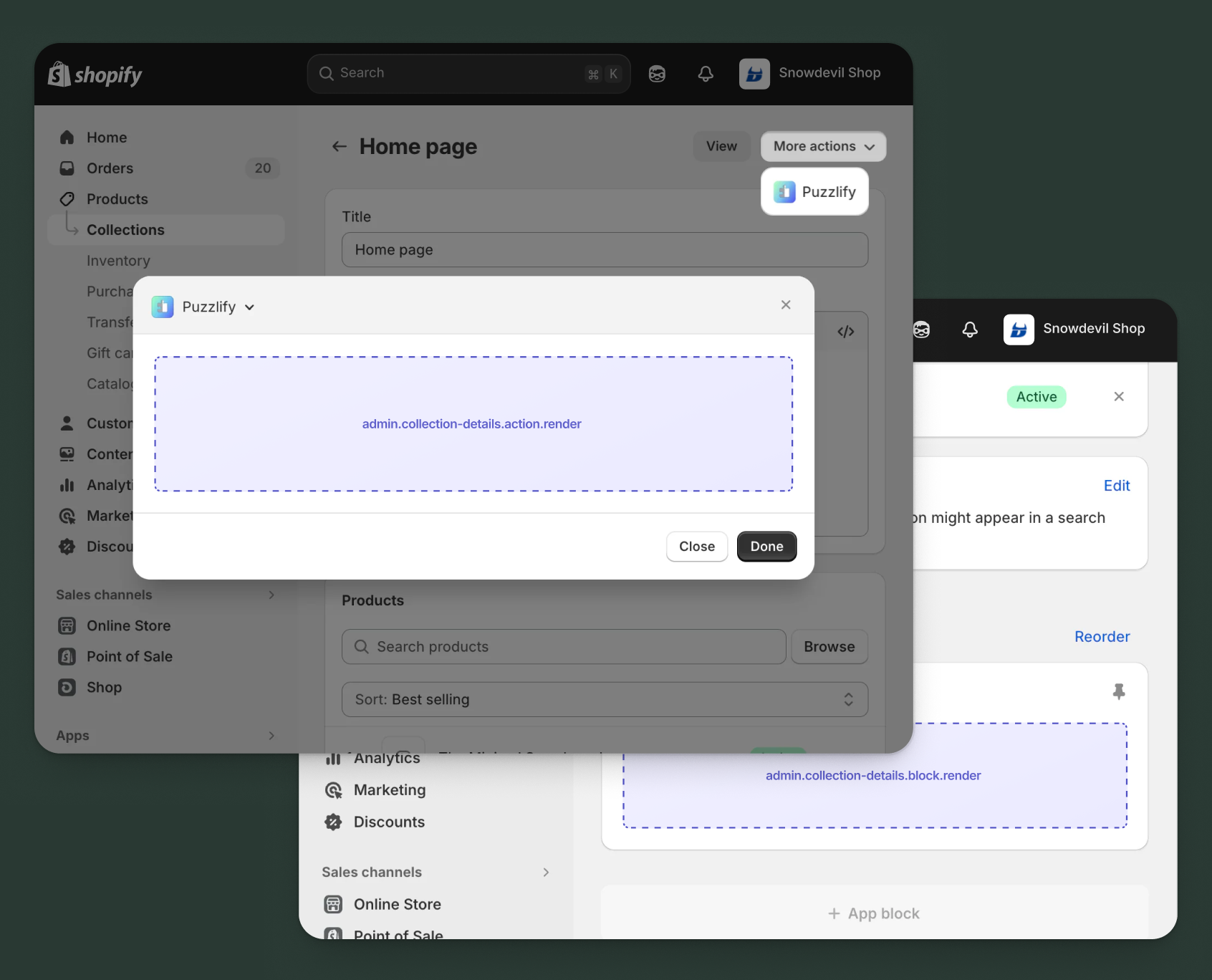
Use action and block targets to extend the collection details page. Add workflows and contextual information that help merchants manage collection relationships and access integrated collection data. Action targets open as modal overlays from the More actions menu, while block targets display as inline cards.
The examples demonstrate fetching data from Shopify's direct API or your app's backend.
Anchor to Collection details action targetCollection details action target
admin.collection-details.action.render
Renders an admin action extension on the collection details page. Merchants can access this extension from the More actions menu. Use this target to provide workflows that operate on collection data, such as syncing with external systems, exporting collection information, or managing credit terms.
Extensions at this target can access collection data through the data property in the Action Extension API. The action renders in a modal overlay, providing space for multi-step workflows, forms, and confirmations.
Supported components
- Admin
Action - Admin
Block - Admin
Print Action - Badge
- Banner
- Block
Stack - Box
- Button
- Checkbox
- Choice
List - Color
Picker - Date
Field - Date
Picker - Divider
- Email
Field - Form
- Function
Settings - Heading
- Heading
Group - Icon
- Image
- Inline
Stack - Link
- Money
Field - Number
Field - Paragraph
- Password
Field - Pressable
- Progress
Indicator - Section
- Select
- Text
- Text
Area - Text
Field - URLField
Available APIs
Supported components
- Admin
Action - Admin
Block - Admin
Print Action - Badge
- Banner
- Block
Stack - Box
- Button
- Checkbox
- Choice
List - Color
Picker - Date
Field - Date
Picker - Divider
- Email
Field - Form
- Function
Settings - Heading
- Heading
Group - Icon
- Image
- Inline
Stack - Link
- Money
Field - Number
Field - Paragraph
- Password
Field - Pressable
- Progress
Indicator - Section
- Select
- Text
- Text
Area - Text
Field - URLField
Available APIs
Examples
Description
Add an action extension that exports all products in a collection to a CSV file using your app backend. This example demonstrates fetching collection data with GraphQL, sending it to an external API for processing, and providing download options.
React
import React, { useState } from 'react';
import {
  reactExtension,
  useApi,
  AdminAction,
  Banner,
  BlockStack,
  Box,
  Button,
  Checkbox,
  ChoiceList,
  Divider,
} from '@shopify/ui-extensions-react/admin';

const TARGET = 'admin.collection-details.action.render';

export default reactExtension(TARGET, () => <App />);

function App() {
  const { data, close, query } = useApi(TARGET);
  const [loading, setLoading] = useState(false);
  const [success, setSuccess] = useState(false);
  const [error, setError] = useState<string | null>(null);
  const [includeVariants, setIncludeVariants] = useState(true);
  const [exportFormat, setExportFormat] = useState(['csv']);

  const handleExport = async () => {
    setLoading(true);
    setError(null);
    const collectionId = data.selected[0].id;

    try {
      const result = await query(`
        query GetCollectionProducts($id: ID!) {
          collection(id: $id) {
            title
            productsCount
            products(first: 100) {
              nodes {
                id
                title
                vendor
                status
                totalInventory
              }
            }
          }
        }
      `, { variables: { id: collectionId } });

      if (result.errors) {
        throw new Error(result.errors[0].message);
      }

      const response = await fetch('https://your-app.com/api/collections/export', {
        method: 'POST',
        headers: { 'Content-Type': 'application/json' },
        body: JSON.stringify({
          collectionId,
          collectionData: result.data.collection,
          options: {
            includeVariants,
            format: exportFormat[0],
          },
        }),
      });

      if (!response.ok) {
        throw new Error('Export failed. Please try again.');
      }

      setSuccess(true);
      close();
    } catch (err) {
      setError(err instanceof Error ? err.message : 'Export failed');
    } finally {
      setLoading(false);
    }
  };

  return (
    <AdminAction
      title="Export Collection Products"
      primaryAction={
        <Button onPress={handleExport} disabled={loading || success}>
          {loading ? 'Exporting...' : 'Export'}
        </Button>
      }
      secondaryAction={<Button onPress={close}>Cancel</Button>}
    >
      <BlockStack gap="base">
        {success && (
          <Banner tone="success">
            Export started! You'll receive an email with the download link.
          </Banner>
        )}
        {error && <Banner tone="critical">{error}</Banner>}

        <Box padding="base">
          <BlockStack gap="base">
            <ChoiceList
              name="format"
              title="Export Format"
              value={exportFormat}
              onChange={setExportFormat}
              choices={[
                { id: 'csv', label: 'CSV (Excel compatible)' },
                { id: 'json', label: 'JSON' },
              ]}
            />

            <Divider />

            <Checkbox
              checked={includeVariants}
              onChange={setIncludeVariants}
            >
              Include product variants
            </Checkbox>
          </BlockStack>
        </Box>
      </BlockStack>
    </AdminAction>
  );
}
TS
import {
  extension,
  AdminAction,
  Banner,
  BlockStack,
  Box,
  Button,
  Checkbox,
  ChoiceList,
  Divider,
} from '@shopify/ui-extensions/admin';

export default extension(
  'admin.collection-details.action.render',
  (root, api) => {
    let loading = false;
    let success = false;
    let error: string | null = null;
    let includeVariants = true;
    let exportFormat = ['csv'];

    const content = root.createFragment();
    const primaryAction = root.createFragment();
    const secondaryAction = root.createFragment();

    const updateUI = () => {
      content.replaceChildren();

      const stack = root.createComponent(BlockStack, { gap: 'base' });

      if (success) {
        stack.appendChild(
          root.createComponent(Banner, { tone: 'success' },
            "Export started! You'll receive an email with the download link."
          )
        );
      }

      if (error) {
        stack.appendChild(
          root.createComponent(Banner, { tone: 'critical' }, error)
        );
      }

      const box = root.createComponent(Box, { padding: 'base' });
      const innerStack = root.createComponent(BlockStack, { gap: 'base' });

      innerStack.appendChild(
        root.createComponent(ChoiceList, {
          name: 'format',
          title: 'Export Format',
          value: exportFormat,
          onChange: (val: string[]) => { exportFormat = val; updateUI(); },
          choices: [
            { id: 'csv', label: 'CSV (Excel compatible)' },
            { id: 'json', label: 'JSON' },
          ],
        })
      );

      innerStack.appendChild(root.createComponent(Divider, {}));

      innerStack.appendChild(
        root.createComponent(Checkbox, {
          checked: includeVariants,
          onChange: (val: boolean) => { includeVariants = val; updateUI(); },
        }, 'Include product variants')
      );

      box.appendChild(innerStack);
      stack.appendChild(box);
      content.appendChild(stack);

      primaryAction.replaceChildren();
      primaryAction.appendChild(
        root.createComponent(Button, {
          onPress: handleExport,
          disabled: loading || success,
        }, loading ? 'Exporting...' : 'Export')
      );
    };

    const handleExport = async () => {
      loading = true;
      error = null;
      updateUI();

      const collectionId = api.data.selected[0].id;

      try {
        const result = await api.query(`
          query GetCollectionProducts($id: ID!) {
            collection(id: $id) {
              title
              productsCount
              products(first: 100) {
                nodes { id title vendor status totalInventory }
              }
            }
          }
        `, { variables: { id: collectionId } });

        if (result.errors) {
          throw new Error(result.errors[0].message);
        }

        const response = await fetch('https://your-app.com/api/collections/export', {
          method: 'POST',
          headers: { 'Content-Type': 'application/json' },
          body: JSON.stringify({
            collectionId,
            collectionData: result.data.collection,
            options: { includeVariants, format: exportFormat[0] },
          }),
        });

        if (!response.ok) throw new Error('Export failed. Please try again.');

        success = true;
        updateUI();
        api.close();
      } catch (err) {
        error = err instanceof Error ? err.message : 'Export failed';
        updateUI();
      } finally {
        loading = false;
        updateUI();
      }
    };

    secondaryAction.appendChild(
      root.createComponent(Button, { onPress: () => api.close() }, 'Cancel')
    );

    updateUI();

    const adminAction = root.createComponent(AdminAction, {
      title: 'Export Collection Products',
      primaryAction,
      secondaryAction,
    });
    adminAction.appendChild(content);
    root.appendChild(adminAction);
    root.mount();
  }
);
Description
Add an action extension that fetches collection details using the [GraphQL Admin API](/docs/api/admin-graphql) and syncs them to an external content management system. This example demonstrates using query() to read collection data including products, images, and SEO metadata.
React
import React, { useState, useEffect } from 'react';
import {
  reactExtension,
  useApi,
  AdminAction,
  Banner,
  BlockStack,
  Box,
  Button,
  Checkbox,
  Divider,
} from '@shopify/ui-extensions-react/admin';

const TARGET = 'admin.collection-details.action.render';

export default reactExtension(TARGET, () => <App />);

function App() {
  const { data, close, query } = useApi(TARGET);
  const [loading, setLoading] = useState(false);
  const [syncing, setSyncing] = useState(false);
  const [success, setSuccess] = useState(false);
  const [error, setError] = useState('');
  const [collection, setCollection] = useState(null);
  const [syncOptions, setSyncOptions] = useState({
    includeProducts: true,
    includeSeo: true,
    includeImages: true,
  });

  useEffect(() => {
    fetchCollectionData();
  }, []);

  const fetchCollectionData = async () => {
    setLoading(true);
    const collectionId = data.selected[0].id;

    try {
      const result = await query(`
        query GetCollection($id: ID!) {
          collection(id: $id) {
            id
            title
            description
            handle
            image { url altText }
            seo { title description }
            productsCount { count }
          }
        }
      `, { variables: { id: collectionId } });

      if (result.data?.collection) {
        setCollection(result.data.collection);
      }
    } catch (err) {
      setError('Failed to load collection data');
    } finally {
      setLoading(false);
    }
  };

  const handleSync = async () => {
    setSyncing(true);
    try {
      const response = await fetch('https://your-cms.com/api/sync-collection', {
        method: 'POST',
        headers: { 'Content-Type': 'application/json' },
        body: JSON.stringify({ collection, options: syncOptions }),
      });

      if (response.ok) {
        setSuccess(true);
        close();
      } else {
        setError('Sync failed. Please try again.');
      }
    } catch (err) {
      setError('Connection error. Check your CMS settings.');
    } finally {
      setSyncing(false);
    }
  };

  return (
    <AdminAction
      title="Sync to CMS"
      primaryAction={
        <Button onPress={handleSync} disabled={loading || syncing || success || !collection}>
          {syncing ? 'Syncing...' : 'Sync Now'}
        </Button>
      }
      secondaryAction={<Button onPress={close}>Cancel</Button>}
    >
      <BlockStack gap="base">
        {success && <Banner tone="success">Collection synced to CMS successfully!</Banner>}
        {error && <Banner tone="critical">{error}</Banner>}

        {loading ? (
          <Banner tone="info">Loading collection data...</Banner>
        ) : collection && (
          <>
            <Banner tone="info">
              Ready to sync "{collection.title}" ({collection.productsCount?.count || 0} products)
            </Banner>
            <Divider />
            <Box padding="base">
              <BlockStack gap="base">
                <Checkbox
                  checked={syncOptions.includeProducts}
                  onChange={(val) => setSyncOptions({ ...syncOptions, includeProducts: val })}
                >
                  Include product references
                </Checkbox>
                <Checkbox
                  checked={syncOptions.includeSeo}
                  onChange={(val) => setSyncOptions({ ...syncOptions, includeSeo: val })}
                >
                  Include SEO metadata
                </Checkbox>
                <Checkbox
                  checked={syncOptions.includeImages}
                  onChange={(val) => setSyncOptions({ ...syncOptions, includeImages: val })}
                >
                  Include collection images
                </Checkbox>
              </BlockStack>
            </Box>
          </>
        )}
      </BlockStack>
    </AdminAction>
  );
}
TS
import {
  extension,
  AdminAction,
  Banner,
  BlockStack,
  Box,
  Button,
  Checkbox,
  Divider,
} from '@shopify/ui-extensions/admin';

export default extension(
  'admin.collection-details.action.render',
  async (root, api) => {
    let loading = true;
    let syncing = false;
    let success = false;
    let error = '';
    let collection: any = null;
    let syncOptions = { includeProducts: true, includeSeo: true, includeImages: true };

    const content = root.createFragment();
    const primaryAction = root.createFragment();
    const secondaryAction = root.createFragment();

    const updateUI = () => {
      content.replaceChildren();
      primaryAction.replaceChildren();

      primaryAction.appendChild(
        root.createComponent(
          Button,
          { onPress: handleSync, disabled: loading || syncing || success || !collection },
          syncing ? 'Syncing...' : 'Sync Now'
        )
      );

      const stack = root.createComponent(BlockStack, { gap: 'base' });

      if (success) {
        stack.appendChild(
          root.createComponent(Banner, { tone: 'success' }, 'Collection synced to CMS successfully!')
        );
      }
      if (error) {
        stack.appendChild(root.createComponent(Banner, { tone: 'critical' }, error));
      }

      if (loading) {
        stack.appendChild(
          root.createComponent(Banner, { tone: 'info' }, 'Loading collection data...')
        );
      } else if (collection) {
        stack.appendChild(
          root.createComponent(
            Banner,
            { tone: 'info' },
            `Ready to sync "${collection.title}" (${collection.productsCount?.count || 0} products)`
          )
        );
        stack.appendChild(root.createComponent(Divider, {}));

        const optionsBox = root.createComponent(Box, { padding: 'base' });
        const optionsStack = root.createComponent(BlockStack, { gap: 'base' });

        optionsStack.appendChild(
          root.createComponent(
            Checkbox,
            {
              checked: syncOptions.includeProducts,
              onChange: (val: boolean) => { syncOptions.includeProducts = val; updateUI(); },
            },
            'Include product references'
          )
        );
        optionsStack.appendChild(
          root.createComponent(
            Checkbox,
            {
              checked: syncOptions.includeSeo,
              onChange: (val: boolean) => { syncOptions.includeSeo = val; updateUI(); },
            },
            'Include SEO metadata'
          )
        );
        optionsStack.appendChild(
          root.createComponent(
            Checkbox,
            {
              checked: syncOptions.includeImages,
              onChange: (val: boolean) => { syncOptions.includeImages = val; updateUI(); },
            },
            'Include collection images'
          )
        );

        optionsBox.appendChild(optionsStack);
        stack.appendChild(optionsBox);
      }

      content.appendChild(stack);
    };

    const handleSync = async () => {
      syncing = true;
      updateUI();

      try {
        const response = await fetch('https://your-cms.com/api/sync-collection', {
          method: 'POST',
          headers: { 'Content-Type': 'application/json' },
          body: JSON.stringify({ collection, options: syncOptions }),
        });

        if (response.ok) {
          success = true;
          updateUI();
          api.close();
        } else {
          error = 'Sync failed. Please try again.';
        }
      } catch (err) {
        error = 'Connection error. Check your CMS settings.';
      } finally {
        syncing = false;
        updateUI();
      }
    };

    const fetchCollectionData = async () => {
      const collectionId = api.data.selected[0].id;

      try {
        const result = await api.query(`
          query GetCollection($id: ID!) {
            collection(id: $id) {
              id
              title
              description
              handle
              image { url altText }
              seo { title description }
              productsCount { count }
            }
          }
        `, { variables: { id: collectionId } });

        if (result.data?.collection) {
          collection = result.data.collection;
        }
      } catch (err) {
        error = 'Failed to load collection data';
      } finally {
        loading = false;
        updateUI();
      }
    };

    secondaryAction.appendChild(
      root.createComponent(Button, { onPress: () => api.close() }, 'Cancel')
    );

    updateUI();

    const adminAction = root.createComponent(AdminAction, {
      title: 'Sync to CMS',
      primaryAction,
      secondaryAction,
    });
    adminAction.appendChild(content);
    root.appendChild(adminAction);
    root.mount();

    await fetchCollectionData();
  }
);
Anchor to Collection details action (should render) targetCollection details action (should render) target
admin.collection-details.action.should-render
Controls the render state of an admin action extension on the collection details page. Use this target to conditionally show or hide your action extension based on the collection's properties, such as status, configuration, or specific business requirements.
This target returns a boolean value that determines whether the corresponding action extension appears in the More actions menu. The extension evaluates each time the page loads.
Supported components
Available APIs
Supported components
Available APIs
Examples
Description
Add a should-render extension that checks with your app backend whether a collection has sufficient sales data to display performance metrics, only showing the action for collections that have been tracked by your analytics system.
React
import {extension} from '@shopify/ui-extensions/admin';

export default extension(
  'admin.collection-details.action.should-render',
  async ({data}) => {
    const collectionId = data.selected[0].id;
    const numericId = collectionId.split('/').pop();

    try {
      const response = await fetch(
        `https://your-app.com/api/collections/${numericId}/has-analytics`,
        {
          method: 'GET',
          headers: {
            'Content-Type': 'application/json',
          },
        }
      );

      if (!response.ok) {
        return {display: false};
      }

      const result = await response.json();

      // Show performance action only if collection has tracked data
      // and meets minimum threshold for meaningful metrics
      const hasEnoughData = result.tracked &&
        result.totalOrders >= 10 &&
        result.daysSinceFirstSale >= 7;

      return {display: hasEnoughData};
    } catch (err) {
      console.error('Failed to check collection analytics:', err);
      return {display: false};
    }
  }
);
TS
import {extension} from '@shopify/ui-extensions/admin';

export default extension(
  'admin.collection-details.action.should-render',
  async ({data}) => {
    const collectionId = data.selected[0].id;
    const numericId = collectionId.split('/').pop();

    try {
      const response = await fetch(
        `https://your-app.com/api/collections/${numericId}/has-analytics`,
        {
          method: 'GET',
          headers: {
            'Content-Type': 'application/json',
          },
        }
      );

      if (!response.ok) {
        return {display: false};
      }

      const result = await response.json();

      // Show performance action only if collection has tracked data
      // and meets minimum threshold for meaningful metrics
      const hasEnoughData = result.tracked &&
        result.totalOrders >= 10 &&
        result.daysSinceFirstSale >= 7;

      return {display: hasEnoughData};
    } catch (err) {
      console.error('Failed to check collection analytics:', err);
      return {display: false};
    }
  }
);
Description
Add a should-render extension that displays an action only when the collection contains products with zero inventory. This example demonstrates querying the [GraphQL Admin API](/docs/api/admin-graphql) to check product availability within a collection.
React
import {extension} from '@shopify/ui-extensions/admin';

export default extension(
  'admin.collection-details.action.should-render',
  async ({data, query}) => {
    const collectionId = data.selected[0].id;

    try {
      const {data: responseData, errors} = await query(`
        query GetCollectionProducts($id: ID!) {
          collection(id: $id) {
            productsCount
            products(first: 50) {
              nodes {
                id
                title
                totalInventory
              }
            }
          }
        }
      `, { variables: { id: collectionId } });

      if (errors || !responseData?.collection) {
        return { display: false };
      }

      const products = responseData.collection.products.nodes;
      const hasOutOfStockItems = products.some(
        (product: { totalInventory: number }) => product.totalInventory === 0
      );

      // Only show action if collection has out-of-stock products
      return { display: hasOutOfStockItems };
    } catch (err) {
      console.error('Failed to check collection inventory:', err);
      return { display: false };
    }
  }
);
TS
import {extension} from '@shopify/ui-extensions/admin';

export default extension(
  'admin.collection-details.action.should-render',
  async ({data, query}) => {
    const collectionId = data.selected[0].id;

    try {
      const {data: responseData, errors} = await query(`
        query GetCollectionProducts($id: ID!) {
          collection(id: $id) {
            productsCount
            products(first: 50) {
              nodes {
                id
                title
                totalInventory
              }
            }
          }
        }
      `, { variables: { id: collectionId } });

      if (errors || !responseData?.collection) {
        return { display: false };
      }

      const products = responseData.collection.products.nodes;
      const hasOutOfStockItems = products.some(
        (product: { totalInventory: number }) => product.totalInventory === 0
      );

      // Only show action if collection has out-of-stock products
      return { display: hasOutOfStockItems };
    } catch (err) {
      console.error('Failed to check collection inventory:', err);
      return { display: false };
    }
  }
);
Anchor to Collection details block targetCollection details block target
admin.collection-details.block.render
Renders an admin block extension inline on the collection details page. Use this target to display contextual information, analytics, or status updates related to the collection without requiring merchant interaction to open a modal.
Extensions at this target can access collection data through the data property in the Block Extension API. Blocks appear as cards on the page and can show real-time data, insights, or quick actions, providing persistent visibility for information merchants need to see at a glance.
Supported components
- Admin
Action - Admin
Block - Admin
Print Action - Badge
- Banner
- Block
Stack - Box
- Button
- Checkbox
- Choice
List - Color
Picker - Date
Field - Date
Picker - Divider
- Email
Field - Form
- Function
Settings - Heading
- Heading
Group - Icon
- Image
- Inline
Stack - Link
- Money
Field - Number
Field - Paragraph
- Password
Field - Pressable
- Progress
Indicator - Section
- Select
- Text
- Text
Area - Text
Field - URLField
Available APIs
Supported components
- Admin
Action - Admin
Block - Admin
Print Action - Badge
- Banner
- Block
Stack - Box
- Button
- Checkbox
- Choice
List - Color
Picker - Date
Field - Date
Picker - Divider
- Email
Field - Form
- Function
Settings - Heading
- Heading
Group - Icon
- Image
- Inline
Stack - Link
- Money
Field - Number
Field - Paragraph
- Password
Field - Pressable
- Progress
Indicator - Section
- Select
- Text
- Text
Area - Text
Field - URLField
Available APIs
Examples
Description
Create a block extension that displays sales and traffic metrics for a collection by fetching analytics data from your app backend. This example shows how to call an external API and render performance KPIs with loading states.
React
import React, { useState, useEffect } from 'react';
import {
  reactExtension,
  useApi,
  AdminBlock,
  Banner,
  BlockStack,
  Box,
  Button,
  Divider,
  Heading,
  Icon,
  Text,
} from '@shopify/ui-extensions-react/admin';

const TARGET = 'admin.collection-details.block.render';

export default reactExtension(TARGET, () => <App />);

function App() {
  const { data } = useApi(TARGET);
  const [metrics, setMetrics] = useState(null);
  const [loading, setLoading] = useState(true);
  const [error, setError] = useState(null);

  const fetchMetrics = async () => {
    setLoading(true);
    setError(null);
    const collectionId = data.selected[0].id;

    try {
      const response = await fetch('https://your-app.com/api/collection-metrics', {
        method: 'POST',
        headers: { 'Content-Type': 'application/json' },
        body: JSON.stringify({ collectionId }),
      });

      if (!response.ok) throw new Error('Failed to fetch metrics');
      const result = await response.json();
      setMetrics(result);
    } catch (err) {
      setError('Unable to load performance data');
    } finally {
      setLoading(false);
    }
  };

  useEffect(() => {
    fetchMetrics();
  }, []);

  if (loading) {
    return (
      <AdminBlock title="Collection Performance">
        <BlockStack gap="base">
          <Text>Loading metrics...</Text>
        </BlockStack>
      </AdminBlock>
    );
  }

  return (
    <AdminBlock title="Collection Performance">
      <BlockStack gap="base">
        {error && (
          <Banner tone="critical">
            {error}
          </Banner>
        )}

        {metrics && (
          <>
            <BlockStack gap="tight">
              <Heading size="small">Sales (Last 30 Days)</Heading>
              <Text emphasis="bold" size="large">${metrics.totalSales.toLocaleString()}</Text>
              <Text appearance="subdued">{metrics.orderCount} orders</Text>
            </BlockStack>

            <Divider />

            <BlockStack gap="tight">
              <Heading size="small">Traffic</Heading>
              <Text emphasis="bold" size="large">{metrics.pageViews.toLocaleString()} views</Text>
              <Text appearance="subdued">{metrics.conversionRate}% conversion rate</Text>
            </BlockStack>

            <Divider />

            <BlockStack gap="tight">
              <Heading size="small">Top Product</Heading>
              <Text>{metrics.topProduct?.title || 'No data'}</Text>
              <Text appearance="subdued">{metrics.topProduct?.unitsSold || 0} units sold</Text>
            </BlockStack>
          </>
        )}

        <Box paddingBlockStart="base">
          <Button onPress={fetchMetrics}>Refresh Metrics</Button>
        </Box>
      </BlockStack>
    </AdminBlock>
  );
}
TS
import {
  extension,
  AdminBlock,
  Banner,
  BlockStack,
  Box,
  Button,
  Divider,
  Heading,
  Text,
} from '@shopify/ui-extensions/admin';

export default extension(
  'admin.collection-details.block.render',
  (root, api) => {
    let metrics = null;
    let loading = true;
    let error = null;

    const content = root.createFragment();

    const fetchMetrics = async () => {
      loading = true;
      error = null;
      updateUI();

      const collectionId = api.data.selected[0].id;

      try {
        const response = await fetch('https://your-app.com/api/collection-metrics', {
          method: 'POST',
          headers: { 'Content-Type': 'application/json' },
          body: JSON.stringify({ collectionId }),
        });

        if (!response.ok) throw new Error('Failed to fetch metrics');
        metrics = await response.json();
      } catch (err) {
        error = 'Unable to load performance data';
      } finally {
        loading = false;
        updateUI();
      }
    };

    const updateUI = () => {
      content.replaceChildren();

      const stack = root.createComponent(BlockStack, { gap: 'base' });

      if (loading) {
        stack.appendChild(root.createComponent(Text, {}, 'Loading metrics...'));
        content.appendChild(stack);
        return;
      }

      if (error) {
        stack.appendChild(root.createComponent(Banner, { tone: 'critical' }, error));
      }

      if (metrics) {
        const salesSection = root.createComponent(BlockStack, { gap: 'tight' });
        salesSection.appendChild(root.createComponent(Heading, { size: 'small' }, 'Sales (Last 30 Days)'));
        salesSection.appendChild(root.createComponent(Text, { emphasis: 'bold', size: 'large' }, `$${metrics.totalSales.toLocaleString()}`));
        salesSection.appendChild(root.createComponent(Text, { appearance: 'subdued' }, `${metrics.orderCount} orders`));
        stack.appendChild(salesSection);

        stack.appendChild(root.createComponent(Divider, {}));

        const trafficSection = root.createComponent(BlockStack, { gap: 'tight' });
        trafficSection.appendChild(root.createComponent(Heading, { size: 'small' }, 'Traffic'));
        trafficSection.appendChild(root.createComponent(Text, { emphasis: 'bold', size: 'large' }, `${metrics.pageViews.toLocaleString()} views`));
        trafficSection.appendChild(root.createComponent(Text, { appearance: 'subdued' }, `${metrics.conversionRate}% conversion rate`));
        stack.appendChild(trafficSection);

        stack.appendChild(root.createComponent(Divider, {}));

        const topProductSection = root.createComponent(BlockStack, { gap: 'tight' });
        topProductSection.appendChild(root.createComponent(Heading, { size: 'small' }, 'Top Product'));
        topProductSection.appendChild(root.createComponent(Text, {}, metrics.topProduct?.title || 'No data'));
        topProductSection.appendChild(root.createComponent(Text, { appearance: 'subdued' }, `${metrics.topProduct?.unitsSold || 0} units sold`));
        stack.appendChild(topProductSection);
      }

      const buttonBox = root.createComponent(Box, { paddingBlockStart: 'base' });
      buttonBox.appendChild(root.createComponent(Button, { onPress: fetchMetrics }, 'Refresh Metrics'));
      stack.appendChild(buttonBox);

      content.appendChild(stack);
    };

    const adminBlock = root.createComponent(AdminBlock, { title: 'Collection Performance' });
    adminBlock.appendChild(content);
    root.appendChild(adminBlock);

    fetchMetrics();
    root.mount();
  }
);
Description
Create a block extension that displays out-of-stock products within a collection using the [direct API](/docs/api/admin-extensions/2025-07#direct-api-access) to fetch inventory data and highlight items needing attention.
React
import React, { useState, useEffect } from 'react';
import {
  reactExtension,
  useApi,
  AdminBlock,
  Banner,
  BlockStack,
  Box,
  Button,
  Divider,
  Heading,
  Icon,
} from '@shopify/ui-extensions-react/admin';

const TARGET = 'admin.collection-details.block.render';

export default reactExtension(TARGET, () => <App />);

function App() {
  const { data, query } = useApi(TARGET);
  const [outOfStock, setOutOfStock] = useState([]);
  const [loading, setLoading] = useState(true);
  const [error, setError] = useState(null);

  useEffect(() => {
    fetchOutOfStockProducts();
  }, []);

  const fetchOutOfStockProducts = async () => {
    setLoading(true);
    setError(null);
    const collectionId = data.selected[0].id;

    try {
      const result = await query(`
        query GetCollectionProducts($id: ID!) {
          collection(id: $id) {
            title
            products(first: 50) {
              nodes {
                id
                title
                totalInventory
                featuredImage {
                  url
                }
              }
            }
          }
        }
      `, { variables: { id: collectionId } });

      if (result.data?.collection?.products?.nodes) {
        const zeroStock = result.data.collection.products.nodes.filter(
          product => product.totalInventory <= 0
        );
        setOutOfStock(zeroStock);
      }
    } catch (err) {
      setError('Failed to fetch inventory data');
    } finally {
      setLoading(false);
    }
  };

  if (loading) {
    return (
      <AdminBlock title="Inventory Status">
        <BlockStack gap="base">
          <Banner tone="info">Loading inventory data...</Banner>
        </BlockStack>
      </AdminBlock>
    );
  }

  return (
    <AdminBlock title="Inventory Status">
      <BlockStack gap="base">
        {error && <Banner tone="critical">{error}</Banner>}

        {outOfStock.length === 0 ? (
          <Banner tone="success">
            <Icon name="CheckCircleFilled" /> All products in stock!
          </Banner>
        ) : (
          <>
            <Banner tone="warning">
              {outOfStock.length} product{outOfStock.length > 1 ? 's' : ''} out of stock
            </Banner>
            <Divider />
            <BlockStack gap="tight">
              {outOfStock.slice(0, 5).map((product) => (
                <Box key={product.id} padding="tight" background="subdued" borderRadius="base">
                  <BlockStack gap="extraTight">
                    <Heading size="6">{product.title}</Heading>
                    <Box><Icon name="AlertCircle" /> Inventory: 0</Box>
                  </BlockStack>
                </Box>
              ))}
              {outOfStock.length > 5 && (
                <Box padding="tight">
                  <Heading size="6">+{outOfStock.length - 5} more items</Heading>
                </Box>
              )}
            </BlockStack>
          </>
        )}

        <Button onPress={fetchOutOfStockProducts}>Refresh</Button>
      </BlockStack>
    </AdminBlock>
  );
}
TS
import {
  extension,
  AdminBlock,
  Banner,
  BlockStack,
  Box,
  Button,
  Divider,
  Heading,
  Icon,
} from '@shopify/ui-extensions/admin';

export default extension(
  'admin.collection-details.block.render',
  (root, api) => {
    const { data, query } = api;
    let outOfStock = [];
    let loading = true;
    let error = null;

    const content = root.createFragment();

    const fetchOutOfStockProducts = async () => {
      loading = true;
      error = null;
      updateUI();

      const collectionId = data.selected[0].id;

      try {
        const result = await query(`
          query GetCollectionProducts($id: ID!) {
            collection(id: $id) {
              title
              products(first: 50) {
                nodes {
                  id
                  title
                  totalInventory
                }
              }
            }
          }
        `, { variables: { id: collectionId } });

        if (result.data?.collection?.products?.nodes) {
          outOfStock = result.data.collection.products.nodes.filter(
            product => product.totalInventory <= 0
          );
        }
      } catch (err) {
        error = 'Failed to fetch inventory data';
      } finally {
        loading = false;
        updateUI();
      }
    };

    const updateUI = () => {
      content.replaceChildren();

      const stack = root.createComponent(BlockStack, { gap: 'base' });

      if (loading) {
        stack.appendChild(
          root.createComponent(Banner, { tone: 'info' }, 'Loading inventory data...')
        );
      } else {
        if (error) {
          stack.appendChild(root.createComponent(Banner, { tone: 'critical' }, error));
        }

        if (outOfStock.length === 0) {
          const successBanner = root.createComponent(Banner, { tone: 'success' });
          successBanner.appendChild(root.createComponent(Icon, { name: 'CheckCircleFilled' }));
          successBanner.appendChild(' All products in stock!');
          stack.appendChild(successBanner);
        } else {
          stack.appendChild(
            root.createComponent(Banner, { tone: 'warning' },
              `${outOfStock.length} product${outOfStock.length > 1 ? 's' : ''} out of stock`
            )
          );
          stack.appendChild(root.createComponent(Divider, {}));

          const itemsStack = root.createComponent(BlockStack, { gap: 'tight' });
          outOfStock.slice(0, 5).forEach((product) => {
            const box = root.createComponent(Box, { padding: 'tight', background: 'subdued', borderRadius: 'base' });
            const innerStack = root.createComponent(BlockStack, { gap: 'extraTight' });
            innerStack.appendChild(root.createComponent(Heading, { size: '6' }, product.title));
            const infoBox = root.createComponent(Box, {});
            infoBox.appendChild(root.createComponent(Icon, { name: 'AlertCircle' }));
            infoBox.appendChild(' Inventory: 0');
            innerStack.appendChild(infoBox);
            box.appendChild(innerStack);
            itemsStack.appendChild(box);
          });

          if (outOfStock.length > 5) {
            const moreBox = root.createComponent(Box, { padding: 'tight' });
            moreBox.appendChild(root.createComponent(Heading, { size: '6' }, `+${outOfStock.length - 5} more items`));
            itemsStack.appendChild(moreBox);
          }
          stack.appendChild(itemsStack);
        }

        stack.appendChild(
          root.createComponent(Button, { onPress: fetchOutOfStockProducts }, 'Refresh')
        );
      }

      content.appendChild(stack);
    };

    updateUI();
    fetchOutOfStockProducts();

    const adminBlock = root.createComponent(AdminBlock, { title: 'Inventory Status' });
    adminBlock.appendChild(content);
    root.appendChild(adminBlock);
    root.mount();
  }
);
Anchor to Collection index targetsCollection index targets
Use action targets to extend the collection index page with bulk operations and workflows that help merchants manage multiple collections efficiently.
Anchor to Collection index action targetCollection index action target
admin.collection-index.action.render
Renders an admin action extension on the collection index page. Merchants can access this extension from the More actions menu. Use this target to provide workflows that operate on collection data, such as syncing with external systems, exporting collection information, or managing credit terms.
Extensions at this target can access collection data through the data property in the Action Extension API. The action renders in a modal overlay, providing space for multi-step workflows, forms, and confirmations.
Supported components
- Admin
Action - Admin
Block - Admin
Print Action - Badge
- Banner
- Block
Stack - Box
- Button
- Checkbox
- Choice
List - Color
Picker - Date
Field - Date
Picker - Divider
- Email
Field - Form
- Function
Settings - Heading
- Heading
Group - Icon
- Image
- Inline
Stack - Link
- Money
Field - Number
Field - Paragraph
- Password
Field - Pressable
- Progress
Indicator - Section
- Select
- Text
- Text
Area - Text
Field - URLField
Available APIs
Supported components
- Admin
Action - Admin
Block - Admin
Print Action - Badge
- Banner
- Block
Stack - Box
- Button
- Checkbox
- Choice
List - Color
Picker - Date
Field - Date
Picker - Divider
- Email
Field - Form
- Function
Settings - Heading
- Heading
Group - Icon
- Image
- Inline
Stack - Link
- Money
Field - Number
Field - Paragraph
- Password
Field - Pressable
- Progress
Indicator - Section
- Select
- Text
- Text
Area - Text
Field - URLField
Available APIs
Examples
Description
Add an action extension that generates a comprehensive report of all collections in the store. This example demonstrates calling your app backend to compile collection statistics, product counts, and inventory totals across the entire catalog.
React
import React, { useState } from 'react';
import {
  reactExtension,
  useApi,
  AdminAction,
  Banner,
  BlockStack,
  Box,
  Button,
  Checkbox,
  ChoiceList,
  Divider,
} from '@shopify/ui-extensions-react/admin';

const TARGET = 'admin.collection-index.action.render';

export default reactExtension(TARGET, () => <App />);

function App() {
  const { data, close } = useApi(TARGET);
  const [loading, setLoading] = useState(false);
  const [success, setSuccess] = useState(false);
  const [error, setError] = useState<string | null>(null);
  const [includeVariants, setIncludeVariants] = useState(true);
  const [exportFields, setExportFields] = useState(['title', 'sku', 'price']);

  const fieldOptions = [
    { label: 'Product Title', value: 'title' },
    { label: 'SKU', value: 'sku' },
    { label: 'Price', value: 'price' },
    { label: 'Inventory Quantity', value: 'inventory' },
    { label: 'Vendor', value: 'vendor' },
  ];

  const handleExport = async () => {
    setLoading(true);
    setError(null);

    const collectionIds = data.selected.map((item) => item.id);

    try {
      const response = await fetch('https://your-app.com/api/collections/export', {
        method: 'POST',
        headers: { 'Content-Type': 'application/json' },
        body: JSON.stringify({
          collectionIds,
          includeVariants,
          fields: exportFields,
        }),
      });

      if (!response.ok) {
        throw new Error('Export failed');
      }

      const { downloadUrl, productCount } = await response.json();

      setSuccess(true);
      setTimeout(() => {
        window.open(downloadUrl, '_blank');
        close();
      }, 1500);
    } catch (err) {
      setError('Failed to generate export. Please try again.');
    } finally {
      setLoading(false);
    }
  };

  const selectedCount = data.selected.length;

  return (
    <AdminAction
      title="Export Collection Products"
      primaryAction={
        <Button onPress={handleExport} disabled={loading || success || exportFields.length === 0}>
          {loading ? 'Generating...' : `Export ${selectedCount} Collection${selectedCount > 1 ? 's' : ''}`}
        </Button>
      }
      secondaryAction={<Button onPress={close}>Cancel</Button>}
    >
      <BlockStack gap="base">
        {success && (
          <Banner tone="success">Export ready! Download starting...</Banner>
        )}
        {error && (
          <Banner tone="critical">{error}</Banner>
        )}

        <Box padding="base">
          <BlockStack gap="base">
            <ChoiceList
              title="Fields to export"
              name="exportFields"
              choices={fieldOptions}
              value={exportFields}
              onChange={setExportFields}
            />

            <Divider />

            <Checkbox
              checked={includeVariants}
              onChange={setIncludeVariants}
            >
              Include all product variants
            </Checkbox>
          </BlockStack>
        </Box>

        <Banner tone="info">
          {selectedCount} collection{selectedCount > 1 ? 's' : ''} selected for export
        </Banner>
      </BlockStack>
    </AdminAction>
  );
}
TS
import {
  extension,
  AdminAction,
  Banner,
  BlockStack,
  Box,
  Button,
  Checkbox,
  ChoiceList,
  Divider,
} from '@shopify/ui-extensions/admin';

export default extension(
  'admin.collection-index.action.render',
  (root, api) => {
    let loading = false;
    let success = false;
    let error: string | null = null;
    let includeVariants = true;
    let exportFields = ['title', 'sku', 'price'];

    const fieldOptions = [
      { label: 'Product Title', value: 'title' },
      { label: 'SKU', value: 'sku' },
      { label: 'Price', value: 'price' },
      { label: 'Inventory Quantity', value: 'inventory' },
      { label: 'Vendor', value: 'vendor' },
    ];

    const handleExport = async () => {
      loading = true;
      error = null;
      updateUI();

      const collectionIds = api.data.selected.map((item) => item.id);

      try {
        const response = await fetch('https://your-app.com/api/collections/export', {
          method: 'POST',
          headers: { 'Content-Type': 'application/json' },
          body: JSON.stringify({
            collectionIds,
            includeVariants,
            fields: exportFields,
          }),
        });

        if (!response.ok) throw new Error('Export failed');

        const { downloadUrl } = await response.json();
        success = true;
        updateUI();

        setTimeout(() => {
          window.open(downloadUrl, '_blank');
          api.close();
        }, 1500);
      } catch (err) {
        error = 'Failed to generate export. Please try again.';
        updateUI();
      } finally {
        loading = false;
        updateUI();
      }
    };

    const primaryAction = root.createFragment();
    const secondaryAction = root.createFragment();
    const content = root.createFragment();

    const selectedCount = api.data.selected.length;

    const updateUI = () => {
      content.replaceChildren();

      const stack = root.createComponent(BlockStack, { gap: 'base' });

      if (success) {
        stack.appendChild(
          root.createComponent(Banner, { tone: 'success' }, 'Export ready! Download starting...')
        );
      }
      if (error) {
        stack.appendChild(root.createComponent(Banner, { tone: 'critical' }, error));
      }

      const box = root.createComponent(Box, { padding: 'base' });
      const innerStack = root.createComponent(BlockStack, { gap: 'base' });

      innerStack.appendChild(
        root.createComponent(ChoiceList, {
          title: 'Fields to export',
          name: 'exportFields',
          choices: fieldOptions,
          value: exportFields,
          onChange: (val: string[]) => { exportFields = val; updateUI(); },
        })
      );

      innerStack.appendChild(root.createComponent(Divider, {}));

      innerStack.appendChild(
        root.createComponent(Checkbox, {
          checked: includeVariants,
          onChange: (val: boolean) => { includeVariants = val; updateUI(); },
        }, 'Include all product variants')
      );

      box.appendChild(innerStack);
      stack.appendChild(box);

      stack.appendChild(
        root.createComponent(Banner, { tone: 'info' },
          `${selectedCount} collection${selectedCount > 1 ? 's' : ''} selected for export`
        )
      );

      content.appendChild(stack);

      primaryAction.replaceChildren();
      primaryAction.appendChild(
        root.createComponent(Button, {
          onPress: handleExport,
          disabled: loading || success || exportFields.length === 0,
        }, loading ? 'Generating...' : `Export ${selectedCount} Collection${selectedCount > 1 ? 's' : ''}`)
      );
    };

    secondaryAction.appendChild(
      root.createComponent(Button, { onPress: () => api.close() }, 'Cancel')
    );

    updateUI();

    const adminAction = root.createComponent(AdminAction, {
      title: 'Export Collection Products',
      primaryAction,
      secondaryAction,
    });
    adminAction.appendChild(content);
    root.appendChild(adminAction);
    root.mount();
  }
);
Description
Add an action extension that pushes all collections to an external marketing platform. This example demonstrates using the [direct API](/docs/api/admin-extensions/2025-07#direct-api-access) to fetch collection details including products, images, and SEO metadata before syncing.
React
import React, { useState, useEffect } from 'react';
import {
  reactExtension,
  useApi,
  AdminAction,
  Banner,
  BlockStack,
  Box,
  Button,
  Checkbox,
  Divider,
} from '@shopify/ui-extensions-react/admin';

const TARGET = 'admin.collection-index.action.render';

export default reactExtension(TARGET, () => <App />);

function App() {
  const { data, close, query } = useApi(TARGET);
  const [loading, setLoading] = useState(false);
  const [syncing, setSyncing] = useState(false);
  const [success, setSuccess] = useState(false);
  const [error, setError] = useState('');
  const [collections, setCollections] = useState([]);
  const [includeProducts, setIncludeProducts] = useState(true);
  const [includeSEO, setIncludeSEO] = useState(true);

  useEffect(() => {
    fetchCollectionDetails();
  }, []);

  const fetchCollectionDetails = async () => {
    setLoading(true);
    try {
      const selectedIds = data.selected.map(s => s.id);
      const results = await Promise.all(
        selectedIds.map(id =>
          query(`query GetCollection($id: ID!) {
            collection(id: $id) {
              id
              title
              handle
              descriptionHtml
              productsCount
              image { url altText }
              seo { title description }
            }
          }`, { variables: { id } })
        )
      );
      setCollections(results.map(r => r.data?.collection).filter(Boolean));
    } catch (err) {
      setError('Failed to fetch collection details');
    } finally {
      setLoading(false);
    }
  };

  const handleSync = async () => {
    setSyncing(true);
    try {
      const response = await fetch('https://your-cms.com/api/sync-collections', {
        method: 'POST',
        headers: { 'Content-Type': 'application/json' },
        body: JSON.stringify({
          collections,
          options: { includeProducts, includeSEO }
        }),
      });
      if (response.ok) {
        setSuccess(true);
        close();
      } else {
        setError('CMS sync failed. Please try again.');
      }
    } catch (err) {
      setError('Connection error. Check your CMS settings.');
    } finally {
      setSyncing(false);
    }
  };

  return (
    <AdminAction
      title="Sync to CMS"
      primaryAction={
        <Button onPress={handleSync} disabled={loading || syncing || success || collections.length === 0}>
          {syncing ? 'Syncing...' : `Sync ${collections.length} Collection(s)`}
        </Button>
      }
      secondaryAction={<Button onPress={close}>Cancel</Button>}
    >
      <BlockStack gap="base">
        {success && <Banner tone="success">Collections synced to CMS successfully!</Banner>}
        {error && <Banner tone="critical">{error}</Banner>}

        {loading ? (
          <Banner tone="info">Loading collection details...</Banner>
        ) : (
          <>
            <Box padding="base">
              <BlockStack gap="base">
                {collections.map(col => (
                  <Box key={col.id} padding="small">
                    <BlockStack gap="extraTight">
                      <Box>{col.title}</Box>
                      <Box>/{col.handle} • {col.productsCount} products</Box>
                    </BlockStack>
                  </Box>
                ))}
              </BlockStack>
            </Box>

            <Divider />

            <BlockStack gap="base">
              <Checkbox checked={includeProducts} onChange={setIncludeProducts}>
                Include product references
              </Checkbox>
              <Checkbox checked={includeSEO} onChange={setIncludeSEO}>
                Include SEO metadata
              </Checkbox>
            </BlockStack>
          </>
        )}
      </BlockStack>
    </AdminAction>
  );
}
TS
import {
  extension,
  AdminAction,
  Banner,
  BlockStack,
  Box,
  Button,
  Checkbox,
  Divider,
} from '@shopify/ui-extensions/admin';

export default extension(
  'admin.collection-index.action.render',
  async (root, api) => {
    let loading = true;
    let syncing = false;
    let success = false;
    let error = '';
    let collections: any[] = [];
    let includeProducts = true;
    let includeSEO = true;

    const content = root.createFragment();
    const primaryAction = root.createFragment();
    const secondaryAction = root.createFragment();

    const updateUI = () => {
      content.replaceChildren();
      primaryAction.replaceChildren();

      primaryAction.appendChild(
        root.createComponent(
          Button,
          { onPress: handleSync, disabled: loading || syncing || success || collections.length === 0 },
          syncing ? 'Syncing...' : `Sync ${collections.length} Collection(s)`
        )
      );

      const stack = root.createComponent(BlockStack, { gap: 'base' });

      if (success) {
        stack.appendChild(root.createComponent(Banner, { tone: 'success' }, 'Collections synced to CMS successfully!'));
      }
      if (error) {
        stack.appendChild(root.createComponent(Banner, { tone: 'critical' }, error));
      }

      if (loading) {
        stack.appendChild(root.createComponent(Banner, { tone: 'info' }, 'Loading collection details...'));
      } else {
        const listBox = root.createComponent(Box, { padding: 'base' });
        const listStack = root.createComponent(BlockStack, { gap: 'base' });

        collections.forEach(col => {
          const itemBox = root.createComponent(Box, { padding: 'small' });
          const itemStack = root.createComponent(BlockStack, { gap: 'extraTight' });
          itemStack.appendChild(root.createComponent(Box, {}, col.title));
          itemStack.appendChild(root.createComponent(Box, {}, `/${col.handle} • ${col.productsCount} products`));
          itemBox.appendChild(itemStack);
          listStack.appendChild(itemBox);
        });

        listBox.appendChild(listStack);
        stack.appendChild(listBox);
        stack.appendChild(root.createComponent(Divider, {}));

        const optionsStack = root.createComponent(BlockStack, { gap: 'base' });
        optionsStack.appendChild(
          root.createComponent(Checkbox, { checked: includeProducts, onChange: (val) => { includeProducts = val; } }, 'Include product references')
        );
        optionsStack.appendChild(
          root.createComponent(Checkbox, { checked: includeSEO, onChange: (val) => { includeSEO = val; } }, 'Include SEO metadata')
        );
        stack.appendChild(optionsStack);
      }

      content.appendChild(stack);
    };

    const handleSync = async () => {
      syncing = true;
      updateUI();
      try {
        const response = await fetch('https://your-cms.com/api/sync-collections', {
          method: 'POST',
          headers: { 'Content-Type': 'application/json' },
          body: JSON.stringify({ collections, options: { includeProducts, includeSEO } }),
        });
        if (response.ok) {
          success = true;
          updateUI();
          api.close();
        } else {
          error = 'CMS sync failed. Please try again.';
        }
      } catch (err) {
        error = 'Connection error. Check your CMS settings.';
      } finally {
        syncing = false;
        updateUI();
      }
    };

    // Fetch collection details using direct API
    const selectedIds = api.data.selected.map(s => s.id);
    const results = await Promise.all(
      selectedIds.map(id =>
        api.query(`query GetCollection($id: ID!) {
          collection(id: $id) {
            id
            title
            handle
            descriptionHtml
            productsCount
            image { url altText }
            seo { title description }
          }
        }`, { variables: { id } })
      )
    );
    collections = results.map(r => r.data?.collection).filter(Boolean);
    loading = false;

    secondaryAction.appendChild(
      root.createComponent(Button, { onPress: () => api.close() }, 'Cancel')
    );

    updateUI();

    const adminAction = root.createComponent(AdminAction, {
      title: 'Sync to CMS',
      primaryAction,
      secondaryAction,
    });
    adminAction.appendChild(content);
    root.appendChild(adminAction);
    root.mount();
  }
);
Anchor to Collection index action (should render) targetCollection index action (should render) target
admin.collection-index.action.should-render
Controls the render state of an admin action extension on the collection index page. Use this target to conditionally show or hide your action extension based on the collection's properties, such as status, configuration, or specific business requirements.
This target returns a boolean value that determines whether the corresponding action extension appears in the More actions menu. The extension evaluates each time the page loads.
Supported components
Available APIs
Supported components
Available APIs
Examples
Description
Add a should-render extension that checks with your app backend whether the store has collection analytics enabled, only showing the action when sufficient tracking data exists.
React
import {extension} from '@shopify/ui-extensions/admin';

export default extension(
  'admin.collection-index.action.should-render',
  async ({data}) => {
    const selectedIds = data.selected.map((item) => item.id);

    if (selectedIds.length === 0) {
      return {display: false};
    }

    try {
      const response = await fetch('https://your-app.com/api/collections/check-analytics', {
        method: 'POST',
        headers: {
          'Content-Type': 'application/json',
        },
        body: JSON.stringify({
          collectionIds: selectedIds,
          minPageViews: 100,
          minDaysActive: 7,
        }),
      });

      if (!response.ok) {
        return {display: false};
      }

      const result = await response.json();

      // Show action only if collections have enough traffic data
      return {display: result.hasAnalyticsData && result.meetsThreshold};
    } catch (err) {
      console.error('Failed to check collection analytics eligibility:', err);
      return {display: false};
    }
  }
);
TS
import {extension} from '@shopify/ui-extensions/admin';

export default extension(
  'admin.collection-index.action.should-render',
  async ({data}) => {
    const selectedIds = data.selected.map((item) => item.id);

    if (selectedIds.length === 0) {
      return {display: false};
    }

    try {
      const response = await fetch('https://your-app.com/api/collections/check-analytics', {
        method: 'POST',
        headers: {
          'Content-Type': 'application/json',
        },
        body: JSON.stringify({
          collectionIds: selectedIds,
          minPageViews: 100,
          minDaysActive: 7,
        }),
      });

      if (!response.ok) {
        return {display: false};
      }

      const result = await response.json();

      // Show action only if collections have enough traffic data
      return {display: result.hasAnalyticsData && result.meetsThreshold};
    } catch (err) {
      console.error('Failed to check collection analytics eligibility:', err);
      return {display: false};
    }
  }
);
Description
Add a should-render extension that checks if any collections contain out-of-stock products using the [GraphQL Admin API](/docs/api/admin-graphql), displaying the action only when store-wide inventory issues exist.
React
import {extension} from '@shopify/ui-extensions/admin';

export default extension(
  'admin.collection-index.action.should-render',
  async ({data, query}) => {
    const collectionId = data.selected[0].id;

    try {
      const {data: responseData, errors} = await query(`
        query GetCollectionProducts($id: ID!) {
          collection(id: $id) {
            productsCount
            products(first: 50) {
              nodes {
                id
                title
                totalInventory
                tracksInventory
              }
            }
          }
        }
      `, { variables: { id: collectionId } });

      if (errors || !responseData?.collection) {
        return { display: false };
      }

      const products = responseData.collection.products.nodes;

      // Check if any products are out of stock (tracked inventory at 0 or below)
      const hasOutOfStockItems = products.some(
        (product: any) => product.tracksInventory && product.totalInventory <= 0
      );

      return { display: hasOutOfStockItems };
    } catch (err) {
      console.error('Failed to check collection inventory:', err);
      return { display: false };
    }
  }
);
TS
import {extension} from '@shopify/ui-extensions/admin';

export default extension(
  'admin.collection-index.action.should-render',
  async ({data, query}) => {
    const collectionId = data.selected[0].id;

    try {
      const {data: responseData, errors} = await query(`
        query GetCollectionProducts($id: ID!) {
          collection(id: $id) {
            productsCount
            products(first: 50) {
              nodes {
                id
                title
                totalInventory
                tracksInventory
              }
            }
          }
        }
      `, { variables: { id: collectionId } });

      if (errors || !responseData?.collection) {
        return { display: false };
      }

      const products = responseData.collection.products.nodes;

      // Check if any products are out of stock (tracked inventory at 0 or below)
      const hasOutOfStockItems = products.some(
        (product: any) => product.tracksInventory && product.totalInventory <= 0
      );

      return { display: hasOutOfStockItems };
    } catch (err) {
      console.error('Failed to check collection inventory:', err);
      return { display: false };
    }
  }
);
Anchor to Best practicesBest practices
- Account for automated collections: Collections can be manual (fixed product list) or automated (rule-based). When displaying collection analytics or inventory status, remember that automated collection membership changes when products are added/removed or when their properties change. Check
ruleSetto determine collection type. - Handle large product sets with pagination: Collections can contain thousands of products. When fetching collection products, use cursor-based pagination (for example, 50 products per page) and implement progressive loading for collections with more than 100 products to avoid timeouts and high query costs.
- Show product rankings within collections: If your extension displays collection analytics, consider showing product performance rankings within the collection. This helps merchants optimize product ordering and identify which items drive collection sales.
- Manage products in multiple collections: Products often belong to multiple collections. When building extensions that modify product metafields or tags based on collection membership, allow merchants to specify whether changes should be collection-specific or apply globally.
- Consider collection availability: Collections can be published to specific sales channels (online store, POS, and others). When syncing collections to external systems, include publication context so the external system knows where the collection is available.
Anchor to LimitationsLimitations
- Single target per module: Each
[[extensions.targeting]]entry in your TOML configuration maps one target to one module file. - Product pagination: The GraphQL API limits product queries to a maximum of 250 items per request.
- Smart collection restrictions: Smart collections reject manual product additions. GraphQL returns an error: "Can't manually add products to a smart collection."
- Block target visibility: Block extensions must be manually added and pinned by merchants before they appear.
- Block collapse behavior: Returning
nullfrom a block extension collapses the block rather than removing it from the page. Blocks can't be fully hidden at runtime.