Build an App Home UI extension
App Home UI extensions are a Shopify-hosted alternative to the developer-hosted iframe model. You build your app's main page as a Preact UI extension that renders in the App Home area of Shopify admin, with no backend server to host or maintain. This path is for custom-distribution apps that don't need server-side logic. For most apps, the iframe model built with React Router is still the recommended path.
To learn more about which option is right for your use case, see the Apps in App Home page.
Anchor to What you'll learnWhat you'll learn
In this tutorial, you'll learn how to do the following tasks:
- Scaffold an extension-only app with an App Home UI extension using Shopify CLI.
- Run your extension in a dev store and preview your changes.
- Deploy the extension as part of an app version.
Anchor to RequirementsRequirements
- You're a user with app development permissions and have created a dev store. You can create one by running
shopify store create dev.
- You're using the latest version of Shopify CLI.
- You're using the latest version of Chrome or Firefox.
Anchor to Step 1: (Optional) Set up Shopify AI ToolkitStep 1: (Optional) Set up Shopify AI Toolkit
Install the Shopify AI Toolkit to connect your AI coding assistant to Shopify's docs, APIs, and CLI. Your assistant gets the Shopify context it needs to answer questions, write code, and run commands more reliably.
Claude Code
In your terminal, run claude plugin install:
Terminal
Codex
In your terminal, run codex plugin add:
Terminal
Antigravity CLI
In your terminal, install the Shopify plugin:
Terminal
Cursor
In Cursor Chat, add the Shopify plugin:
Cursor Chat
Hermes
In your terminal, download the install script and run it:
Terminal
OpenClaw
In your terminal, install the Shopify plugin from npm:
Terminal
Pi
In your terminal, install the package from npm:
Terminal
VS Code
-
Ensure the Agent plugins preview is enabled in your VS Code settings.
-
Open the Command Palette (
Cmd+Shift+Pon macOS,Ctrl+Shift+Pon Windows/Linux) and run:VS Code: Command Palette
Chat: Install Plugin From Source -
When prompted, enter the repository URL:
VS Code: Plugin source URL
https://github.com/Shopify/shopify-ai-toolkit
In your terminal, run claude plugin install:
Terminal
Anchor to Step 2: Scaffold an extension-only appStep 2: Scaffold an extension-only app
Scaffold a new app and select the extension-only template. The template includes an App Home UI extension by default, so the scaffolded app already has a templated app with a landing page.
-
Navigate to the directory where you want to create your app.
-
Run the following command:
Terminal
shopify app init -
When prompted, enter a name for your app and select Build an extension-only app.
Shopify CLI creates a new app with an
extensions/app-home/folder containing the configuration and source files for your App Home UI extension.
Anchor to Step 3: Examine the generated extensionStep 3: Examine the generated extension
Open the new app in your editor and look at the files that Shopify CLI generated for the extension.
-
Open
extensions/app-home/shopify.extension.toml.The file declares a UI extension that targets
admin.app.home.render. Themoduleproperty points to the Preact entry file that renders the page.extensions/app-home/shopify.extension.toml
api_version = "2026-07"[[extensions]]# Change the merchant-facing name of the extension in locales/en.default.jsonname = "t:name"handle = "app-home"uid = "83247469-d4a8-2612-c903-5468f6914aaa918849e8"type = "ui_extension"# Only 1 target can be specified for each Admin block extension[[extensions.targeting]]module = "./src/AppHome.jsx"target = "admin.app.home.render"[access_scopes]# Learn more at https://shopify.dev/docs/apps/tools/cli/configuration#access_scopesscopes = "write_metaobject_definitions,write_metaobjects,write_products"For the full set of configurable properties, see Configuring app extensions.
-
Open
extensions/app-home/src/AppHome.jsx.This is the entry module for the extension. It provides a single-page app skeleton that uses client-side routing to serve multiple pages in the Shopify admin.
extensions/app-home/src/AppHome.jsx
import {render} from 'preact';import {LocationProvider, ErrorBoundary, Router, Route} from 'preact-iso';import HomePage from './pages/HomePage.jsx';import FaqPage from './pages/FaqPage.jsx';import NotFoundPage from './pages/NotFoundPage.jsx';export default async () => {render(<App />, document.body);};function App() {return (<LocationProvider><ErrorBoundary><Router><Route path="/" component={HomePage} /><Route path="/faq/:id" component={FaqPage} /><Route default component={NotFoundPage} /></Router></ErrorBoundary></LocationProvider>);}The home page for your app is defined in
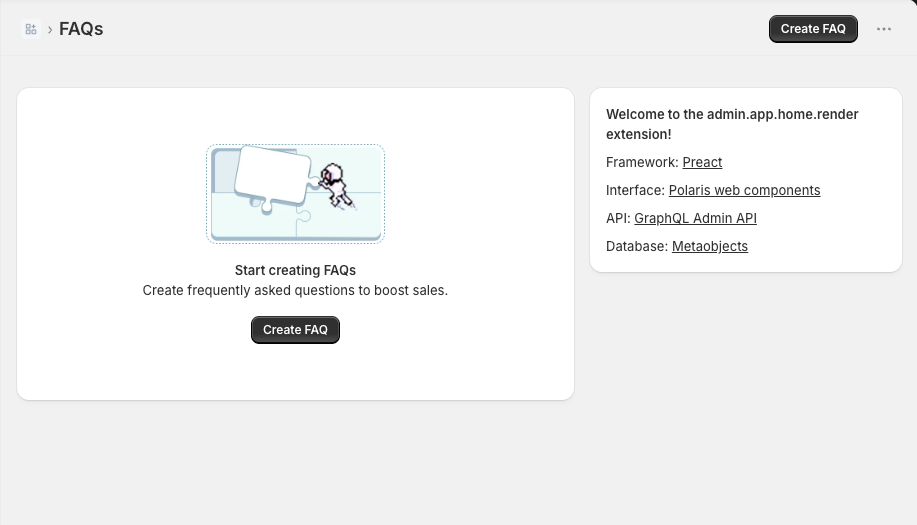
extensions/app-home/src/pages/HomePage.jsx. The HomePage serves as the index view for an FAQ-manager app and displays either an empty state or a table listing all the app's FAQs.FaqPage.jsxhandles both creation (/faq/new) and editing (/faq/:id) in a single form-based detail view. The two pages are connected through client-side routing using thepreact-isolibrary.
Anchor to Step 4: Run your appStep 4: Run your app
Start a local development server and preview the extension in your dev store's admin.
-
From the app's root directory, run the following command:
Terminal
shopify app dev -
When prompted, select your dev store.
-
Press
pto open the preview URL.
Your dev store opens at your app's home page. To open the FAQ editor, click Create FAQ.
Anchor to Step 5: Deploy your extensionStep 5: Deploy your extension
App Home UI extensions deploy as part of an app version. There's no separate hosting step.
-
From the app's root directory, run
shopify app deployto release a new app version. -
Install the released version on your dev store with custom distribution. For details, see Select a distribution method and Deploy app versions.


