Version 2025-07 is the last API version to support React-based UI components. Later versions use web components, native UI elements with built-in accessibility, better performance, and consistent styling with Shopify's design system. Check out the upgrade guide to upgrade your extension.
Product variants
Product variant pages display information about individual product variations, including SKU, price, inventory levels, and option values like size or color. Extensions on these pages help merchants manage variant-specific workflows, sync inventory with external systems, and configure purchase options.
Anchor to Use casesUse cases
- Inventory synchronization: Sync variant inventory levels with external warehouse management systems, 3PLs, or ERP platforms to maintain accurate stock counts across multiple locations and sales channels.
- Pricing and cost management: Display cost information from suppliers, calculate margins, apply bulk pricing rules, or sync variant prices with external pricing engines and wholesale platforms.
- Marketplace publishing: Push variant data to external marketplaces like Amazon, eBay, or Google Shopping, including SKU mappings, inventory levels, and marketplace-specific attributes.
- Subscription and purchase options: Configure variant-specific subscription settings, bundle configurations, or pre-order options through external subscription management platforms.
- Variant analytics: Display variant-level performance metrics, sales velocity, or demand forecasting data from external analytics platforms to help merchants optimize inventory.
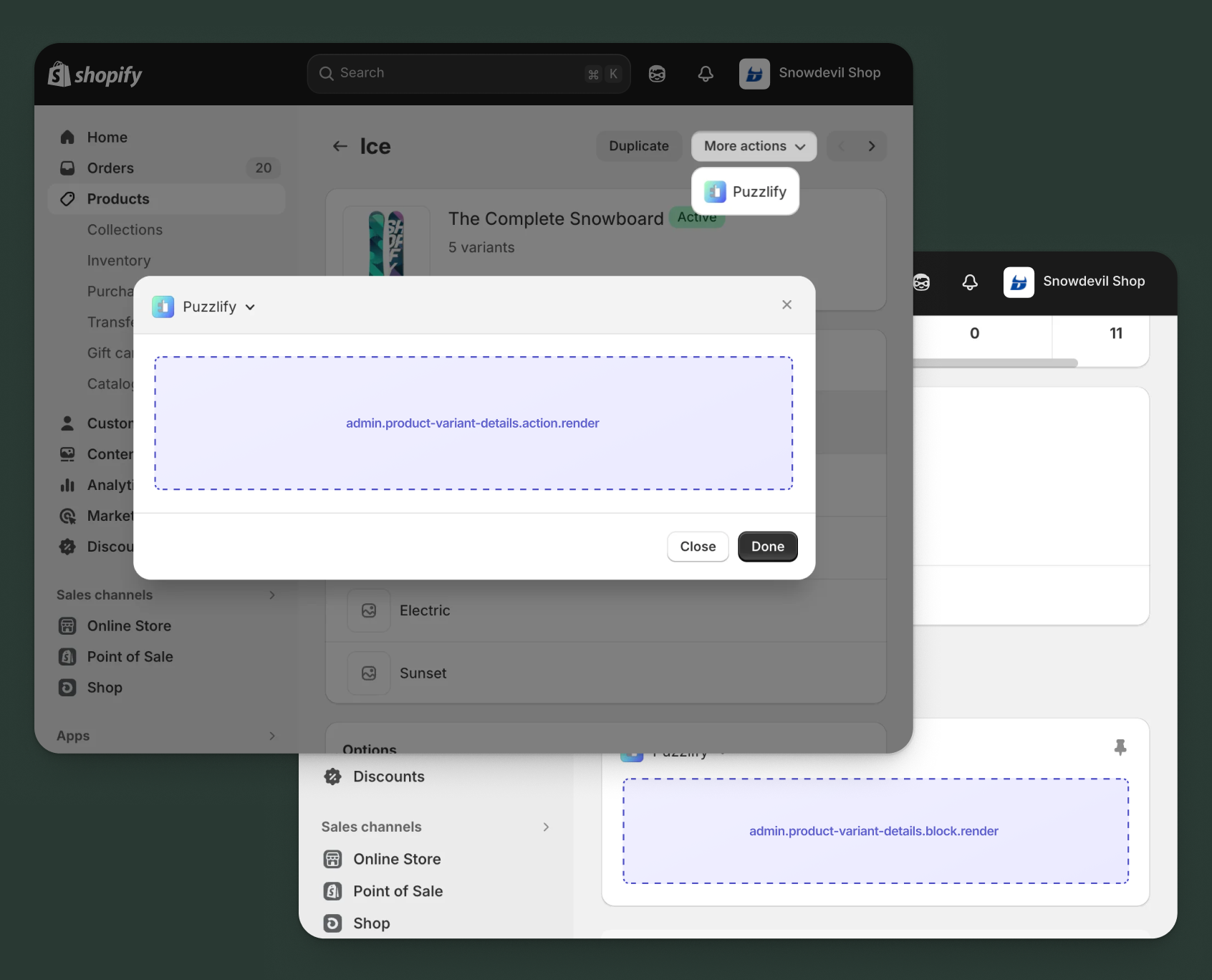
Anchor to Product variant details targetsProduct variant details targets
Use action and block targets to extend the product variant details page with workflows and contextual information.
Extensions can query and mutate Shopify data using the direct API, or call your app's backend for custom business logic and external integrations.
Anchor to Product variant details action ,[object Object]Product variant details action target
admin.product-variant-details.action.render
Renders an admin action extension on the product variants details page. Merchants can access this extension from the More actions menu. Use this target to provide workflows that operate on product variants data, such as syncing with external systems, exporting product variants information, or managing credit terms.
Extensions at this target can access product variants data through the data property in the Action Extension API. The action renders in a modal overlay, providing space for multi-step workflows, forms, and confirmations.
Supported components
- Admin
Action - Admin
Block - Admin
Print Action - Badge
- Banner
- Block
Stack - Box
- Button
- Checkbox
- Choice
List - Color
Picker - Date
Field - Date
Picker - Divider
- Email
Field - Form
- Function
Settings - Heading
- Heading
Group - Icon
- Image
- Inline
Stack - Link
- Money
Field - Number
Field - Paragraph
- Password
Field - Pressable
- Progress
Indicator - Section
- Select
- Text
- Text
Area - Text
Field - URLField
Available APIs
Supported components
- Admin
Action - Admin
Block - Admin
Print Action - Badge
- Banner
- Block
Stack - Box
- Button
- Checkbox
- Choice
List - Color
Picker - Date
Field - Date
Picker - Divider
- Email
Field - Form
- Function
Settings - Heading
- Heading
Group - Icon
- Image
- Inline
Stack - Link
- Money
Field - Number
Field - Paragraph
- Password
Field - Pressable
- Progress
Indicator - Section
- Select
- Text
- Text
Area - Text
Field - URLField
Available APIs
Examples
Description
Add an action extension that syncs a product variant's inventory levels with an external warehouse management system. This example demonstrates calling your app backend to fetch real-time stock data and update inventory quantities.
React
import React from 'react';
import { useState, useEffect } from 'react';
import {
  reactExtension,
  useApi,
  AdminAction,
  Banner,
  BlockStack,
  Box,
  Button,
  Checkbox,
  Divider,
} from '@shopify/ui-extensions-react/admin';

const TARGET = 'admin.product-variant-details.action.render';

export default reactExtension(TARGET, () => <App />);

function App() {
  const { data, close } = useApi(TARGET);
  const [loading, setLoading] = useState(false);
  const [success, setSuccess] = useState(false);
  const [error, setError] = useState<string | null>(null);
  const [warehouseData, setWarehouseData] = useState<any>(null);
  const [updateShopify, setUpdateShopify] = useState(true);
  const [notifyLowStock, setNotifyLowStock] = useState(false);

  const variantId = data.selected[0].id;

  useEffect(() => {
    fetchWarehouseData();
  }, []);

  const fetchWarehouseData = async () => {
    setLoading(true);
    try {
      const response = await fetch('https://your-app.com/api/warehouse/inventory', {
        method: 'POST',
        headers: { 'Content-Type': 'application/json' },
        body: JSON.stringify({ variantId }),
      });

      if (response.ok) {
        const result = await response.json();
        setWarehouseData(result);
      } else {
        setError('Failed to fetch warehouse data');
      }
    } catch (err) {
      setError('Connection error');
    } finally {
      setLoading(false);
    }
  };

  const handleSync = async () => {
    setLoading(true);
    setError(null);

    try {
      const response = await fetch('https://your-app.com/api/warehouse/sync', {
        method: 'POST',
        headers: { 'Content-Type': 'application/json' },
        body: JSON.stringify({
          variantId,
          updateShopify,
          notifyLowStock,
        }),
      });

      if (response.ok) {
        setSuccess(true);
        close();
      } else {
        const result = await response.json();
        setError(result.message || 'Sync failed');
      }
    } catch (err) {
      setError('Failed to sync inventory');
    } finally {
      setLoading(false);
    }
  };

  return (
    <AdminAction
      title="Sync Inventory from Warehouse"
      primaryAction={
        <Button onPress={handleSync} disabled={loading || success || !warehouseData}>
          {loading ? 'Syncing...' : 'Sync Now'}
        </Button>
      }
      secondaryAction={<Button onPress={close}>Cancel</Button>}
    >
      <BlockStack gap="base">
        {success && <Banner tone="success">Inventory synced successfully!</Banner>}
        {error && <Banner tone="critical">{error}</Banner>}

        {warehouseData && (
          <Banner tone="info">
            Warehouse stock: {warehouseData.quantity} units at {warehouseData.location}
          </Banner>
        )}

        <Divider />

        <Box padding="base">
          <BlockStack gap="base">
            <Checkbox
              checked={updateShopify}
              onChange={setUpdateShopify}
            >
              Update Shopify inventory levels
            </Checkbox>
            <Checkbox
              checked={notifyLowStock}
              onChange={setNotifyLowStock}
            >
              Send alert if stock is below threshold
            </Checkbox>
          </BlockStack>
        </Box>
      </BlockStack>
    </AdminAction>
  );
}
TS
import {
  extension,
  AdminAction,
  Banner,
  BlockStack,
  Box,
  Button,
  Checkbox,
  Divider,
} from '@shopify/ui-extensions/admin';

export default extension(
  'admin.product-variant-details.action.render',
  (root, api) => {
    let loading = false;
    let success = false;
    let error: string | null = null;
    let warehouseData: any = null;
    let updateShopify = true;
    let notifyLowStock = false;

    const variantId = api.data.selected[0].id;
    const content = root.createFragment();
    const primaryAction = root.createFragment();
    const secondaryAction = root.createFragment();

    const updateUI = () => {
      content.replaceChildren();

      const stack = root.createComponent(BlockStack, { gap: 'base' });

      if (success) {
        stack.appendChild(
          root.createComponent(Banner, { tone: 'success' }, 'Inventory synced successfully!')
        );
      }

      if (error) {
        stack.appendChild(
          root.createComponent(Banner, { tone: 'critical' }, error)
        );
      }

      if (warehouseData) {
        stack.appendChild(
          root.createComponent(
            Banner,
            { tone: 'info' },
            `Warehouse stock: ${warehouseData.quantity} units at ${warehouseData.location}`
          )
        );
      }

      stack.appendChild(root.createComponent(Divider, {}));

      const box = root.createComponent(Box, { padding: 'base' });
      const checkboxStack = root.createComponent(BlockStack, { gap: 'base' });

      checkboxStack.appendChild(
        root.createComponent(
          Checkbox,
          {
            checked: updateShopify,
            onChange: (val: boolean) => { updateShopify = val; updateUI(); },
          },
          'Update Shopify inventory levels'
        )
      );

      checkboxStack.appendChild(
        root.createComponent(
          Checkbox,
          {
            checked: notifyLowStock,
            onChange: (val: boolean) => { notifyLowStock = val; updateUI(); },
          },
          'Send alert if stock is below threshold'
        )
      );

      box.appendChild(checkboxStack);
      stack.appendChild(box);
      content.appendChild(stack);

      primaryAction.replaceChildren();
      primaryAction.appendChild(
        root.createComponent(
          Button,
          { onPress: handleSync, disabled: loading || success || !warehouseData },
          loading ? 'Syncing...' : 'Sync Now'
        )
      );
    };

    const fetchWarehouseData = async () => {
      loading = true;
      updateUI();

      try {
        const response = await fetch('https://your-app.com/api/warehouse/inventory', {
          method: 'POST',
          headers: { 'Content-Type': 'application/json' },
          body: JSON.stringify({ variantId }),
        });

        if (response.ok) {
          warehouseData = await response.json();
        } else {
          error = 'Failed to fetch warehouse data';
        }
      } catch (err) {
        error = 'Connection error';
      } finally {
        loading = false;
        updateUI();
      }
    };

    const handleSync = async () => {
      loading = true;
      error = null;
      updateUI();

      try {
        const response = await fetch('https://your-app.com/api/warehouse/sync', {
          method: 'POST',
          headers: { 'Content-Type': 'application/json' },
          body: JSON.stringify({ variantId, updateShopify, notifyLowStock }),
        });

        if (response.ok) {
          success = true;
          updateUI();
          api.close();
        } else {
          const result = await response.json();
          error = result.message || 'Sync failed';
          updateUI();
        }
      } catch (err) {
        error = 'Failed to sync inventory';
        updateUI();
      } finally {
        loading = false;
        updateUI();
      }
    };

    secondaryAction.appendChild(
      root.createComponent(Button, { onPress: () => api.close() }, 'Cancel')
    );

    updateUI();
    fetchWarehouseData();

    const adminAction = root.createComponent(AdminAction, {
      title: 'Sync Inventory from Warehouse',
      primaryAction,
      secondaryAction,
    });
    adminAction.appendChild(content);
    root.appendChild(adminAction);
    root.mount();
  }
);
Description
Add an action extension that publishes a product variant to an external marketplace. This example demonstrates using the [direct API](/docs/api/admin-extensions/2025-07#direct-api-access) to fetch variant details including inventory, pricing, and images from the [GraphQL Admin API](/docs/api/admin-graphql) before publishing.
React
import React from 'react';
import { useState, useEffect } from 'react';
import {
  reactExtension,
  useApi,
  AdminAction,
  Banner,
  BlockStack,
  Box,
  Button,
  Checkbox,
  ChoiceList,
  Divider,
} from '@shopify/ui-extensions-react/admin';

const TARGET = 'admin.product-variant-details.action.render';

export default reactExtension(TARGET, () => <App />);

function App() {
  const { data, close, query } = useApi(TARGET);
  const [loading, setLoading] = useState(false);
  const [fetching, setFetching] = useState(true);
  const [success, setSuccess] = useState(false);
  const [error, setError] = useState('');
  const [variantData, setVariantData] = useState(null);
  const [marketplace, setMarketplace] = useState(['amazon']);
  const [includeInventory, setIncludeInventory] = useState(true);

  useEffect(() => {
    fetchVariantDetails();
  }, []);

  const fetchVariantDetails = async () => {
    const variantId = data.selected[0].id;

    try {
      const result = await query(
        `query GetVariant($id: ID!) {
          productVariant(id: $id) {
            id
            title
            sku
            price
            inventoryQuantity
            product {
              title
              vendor
            }
            image {
              url
            }
          }
        }`,
        { variables: { id: variantId } }
      );

      if (result.data?.productVariant) {
        setVariantData(result.data.productVariant);
      } else {
        setError('Failed to load variant details');
      }
    } catch (err) {
      setError('Error fetching variant data');
    } finally {
      setFetching(false);
    }
  };

  const handlePublish = async () => {
    setLoading(true);
    setError('');

    try {
      const response = await fetch('https://your-app.com/api/publish-variant', {
        method: 'POST',
        headers: { 'Content-Type': 'application/json' },
        body: JSON.stringify({
          variant: variantData,
          marketplaces: marketplace,
          includeInventory,
        }),
      });

      if (response.ok) {
        setSuccess(true);
        close();
      } else {
        setError('Failed to publish variant');
      }
    } catch (err) {
      setError('Connection error');
    } finally {
      setLoading(false);
    }
  };

  if (fetching) {
    return (
      <AdminAction title="Publish to Marketplace">
        <Banner tone="info">Loading variant details...</Banner>
      </AdminAction>
    );
  }

  return (
    <AdminAction
      title="Publish to Marketplace"
      primaryAction={
        <Button onPress={handlePublish} disabled={loading || success || !variantData}>
          {loading ? 'Publishing...' : 'Publish'}
        </Button>
      }
      secondaryAction={<Button onPress={close}>Cancel</Button>}
    >
      <BlockStack gap="base">
        {success && <Banner tone="success">Variant published successfully!</Banner>}
        {error && <Banner tone="critical">{error}</Banner>}

        {variantData && (
          <Banner tone="info">
            {variantData.product.title} - {variantData.title} | SKU: {variantData.sku || 'N/A'} | ${variantData.price}
          </Banner>
        )}

        <Divider />

        <ChoiceList
          title="Select Marketplaces"
          choices={[
            { id: 'amazon', label: 'Amazon' },
            { id: 'ebay', label: 'eBay' },
            { id: 'walmart', label: 'Walmart' },
          ]}
          value={marketplace}
          onChange={setMarketplace}
        />

        <Box padding="base">
          <Checkbox
            checked={includeInventory}
            onChange={setIncludeInventory}
          >
            Sync inventory levels ({variantData?.inventoryQuantity || 0} in stock)
          </Checkbox>
        </Box>
      </BlockStack>
    </AdminAction>
  );
}
TS
import {
  extension,
  AdminAction,
  Banner,
  BlockStack,
  Box,
  Button,
  Checkbox,
  ChoiceList,
  Divider,
} from '@shopify/ui-extensions/admin';

export default extension(
  'admin.product-variant-details.action.render',
  async (root, api) => {
    let loading = false;
    let success = false;
    let error = '';
    let variantData: any = null;
    let marketplace = ['amazon'];
    let includeInventory = true;

    const content = root.createFragment();
    const primaryAction = root.createFragment();
    const secondaryAction = root.createFragment();

    const fetchVariantDetails = async () => {
      const variantId = api.data.selected[0].id;

      try {
        const result = await api.query(
          `query GetVariant($id: ID!) {
            productVariant(id: $id) {
              id
              title
              sku
              price
              inventoryQuantity
              product {
                title
                vendor
              }
              image {
                url
              }
            }
          }`,
          { variables: { id: variantId } }
        );

        if (result.data?.productVariant) {
          variantData = result.data.productVariant;
        } else {
          error = 'Failed to load variant details';
        }
      } catch (err) {
        error = 'Error fetching variant data';
      }
      updateUI();
    };

    const handlePublish = async () => {
      loading = true;
      error = '';
      updateUI();

      try {
        const response = await fetch('https://your-app.com/api/publish-variant', {
          method: 'POST',
          headers: { 'Content-Type': 'application/json' },
          body: JSON.stringify({
            variant: variantData,
            marketplaces: marketplace,
            includeInventory,
          }),
        });

        if (response.ok) {
          success = true;
          updateUI();
          api.close();
        } else {
          error = 'Failed to publish variant';
        }
      } catch (err) {
        error = 'Connection error';
      } finally {
        loading = false;
        updateUI();
      }
    };

    const updateUI = () => {
      content.replaceChildren();

      const stack = root.createComponent(BlockStack, { gap: 'base' });

      if (success) {
        stack.appendChild(root.createComponent(Banner, { tone: 'success' }, 'Variant published successfully!'));
      }
      if (error) {
        stack.appendChild(root.createComponent(Banner, { tone: 'critical' }, error));
      }

      if (variantData) {
        stack.appendChild(root.createComponent(
          Banner,
          { tone: 'info' },
          `${variantData.product.title} - ${variantData.title} | SKU: ${variantData.sku || 'N/A'} | $${variantData.price}`
        ));
      }

      stack.appendChild(root.createComponent(Divider, {}));

      stack.appendChild(root.createComponent(ChoiceList, {
        title: 'Select Marketplaces',
        choices: [
          { id: 'amazon', label: 'Amazon' },
          { id: 'ebay', label: 'eBay' },
          { id: 'walmart', label: 'Walmart' },
        ],
        value: marketplace,
        onChange: (val: string[]) => { marketplace = val; updateUI(); },
      }));

      const checkboxBox = root.createComponent(Box, { padding: 'base' });
      checkboxBox.appendChild(root.createComponent(
        Checkbox,
        {
          checked: includeInventory,
          onChange: (val: boolean) => { includeInventory = val; updateUI(); },
        },
        `Sync inventory levels (${variantData?.inventoryQuantity || 0} in stock)`
      ));
      stack.appendChild(checkboxBox);

      content.appendChild(stack);

      primaryAction.replaceChildren();
      primaryAction.appendChild(root.createComponent(
        Button,
        { onPress: handlePublish, disabled: loading || success || !variantData },
        loading ? 'Publishing...' : 'Publish'
      ));
    };

    secondaryAction.appendChild(
      root.createComponent(Button, { onPress: () => api.close() }, 'Cancel')
    );

    content.appendChild(root.createComponent(Banner, { tone: 'info' }, 'Loading variant details...'));

    const adminAction = root.createComponent(AdminAction, {
      title: 'Publish to Marketplace',
      primaryAction,
      secondaryAction,
    });
    adminAction.appendChild(content);
    root.appendChild(adminAction);
    root.mount();

    await fetchVariantDetails();
  }
);
Anchor to Product variant details action (should render) ,[object Object]Product variant details action (should render) target
admin.product-variant-details.action.should-render
Controls the render state of an admin action extension on the product variants details page. Use this target to conditionally show or hide your action extension based on the product variant's properties, such as status, configuration, or specific business requirements.
This target returns a boolean value that determines whether the corresponding action extension appears in the More actions menu. The extension evaluates each time the page loads.
Supported components
Available APIs
Supported components
Available APIs
Examples
Description
Add an action extension that checks with your app backend whether a product variant's pricing needs review based on custom business rules like margin thresholds or competitor pricing. This example demonstrates calling an external API to determine if the action should display.
React
import {extension} from '@shopify/ui-extensions/admin';

export default extension(
  'admin.product-variant-details.action.should-render',
  async ({data}) => {
    const variantId = data.selected[0].id;

    try {
      const response = await fetch('https://your-app.com/api/variant-price-review', {
        method: 'POST',
        headers: {'Content-Type': 'application/json'},
        body: JSON.stringify({variantId}),
      });

      if (!response.ok) {
        return {display: false};
      }

      const result = await response.json();

      // Display action if variant needs price review based on:
      // - Margin below threshold
      // - Price hasn't been reviewed recently
      // - Competitor price changes detected
      return {display: result.needsPriceReview === true};
    } catch (err) {
      console.error('Failed to check price review status:', err);
      return {display: false};
    }
  }
);
TS
import {extension} from '@shopify/ui-extensions/admin';

export default extension(
  'admin.product-variant-details.action.should-render',
  async ({data}) => {
    const variantId = data.selected[0].id;

    try {
      const response = await fetch('https://your-app.com/api/variant-price-review', {
        method: 'POST',
        headers: {'Content-Type': 'application/json'},
        body: JSON.stringify({variantId}),
      });

      if (!response.ok) {
        return {display: false};
      }

      const result = await response.json();

      // Display action if variant needs price review based on:
      // - Margin below threshold
      // - Price hasn't been reviewed recently
      // - Competitor price changes detected
      return {display: result.needsPriceReview === true};
    } catch (err) {
      console.error('Failed to check price review status:', err);
      return {display: false};
    }
  }
);
Description
Add an action extension that only displays for product variants that have stock available. This example uses the [direct API](/docs/api/admin-extensions/2025-07#direct-api-access) to query the variant's inventory quantity and conditionally shows the action for in-stock items.
React
import {extension} from '@shopify/ui-extensions/admin';

const TARGET = 'admin.product-variant-details.action.should-render';

export default extension(TARGET, async ({data, query}) => {
  const variantId = data.selected[0].id;

  try {
    const {data: responseData, errors} = await query(`
      query GetVariantInventory($id: ID!) {
        productVariant(id: $id) {
          inventoryQuantity
          inventoryPolicy
          inventoryItem {
            tracked
          }
        }
      }
    `, { variables: { id: variantId } });

    if (errors || !responseData?.productVariant) {
      return { display: false };
    }

    const variant = responseData.productVariant;
    const isTracked = variant.inventoryItem?.tracked ?? false;
    const hasStock = variant.inventoryQuantity > 0;
    const allowsOversell = variant.inventoryPolicy === 'CONTINUE';

    // Show action only for variants with available stock
    // or variants that allow overselling
    const shouldDisplay = hasStock || allowsOversell || !isTracked;

    return { display: shouldDisplay };
  } catch (err) {
    console.error('Failed to check inventory status:', err);
    return { display: false };
  }
});
TS
import {extension} from '@shopify/ui-extensions/admin';

const TARGET = 'admin.product-variant-details.action.should-render';

export default extension(TARGET, async ({data, query}) => {
  const variantId = data.selected[0].id;

  try {
    const {data: responseData, errors} = await query(`
      query GetVariantInventory($id: ID!) {
        productVariant(id: $id) {
          inventoryQuantity
          inventoryPolicy
          inventoryItem {
            tracked
          }
        }
      }
    `, { variables: { id: variantId } });

    if (errors || !responseData?.productVariant) {
      return { display: false };
    }

    const variant = responseData.productVariant;
    const isTracked = variant.inventoryItem?.tracked ?? false;
    const hasStock = variant.inventoryQuantity > 0;
    const allowsOversell = variant.inventoryPolicy === 'CONTINUE';

    // Show action only for variants with available stock
    // or variants that allow overselling
    const shouldDisplay = hasStock || allowsOversell || !isTracked;

    return { display: shouldDisplay };
  } catch (err) {
    console.error('Failed to check inventory status:', err);
    return { display: false };
  }
});
Anchor to Product variant details block ,[object Object]Product variant details block target
admin.product-variant-details.block.render
Renders an admin block extension inline on the product variants details page. Use this target to display contextual information, analytics, or status updates related to the product variants without requiring merchant interaction to open a modal.
Extensions at this target can access product variants data through the data property in the Block Extension API. Blocks appear as cards on the page and can show real-time data, insights, or quick actions, providing persistent visibility for information merchants need to see at a glance.
Supported components
- Admin
Action - Admin
Block - Admin
Print Action - Badge
- Banner
- Block
Stack - Box
- Button
- Checkbox
- Choice
List - Color
Picker - Date
Field - Date
Picker - Divider
- Email
Field - Form
- Function
Settings - Heading
- Heading
Group - Icon
- Image
- Inline
Stack - Link
- Money
Field - Number
Field - Paragraph
- Password
Field - Pressable
- Progress
Indicator - Section
- Select
- Text
- Text
Area - Text
Field - URLField
Available APIs
Supported components
- Admin
Action - Admin
Block - Admin
Print Action - Badge
- Banner
- Block
Stack - Box
- Button
- Checkbox
- Choice
List - Color
Picker - Date
Field - Date
Picker - Divider
- Email
Field - Form
- Function
Settings - Heading
- Heading
Group - Icon
- Image
- Inline
Stack - Link
- Money
Field - Number
Field - Paragraph
- Password
Field - Pressable
- Progress
Indicator - Section
- Select
- Text
- Text
Area - Text
Field - URLField
Available APIs
Examples
Description
Create a block extension that shows competitor prices for a product variant by fetching pricing data from your app backend. This example demonstrates calling your app's API to retrieve and display competitive market intelligence.
React
import React, { useState, useEffect } from 'react';
import {
  reactExtension,
  useApi,
  AdminBlock,
  Banner,
  BlockStack,
  Box,
  Button,
  Divider,
  Heading,
  Icon,
  Text,
} from '@shopify/ui-extensions-react/admin';

const TARGET = 'admin.product-variant-details.block.render';

export default reactExtension(TARGET, () => <App />);

function App() {
  const { data } = useApi(TARGET);
  const [loading, setLoading] = useState(true);
  const [error, setError] = useState(null);
  const [competitors, setCompetitors] = useState([]);
  const [variantPrice, setVariantPrice] = useState(null);

  const fetchCompetitorPricing = async () => {
    setLoading(true);
    setError(null);
    const variantId = data.selected[0].id;

    try {
      const response = await fetch('https://your-app.com/api/competitor-pricing', {
        method: 'POST',
        headers: { 'Content-Type': 'application/json' },
        body: JSON.stringify({ variantId }),
      });

      if (!response.ok) throw new Error('Failed to fetch pricing');

      const result = await response.json();
      setCompetitors(result.competitors);
      setVariantPrice(result.yourPrice);
    } catch (err) {
      setError('Unable to load competitor pricing');
    } finally {
      setLoading(false);
    }
  };

  useEffect(() => {
    fetchCompetitorPricing();
  }, []);

  const getPriceTone = (competitorPrice) => {
    if (!variantPrice) return 'info';
    if (competitorPrice > variantPrice) return 'success';
    if (competitorPrice < variantPrice) return 'critical';
    return 'info';
  };

  return (
    <AdminBlock title="Competitor Pricing">
      {error && (
        <Banner tone="critical" dismissible onDismiss={() => setError(null)}>
          {error}
        </Banner>
      )}

      <BlockStack gap="base">
        {loading ? (
          <Text>Loading competitor data...</Text>
        ) : (
          <>
            <Box padding="base" background="subdued" borderRadius="base">
              <BlockStack gap="tight">
                <Text emphasis="bold">Your Price</Text>
                <Heading size="large">${variantPrice?.toFixed(2) || 'N/A'}</Heading>
              </BlockStack>
            </Box>

            <Divider />

            <Heading size="small">Market Comparison</Heading>

            {competitors.map((competitor, index) => (
              <Box key={index} padding="base" border="base" borderRadius="base">
                <BlockStack gap="tight">
                  <Text emphasis="bold">{competitor.name}</Text>
                  <Text tone={getPriceTone(competitor.price)}>
                    ${competitor.price.toFixed(2)}
                    {competitor.price < variantPrice && ' (Lower)'}
                    {competitor.price > variantPrice && ' (Higher)'}
                  </Text>
                  <Text appearance="subdued" size="small">
                    Last updated: {competitor.lastUpdated}
                  </Text>
                </BlockStack>
              </Box>
            ))}

            <Button onPress={fetchCompetitorPricing}>
              Refresh Pricing
            </Button>
          </>
        )}
      </BlockStack>
    </AdminBlock>
  );
}
TS
import {
  extension,
  AdminBlock,
  Banner,
  BlockStack,
  Box,
  Button,
  Divider,
  Heading,
  Text,
} from '@shopify/ui-extensions/admin';

export default extension(
  'admin.product-variant-details.block.render',
  (root, api) => {
    let loading = true;
    let error: string | null = null;
    let competitors: Array<{ name: string; price: number; lastUpdated: string }> = [];
    let variantPrice: number | null = null;

    const content = root.createFragment();

    const getPriceTone = (competitorPrice: number) => {
      if (!variantPrice) return undefined;
      if (competitorPrice > variantPrice) return 'success';
      if (competitorPrice < variantPrice) return 'critical';
      return undefined;
    };

    const fetchCompetitorPricing = async () => {
      loading = true;
      error = null;
      updateUI();

      const variantId = api.data.selected[0].id;

      try {
        const response = await fetch('https://your-app.com/api/competitor-pricing', {
          method: 'POST',
          headers: { 'Content-Type': 'application/json' },
          body: JSON.stringify({ variantId }),
        });

        if (!response.ok) throw new Error('Failed to fetch pricing');

        const result = await response.json();
        competitors = result.competitors;
        variantPrice = result.yourPrice;
      } catch (err) {
        error = 'Unable to load competitor pricing';
      } finally {
        loading = false;
        updateUI();
      }
    };

    const updateUI = () => {
      content.replaceChildren();

      if (error) {
        content.appendChild(
          root.createComponent(Banner, { tone: 'critical' }, error)
        );
      }

      const stack = root.createComponent(BlockStack, { gap: 'base' });

      if (loading) {
        stack.appendChild(root.createComponent(Text, {}, 'Loading competitor data...'));
      } else {
        const priceBox = root.createComponent(Box, { padding: 'base', background: 'subdued', borderRadius: 'base' });
        const priceStack = root.createComponent(BlockStack, { gap: 'tight' });
        priceStack.appendChild(root.createComponent(Text, { emphasis: 'bold' }, 'Your Price'));
        priceStack.appendChild(root.createComponent(Heading, { size: 'large' }, `$${variantPrice?.toFixed(2) || 'N/A'}`));
        priceBox.appendChild(priceStack);
        stack.appendChild(priceBox);

        stack.appendChild(root.createComponent(Divider, {}));
        stack.appendChild(root.createComponent(Heading, { size: 'small' }, 'Market Comparison'));

        competitors.forEach((competitor) => {
          const compBox = root.createComponent(Box, { padding: 'base', border: 'base', borderRadius: 'base' });
          const compStack = root.createComponent(BlockStack, { gap: 'tight' });

          compStack.appendChild(root.createComponent(Text, { emphasis: 'bold' }, competitor.name));

          let priceLabel = `$${competitor.price.toFixed(2)}`;
          if (variantPrice && competitor.price < variantPrice) priceLabel += ' (Lower)';
          if (variantPrice && competitor.price > variantPrice) priceLabel += ' (Higher)';

          compStack.appendChild(root.createComponent(Text, { tone: getPriceTone(competitor.price) }, priceLabel));
          compStack.appendChild(root.createComponent(Text, { appearance: 'subdued', size: 'small' }, `Last updated: ${competitor.lastUpdated}`));

          compBox.appendChild(compStack);
          stack.appendChild(compBox);
        });

        stack.appendChild(
          root.createComponent(Button, { onPress: fetchCompetitorPricing }, 'Refresh Pricing')
        );
      }

      content.appendChild(stack);
    };

    const adminBlock = root.createComponent(AdminBlock, { title: 'Competitor Pricing' });
    adminBlock.appendChild(content);
    root.appendChild(adminBlock);

    fetchCompetitorPricing();
    root.mount();
  }
);
Description
Create a block extension that displays low stock warnings and reorder points for a product variant using the [direct API](/docs/api/admin-extensions/2025-07#direct-api-access) to fetch inventory levels from the [GraphQL Admin API](/docs/api/admin-graphql).
React
import React, { useState, useEffect } from 'react';
import {
  reactExtension,
  useApi,
  AdminBlock,
  Banner,
  BlockStack,
  Box,
  Divider,
  Heading,
  Icon,
  Button,
} from '@shopify/ui-extensions-react/admin';

const TARGET = 'admin.product-variant-details.block.render';

export default reactExtension(TARGET, () => <App />);

function App() {
  const { data, query } = useApi(TARGET);
  const [inventory, setInventory] = useState(null);
  const [loading, setLoading] = useState(true);
  const [error, setError] = useState(null);

  const REORDER_POINT = 10;
  const LOW_STOCK_THRESHOLD = 25;

  useEffect(() => {
    fetchInventory();
  }, []);

  async function fetchInventory() {
    const variantId = data.selected[0].id;

    try {
      const result = await query(`
        query GetVariantInventory($id: ID!) {
          productVariant(id: $id) {
            displayName
            sku
            inventoryQuantity
            inventoryItem {
              tracked
              inventoryLevels(first: 5) {
                nodes {
                  location {
                    name
                  }
                  quantities(names: ["available", "incoming"]) {
                    name
                    quantity
                  }
                }
              }
            }
          }
        }
      `, { variables: { id: variantId } });

      if (result.data?.productVariant) {
        setInventory(result.data.productVariant);
      } else {
        setError('Could not load inventory data');
      }
    } catch (err) {
      setError('Failed to fetch inventory');
    } finally {
      setLoading(false);
    }
  }

  const totalAvailable = inventory?.inventoryItem?.inventoryLevels?.nodes?.reduce(
    (sum, level) => sum + (level.quantities?.find(q => q.name === 'available')?.quantity || 0),
    0
  ) || 0;

  const getStockStatus = () => {
    if (totalAvailable <= 0) return { tone: 'critical', message: 'Out of stock', icon: 'AlertCircle' };
    if (totalAvailable <= REORDER_POINT) return { tone: 'critical', message: 'Below reorder point', icon: 'AlertCircle' };
    if (totalAvailable <= LOW_STOCK_THRESHOLD) return { tone: 'warning', message: 'Low stock', icon: 'Alert' };
    return { tone: 'success', message: 'Stock healthy', icon: 'CheckCircle' };
  };

  if (loading) {
    return (
      <AdminBlock title="Inventory Alerts">
        <BlockStack>
          <Box padding="base">Loading inventory data...</Box>
        </BlockStack>
      </AdminBlock>
    );
  }

  if (error) {
    return (
      <AdminBlock title="Inventory Alerts">
        <Banner tone="critical">{error}</Banner>
      </AdminBlock>
    );
  }

  const status = getStockStatus();

  return (
    <AdminBlock title="Inventory Alerts">
      <BlockStack gap="base">
        <Banner tone={status.tone}>
          <BlockStack gap="tight">
            <Heading>
              <Icon name={status.icon} /> {status.message}
            </Heading>
            <Box>Total available: {totalAvailable} units</Box>
            <Box>Reorder point: {REORDER_POINT} units</Box>
          </BlockStack>
        </Banner>

        <Divider />

        <Heading>Location Breakdown</Heading>
        {inventory?.inventoryItem?.inventoryLevels?.nodes?.map((level, idx) => {
          const available = level.quantities?.find(q => q.name === 'available')?.quantity || 0;
          const incoming = level.quantities?.find(q => q.name === 'incoming')?.quantity || 0;
          return (
            <Box key={idx} padding="tight base">
              <BlockStack gap="tight">
                <Heading>{level.location.name}</Heading>
                <Box>Available: {available} | Incoming: {incoming}</Box>
              </BlockStack>
            </Box>
          );
        })}

        <Button onPress={fetchInventory}>Refresh</Button>
      </BlockStack>
    </AdminBlock>
  );
}
TS
import {
  extension,
  AdminBlock,
  Banner,
  BlockStack,
  Box,
  Divider,
  Heading,
  Icon,
  Button,
} from '@shopify/ui-extensions/admin';

export default extension(
  'admin.product-variant-details.block.render',
  (root, api) => {
    const REORDER_POINT = 10;
    const LOW_STOCK_THRESHOLD = 25;

    let inventory = null;
    let loading = true;
    let error = null;

    const content = root.createFragment();

    const getStockStatus = (totalAvailable) => {
      if (totalAvailable <= 0) return { tone: 'critical', message: 'Out of stock', icon: 'AlertCircle' };
      if (totalAvailable <= REORDER_POINT) return { tone: 'critical', message: 'Below reorder point', icon: 'AlertCircle' };
      if (totalAvailable <= LOW_STOCK_THRESHOLD) return { tone: 'warning', message: 'Low stock', icon: 'Alert' };
      return { tone: 'success', message: 'Stock healthy', icon: 'CheckCircle' };
    };

    const updateUI = () => {
      content.replaceChildren();

      if (loading) {
        content.appendChild(
          root.createComponent(Box, { padding: 'base' }, 'Loading inventory data...')
        );
        return;
      }

      if (error) {
        content.appendChild(root.createComponent(Banner, { tone: 'critical' }, error));
        return;
      }

      const totalAvailable = inventory?.inventoryItem?.inventoryLevels?.nodes?.reduce(
        (sum, level) => sum + (level.quantities?.find(q => q.name === 'available')?.quantity || 0),
        0
      ) || 0;

      const status = getStockStatus(totalAvailable);
      const stack = root.createComponent(BlockStack, { gap: 'base' });

      const bannerContent = root.createComponent(BlockStack, { gap: 'tight' });
      bannerContent.appendChild(root.createComponent(Heading, {}, `${status.message}`));
      bannerContent.appendChild(root.createComponent(Box, {}, `Total available: ${totalAvailable} units`));
      bannerContent.appendChild(root.createComponent(Box, {}, `Reorder point: ${REORDER_POINT} units`));

      stack.appendChild(root.createComponent(Banner, { tone: status.tone }, bannerContent));
      stack.appendChild(root.createComponent(Divider, {}));
      stack.appendChild(root.createComponent(Heading, {}, 'Location Breakdown'));

      inventory?.inventoryItem?.inventoryLevels?.nodes?.forEach((level) => {
        const available = level.quantities?.find(q => q.name === 'available')?.quantity || 0;
        const incoming = level.quantities?.find(q => q.name === 'incoming')?.quantity || 0;

        const locationBox = root.createComponent(Box, { padding: 'tight base' });
        const locationStack = root.createComponent(BlockStack, { gap: 'tight' });
        locationStack.appendChild(root.createComponent(Heading, {}, level.location.name));
        locationStack.appendChild(root.createComponent(Box, {}, `Available: ${available} | Incoming: ${incoming}`));
        locationBox.appendChild(locationStack);
        stack.appendChild(locationBox);
      });

      stack.appendChild(root.createComponent(Button, { onPress: fetchInventory }, 'Refresh'));
      content.appendChild(stack);
    };

    async function fetchInventory() {
      loading = true;
      error = null;
      updateUI();

      const variantId = api.data.selected[0].id;

      try {
        const result = await api.query(`
          query GetVariantInventory($id: ID!) {
            productVariant(id: $id) {
              displayName
              sku
              inventoryQuantity
              inventoryItem {
                tracked
                inventoryLevels(first: 5) {
                  nodes {
                    location { name }
                    quantities(names: ["available", "incoming"]) {
                      name
                      quantity
                    }
                  }
                }
              }
            }
          }
        `, { variables: { id: variantId } });

        if (result.data?.productVariant) {
          inventory = result.data.productVariant;
        } else {
          error = 'Could not load inventory data';
        }
      } catch (err) {
        error = 'Failed to fetch inventory';
      } finally {
        loading = false;
        updateUI();
      }
    }

    const adminBlock = root.createComponent(AdminBlock, { title: 'Inventory Alerts' });
    adminBlock.appendChild(content);
    root.appendChild(adminBlock);

    fetchInventory();
    root.mount();
  }
);
Anchor to Product variant details configuration ,[object Object]Product variant details configuration target
admin.product-variant-details.configuration.render
Renders a configuration interface for product bundles on product variant details pages. This target allows merchants to configure component products, quantities, and pricing for bundle configurations directly from the variant editor. Use this target when your app needs to provide merchant-facing configuration UI for bundle components and options.
Learn how to add a product configuration extension.
Supported components
- Admin
Action - Admin
Block - Admin
Print Action - Badge
- Banner
- Block
Stack - Box
- Button
- Checkbox
- Choice
List - Color
Picker - Date
Field - Date
Picker - Divider
- Email
Field - Form
- Function
Settings - Heading
- Heading
Group - Icon
- Image
- Inline
Stack - Link
- Money
Field - Number
Field - Paragraph
- Password
Field - Pressable
- Progress
Indicator - Section
- Select
- Text
- Text
Area - Text
Field - URLField
Available APIs
Supported components
- Admin
Action - Admin
Block - Admin
Print Action - Badge
- Banner
- Block
Stack - Box
- Button
- Checkbox
- Choice
List - Color
Picker - Date
Field - Date
Picker - Divider
- Email
Field - Form
- Function
Settings - Heading
- Heading
Group - Icon
- Image
- Inline
Stack - Link
- Money
Field - Number
Field - Paragraph
- Password
Field - Pressable
- Progress
Indicator - Section
- Select
- Text
- Text
Area - Text
Field - URLField
Available APIs
Examples
Description
Create a configuration extension that lets merchants define which products are included in a bundle and set component quantities. This example demonstrates using the [direct API](/docs/api/admin-extensions/2025-07#direct-api-access) to search for products and save bundle configuration to metafields.
React
import React from 'react';
import { useState, useEffect } from 'react';
import {
  reactExtension,
  useApi,
  AdminAction,
  Banner,
  BlockStack,
  Box,
  Button,
  Checkbox,
  ChoiceList,
  Divider,
} from '@shopify/ui-extensions-react/admin';

const TARGET = 'admin.product-variant-details.configuration.render';

export default reactExtension(TARGET, () => <App />);

function App() {
  const { data, close } = useApi(TARGET);
  const [loading, setLoading] = useState(false);
  const [success, setSuccess] = useState(false);
  const [error, setError] = useState('');
  const [warehouseData, setWarehouseData] = useState(null);
  const [syncLocation, setSyncLocation] = useState(['primary']);
  const [updateThreshold, setUpdateThreshold] = useState(false);

  const variantId = data.selected[0].id;

  useEffect(() => {
    fetchWarehouseData();
  }, []);

  const fetchWarehouseData = async () => {
    try {
      const response = await fetch('https://your-app.com/api/warehouse/inventory', {
        method: 'POST',
        headers: { 'Content-Type': 'application/json' },
        body: JSON.stringify({ variantId }),
      });
      if (response.ok) {
        const result = await response.json();
        setWarehouseData(result);
      }
    } catch (err) {
      setError('Failed to fetch warehouse data');
    }
  };

  const handleSync = async () => {
    setLoading(true);
    setError('');

    try {
      const response = await fetch('https://your-app.com/api/warehouse/sync', {
        method: 'POST',
        headers: { 'Content-Type': 'application/json' },
        body: JSON.stringify({
          variantId,
          locations: syncLocation,
          updateThreshold,
        }),
      });

      if (response.ok) {
        setSuccess(true);
        close();
      } else {
        const result = await response.json();
        setError(result.message || 'Sync failed');
      }
    } catch (err) {
      setError('Connection error. Please try again.');
    } finally {
      setLoading(false);
    }
  };

  return (
    <AdminAction
      title="Sync Inventory from Warehouse"
      primaryAction={
        <Button onPress={handleSync} disabled={loading || success || !warehouseData}>
          {loading ? 'Syncing...' : 'Sync Now'}
        </Button>
      }
      secondaryAction={<Button onPress={close}>Cancel</Button>}
    >
      <BlockStack gap="base">
        {success && (
          <Banner tone="success">Inventory synced successfully!</Banner>
        )}
        {error && <Banner tone="critical">{error}</Banner>}

        {warehouseData && (
          <Banner tone="info">
            Warehouse stock: {warehouseData.quantity} units available
          </Banner>
        )}

        <Divider />

        <Box paddingBlockStart="base">
          <ChoiceList
            title="Sync to location"
            choices={[
              { id: 'primary', label: 'Primary warehouse' },
              { id: 'secondary', label: 'Secondary warehouse' },
              { id: 'all', label: 'All locations' },
            ]}
            value={syncLocation}
            onChange={setSyncLocation}
          />
        </Box>

        <Divider />

        <Box paddingBlockStart="base">
          <Checkbox
            checked={updateThreshold}
            onChange={setUpdateThreshold}
          >
            Update low stock threshold based on warehouse data
          </Checkbox>
        </Box>
      </BlockStack>
    </AdminAction>
  );
}
TS
import {
  extension,
  AdminAction,
  Banner,
  BlockStack,
  Box,
  Button,
  Checkbox,
  ChoiceList,
  Divider,
} from '@shopify/ui-extensions/admin';

export default extension(
  'admin.product-variant-details.configuration.render',
  (root, api) => {
    let loading = false;
    let success = false;
    let error = '';
    let warehouseData: { quantity: number } | null = null;
    let syncLocation = ['primary'];
    let updateThreshold = false;

    const variantId = api.data.selected[0].id;

    const content = root.createFragment();
    const primaryAction = root.createFragment();
    const secondaryAction = root.createFragment();

    const updateUI = () => {
      content.replaceChildren();

      const stack = root.createComponent(BlockStack, { gap: 'base' });

      if (success) {
        stack.appendChild(
          root.createComponent(Banner, { tone: 'success' }, 'Inventory synced successfully!')
        );
      }
      if (error) {
        stack.appendChild(root.createComponent(Banner, { tone: 'critical' }, error));
      }
      if (warehouseData) {
        stack.appendChild(
          root.createComponent(Banner, { tone: 'info' }, `Warehouse stock: ${warehouseData.quantity} units available`)
        );
      }

      stack.appendChild(root.createComponent(Divider, {}));

      const locationBox = root.createComponent(Box, { paddingBlockStart: 'base' });
      locationBox.appendChild(
        root.createComponent(ChoiceList, {
          title: 'Sync to location',
          choices: [
            { id: 'primary', label: 'Primary warehouse' },
            { id: 'secondary', label: 'Secondary warehouse' },
            { id: 'all', label: 'All locations' },
          ],
          value: syncLocation,
          onChange: (val: string[]) => {
            syncLocation = val;
            updateUI();
          },
        })
      );
      stack.appendChild(locationBox);

      stack.appendChild(root.createComponent(Divider, {}));

      const thresholdBox = root.createComponent(Box, { paddingBlockStart: 'base' });
      thresholdBox.appendChild(
        root.createComponent(Checkbox, {
          checked: updateThreshold,
          onChange: (val: boolean) => {
            updateThreshold = val;
            updateUI();
          },
        }, 'Update low stock threshold based on warehouse data')
      );
      stack.appendChild(thresholdBox);

      content.appendChild(stack);
      updatePrimaryAction();
    };

    const updatePrimaryAction = () => {
      primaryAction.replaceChildren();
      primaryAction.appendChild(
        root.createComponent(
          Button,
          { onPress: handleSync, disabled: loading || success || !warehouseData },
          loading ? 'Syncing...' : 'Sync Now'
        )
      );
    };

    const fetchWarehouseData = async () => {
      try {
        const response = await fetch('https://your-app.com/api/warehouse/inventory', {
          method: 'POST',
          headers: { 'Content-Type': 'application/json' },
          body: JSON.stringify({ variantId }),
        });
        if (response.ok) {
          warehouseData = await response.json();
          updateUI();
        }
      } catch (err) {
        error = 'Failed to fetch warehouse data';
        updateUI();
      }
    };

    const handleSync = async () => {
      loading = true;
      error = '';
      updateUI();

      try {
        const response = await fetch('https://your-app.com/api/warehouse/sync', {
          method: 'POST',
          headers: { 'Content-Type': 'application/json' },
          body: JSON.stringify({ variantId, locations: syncLocation, updateThreshold }),
        });

        if (response.ok) {
          success = true;
          updateUI();
          api.close();
        } else {
          const result = await response.json();
          error = result.message || 'Sync failed';
          updateUI();
        }
      } catch (err) {
        error = 'Connection error. Please try again.';
        updateUI();
      } finally {
        loading = false;
        updateUI();
      }
    };

    secondaryAction.appendChild(
      root.createComponent(Button, { onPress: () => api.close() }, 'Cancel')
    );

    updateUI();
    fetchWarehouseData();

    const adminAction = root.createComponent(AdminAction, {
      title: 'Sync Inventory from Warehouse',
      primaryAction,
      secondaryAction,
    });
    adminAction.appendChild(content);
    root.appendChild(adminAction);
    root.mount();
  }
);
Description
Create a configuration extension that lets merchants set marketplace-specific attributes for product variants, such as category mappings, custom fields, and fulfillment options. This example demonstrates using the [direct API](/docs/api/admin-extensions/2025-07#direct-api-access) to save marketplace configuration to variant metafields.
React
import React, { useState, useEffect } from 'react';
import {
  reactExtension,
  useApi,
  AdminAction,
  Banner,
  BlockStack,
  Box,
  Button,
  Checkbox,
  ChoiceList,
  Divider,
} from '@shopify/ui-extensions-react/admin';

const TARGET = 'admin.product-variant-details.configuration.render';

export default reactExtension(TARGET, () => <App />);

function App() {
  const { data, close, query } = useApi(TARGET);
  const [loading, setLoading] = useState(false);
  const [fetching, setFetching] = useState(true);
  const [success, setSuccess] = useState(false);
  const [error, setError] = useState('');
  const [variantData, setVariantData] = useState(null);
  const [marketplaces, setMarketplaces] = useState(['amazon']);
  const [syncInventory, setSyncInventory] = useState(true);

  useEffect(() => {
    fetchVariantDetails();
  }, []);

  const fetchVariantDetails = async () => {
    const variantId = data.selected[0].id;

    try {
      const result = await query(
        `query GetVariant($id: ID!) {
          productVariant(id: $id) {
            id
            title
            sku
            price
            inventoryQuantity
            image {
              url
            }
            product {
              title
              vendor
            }
          }
        }`,
        { variables: { id: variantId } }
      );

      if (result.data?.productVariant) {
        setVariantData(result.data.productVariant);
      }
    } catch (err) {
      setError('Failed to load variant details');
    } finally {
      setFetching(false);
    }
  };

  const handlePublish = async () => {
    setLoading(true);
    setError('');

    try {
      const response = await fetch('https://your-app.com/api/marketplace/publish', {
        method: 'POST',
        headers: { 'Content-Type': 'application/json' },
        body: JSON.stringify({
          variant: variantData,
          marketplaces,
          syncInventory,
        }),
      });

      if (response.ok) {
        setSuccess(true);
        close();
      } else {
        setError('Failed to publish to marketplace');
      }
    } catch (err) {
      setError('Connection error. Please try again.');
    } finally {
      setLoading(false);
    }
  };

  if (fetching) {
    return (
      <AdminAction title="Publish to Marketplace">
        <Banner tone="info">Loading variant details...</Banner>
      </AdminAction>
    );
  }

  return (
    <AdminAction
      title="Publish to Marketplace"
      primaryAction={
        <Button onPress={handlePublish} disabled={loading || success || !variantData}>
          {loading ? 'Publishing...' : 'Publish'}
        </Button>
      }
      secondaryAction={<Button onPress={close}>Cancel</Button>}
    >
      <BlockStack gap="base">
        {success && <Banner tone="success">Variant published successfully!</Banner>}
        {error && <Banner tone="critical">{error}</Banner>}

        {variantData && (
          <Box padding="base">
            <BlockStack gap="base">
              <Banner tone="info">
                {variantData.product.title} - {variantData.title} | SKU: {variantData.sku || 'N/A'} | Price: ${variantData.price}
              </Banner>

              <Divider />

              <ChoiceList
                title="Select Marketplaces"
                name="marketplaces"
                value={marketplaces}
                onChange={setMarketplaces}
                choices={[
                  { label: 'Amazon', value: 'amazon' },
                  { label: 'eBay', value: 'ebay' },
                  { label: 'Walmart', value: 'walmart' },
                ]}
              />

              <Divider />

              <Checkbox
                checked={syncInventory}
                onChange={setSyncInventory}
              >
                Sync inventory levels ({variantData.inventoryQuantity} in stock)
              </Checkbox>
            </BlockStack>
          </Box>
        )}
      </BlockStack>
    </AdminAction>
  );
}
TS
import {
  extension,
  AdminAction,
  Banner,
  BlockStack,
  Box,
  Button,
  Checkbox,
  ChoiceList,
  Divider,
} from '@shopify/ui-extensions/admin';

export default extension(
  'admin.product-variant-details.configuration.render',
  (root, api) => {
    let loading = false;
    let success = false;
    let error = '';
    let variantData: any = null;
    let marketplaces = ['amazon'];
    let syncInventory = true;

    const primaryAction = root.createFragment();
    const secondaryAction = root.createFragment();
    const content = root.createFragment();

    const publishButton = root.createComponent(
      Button,
      { onPress: handlePublish, disabled: true },
      'Publish'
    );
    primaryAction.appendChild(publishButton);
    secondaryAction.appendChild(
      root.createComponent(Button, { onPress: () => api.close() }, 'Cancel')
    );

    async function fetchVariantDetails() {
      const variantId = api.data.selected[0].id;

      try {
        const result = await api.query(
          `query GetVariant($id: ID!) {
            productVariant(id: $id) {
              id
              title
              sku
              price
              inventoryQuantity
              image { url }
              product { title vendor }
            }
          }`,
          { variables: { id: variantId } }
        );

        if (result.data?.productVariant) {
          variantData = result.data.productVariant;
          publishButton.updateProps({ disabled: false });
        }
      } catch (err) {
        error = 'Failed to load variant details';
      }
      updateUI();
    }

    async function handlePublish() {
      loading = true;
      error = '';
      publishButton.updateProps({ disabled: true });
      updateUI();

      try {
        const response = await fetch('https://your-app.com/api/marketplace/publish', {
          method: 'POST',
          headers: { 'Content-Type': 'application/json' },
          body: JSON.stringify({ variant: variantData, marketplaces, syncInventory }),
        });

        if (response.ok) {
          success = true;
          updateUI();
          api.close();
        } else {
          error = 'Failed to publish to marketplace';
        }
      } catch (err) {
        error = 'Connection error. Please try again.';
      } finally {
        loading = false;
        publishButton.updateProps({ disabled: success });
        updateUI();
      }
    }

    function updateUI() {
      content.replaceChildren();

      const stack = root.createComponent(BlockStack, { gap: 'base' });

      if (success) {
        stack.appendChild(root.createComponent(Banner, { tone: 'success' }, 'Variant published successfully!'));
      }
      if (error) {
        stack.appendChild(root.createComponent(Banner, { tone: 'critical' }, error));
      }

      if (variantData) {
        const box = root.createComponent(Box, { padding: 'base' });
        const innerStack = root.createComponent(BlockStack, { gap: 'base' });

        innerStack.appendChild(
          root.createComponent(Banner, { tone: 'info' },
            `${variantData.product.title} - ${variantData.title} | SKU: ${variantData.sku || 'N/A'} | Price: $${variantData.price}`
          )
        );

        innerStack.appendChild(root.createComponent(Divider, {}));

        innerStack.appendChild(
          root.createComponent(ChoiceList, {
            title: 'Select Marketplaces',
            name: 'marketplaces',
            value: marketplaces,
            onChange: (val: string[]) => { marketplaces = val; },
            choices: [
              { label: 'Amazon', value: 'amazon' },
              { label: 'eBay', value: 'ebay' },
              { label: 'Walmart', value: 'walmart' },
            ],
          })
        );

        innerStack.appendChild(root.createComponent(Divider, {}));

        innerStack.appendChild(
          root.createComponent(Checkbox, {
            checked: syncInventory,
            onChange: (val: boolean) => { syncInventory = val; },
          }, `Sync inventory levels (${variantData.inventoryQuantity} in stock)`)
        );

        box.appendChild(innerStack);
        stack.appendChild(box);
      } else if (!error) {
        stack.appendChild(root.createComponent(Banner, { tone: 'info' }, 'Loading variant details...'));
      }

      content.appendChild(stack);
    }

    updateUI();
    fetchVariantDetails();

    const adminAction = root.createComponent(AdminAction, {
      title: 'Publish to Marketplace',
      primaryAction,
      secondaryAction,
    });
    adminAction.appendChild(content);
    root.appendChild(adminAction);
    root.mount();
  }
);
Anchor to Product variant purchase option targetsProduct variant purchase option targets
Use action targets to extend the product variant purchase option page with workflows and operations.
Extensions can query and mutate Shopify data using the direct API, or call your app's backend for custom business logic and external integrations.
Anchor to Product variant purchase option action ,[object Object]Product variant purchase option action target
admin.product-variant-purchase-option.action.render
Renders an admin action extension on the product variants details page. Merchants can access this extension from the More actions menu. Use this target to provide workflows that operate on product variants data, such as syncing with external systems, exporting product variants information, or managing credit terms.
Extensions at this target can access product variants data through the data property in the Action Extension API. The action renders in a modal overlay, providing space for multi-step workflows, forms, and confirmations.
Supported components
- Admin
Action - Admin
Block - Admin
Print Action - Badge
- Banner
- Block
Stack - Box
- Button
- Checkbox
- Choice
List - Color
Picker - Date
Field - Date
Picker - Divider
- Email
Field - Form
- Function
Settings - Heading
- Heading
Group - Icon
- Image
- Inline
Stack - Link
- Money
Field - Number
Field - Paragraph
- Password
Field - Pressable
- Progress
Indicator - Section
- Select
- Text
- Text
Area - Text
Field - URLField
Available APIs
Supported components
- Admin
Action - Admin
Block - Admin
Print Action - Badge
- Banner
- Block
Stack - Box
- Button
- Checkbox
- Choice
List - Color
Picker - Date
Field - Date
Picker - Divider
- Email
Field - Form
- Function
Settings - Heading
- Heading
Group - Icon
- Image
- Inline
Stack - Link
- Money
Field - Number
Field - Paragraph
- Password
Field - Pressable
- Progress
Indicator - Section
- Select
- Text
- Text
Area - Text
Field - URLField
Available APIs
Examples
Description
Add an action extension that syncs product variant inventory levels with an external warehouse management system. This example demonstrates calling your app backend to fetch real-time stock data and update inventory counts with configurable sync options.
React
import React from 'react';
import { useState } from 'react';
import {
  reactExtension,
  useApi,
  AdminAction,
  Banner,
  BlockStack,
  Box,
  Button,
  Checkbox,
  ChoiceList,
  Divider,
} from '@shopify/ui-extensions-react/admin';

const TARGET = 'admin.product-variant-purchase-option.action.render';

export default reactExtension(TARGET, () => <App />);

function App() {
  const { data, close } = useApi(TARGET);
  const [loading, setLoading] = useState(false);
  const [success, setSuccess] = useState(false);
  const [error, setError] = useState<string | null>(null);
  const [warehouse, setWarehouse] = useState(['primary']);
  const [overwriteExisting, setOverwriteExisting] = useState(true);
  const [syncReserved, setSyncReserved] = useState(false);

  const handleSync = async () => {
    setLoading(true);
    setError(null);
    const variantId = data.selected[0].id;

    try {
      const response = await fetch('https://your-app.com/api/inventory/sync', {
        method: 'POST',
        headers: { 'Content-Type': 'application/json' },
        body: JSON.stringify({
          variantId,
          warehouse: warehouse[0],
          overwriteExisting,
          includeReserved: syncReserved,
        }),
      });

      if (!response.ok) {
        const errorData = await response.json();
        throw new Error(errorData.message || 'Sync failed');
      }

      setSuccess(true);
      close();
    } catch (err) {
      setError(err instanceof Error ? err.message : 'Failed to sync inventory');
    } finally {
      setLoading(false);
    }
  };

  return (
    <AdminAction
      title="Sync Inventory from Warehouse"
      primaryAction={
        <Button onPress={handleSync} disabled={loading || success}>
          {loading ? 'Syncing...' : 'Sync Now'}
        </Button>
      }
      secondaryAction={<Button onPress={close}>Cancel</Button>}
    >
      <BlockStack gap="base">
        {success && (
          <Banner tone="success">Inventory synced successfully!</Banner>
        )}
        {error && (
          <Banner tone="critical">{error}</Banner>
        )}

        <Box>
          <ChoiceList
            title="Select Warehouse"
            name="warehouse"
            value={warehouse}
            onChange={setWarehouse}
            choices={[
              { label: 'Primary Warehouse (US-East)', value: 'primary' },
              { label: 'Secondary Warehouse (US-West)', value: 'secondary' },
              { label: 'European Distribution Center', value: 'europe' },
            ]}
          />
        </Box>

        <Divider />

        <BlockStack gap="base">
          <Checkbox
            checked={overwriteExisting}
            onChange={setOverwriteExisting}
          >
            Overwrite existing inventory counts
          </Checkbox>
          <Checkbox
            checked={syncReserved}
            onChange={setSyncReserved}
          >
            Include reserved stock in available count
          </Checkbox>
        </BlockStack>
      </BlockStack>
    </AdminAction>
  );
}
TS
import {
  extension,
  AdminAction,
  Banner,
  BlockStack,
  Box,
  Button,
  Checkbox,
  ChoiceList,
  Divider,
} from '@shopify/ui-extensions/admin';

export default extension(
  'admin.product-variant-purchase-option.action.render',
  (root, api) => {
    let loading = false;
    let success = false;
    let error: string | null = null;
    let warehouse = ['primary'];
    let overwriteExisting = true;
    let syncReserved = false;

    const content = root.createFragment();
    const primaryAction = root.createFragment();
    const secondaryAction = root.createFragment();

    const updateUI = () => {
      content.replaceChildren();

      const stack = root.createComponent(BlockStack, { gap: 'base' });

      if (success) {
        stack.appendChild(
          root.createComponent(Banner, { tone: 'success' }, 'Inventory synced successfully!')
        );
      }

      if (error) {
        stack.appendChild(
          root.createComponent(Banner, { tone: 'critical' }, error)
        );
      }

      const warehouseBox = root.createComponent(Box, {});
      warehouseBox.appendChild(
        root.createComponent(ChoiceList, {
          title: 'Select Warehouse',
          name: 'warehouse',
          value: warehouse,
          onChange: (val: string[]) => { warehouse = val; updateUI(); },
          choices: [
            { label: 'Primary Warehouse (US-East)', value: 'primary' },
            { label: 'Secondary Warehouse (US-West)', value: 'secondary' },
            { label: 'European Distribution Center', value: 'europe' },
          ],
        })
      );
      stack.appendChild(warehouseBox);

      stack.appendChild(root.createComponent(Divider, {}));

      const optionsStack = root.createComponent(BlockStack, { gap: 'base' });
      optionsStack.appendChild(
        root.createComponent(Checkbox, {
          checked: overwriteExisting,
          onChange: (val: boolean) => { overwriteExisting = val; updateUI(); },
        }, 'Overwrite existing inventory counts')
      );
      optionsStack.appendChild(
        root.createComponent(Checkbox, {
          checked: syncReserved,
          onChange: (val: boolean) => { syncReserved = val; updateUI(); },
        }, 'Include reserved stock in available count')
      );
      stack.appendChild(optionsStack);

      content.appendChild(stack);
      updatePrimaryButton();
    };

    const updatePrimaryButton = () => {
      primaryAction.replaceChildren();
      primaryAction.appendChild(
        root.createComponent(
          Button,
          { onPress: handleSync, disabled: loading || success },
          loading ? 'Syncing...' : 'Sync Now'
        )
      );
    };

    const handleSync = async () => {
      loading = true;
      error = null;
      updateUI();

      const variantId = api.data.selected[0].id;

      try {
        const response = await fetch('https://your-app.com/api/inventory/sync', {
          method: 'POST',
          headers: { 'Content-Type': 'application/json' },
          body: JSON.stringify({
            variantId,
            warehouse: warehouse[0],
            overwriteExisting,
            includeReserved: syncReserved,
          }),
        });

        if (!response.ok) {
          const errorData = await response.json();
          throw new Error(errorData.message || 'Sync failed');
        }

        success = true;
        updateUI();
        api.close();
      } catch (err) {
        error = err instanceof Error ? err.message : 'Failed to sync inventory';
        updateUI();
      } finally {
        loading = false;
        updateUI();
      }
    };

    secondaryAction.appendChild(
      root.createComponent(Button, { onPress: () => api.close() }, 'Cancel')
    );

    updateUI();

    const adminAction = root.createComponent(AdminAction, {
      title: 'Sync Inventory from Warehouse',
      primaryAction,
      secondaryAction,
    });
    adminAction.appendChild(content);
    root.appendChild(adminAction);
    root.mount();
  }
);
Description
Add an action extension that publishes a product variant's purchase option (subscription) to an external marketplace. This example demonstrates using the [direct API](/docs/api/admin-extensions/2025-07#direct-api-access) to fetch variant and subscription details from the [GraphQL Admin API](/docs/api/admin-graphql) before syncing to an external service.
React
import React, { useState, useEffect } from 'react';
import {
  reactExtension,
  useApi,
  AdminAction,
  Banner,
  BlockStack,
  Box,
  Button,
  Checkbox,
  Divider,
} from '@shopify/ui-extensions-react/admin';

const TARGET = 'admin.product-variant-purchase-option.action.render';

export default reactExtension(TARGET, () => <App />);

function App() {
  const { data, close, query } = useApi(TARGET);
  const [loading, setLoading] = useState(false);
  const [fetching, setFetching] = useState(true);
  const [success, setSuccess] = useState(false);
  const [error, setError] = useState('');
  const [variantData, setVariantData] = useState(null);
  const [includeInventory, setIncludeInventory] = useState(true);
  const [syncPricing, setSyncPricing] = useState(true);

  useEffect(() => {
    fetchVariantDetails();
  }, []);

  const fetchVariantDetails = async () => {
    const variantId = data.selected[0].id;

    try {
      const result = await query(`
        query GetVariantDetails($id: ID!) {
          productVariant(id: $id) {
            id
            title
            sku
            price
            inventoryQuantity
            product {
              title
              vendor
            }
            sellingPlanGroups(first: 5) {
              edges {
                node {
                  name
                  sellingPlans(first: 3) {
                    edges {
                      node {
                        name
                        billingPolicy {
                          ... on SellingPlanRecurringBillingPolicy {
                            interval
                            intervalCount
                          }
                        }
                      }
                    }
                  }
                }
              }
            }
          }
        }
      `, { variables: { id: variantId } });

      setVariantData(result.data.productVariant);
    } catch (err) {
      setError('Failed to fetch variant details');
    } finally {
      setFetching(false);
    }
  };

  const handlePublish = async () => {
    setLoading(true);
    setError('');

    try {
      const response = await fetch('https://marketplace-api.example.com/listings', {
        method: 'POST',
        headers: { 'Content-Type': 'application/json' },
        body: JSON.stringify({
          variant: variantData,
          options: { includeInventory, syncPricing },
        }),
      });

      if (response.ok) {
        setSuccess(true);
        close();
      } else {
        setError('Failed to publish to marketplace');
      }
    } catch (err) {
      setError('Connection error. Please try again.');
    } finally {
      setLoading(false);
    }
  };

  const subscriptionCount = variantData?.sellingPlanGroups?.edges?.length || 0;

  return (
    <AdminAction
      title="Publish to Marketplace"
      primaryAction={
        <Button onPress={handlePublish} disabled={loading || success || fetching}>
          {loading ? 'Publishing...' : 'Publish'}
        </Button>
      }
      secondaryAction={<Button onPress={close}>Cancel</Button>}
    >
      <BlockStack gap="base">
        {success && <Banner tone="success">Successfully published to marketplace!</Banner>}
        {error && <Banner tone="critical">{error}</Banner>}

        {fetching ? (
          <Banner tone="info">Loading variant details...</Banner>
        ) : variantData && (
          <>
            <Box padding="base">
              <BlockStack gap="tight">
                <Banner tone="info">
                  {variantData.product.title} - {variantData.title}
                  {variantData.sku && ` (SKU: ${variantData.sku})`}
                </Banner>
                <Banner tone="warning">
                  {subscriptionCount} subscription plan{subscriptionCount !== 1 ? 's' : ''} will be synced
                </Banner>
              </BlockStack>
            </Box>

            <Divider />

            <Box padding="base">
              <BlockStack gap="base">
                <Checkbox
                  checked={includeInventory}
                  onChange={setIncludeInventory}
                >
                  Sync inventory levels
                </Checkbox>
                <Checkbox
                  checked={syncPricing}
                  onChange={setSyncPricing}
                >
                  Sync subscription pricing
                </Checkbox>
              </BlockStack>
            </Box>
          </>
        )}
      </BlockStack>
    </AdminAction>
  );
}
TS
import {
  extension,
  AdminAction,
  Banner,
  BlockStack,
  Box,
  Button,
  Checkbox,
  Divider,
} from '@shopify/ui-extensions/admin';

export default extension(
  'admin.product-variant-purchase-option.action.render',
  async (root, api) => {
    let loading = false;
    let success = false;
    let error = '';
    let variantData: any = null;
    let includeInventory = true;
    let syncPricing = true;

    const content = root.createFragment();
    const primaryAction = root.createFragment();
    const secondaryAction = root.createFragment();

    const updateUI = () => {
      content.replaceChildren();

      if (success) {
        content.appendChild(
          root.createComponent(Banner, { tone: 'success' }, 'Successfully published to marketplace!')
        );
        return;
      }

      if (error) {
        content.appendChild(root.createComponent(Banner, { tone: 'critical' }, error));
      }

      if (!variantData) {
        content.appendChild(
          root.createComponent(Banner, { tone: 'info' }, 'Loading variant details...')
        );
        return;
      }

      const subscriptionCount = variantData.sellingPlanGroups?.edges?.length || 0;

      const stack = root.createComponent(BlockStack, { gap: 'base' });

      const infoBox = root.createComponent(Box, { padding: 'base' });
      const infoStack = root.createComponent(BlockStack, { gap: 'tight' });

      infoStack.appendChild(
        root.createComponent(
          Banner,
          { tone: 'info' },
          `${variantData.product.title} - ${variantData.title}${variantData.sku ? ` (SKU: ${variantData.sku})` : ''}`
        )
      );
      infoStack.appendChild(
        root.createComponent(
          Banner,
          { tone: 'warning' },
          `${subscriptionCount} subscription plan${subscriptionCount !== 1 ? 's' : ''} will be synced`
        )
      );
      infoBox.appendChild(infoStack);
      stack.appendChild(infoBox);

      stack.appendChild(root.createComponent(Divider, {}));

      const optionsBox = root.createComponent(Box, { padding: 'base' });
      const optionsStack = root.createComponent(BlockStack, { gap: 'base' });

      optionsStack.appendChild(
        root.createComponent(
          Checkbox,
          {
            checked: includeInventory,
            onChange: (val: boolean) => { includeInventory = val; updateUI(); },
          },
          'Sync inventory levels'
        )
      );
      optionsStack.appendChild(
        root.createComponent(
          Checkbox,
          {
            checked: syncPricing,
            onChange: (val: boolean) => { syncPricing = val; updateUI(); },
          },
          'Sync subscription pricing'
        )
      );

      optionsBox.appendChild(optionsStack);
      stack.appendChild(optionsBox);
      content.appendChild(stack);
    };

    const handlePublish = async () => {
      loading = true;
      error = '';
      updatePrimaryButton();

      try {
        const response = await fetch('https://marketplace-api.example.com/listings', {
          method: 'POST',
          headers: { 'Content-Type': 'application/json' },
          body: JSON.stringify({
            variant: variantData,
            options: { includeInventory, syncPricing },
          }),
        });

        if (response.ok) {
          success = true;
          updateUI();
          api.close();
        } else {
          error = 'Failed to publish to marketplace';
          updateUI();
        }
      } catch (err) {
        error = 'Connection error. Please try again.';
        updateUI();
      } finally {
        loading = false;
        updatePrimaryButton();
      }
    };

    const primaryButton = root.createComponent(
      Button,
      { onPress: handlePublish, disabled: true },
      'Loading...'
    );

    const updatePrimaryButton = () => {
      primaryButton.updateProps({
        disabled: loading || success || !variantData,
      });
      primaryButton.replaceChildren(loading ? 'Publishing...' : 'Publish');
    };

    primaryAction.appendChild(primaryButton);
    secondaryAction.appendChild(
      root.createComponent(Button, { onPress: () => api.close() }, 'Cancel')
    );

    const adminAction = root.createComponent(AdminAction, {
      title: 'Publish to Marketplace',
      primaryAction,
      secondaryAction,
    });
    adminAction.appendChild(content);
    root.appendChild(adminAction);

    updateUI();

    const variantId = api.data.selected[0].id;
    const result = await api.query(`
      query GetVariantDetails($id: ID!) {
        productVariant(id: $id) {
          id
          title
          sku
          price
          inventoryQuantity
          product {
            title
            vendor
          }
          sellingPlanGroups(first: 5) {
            edges {
              node {
                name
                sellingPlans(first: 3) {
                  edges {
                    node {
                      name
                      billingPolicy {
                        ... on SellingPlanRecurringBillingPolicy {
                          interval
                          intervalCount
                        }
                      }
                    }
                  }
                }
              }
            }
          }
        }
      }
    `, { variables: { id: variantId } });

    variantData = result.data.productVariant;
    updateUI();
    updatePrimaryButton();

    root.mount();
  }
);
Anchor to Best practicesBest practices
- Display variant context clearly: Always show which product a variant belongs to (product title) alongside variant-specific details (option values, SKU). Merchants often view variants out of context and need this information to make decisions.
- Aggregate inventory across locations: When displaying variant inventory, show total inventory by default but allow filtering by location. Merchants with multi-location setups need location-specific visibility for fulfillment decisions.
- Validate marketplace requirements: Before publishing variants to external marketplaces, validate that required variant fields (SKU, barcode, weight, dimensions) are populated. Many marketplaces reject variants missing these fields, and early validation prevents failed sync attempts.
- Handle option combinations carefully: Variants are defined by option combinations (for example, Size: Large, Color: Red). When building extensions that manipulate variants, preserve the option structure and validate that option combinations remain unique within the product.
- Check inventory tracking status: Use
inventoryItem.trackedto determine if a variant tracks inventory before displaying inventory-related actions. Extensions that assume all variants track inventory will fail for digital products or services.
Anchor to LimitationsLimitations
- Single target per module: Each
[[extensions.targeting]]entry in your TOML configuration maps one target to one module file. - Purchase option target visibility: The
admin.product-variant-purchase-option.action.rendertarget only appears when the product variant has a selling plan group associated with it. - Configuration target availability: The
admin.product-variant-details.configuration.rendertarget only appears for product variants configured as bundles. - Block target visibility: Block extensions must be manually added and pinned by merchants before they appear.
- Block collapse behavior: Returning
nullfrom a block extension collapses the block rather than removing it from the page. Blocks can't be fully hidden at runtime.