Intents API
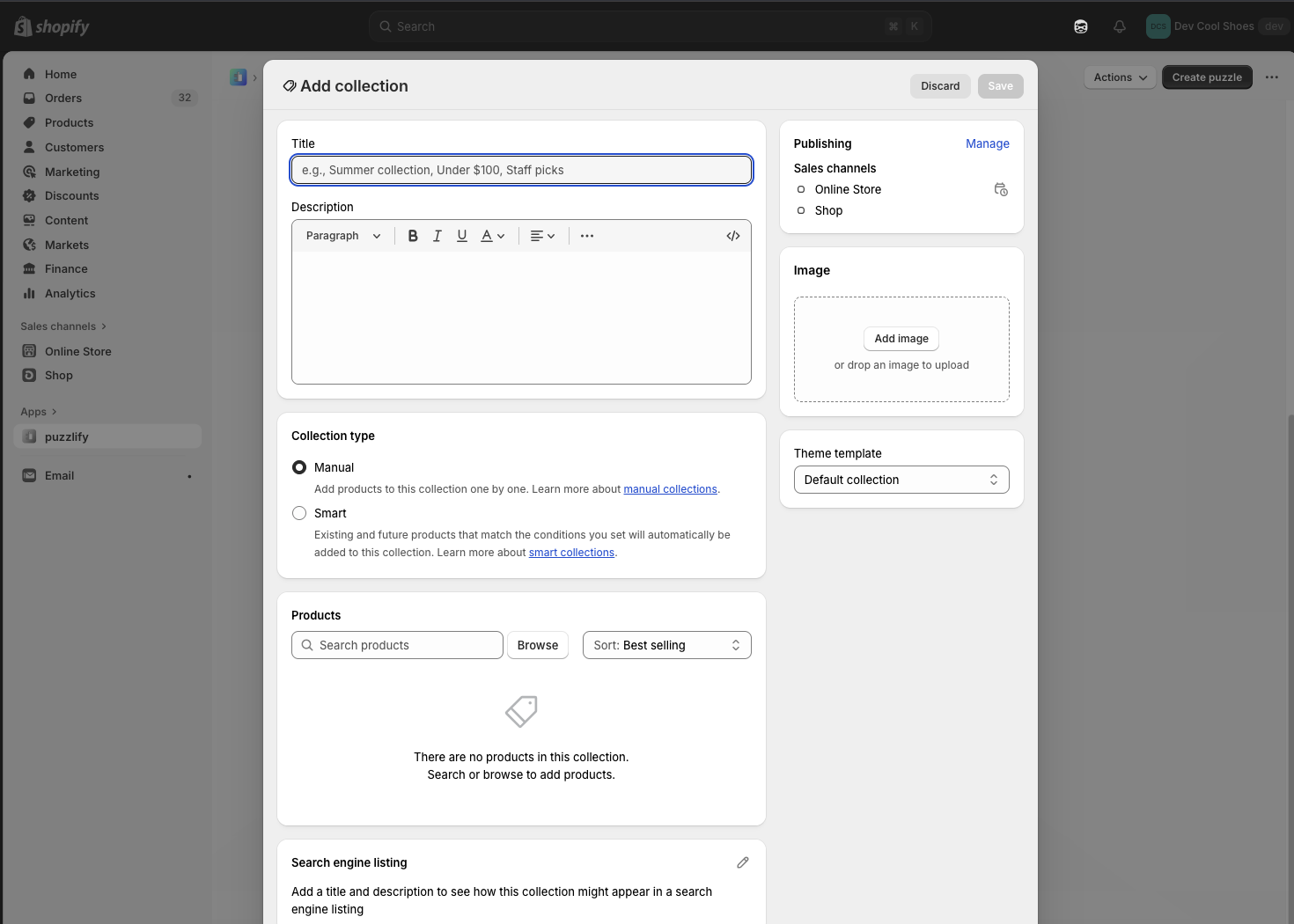
The Intents API launches Shopify's native admin interfaces for creating and editing resources. When your extension calls an intent, merchants complete their changes using the standard admin UI, and your extension receives the result. This means you don't need to build custom forms.
Use this API to build workflows like adding products to collections from bulk actions, creating multiple related resources in sequence (like a product, collection, and discount for a promotion), opening specific resources for editing from custom buttons, or launching discount creation with pre-selected types.
Anchor to Use casesUse cases
- Extension communication: Enable communication between extensions through intents.
- Navigation triggers: Handle navigation requests from other extensions.
- Workflow coordination: Coordinate workflows across multiple extensions.
- Deep linking: Support deep linking and cross-extension navigation.
Anchor to invoke methodinvoke method
The invoke method launches a Shopify admin workflow for creating or editing resources. The method returns a promise that resolves to an activity handle you can await to get the workflow result.
The method accepts either:
- String query:
${action}:${type},${value}with optional second parameter () - Object: Properties for
action,type,value, anddata
IntentQueryOptions parameters
Optional parameters for the invoke method when using the string query format:
value(string): The resource identifier for edit operations (for example,). Required when editing existing resources. Omit for create operations.data({ [key: string]: unknown }): Additional context required by specific resource types. For example, discounts require a type, variants require a product ID, and metaobjects require a definition type.
Supported resources
The following tables show which resource types you can create or edit, and what values you need to pass for value and data for each operation.
Article
Articles are blog posts published on the Online Store. Use this to create or edit articles for merchant blogs.
| Action | Type | Value | Data |
|---|---|---|---|
create | | — | — |
edit | | | — |
Catalog
Catalogs are product groupings that organize products for different markets or channels. Use this to create or edit catalogs for B2B or multi-market selling.
| Action | Type | Value | Data |
|---|---|---|---|
create | | — | — |
edit | | | — |
Collection
Collections are groups of products organized manually or by automated rules. Use this to create or edit product collections.
| Action | Type | Value | Data |
|---|---|---|---|
create | | — | — |
edit | | | — |
Customer
Customers are profiles with contact information, order history, and metadata. Use this to create or edit customer accounts.
| Action | Type | Value | Data |
|---|---|---|---|
create | | — | — |
edit | | | — |
Discount
Discounts are price reductions applied to products, orders, or shipping. Use this to create or edit discount codes and automatic discounts. Creating discounts requires specifying a discount type.
| Action | Type | Value | Data |
|---|---|---|---|
create | | — | { type: 'amount-off-product' | 'amount-off-order' | 'buy-x-get-y' | 'free-shipping' } |
edit | | | — |
For edit intents, pass a discount GID. Use as the canonical value. If you use a method-specific GID, match it to the discount method: use for discount codes and for automatic discounts.
For edit intents, pass a discount GID. Use as the canonical value. If you use a method-specific GID, match it to the discount method: use for discount codes and for automatic discounts.
Note: For edit intents, pass a discount GID. Use <code><span class="PreventFireFoxApplyingGapToWBR">gid://shopify<wbr/>/Discount<wbr/>Node<wbr/>/{id}</span></code> as the canonical value. If you use a method-specific GID, match it to the discount method: use <code><span class="PreventFireFoxApplyingGapToWBR">gid://shopify<wbr/>/Discount<wbr/>Code<wbr/>Node<wbr/>/{id}</span></code> for discount codes and <code><span class="PreventFireFoxApplyingGapToWBR">gid://shopify<wbr/>/Discount<wbr/>Automatic<wbr/>Node<wbr/>/{id}</span></code> for automatic discounts.
Market
Markets are geographic regions with customized pricing, languages, and domains. Use this to create or edit markets for international selling.
| Action | Type | Value | Data |
|---|---|---|---|
create | | — | — |
edit | | | — |
Menu
Menus are navigation structures for the Online Store. Use this to create or edit menu structures and links.
| Action | Type | Value | Data |
|---|---|---|---|
create | | — | — |
edit | | | — |
Metafield definition
Metafield definitions are schemas that define custom data fields for resources. Use this to create or edit metafield definitions that merchants can use to add structured data to products, customers, and other resources.
| Action | Type | Value | Data |
|---|---|---|---|
create | | — | |
edit | | | |
Metaobject
Metaobjects are custom structured data entries based on metaobject definitions. Use this to create or edit metaobject instances that store complex custom data. Requires a definition type.
| Action | Type | Value | Data |
|---|---|---|---|
create | | — | { type: 'shopify--color-pattern' } |
edit | | | { type: 'shopify--color-pattern' } |
Metaobject definition
Metaobject definitions are schemas that define the structure for metaobjects. Use this to create or edit metaobject definitions that determine the fields and data types for custom structured data.
| Action | Type | Value | Data |
|---|---|---|---|
create | | — | — |
edit | | — | |
Page
Pages are static content pages for the Online Store. Use this to create or edit pages like About Us, Contact, or custom informational pages.
| Action | Type | Value | Data |
|---|---|---|---|
create | | — | — |
edit | | | — |
Product
Products are items sold in the store with pricing, inventory, and variants. Use this to create or edit products.
| Action | Type | Value | Data |
|---|---|---|---|
create | | — | — |
edit | | | — |
Product variant
Product variants are specific combinations of product options like size and color. Use this to create or edit product variants. Creating variants requires a parent product ID.
| Action | Type | Value | Data |
|---|---|---|---|
create | | — | |
edit | | | |
Note: When editing products with variants, query the <a href="/docs/api/admin-graphql/latest/objects/Product#field-Product.fields.hasOnlyDefaultVariant"><code><span class="PreventFireFoxApplyingGapToWBR">product.has<wbr/>Only<wbr/>Default<wbr/>Variant</span></code></a> field first. If <code>true</code>, then use the <code><span class="PreventFireFoxApplyingGapToWBR">shopify<wbr/>/Product</span></code> edit intent. If <code>false</code>, then use the <code><span class="PreventFireFoxApplyingGapToWBR">shopify<wbr/>/Product<wbr/>Variant</span></code> edit intent for specific variants.
Anchor to IntentResponseIntent
The result returned when an intent workflow completes. Check the code property to determine the outcome:
'ok': The merchant completed the workflow successfully.'error': The workflow failed due to validation or other errors.'closed': The merchant cancelled without completing.
SuccessIntentResponse | ErrorIntentResponse | ClosedIntentResponseSuccessIntentResponse | ErrorIntentResponse | ClosedIntentResponseClosedIntentResponse
- Anchor to codecodecode'closed''closed'
Indicates the workflow was closed without completion. When
'closed', the merchant exited the workflow before finishing.
ErrorIntentResponse
- Anchor to codecodecode'error''error'
Indicates the workflow failed. When
'error', the workflow encountered validation errors or other issues that prevented completion.- Anchor to issuesissuesissues{ path?: string[]; message?: string; code?: string; }[]{ path?: string[]; message?: string; code?: string; }[]
Specific validation issues or field errors. Present when validation fails on particular fields, allowing you to show targeted error messages.
- Anchor to messagemessagemessagestringstring
A general error message describing what went wrong. Use this to display feedback when specific field errors aren't available.
SuccessIntentResponse
- Anchor to codecodecode'ok''ok'
Indicates successful completion. When
'ok', the merchant completed the workflow and the resource was created or updated.- Anchor to datadatadata{ [key: string]: unknown; }{ [key: string]: unknown; }
Additional data returned by the workflow, such as the created or updated resource information with IDs and properties.
SuccessIntentResponse
The response returned when a merchant successfully completes the workflow. Use this to access the created or updated resource data.
- code
Indicates successful completion. When `'ok'`, the merchant completed the workflow and the resource was created or updated.
'ok' - data
Additional data returned by the workflow, such as the created or updated resource information with IDs and properties.
{ [key: string]: unknown; }
ErrorIntentResponse
The response returned when the workflow fails due to validation errors or other issues. Use this to display error messages and help merchants fix problems.
- code
Indicates the workflow failed. When `'error'`, the workflow encountered validation errors or other issues that prevented completion.
'error' - issues
Specific validation issues or field errors. Present when validation fails on particular fields, allowing you to show targeted error messages.
{ path?: string[]; message?: string; code?: string; }[] - message
A general error message describing what went wrong. Use this to display feedback when specific field errors aren't available.
string
ClosedIntentResponse
The response returned when a merchant closes or cancels the workflow without completing it. Check for this response to handle cancellation gracefully in your extension.
- code
Indicates the workflow was closed without completion. When `'closed'`, the merchant exited the workflow before finishing.
'closed'
jsx
Preview
Examples
Create a new article
Description
Launch the article creation workflow from a button click. This example uses `shopify.intents.invoke()` to open the article editor, awaits the workflow completion, and displays success or cancellation feedback based on the response code.
jsx
import {render} from 'preact';
import {useState} from 'preact/hooks';

export default async () => {
  render(<Extension />, document.body);
};

function Extension() {
  const [result, setResult] = useState(null);
  const [creating, setCreating] = useState(false);

  const handleCreate = async () => {
    setCreating(true);

    const activity = await shopify.intents.invoke('create:shopify/Article');
    const response = await activity.complete;

    setResult(response);
    setCreating(false);
  };

  return (
    <s-admin-block heading="Create Article">
      <s-button onClick={handleCreate} disabled={creating}>
        {creating ? 'Creating...' : 'Launch Article Creator'}
      </s-button>
      {result?.code === 'ok' && (
        <s-banner tone="success">Article created successfully!</s-banner>
      )}
      {result?.code === 'closed' && (
        <s-text>Creation cancelled</s-text>
      )}
    </s-admin-block>
  );
}
Edit an existing article
Description
Open the article editor for a selected blog post. This example retrieves the article GID from extension context, passes it to the edit intent, and handles both successful updates and cancellations.
jsx
import {render} from 'preact';
import {useState} from 'preact/hooks';

export default async () => {
  render(<Extension />, document.body);
};

function Extension() {
  const {data} = shopify;
  const [result, setResult] = useState(null);
  const [loading, setLoading] = useState(false);

  const resourceId = data.selected[0]?.id || 'gid://shopify/Article/123456789';

  const handleAction = async () => {
    setLoading(true);

    const activity = await shopify.intents.invoke('edit:shopify/Article', {
      value: resourceId,
    });

    const response = await activity.complete;
    setResult(response);
    setLoading(false);
  };

  return (
    <s-admin-block heading="Edit Article">
      <s-text>Editing: {resourceId}</s-text>
      <s-button onClick={handleAction} disabled={loading}>
        {loading ? 'Opening...' : 'Edit Article'}
      </s-button>
      {result?.code === 'ok' && (
        <s-banner tone="success">Article updated!</s-banner>
      )}
      {result?.code === 'closed' && (
        <s-text>Edit cancelled</s-text>
      )}
    </s-admin-block>
  );
}
Create a new catalog
Description
Launch the catalog creation workflow to set up B2B customer groups or market-specific product collections. This example invokes the create intent, manages loading state, and displays success or cancellation feedback.
jsx
import {render} from 'preact';
import {useState} from 'preact/hooks';

export default async () => {
  render(<Extension />, document.body);
};

function Extension() {
  const [result, setResult] = useState(null);
  const [loading, setLoading] = useState(false);

  const handleAction = async () => {
    setLoading(true);

    const activity = await shopify.intents.invoke('create:shopify/Catalog');
    const response = await activity.complete;

    setResult(response);
    setLoading(false);
  };

  return (
    <s-admin-block heading="Create Catalog">
      <s-button onClick={handleAction} disabled={loading}>
        {loading ? 'Creating...' : 'Launch Catalog Creator'}
      </s-button>
      {result?.code === 'ok' && (
        <s-banner tone="success">Catalog created successfully!</s-banner>
      )}
      {result?.code === 'closed' && (
        <s-text>Creation cancelled</s-text>
      )}
    </s-admin-block>
  );
}
Edit an existing catalog
Description
Open the catalog editor to adjust product assignments or market settings. This example retrieves the catalog GID from extension context, invokes the edit intent, and handles the completion response.
jsx
import {render} from 'preact';
import {useState} from 'preact/hooks';

export default async () => {
  render(<Extension />, document.body);
};

function Extension() {
  const {data} = shopify;
  const [result, setResult] = useState(null);
  const [loading, setLoading] = useState(false);

  const resourceId = data.selected[0]?.id || 'gid://shopify/Catalog/123456789';

  const handleAction = async () => {
    setLoading(true);

    const activity = await shopify.intents.invoke('edit:shopify/Catalog', {
      value: resourceId,
    });

    const response = await activity.complete;
    setResult(response);
    setLoading(false);
  };

  return (
    <s-admin-block heading="Edit Catalog">
      <s-text>Editing: {resourceId}</s-text>
      <s-button onClick={handleAction} disabled={loading}>
        {loading ? 'Opening...' : 'Edit Catalog'}
      </s-button>
      {result?.code === 'ok' && (
        <s-banner tone="success">Catalog updated!</s-banner>
      )}
      {result?.code === 'closed' && (
        <s-text>Edit cancelled</s-text>
      )}
    </s-admin-block>
  );
}
Create a new collection
Description
Launch the collection creation workflow for organizing products on the storefront. This example invokes the create intent, tracks loading state, and displays feedback when the workflow completes.
jsx
import {render} from 'preact';
import {useState} from 'preact/hooks';

export default async () => {
  render(<Extension />, document.body);
};

function Extension() {
  const [result, setResult] = useState(null);
  const [loading, setLoading] = useState(false);

  const handleAction = async () => {
    setLoading(true);

    const activity = await shopify.intents.invoke('create:shopify/Collection');
    const response = await activity.complete;

    setResult(response);
    setLoading(false);
  };

  return (
    <s-admin-block heading="Create Collection">
      <s-button onClick={handleAction} disabled={loading}>
        {loading ? 'Creating...' : 'Launch Collection Creator'}
      </s-button>
      {result?.code === 'ok' && (
        <s-banner tone="success">Collection created successfully!</s-banner>
      )}
      {result?.code === 'closed' && (
        <s-text>Creation cancelled</s-text>
      )}
    </s-admin-block>
  );
}
Edit an existing collection
Description
Open the collection editor to modify products or automation rules. This example retrieves the collection GID, invokes the edit intent, and handles the completion response.
jsx
import {render} from 'preact';
import {useState} from 'preact/hooks';

export default async () => {
  render(<Extension />, document.body);
};

function Extension() {
  const {data} = shopify;
  const [result, setResult] = useState(null);
  const [loading, setLoading] = useState(false);

  const resourceId = data.selected[0]?.id || 'gid://shopify/Collection/123456789';

  const handleAction = async () => {
    setLoading(true);

    const activity = await shopify.intents.invoke('edit:shopify/Collection', {
      value: resourceId,
    });

    const response = await activity.complete;
    setResult(response);
    setLoading(false);
  };

  return (
    <s-admin-block heading="Edit Collection">
      <s-text>Editing: {resourceId}</s-text>
      <s-button onClick={handleAction} disabled={loading}>
        {loading ? 'Opening...' : 'Edit Collection'}
      </s-button>
      {result?.code === 'ok' && (
        <s-banner tone="success">Collection updated!</s-banner>
      )}
      {result?.code === 'closed' && (
        <s-text>Edit cancelled</s-text>
      )}
    </s-admin-block>
  );
}
Create a new customer
Description
Launch the customer creation form to add a new profile with contact details and addresses. This example invokes the create intent, awaits completion, and displays feedback based on the result code.
jsx
import {render} from 'preact';
import {useState} from 'preact/hooks';

export default async () => {
  render(<Extension />, document.body);
};

function Extension() {
  const [result, setResult] = useState(null);
  const [loading, setLoading] = useState(false);

  const handleAction = async () => {
    setLoading(true);

    const activity = await shopify.intents.invoke('create:shopify/Customer');
    const response = await activity.complete;

    setResult(response);
    setLoading(false);
  };

  return (
    <s-admin-block heading="Create Customer">
      <s-button onClick={handleAction} disabled={loading}>
        {loading ? 'Creating...' : 'Launch Customer Creator'}
      </s-button>
      {result?.code === 'ok' && (
        <s-banner tone="success">Customer created successfully!</s-banner>
      )}
      {result?.code === 'closed' && (
        <s-text>Creation cancelled</s-text>
      )}
    </s-admin-block>
  );
}
Edit an existing customer
Description
Open the customer editor to update contact information or tags. This example retrieves the customer GID from extension context, invokes the edit intent, and handles the completion response.
jsx
import {render} from 'preact';
import {useState} from 'preact/hooks';

export default async () => {
  render(<Extension />, document.body);
};

function Extension() {
  const {data} = shopify;
  const [result, setResult] = useState(null);
  const [loading, setLoading] = useState(false);

  const resourceId = data.selected[0]?.id || 'gid://shopify/Customer/123456789';

  const handleAction = async () => {
    setLoading(true);

    const activity = await shopify.intents.invoke('edit:shopify/Customer', {
      value: resourceId,
    });

    const response = await activity.complete;
    setResult(response);
    setLoading(false);
  };

  return (
    <s-admin-block heading="Edit Customer">
      <s-text>Editing: {resourceId}</s-text>
      <s-button onClick={handleAction} disabled={loading}>
        {loading ? 'Opening...' : 'Edit Customer'}
      </s-button>
      {result?.code === 'ok' && (
        <s-banner tone="success">Customer updated!</s-banner>
      )}
      {result?.code === 'closed' && (
        <s-text>Edit cancelled</s-text>
      )}
    </s-admin-block>
  );
}
Create a new discount
Description
Launch the discount creation form for setting up promotional campaigns. This example invokes the create intent, manages loading state, and displays feedback on completion.
jsx
import {render} from 'preact';
import {useState} from 'preact/hooks';

export default async () => {
  render(<Extension />, document.body);
};

function Extension() {
  const [result, setResult] = useState(null);
  const [loading, setLoading] = useState(false);

  const handleAction = async () => {
    setLoading(true);

    const activity = await shopify.intents.invoke('create:shopify/Discount');
    const response = await activity.complete;

    setResult(response);
    setLoading(false);
  };

  return (
    <s-admin-block heading="Create Discount">
      <s-button onClick={handleAction} disabled={loading}>
        {loading ? 'Creating...' : 'Launch Discount Creator'}
      </s-button>
      {result?.code === 'ok' && (
        <s-banner tone="success">Discount created successfully!</s-banner>
      )}
      {result?.code === 'closed' && (
        <s-text>Creation cancelled</s-text>
      )}
    </s-admin-block>
  );
}
Edit an existing discount
Description
Open the discount editor to adjust values or extend active dates. This example retrieves the discount GID from extension context, invokes the edit intent, and handles the completion response.
jsx
import {render} from 'preact';
import {useState} from 'preact/hooks';

export default async () => {
  render(<Extension />, document.body);
};

function Extension() {
  const {data} = shopify;
  const [result, setResult] = useState(null);
  const [loading, setLoading] = useState(false);

  const resourceId = data.selected[0]?.id || 'gid://shopify/DiscountNode/123456789';

  const handleAction = async () => {
    setLoading(true);

    const activity = await shopify.intents.invoke('edit:shopify/Discount', {
      value: resourceId,
    });

    const response = await activity.complete;
    setResult(response);
    setLoading(false);
  };

  return (
    <s-admin-block heading="Edit Discount">
      <s-text>Editing: {resourceId}</s-text>
      <s-button onClick={handleAction} disabled={loading}>
        {loading ? 'Opening...' : 'Edit Discount'}
      </s-button>
      {result?.code === 'ok' && (
        <s-banner tone="success">Discount updated!</s-banner>
      )}
      {result?.code === 'closed' && (
        <s-text>Edit cancelled</s-text>
      )}
    </s-admin-block>
  );
}
Create a new market
Description
Launch the market creation workflow for international selling with region-specific configurations. This example invokes the create intent, manages loading state, and displays feedback on completion.
jsx
import {render} from 'preact';
import {useState} from 'preact/hooks';

export default async () => {
  render(<Extension />, document.body);
};

function Extension() {
  const [result, setResult] = useState(null);
  const [loading, setLoading] = useState(false);

  const handleAction = async () => {
    setLoading(true);

    const activity = await shopify.intents.invoke('create:shopify/Market');
    const response = await activity.complete;

    setResult(response);
    setLoading(false);
  };

  return (
    <s-admin-block heading="Create Market">
      <s-button onClick={handleAction} disabled={loading}>
        {loading ? 'Creating...' : 'Launch Market Creator'}
      </s-button>
      {result?.code === 'ok' && (
        <s-banner tone="success">Market created successfully!</s-banner>
      )}
      {result?.code === 'closed' && (
        <s-text>Creation cancelled</s-text>
      )}
    </s-admin-block>
  );
}
Edit an existing market
Description
Open the market editor to adjust geographic coverage or pricing strategies. This example retrieves the market GID from extension context, invokes the edit intent, and handles the completion response.
jsx
import {render} from 'preact';
import {useState} from 'preact/hooks';

export default async () => {
  render(<Extension />, document.body);
};

function Extension() {
  const {data} = shopify;
  const [result, setResult] = useState(null);
  const [loading, setLoading] = useState(false);

  const resourceId = data.selected[0]?.id || 'gid://shopify/Market/123456789';

  const handleAction = async () => {
    setLoading(true);

    const activity = await shopify.intents.invoke('edit:shopify/Market', {
      value: resourceId,
    });

    const response = await activity.complete;
    setResult(response);
    setLoading(false);
  };

  return (
    <s-admin-block heading="Edit Market">
      <s-text>Editing: {resourceId}</s-text>
      <s-button onClick={handleAction} disabled={loading}>
        {loading ? 'Opening...' : 'Edit Market'}
      </s-button>
      {result?.code === 'ok' && (
        <s-banner tone="success">Market updated!</s-banner>
      )}
      {result?.code === 'closed' && (
        <s-text>Edit cancelled</s-text>
      )}
    </s-admin-block>
  );
}
Create a new menu
Description
Launch the menu creation workflow for storefront navigation headers or footers. This example invokes the create intent, tracks loading state, and displays feedback on completion.
jsx
import {render} from 'preact';
import {useState} from 'preact/hooks';

export default async () => {
  render(<Extension />, document.body);
};

function Extension() {
  const [result, setResult] = useState(null);
  const [loading, setLoading] = useState(false);

  const handleAction = async () => {
    setLoading(true);

    const activity = await shopify.intents.invoke('create:shopify/Menu');
    const response = await activity.complete;

    setResult(response);
    setLoading(false);
  };

  return (
    <s-admin-block heading="Create Menu">
      <s-button onClick={handleAction} disabled={loading}>
        {loading ? 'Creating...' : 'Launch Menu Creator'}
      </s-button>
      {result?.code === 'ok' && (
        <s-banner tone="success">Menu created successfully!</s-banner>
      )}
      {result?.code === 'closed' && (
        <s-text>Creation cancelled</s-text>
      )}
    </s-admin-block>
  );
}
Edit an existing menu
Description
Open the menu editor to reorganize navigation structure or update links. This example retrieves the menu GID from extension context, invokes the edit intent, and handles the completion response.
jsx
import {render} from 'preact';
import {useState} from 'preact/hooks';

export default async () => {
  render(<Extension />, document.body);
};

function Extension() {
  const {data} = shopify;
  const [result, setResult] = useState(null);
  const [loading, setLoading] = useState(false);

  const resourceId = data.selected[0]?.id || 'gid://shopify/Menu/123456789';

  const handleAction = async () => {
    setLoading(true);

    const activity = await shopify.intents.invoke('edit:shopify/Menu', {
      value: resourceId,
    });

    const response = await activity.complete;
    setResult(response);
    setLoading(false);
  };

  return (
    <s-admin-block heading="Edit Menu">
      <s-text>Editing: {resourceId}</s-text>
      <s-button onClick={handleAction} disabled={loading}>
        {loading ? 'Opening...' : 'Edit Menu'}
      </s-button>
      {result?.code === 'ok' && (
        <s-banner tone="success">Menu updated!</s-banner>
      )}
      {result?.code === 'closed' && (
        <s-text>Edit cancelled</s-text>
      )}
    </s-admin-block>
  );
}
Create a new metafield definition
Description
Launch the metafield definition creator to add custom data fields to products, orders, or customers. This example invokes the create intent, manages loading state, and displays feedback on completion.
jsx
import {render} from 'preact';
import {useState} from 'preact/hooks';

export default async () => {
  render(<Extension />, document.body);
};

function Extension() {
  const [result, setResult] = useState(null);
  const [loading, setLoading] = useState(false);

  const handleAction = async () => {
    setLoading(true);

    const activity = await shopify.intents.invoke('create:shopify/MetafieldDefinition');
    const response = await activity.complete;

    setResult(response);
    setLoading(false);
  };

  return (
    <s-admin-block heading="Create Metafield Definition">
      <s-button onClick={handleAction} disabled={loading}>
        {loading ? 'Creating...' : 'Launch Metafield Definition Creator'}
      </s-button>
      {result?.code === 'ok' && (
        <s-banner tone="success">Metafield Definition created successfully!</s-banner>
      )}
      {result?.code === 'closed' && (
        <s-text>Creation cancelled</s-text>
      )}
    </s-admin-block>
  );
}
Edit an existing metafield definition
Description
Open the metafield definition editor to modify validation rules or field descriptions. This example retrieves the definition GID from extension context, invokes the edit intent, and handles the completion response.
jsx
import {render} from 'preact';
import {useState} from 'preact/hooks';

export default async () => {
  render(<Extension />, document.body);
};

function Extension() {
  const {data} = shopify;
  const [result, setResult] = useState(null);
  const [loading, setLoading] = useState(false);

  const resourceId = data.selected[0]?.id || 'gid://shopify/MetafieldDefinition/123456789';

  const handleAction = async () => {
    setLoading(true);

    const activity = await shopify.intents.invoke('edit:shopify/MetafieldDefinition', {
      value: resourceId,
    });

    const response = await activity.complete;
    setResult(response);
    setLoading(false);
  };

  return (
    <s-admin-block heading="Edit Metafield Definition">
      <s-text>Editing: {resourceId}</s-text>
      <s-button onClick={handleAction} disabled={loading}>
        {loading ? 'Opening...' : 'Edit Metafield Definition'}
      </s-button>
      {result?.code === 'ok' && (
        <s-banner tone="success">Metafield Definition updated!</s-banner>
      )}
      {result?.code === 'closed' && (
        <s-text>Edit cancelled</s-text>
      )}
    </s-admin-block>
  );
}
Create a new metaobject
Description
Launch the metaobject creator to add a new entry to a custom content type. This example invokes the create intent, tracks loading state, and displays feedback on completion.
jsx
import {render} from 'preact';
import {useState} from 'preact/hooks';

export default async () => {
  render(<Extension />, document.body);
};

function Extension() {
  const [result, setResult] = useState(null);
  const [loading, setLoading] = useState(false);

  const handleAction = async () => {
    setLoading(true);

    const activity = await shopify.intents.invoke('create:shopify/Metaobject');
    const response = await activity.complete;

    setResult(response);
    setLoading(false);
  };

  return (
    <s-admin-block heading="Create Metaobject">
      <s-button onClick={handleAction} disabled={loading}>
        {loading ? 'Creating...' : 'Launch Metaobject Creator'}
      </s-button>
      {result?.code === 'ok' && (
        <s-banner tone="success">Metaobject created successfully!</s-banner>
      )}
      {result?.code === 'closed' && (
        <s-text>Creation cancelled</s-text>
      )}
    </s-admin-block>
  );
}
Edit an existing metaobject
Description
Open the metaobject editor to modify field values or resource references. This example retrieves the metaobject GID from extension context, invokes the edit intent, and handles the completion response.
jsx
import {render} from 'preact';
import {useState} from 'preact/hooks';

export default async () => {
  render(<Extension />, document.body);
};

function Extension() {
  const {data} = shopify;
  const [result, setResult] = useState(null);
  const [loading, setLoading] = useState(false);

  const resourceId = data.selected[0]?.id || 'gid://shopify/Metaobject/123456789';

  const handleAction = async () => {
    setLoading(true);

    const activity = await shopify.intents.invoke('edit:shopify/Metaobject', {
      value: resourceId,
    });

    const response = await activity.complete;
    setResult(response);
    setLoading(false);
  };

  return (
    <s-admin-block heading="Edit Metaobject">
      <s-text>Editing: {resourceId}</s-text>
      <s-button onClick={handleAction} disabled={loading}>
        {loading ? 'Opening...' : 'Edit Metaobject'}
      </s-button>
      {result?.code === 'ok' && (
        <s-banner tone="success">Metaobject updated!</s-banner>
      )}
      {result?.code === 'closed' && (
        <s-text>Edit cancelled</s-text>
      )}
    </s-admin-block>
  );
}
Create a new metaobject definition
Description
Launch the metaobject definition creator to build reusable content types with custom field schemas. This example invokes the create intent, manages loading state, and displays feedback on completion.
jsx
import {render} from 'preact';
import {useState} from 'preact/hooks';

export default async () => {
  render(<Extension />, document.body);
};

function Extension() {
  const [result, setResult] = useState(null);
  const [loading, setLoading] = useState(false);

  const handleAction = async () => {
    setLoading(true);

    const activity = await shopify.intents.invoke('create:shopify/MetaobjectDefinition');
    const response = await activity.complete;

    setResult(response);
    setLoading(false);
  };

  return (
    <s-admin-block heading="Create Metaobject Definition">
      <s-button onClick={handleAction} disabled={loading}>
        {loading ? 'Creating...' : 'Launch Metaobject Definition Creator'}
      </s-button>
      {result?.code === 'ok' && (
        <s-banner tone="success">Metaobject Definition created successfully!</s-banner>
      )}
      {result?.code === 'closed' && (
        <s-text>Creation cancelled</s-text>
      )}
    </s-admin-block>
  );
}
Edit an existing metaobject definition
Description
Open the metaobject definition editor to add fields or update validation rules. This example retrieves the definition GID from extension context, invokes the edit intent, and handles the completion response.
jsx
import {render} from 'preact';
import {useState} from 'preact/hooks';

export default async () => {
  render(<Extension />, document.body);
};

function Extension() {
  const [result, setResult] = useState(null);
  const [loading, setLoading] = useState(false);

  const definitionType = 'my_metaobject_definition_type';

  const handleAction = async () => {
    setLoading(true);

    const activity = await shopify.intents.invoke('edit:shopify/MetaobjectDefinition', {
      data: {
        type: definitionType,
      },
    });

    const response = await activity.complete;
    setResult(response);
    setLoading(false);
  };

  return (
    <s-admin-block heading="Edit Metaobject Definition">
      <s-text>Editing: {definitionType}</s-text>
      <s-button onClick={handleAction} disabled={loading}>
        {loading ? 'Opening...' : 'Edit Metaobject Definition'}
      </s-button>
      {result?.code === 'ok' && (
        <s-banner tone="success">Metaobject Definition updated!</s-banner>
      )}
      {result?.code === 'closed' && (
        <s-text>Edit cancelled</s-text>
      )}
    </s-admin-block>
  );
}
Create a new page
Description
Launch the page creator to add an informational page like About Us or Shipping Policy. This example invokes the create intent, manages loading state, and displays feedback on completion.
jsx
import {render} from 'preact';
import {useState} from 'preact/hooks';

export default async () => {
  render(<Extension />, document.body);
};

function Extension() {
  const [result, setResult] = useState(null);
  const [loading, setLoading] = useState(false);

  const handleAction = async () => {
    setLoading(true);

    const activity = await shopify.intents.invoke('create:shopify/Page');
    const response = await activity.complete;

    setResult(response);
    setLoading(false);
  };

  return (
    <s-admin-block heading="Create Page">
      <s-button onClick={handleAction} disabled={loading}>
        {loading ? 'Creating...' : 'Launch Page Creator'}
      </s-button>
      {result?.code === 'ok' && (
        <s-banner tone="success">Page created successfully!</s-banner>
      )}
      {result?.code === 'closed' && (
        <s-text>Creation cancelled</s-text>
      )}
    </s-admin-block>
  );
}
Edit an existing page
Description
Open the page editor to update content or SEO metadata. This example retrieves the page GID from extension context, invokes the edit intent, and handles the completion response.
jsx
import {render} from 'preact';
import {useState} from 'preact/hooks';

export default async () => {
  render(<Extension />, document.body);
};

function Extension() {
  const {data} = shopify;
  const [result, setResult] = useState(null);
  const [loading, setLoading] = useState(false);

  const resourceId = data.selected[0]?.id || 'gid://shopify/Page/123456789';

  const handleAction = async () => {
    setLoading(true);

    const activity = await shopify.intents.invoke('edit:shopify/Page', {
      value: resourceId,
    });

    const response = await activity.complete;
    setResult(response);
    setLoading(false);
  };

  return (
    <s-admin-block heading="Edit Page">
      <s-text>Editing: {resourceId}</s-text>
      <s-button onClick={handleAction} disabled={loading}>
        {loading ? 'Opening...' : 'Edit Page'}
      </s-button>
      {result?.code === 'ok' && (
        <s-banner tone="success">Page updated!</s-banner>
      )}
      {result?.code === 'closed' && (
        <s-text>Edit cancelled</s-text>
      )}
    </s-admin-block>
  );
}
Create a new product
Description
Launch the product creation workflow to add a new item to the store catalog. This example invokes the create intent, tracks loading state, and displays feedback on completion.
jsx
import {render} from 'preact';
import {useState} from 'preact/hooks';

export default async () => {
  render(<Extension />, document.body);
};

function Extension() {
  const [result, setResult] = useState(null);
  const [creating, setCreating] = useState(false);

  const handleCreate = async () => {
    setCreating(true);

    const activity = await shopify.intents.invoke('create:shopify/Product');
    const response = await activity.complete;

    setResult(response);
    setCreating(false);
  };

  return (
    <s-admin-block heading="Create Product">
      <s-button onClick={handleCreate} disabled={creating}>
        {creating ? 'Creating...' : 'Launch Product Creator'}
      </s-button>
      {result?.code === 'ok' && (
        <s-banner tone="success">
          Product created: {result.data?.product?.id}
        </s-banner>
      )}
      {result?.code === 'closed' && (
        <s-text>Creation cancelled</s-text>
      )}
    </s-admin-block>
  );
}
Edit an existing product
Description
Open the product editor to update details, pricing, or images. This example retrieves the product GID from extension context, invokes the edit intent, and handles the completion response.
jsx
import {render} from 'preact';
import {useState} from 'preact/hooks';

export default async () => {
  render(<Extension />, document.body);
};

function Extension() {
  const {data} = shopify;
  const [result, setResult] = useState(null);
  const [editing, setEditing] = useState(false);

  const productId = data.selected[0]?.id || 'gid://shopify/Product/123456789';

  const handleEdit = async () => {
    setEditing(true);

    const activity = await shopify.intents.invoke('edit:shopify/Product', {
      value: productId,
    });

    const response = await activity.complete;
    setResult(response);
    setEditing(false);
  };

  return (
    <s-admin-block heading="Edit Product">
      <s-text>Product: {productId}</s-text>
      <s-button onClick={handleEdit} disabled={editing}>
        {editing ? 'Opening...' : 'Edit Product'}
      </s-button>
      {result?.code === 'ok' && (
        <s-banner tone="success">Product updated!</s-banner>
      )}
      {result?.code === 'closed' && (
        <s-text>Edit cancelled</s-text>
      )}
    </s-admin-block>
  );
}
Create a new variant
Description
Launch the variant creation workflow to add size, color, or material options to a product. This example invokes the create intent, manages loading state, and displays feedback on completion.
jsx
import {render} from 'preact';
import {useState} from 'preact/hooks';

export default async () => {
  render(<Extension />, document.body);
};

function Extension() {
  const [result, setResult] = useState(null);
  const [loading, setLoading] = useState(false);

  const handleAction = async () => {
    setLoading(true);

    const activity = await shopify.intents.invoke('create:shopify/ProductVariant');
    const response = await activity.complete;

    setResult(response);
    setLoading(false);
  };

  return (
    <s-admin-block heading="Create Product Variant">
      <s-button onClick={handleAction} disabled={loading}>
        {loading ? 'Creating...' : 'Launch Product Variant Creator'}
      </s-button>
      {result?.code === 'ok' && (
        <s-banner tone="success">Product Variant created successfully!</s-banner>
      )}
      {result?.code === 'closed' && (
        <s-text>Creation cancelled</s-text>
      )}
    </s-admin-block>
  );
}
Edit an existing variant
Description
Open the variant editor to modify pricing, SKU, or inventory levels. This example retrieves the variant GID from extension context, invokes the edit intent, and handles the completion response.
jsx
import {render} from 'preact';
import {useState} from 'preact/hooks';

export default async () => {
  render(<Extension />, document.body);
};

function Extension() {
  const {data} = shopify;
  const [result, setResult] = useState(null);
  const [loading, setLoading] = useState(false);

  const resourceId = data.selected[0]?.id || 'gid://shopify/ProductVariant/123456789';

  const handleAction = async () => {
    setLoading(true);

    const activity = await shopify.intents.invoke('edit:shopify/ProductVariant', {
      value: resourceId,
    });

    const response = await activity.complete;
    setResult(response);
    setLoading(false);
  };

  return (
    <s-admin-block heading="Edit Product Variant">
      <s-text>Editing: {resourceId}</s-text>
      <s-button onClick={handleAction} disabled={loading}>
        {loading ? 'Opening...' : 'Edit Product Variant'}
      </s-button>
      {result?.code === 'ok' && (
        <s-banner tone="success">Product Variant updated!</s-banner>
      )}
      {result?.code === 'closed' && (
        <s-text>Edit cancelled</s-text>
      )}
    </s-admin-block>
  );
}
Anchor to Best practicesBest practices
- Parse
ErrorIntentResponse.issuesarray for specific feedback: Whencode: 'error', theissuesarray contains structured validation errors with field paths and messages. Use this to show specific error feedback rather than generic error messages. - Distinguish
closedfromerror:code: 'closed'means the merchant cancelled, whilecode: 'error'means validation or save failures. Handle these differently. Closed isn't an error state. - Query
product.hasOnlyDefaultVariantbefore editing: If the value isfalse, use theshopify/ProductVariantedit intent instead ofshopify/Productto edit specific variants.
Anchor to LimitationsLimitations
- Some resources require
datafor create operations. Discounts need{ type: 'amount-off-product' }, variants need{ productId: 'gid://...' }, and metaobjects need{ type: 'definition-type' }. Missing required data causes the intent to fail. - MetaobjectDefinition edit requires
{ data: { type: 'definition-type' }}instead of passing the GID invalue. It's the only resource with this pattern. - Intent workflows pause your extension until completion. You can't run other operations while an intent is open.
- The workflow UI can't be customized. Field order, labels, and validation messages are controlled by Shopify and can't be modified.
- Your extension only receives the final result. Intermediate workflow state and partial saves aren't communicated back to your extension.