Version 2025-07 is the last API version to support React-based UI components. Later versions use web components, native UI elements with built-in accessibility, better performance, and consistent styling with Shopify's design system. Check out the upgrade guide to upgrade your extension.
Segmented
The SegmentedControl component displays a horizontal row of segments that allow users to switch between different views or filter content. Use it to provide mutually exclusive options with clear visual selection states.
The component provides mutually exclusive selection within a compact horizontal layout, with visual highlighting of the active segment and smooth transition animations, making it ideal for view switching, filter controls, or any interface requiring clear, space-efficient option selection.
SegmentedControl components provide animated transitions between segments that clearly indicate state changes without being distracting, helping merchants confirm their selection while maintaining focus on content.
Anchor to Use casesUse cases
- View switchers: Create view switchers for different data presentations like list and grid views.
- Filtering options: Provide filtering options for showing all, active, or archived items.
- Settings organization: Organize configuration options into groups users can switch between.
- Mode switching: Enable quick switching between different modes like edit versus view.
Anchor to PropertiesProperties
Configure the following properties on the SegmentedControl component.
- Anchor to onSelecton
Selecton Select (id: string) => void(id: string) => voidrequiredrequired A callback function executed when a segment is selected, receiving the selected segment's id as a parameter.
- Anchor to segmentssegmentssegmentsSegment[]Segment[]requiredrequired
An array of segment objects that define the available options in the segmented control.
- Anchor to selectedselectedselectedstringstringrequiredrequired
The id of the currently selected segment that determines which option is visually highlighted.
Segment
Defines the structure and configuration options for individual segments within the SegmentedControl component.
- disabled
Whether the segment is disabled and non-interactive.
boolean - id
The unique identifier for the segment used for selection tracking and callback identification.
string - label
The text label displayed on the segment that users see and interact with.
string
Anchor to ExamplesExamples
Anchor to Switch between views or filtersSwitch between views or filters
Enable view switching or content filtering with mutually exclusive segments. This example shows a SegmentedControl that displays options in a compact horizontal layout with clear visual selection states and smooth transitions, ideal for view toggles or filter controls.Switch between views or filters
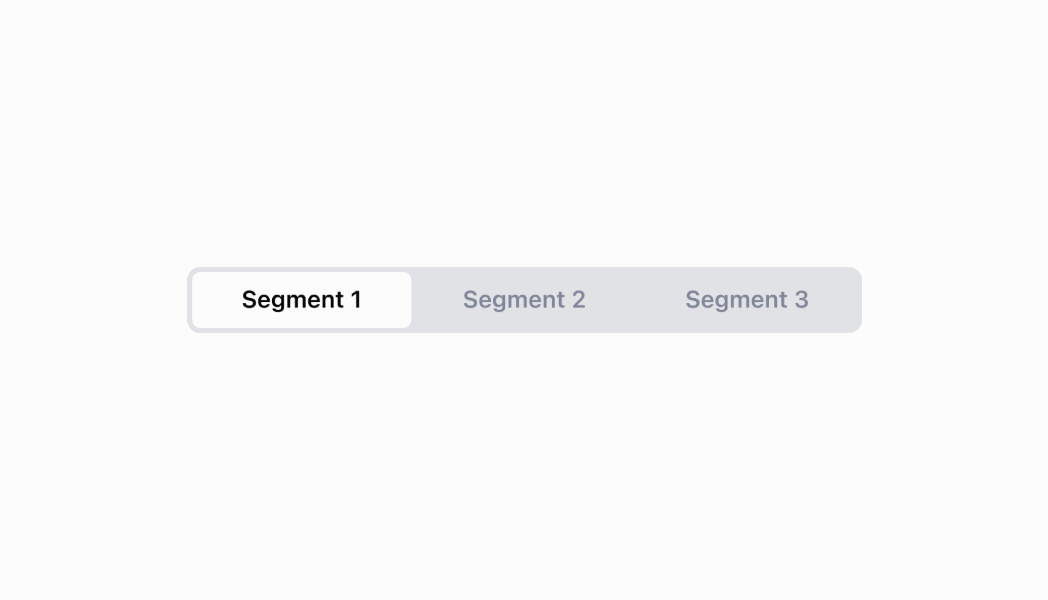
Switch between views or filters
React
import React from 'react';
import {
  reactExtension,
  Screen,
  SegmentedControl,
  Stack,
} from '@shopify/ui-extensions-react/point-of-sale';

export const SmartGridModal = () => {
  const [selected, setSelected] =
    React.useState('1');
  return (
    <Screen
      name="SegmentedControl"
      title="SegmentedControl"
    >
      <Stack
        direction="vertical"
        paddingHorizontal="ExtraExtraLarge"
      >
        <SegmentedControl
          segments={[
            {
              id: '1',
              label: '1',
              disabled: false,
            },
            {
              id: '2',
              label: '2',
              disabled: false,
            },
            {
              id: '3',
              label: '3 (disabled)',
              disabled: true,
            },
          ]}
          selected={selected}
          onSelect={setSelected}
        />
      </Stack>
    </Screen>
  );
};

export default reactExtension(
  'pos.home.modal.render',
  () => {
    return <SmartGridModal />;
  },
);
TS
import {
  extension,
  Screen,
  ScrollView,
  SegmentedControl,
} from '@shopify/ui-extensions/point-of-sale';

export default extension(
  'pos.home.modal.render',
  (root) => {
    const mainScreen = root.createComponent(
      Screen,
      {
        name: 'SegmentedControl',
        title: 'SegmentedControl',
      },
    );
    const scrollView =
      root.createComponent(ScrollView);

    const onSelect = (id: string) => {
      segmentedControl.updateProps({
        selected: id,
      });
    };

    const segmentedControl = root.createComponent(
      SegmentedControl,
      {
        onSelect,
        selected: '1',
        segments: [
          {id: '1', label: '1', disabled: false},
          {id: '2', label: '2', disabled: false},
          {
            id: '3',
            label: '3 (disabled)',
            disabled: true,
          },
        ],
      },
    );

    scrollView.append(segmentedControl);

    mainScreen.append(scrollView);
    root.append(mainScreen);
  },
);
Anchor to Best practicesBest practices
- Limit the number of segments appropriately: Use two to five segments for optimal usability. Too few segments may not justify the component, while too many can overwhelm users and reduce touch target sizes on POS devices.
- Implement meaningful selection logic: Provide immediate visual feedback by updating content, filters, or views based on the selection.
- Handle disabled states strategically: Use the
disabledproperty on individual segments when options are temporarily unavailable or contextually inappropriate. Provide clear visual indication and consider alternative messaging when segments are disabled. - Design for touch interfaces: Ensure segments are large enough for comfortable touch interaction on POS devices.
- Maintain consistent selection patterns: Keep the same segment selected when users navigate away and return to a screen, unless the context has changed significantly. This helps maintain user orientation and reduces cognitive load.
Anchor to LimitationsLimitations
- SegmentedControl is designed for mutually exclusive selections—multiple selection scenarios require different components like checkbox lists or choice lists.
- The component provides the selection interface but doesn't manage content switching—you must implement the logic to show/hide or update content based on the selected segment.
- Visual styling and layout are controlled by the POS design system—custom segment styling or layout modifications beyond the provided properties are not supported.