Version 2025-07 is the last API version to support React-based UI components. Later versions use web components, native UI elements with built-in accessibility, better performance, and consistent styling with Shopify's design system. Check out the upgrade guide to upgrade your extension.
Customer details
The customer details screen appears when merchants look up a customer during checkout or need to access customer history and profile information. This screen serves as the hub for customer management within POS, displaying customer data, purchase history, and contact details.
Anchor to Use casesUse cases
- Loyalty programs: Display loyalty status, points balance, and tier information.
- Customer discounts: Apply personalized discounts based on membership level or purchase history.
- Profile management: Launch workflows for updating customer preferences and communication settings.
- Customer service: Process loyalty redemptions, account adjustments, and service requests.
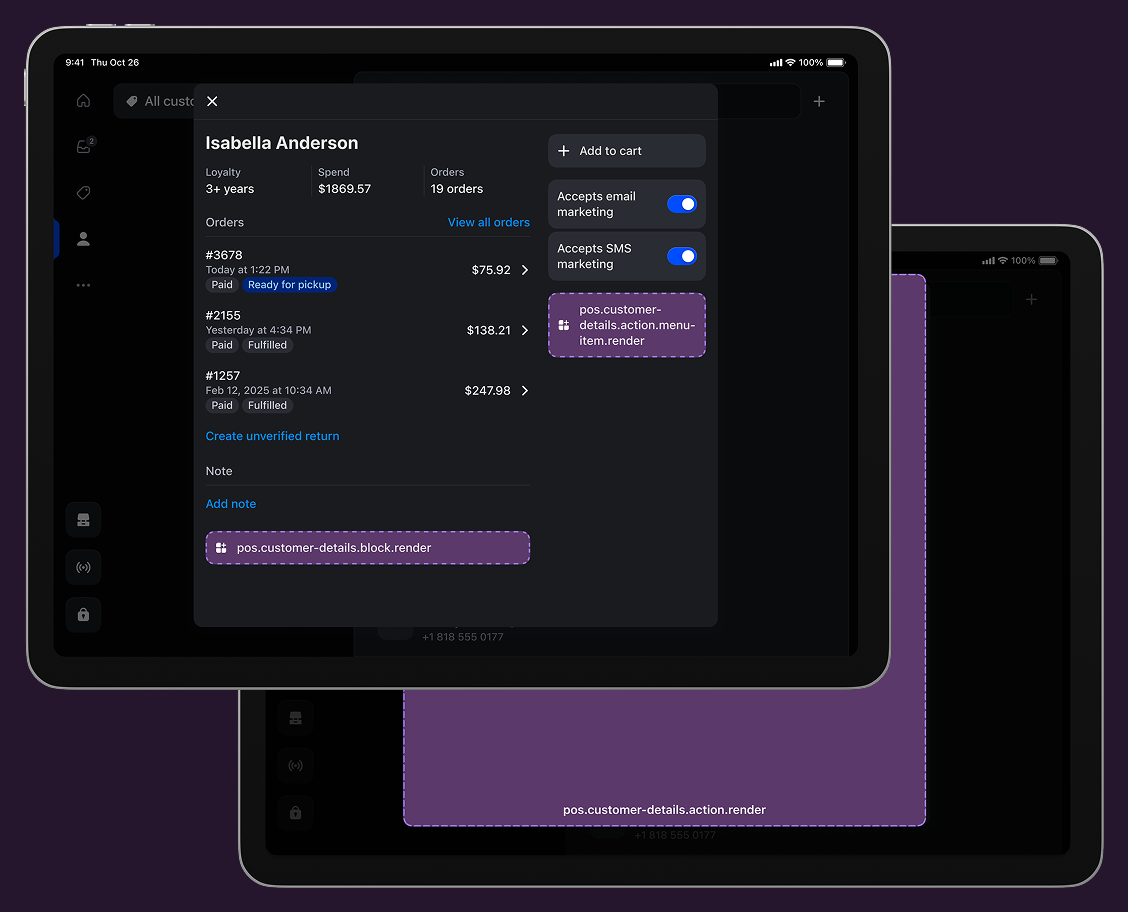
Anchor to Customer details targetsCustomer details targets
Use these targets for customer service capabilities, loyalty program integration, or tools for customer engagement and support during transactions.
Anchor to Customer details block ,[object Object]Customer details block target
pos.customer-details.block.render
Renders a custom information section within the customer details screen. Use this target for displaying supplementary customer data like loyalty status, points balance, or personalized information alongside standard customer details.
Extensions at this target appear as persistent blocks within the customer details interface and support interactive elements that can launch modal workflows using api.action.presentModal() for more complex customer operations.
Examples
Add a customer details block
Description
Display custom information within the customer details screen as a persistent block. This example shows how to create blocks that show supplementary customer data like loyalty status, points balance, or personalized information with interactive elements that can launch modal workflows.
React
import React from 'react';

import {
  Text,
  useApi,
  reactExtension,
  POSBlock,
  POSBlockRow,
} from '@shopify/ui-extensions-react/point-of-sale';

const Block = () => {
  const api = useApi<'pos.customer-details.block.render'>();
  return (
    <POSBlock action={{title: 'Open action', onPress: api.action.presentModal}}>
      <POSBlockRow>
        <Text>{'This is a block extension'}</Text>
        <Text>{`Customer ID for this customer: ${api.customer.id}`}</Text>
      </POSBlockRow>
    </POSBlock>
  );
};

export default reactExtension('pos.customer-details.block.render', () => (
  <Block />
));
TS
import {
  POSBlock,
  Text,
  POSBlockRow,
  extension,
} from '@shopify/ui-extensions/point-of-sale';

export default extension('pos.customer-details.block.render', (root, api) => {
  const block = root.createComponent(POSBlock, {
    action: {title: 'Open action', onPress: api.action.presentModal},
  });

  const mainText = root.createComponent(Text);
  mainText.append('This is a block extension');

  const subtitleText = root.createComponent(Text);
  subtitleText.append(`Customer ID for this customer: ${api.customer.id}`);

  const blockMainRow = root.createComponent(POSBlockRow);
  blockMainRow.append(mainText);

  const blockSubtitleRow = root.createComponent(POSBlockRow);
  blockSubtitleRow.append(subtitleText);
  block.append(blockMainRow);
  block.append(blockSubtitleRow);

  root.append(block);
});
pos.customer-details.action.menu-item.render
Renders a single interactive button component as a menu item in the customer details action menu. Use this target for customer-specific operations like applying customer discounts, processing loyalty redemptions, or launching profile update workflows.
Extensions at this target can access the customer identifier through the Customer API to perform customer-specific operations. Menu items typically invoke api.action.presentModal() to launch the companion modal for complete customer workflows.
Supported components
Supported components
Examples
Create a customer details action menu item
Description
Add an interactive menu item to the customer details action menu for customer-specific operations. This example shows how to create a menu item that accesses customer data and launches modal workflows for tasks like applying discounts, processing loyalty redemptions, or updating customer profiles.
React
import React from 'react';
import {
  reactExtension,
  Button,
  useApi,
} from '@shopify/ui-extensions-react/point-of-sale';

const ButtonComponent = () => {
  const api = useApi<'pos.customer-details.action.menu-item.render'>();

  return <Button onPress={() => api.action.presentModal()} />;
};

export default reactExtension(
  'pos.customer-details.action.menu-item.render',
  () => <ButtonComponent />,
);
TS
import {Button, extension} from '@shopify/ui-extensions/point-of-sale';

export default extension(
  'pos.customer-details.action.menu-item.render',
  (root, api) => {
    const button = root.createComponent(Button, {
      onPress: () => {
        api.action.presentModal();
      },
    });

    root.append(button);
  },
);
Anchor to Customer details action (modal) ,[object Object]Customer details action (modal) target
pos.customer-details.action.render
Renders a full-screen modal interface launched from customer details menu items. Use this target for complex customer workflows that require forms, multi-step processes, or detailed information displays beyond what a simple button can provide.
Extensions at this target have access to customer data through the Customer API and support workflows with multiple screens, navigation, and interactive components.
Supported components
Supported components
Examples
Create a customer details action modal
Description
Build a full-screen modal launched from customer details menu items for complex customer workflows. This example demonstrates creating modals with multiple screens and interactive components, enabling forms, multi-step processes, or detailed information displays with full customer data access.
React
import React from 'react';

import {
  Text,
  Screen,
  ScrollView,
  Navigator,
  reactExtension,
  useApi,
} from '@shopify/ui-extensions-react/point-of-sale';

const Modal = () => {
  const api = useApi<'pos.customer-details.action.render'>();
  return (
    <Navigator>
      <Screen name="CustomerDetails" title="Customer Details">
        <ScrollView>
          <Text>{`Customer ID: ${api.customer.id}`}</Text>
        </ScrollView>
      </Screen>
    </Navigator>
  );
};

export default reactExtension('pos.customer-details.action.render', () => (
  <Modal />
));
TS
import {
  Navigator,
  Screen,
  ScrollView,
  Text,
  extension,
} from '@shopify/ui-extensions/point-of-sale';

export default extension('pos.customer-details.action.render', (root, api) => {
  const navigator = root.createComponent(Navigator);
  const screen = root.createComponent(Screen, {
    name: 'CustomerDetails',
    title: 'Customer Details',
  });
  const scrollView = root.createComponent(ScrollView);
  const text = root.createComponent(Text);

  text.append(`Customer ID: ${api.customer.id}`);
  scrollView.append(text);
  screen.append(scrollView);
  navigator.append(screen);
  root.append(navigator);
});
Anchor to Best practicesBest practices
- Show clear action confirmations: Show clear success or error messages that specify which customer was affected and what change was made. Use messages like "Loyalty points updated for Jane Doe," "Preferences saved successfully," or "Unable to process - customer not found" to provide immediate feedback.
- Ensure service continuity: Ensure that customer-related changes integrate properly with the overall transaction and customer relationship, such as updated customer profile, applied customer discounts, and recorded service interactions.
- Handle error states gracefully: Communicate customer data limitations clearly rather than showing generic error messages. If your extension accesses or modifies customer information, ensure you handle data responsibly, display only necessary information, and provide clear messaging about any data collection, processing, or sharing that occurs through your extension functionality.
- Write clear and action-oriented labels: Use action-oriented labels that specify what will happen for this particular customer, with descriptive titles that indicate the information type. Use "Update loyalty tier" or "Loyalty Status" instead of generic labels like "Loyalty options" or "Customer App."
- Show status and contextual data: Show current customer status, relevant metrics, and action eligibility to support service decisions, such as loyalty tier and points, "VIP customer - expedited service," and recent purchase patterns.
Anchor to LimitationsLimitations
-
You can only render one Button component for each POS UI extension using the action (menu item) target.
-
Customer data is read-only through the Customer API, which provides only the customer ID. To access additional customer information or modify customer data, use external API calls or integrate with the Customer API through your app backend.