About POS UI extension localization
Merchants can expand their business to a global audience by creating shopping experiences in local languages and currencies. You can translate POS UI extensions into multiple languages for international merchants, staff, and customers. Shopify provides a set of JavaScript APIs for accessing translations and provides localized formatting utilities for your POS UI extension.
Anchor to What is localization?What is localization?
Localization is the process of adapting content to meet the language and cultural requirements of a specific country or region. Shopify localizes POS UI extensions by resolving customer and shop locales against the extensions' translation data.
The following diagram shows customers in France and Canada that are interacting with a store in Germany. The customers receive localized experiences based on the translation data that's supplied by an app extension.
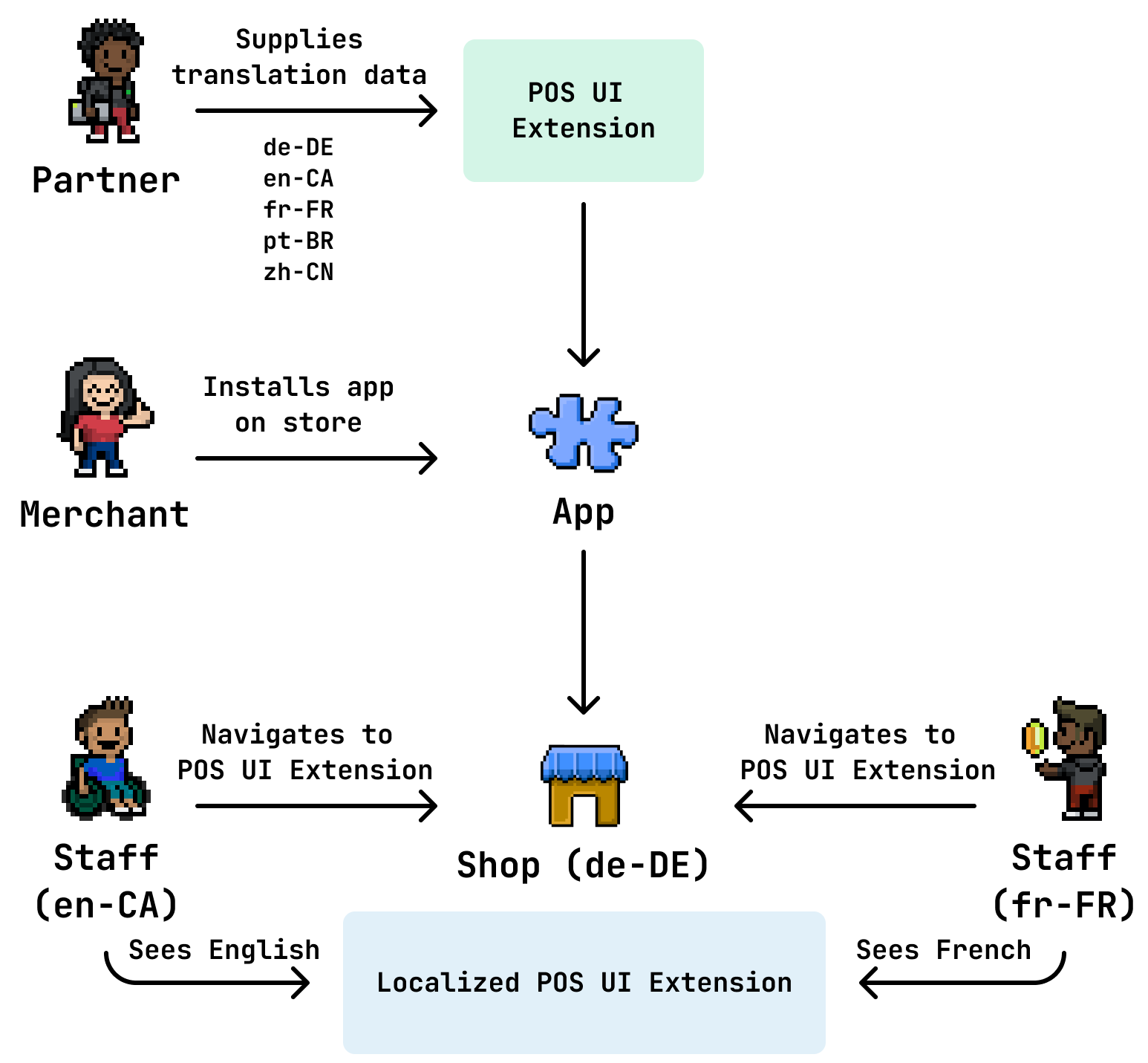
Anchor to How it worksHow it works
You supply translation data for your extension's strings in .json-formatted locale files, which are stored in the extension's locales folder.
The POS UI extension queries the locale files for a match against locale data and translates the extension UI.
Shopify chooses a translation based on this order of precedence, from highest to lowest priority:
-
The customer locale. Example:
de-DE. -
The non-regional customer locale. Example:
de. -
The shop locale. Example:
fr-FR. -
The non-regional shop locale. Example:
fr. -
The extension's default locale.
Anchor to Locale filesLocale files
Locale files are UTF-8-encoded JSON files that contain a set of translations for your POS UI extension's strings. You can create non-regional, regional, and default locales.
Translations consist of key/value pairs. You can supply singular and plural translations.
Anchor to Non-regional localeNon-regional locale
Use an IETF BCP 47 language tag:
Non-regional locale
Anchor to Regional localeRegional locale
Insert an ISO 3166-1 region code after the language tag:
Regional locale
Anchor to Default localeDefault locale
Insert .default between the locale and the .json file extension:
Default locale
Anchor to PluralizationPluralization
The implementation of plural translation keys follows the language plural rules included in the Common Locale Data Repository. You can specify any pluralization key that Intl.PluralRules.select() supports and that's appropriate for the locale.
Additional details for localizing pluralized content:
-
The call to
translate()must have a single count option. -
Shopify uses
countto determine a plural key for the given locale. -
The translation must define all possible plural keys for the given locale. For example:
{"youHaveMessages": {"one": "you have one message","other": "you have {{count}} messages"}}{"youHaveMessages": {"zero": "ليس لديك رسائل","one": "لديك رسالة واحدة","two": "لديك رسالتان","few": "رسائل {{count}} لديك","many": "رسالة {{count}} لديك","other": "رسالة {{count}} لديك"}}locales/en.json
{
  "youHaveMessages": {
    "one": "you have one message",
    "other": "you have {{count}} messages"
  }
}
locales/ar.json
{ "youHaveMessages": { "zero": "ليس لديك رسائل", "one": "لديك رسالة واحدة", "two": "لديك رسالتان", "few": "رسائل {{count}} لديك", "many": "رسالة {{count}} لديك", "other": "رسالة {{count}} لديك" } } -
Complex pluralization, such as dynamic numeric ranges, isn't supported. For example, you can't localize a phrase that lists a numeric range of items left in stock. This is because the range changes as items are sold, and for some languages, the localizer would need to update the grammar as well.
Anchor to LimitationsLimitations
-
Merchants can't override or add translations.
-
Translations can't contain HTML.
-
Use our
i18nfunctions to localize content. However, if you need to useIntlfunctions for more advanced formatting, only the following are supported:Intl.NumberFormatIntl.DateTimeFormatIntl.PluralRules
NoteSome older browsers don't support
Intl. In these cases, Shopify polyfills a small portion of the object.Note:Some older browsers don't support
Intl. In these cases, Shopify polyfills a small portion of the object.
Anchor to Next stepsNext steps
- Learn how to localize a POS UI extension.