Fulfillment
Requires access scope, access scope, access scope or access scope.
The FulfillmentOrder object represents either an item or a group of items in an Order that are expected to be fulfilled from the same location. There can be more than one fulfillment order for an order at a given location.
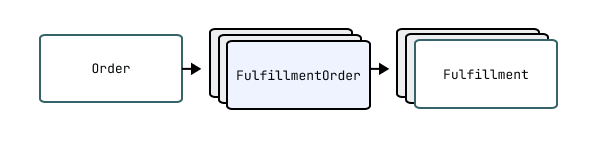
Fulfillment orders represent the work which is intended to be done in relation to an order. When fulfillment has started for one or more line items, a Fulfillment is created by a merchant or third party to represent the ongoing or completed work of fulfillment.
See below for more details on creating fulfillments.
Shopify creates fulfillment orders automatically when an order is created. It is not possible to manually create fulfillment orders.
See below for more details on the lifecycle of a fulfillment order.
Shopify creates fulfillment orders automatically when an order is created. It is not possible to manually create fulfillment orders.
See below for more details on the lifecycle of a fulfillment order.
Note: Shopify creates fulfillment orders automatically when an order is created. It is not possible to manually create fulfillment orders.</p> <p><a href="#the-lifecycle-of-a-fulfillment-order">See below for more details on the lifecycle of a fulfillment order</a>.
Retrieving fulfillment orders
Fulfillment orders from an order
All fulfillment orders related to a given order can be retrieved with the Order.fulfillmentOrders connection.
API access scopes govern which fulfillments orders are returned to clients. An API client will only receive a subset of the fulfillment orders which belong to an order if they don't have the necessary access scopes to view all of the fulfillment orders.
Fulfillment orders assigned to the app for fulfillment
Fulfillment service apps can retrieve the fulfillment orders which have been assigned to their locations with the
assignedFulfillmentOrders
connection.
Use the argument to control whether all assigned fulfillment orders
should be returned or only those where a merchant has sent a
fulfillment request
and it has yet to be responded to.
The API client must be granted the access scope to access
the assigned fulfillment orders.
All fulfillment orders
Apps can retrieve all fulfillment orders with the fulfillmentOrders query. This query returns all assigned, merchant-managed, and third-party fulfillment orders on the shop, which are accessible to the app according to the fulfillment order access scopes it was granted with.
The lifecycle of a fulfillment order
Fulfillment Order Creation
After an order is created, a background worker performs the order routing process which determines which locations will be responsible for fulfilling the purchased items. Once the order routing process is complete, one or more fulfillment orders will be created and assigned to these locations. It is not possible to manually create fulfillment orders.
Once a fulfillment order has been created, it will have one of two different lifecycles depending on the type of location which the fulfillment order is assigned to.
The lifecycle of a fulfillment order at a merchant managed location
Fulfillment orders are completed by creating fulfillments. Fulfillments represents the work done.
For digital products a merchant or an order management app would create a fulfilment once the digital asset has been provisioned. For example, in the case of a digital gift card, a merchant would to do this once the gift card has been activated - before the email has been shipped.
On the other hand, for a traditional shipped order, a merchant or an order management app would create a fulfillment after picking and packing the items relating to a fulfillment order, but before the courier has collected the goods.
Learn about managing fulfillment orders as an order management app.
The lifecycle of a fulfillment order at a location which is managed by a fulfillment service
For fulfillment orders which are assigned to a location that is managed by a fulfillment service, a merchant or an Order Management App can send a fulfillment request to the fulfillment service which operates the location to request that they fulfill the associated items. A fulfillment service has the option to accept or reject this fulfillment request.
Once the fulfillment service has accepted the request, the request can no longer be cancelled by the merchant or order management app and instead a cancellation request must be submitted to the fulfillment service.
Once a fulfillment service accepts a fulfillment request, then after they are ready to pack items and send them for delivery, they create fulfillments with the fulfillmentCreate mutation. They can provide tracking information right away or create fulfillments without it and then update the tracking information for fulfillments with the fulfillmentTrackingInfoUpdate mutation.
Learn about managing fulfillment orders as a fulfillment service.
API access scopes
Fulfillment orders are governed by the following API access scopes:
- The
andaccess scopes grant access to fulfillment orders assigned to merchant-managed locations. - The
andaccess scopes are intended for fulfillment services. These scopes grant access to fulfillment orders assigned to locations that are being managed by fulfillment services. - The
andaccess scopes grant access to fulfillment orders assigned to locations managed by other fulfillment services.
Fulfillment service app access scopes
Usually, fulfillment services have the access scope
and don't have the
or access scopes.
The app will only have access to the fulfillment orders assigned to their location
(or multiple locations if the app registers multiple fulfillment services on the shop).
The app will not have access to fulfillment orders assigned to merchant-managed locations
or locations owned by other fulfillment service apps.
Order management app access scopes
Order management apps will usually request and
access scopes. This will allow them to manage all fulfillment orders
on behalf of a merchant.
If an app combines the functions of an order management app and a fulfillment service, then the app should request all access scopes to manage all assigned and all unassigned fulfillment orders.
Notifications about fulfillment orders
Fulfillment services are required to register a self-hosted callback URL which has a number of uses. One of these uses is that this callback URL will be notified whenever a merchant submits a fulfillment or cancellation request.
Both merchants and apps can subscribe to the fulfillment order webhooks to be notified whenever fulfillment order related domain events occur.
Anchor to FieldsFields
- assignedLocation (FulfillmentOrderAssignedLocation!)
- createdAt (DateTime!)
- deliveryMethod (DeliveryMethod)
- destination (FulfillmentOrderDestination)
- fulfillAt (DateTime)
- fulfillBy (DateTime)
- fulfillmentHolds ([FulfillmentHold!]!)
- fulfillmentOrdersForMerge (FulfillmentOrderConnection!)
- fulfillments (FulfillmentConnection!)
- id (ID!)
- internationalDuties (FulfillmentOrderInternationalDuties)
- lineItems (FulfillmentOrderLineItemConnection!)
- locationsForMove (FulfillmentOrderLocationForMoveConnection!)
- merchantRequests (FulfillmentOrderMerchantRequestConnection!)
- order (Order!)
- orderId (ID!)
- orderName (String!)
- orderProcessedAt (DateTime!)
- remainingLineItemsWeight (Weight)
- requestStatus (FulfillmentOrderRequestStatus!)
- status (FulfillmentOrderStatus!)
- supportedActions ([FulfillmentOrderSupportedAction!]!)
- updatedAt (DateTime!)
- channelId (ID): deprecated
- Anchor to assignedLocationassigned•Fulfillment
Location Order Assigned Location! non-null The fulfillment order's assigned location. This is the location where the fulfillment is expected to happen.
The fulfillment order's assigned location might change in the following cases:
- The fulfillment order has been entirely moved to a new location. For example, the fulfillmentOrderMove mutation has been called, and you see the original fulfillment order in the movedFulfillmentOrder field within the mutation's response.
- Work on the fulfillment order hasn't yet begun, which means that the fulfillment order has the OPEN, SCHEDULED, or ON_HOLD status, and the shop's location properties might be undergoing edits (for example, in the Shopify admin).
Show fields
- Anchor to createdAtcreated•Date
At Time! non-null Date and time when the fulfillment order was created.
- Anchor to deliveryMethoddelivery•Delivery
Method Method Delivery method of this fulfillment order.
Show fields
- Anchor to destinationdestination•Fulfillment
Order Destination The destination where the items should be sent.
Show fields
- Anchor to fulfillAtfulfill•Date
At Time The date and time at which the fulfillment order will be fulfillable. When this date and time is reached, the scheduled fulfillment order is automatically transitioned to open. For example, the
date for a subscription order might be the 1st of each month, a pre-orderdate would benil, and a standard orderdate would be the order creation date.- Anchor to fulfillByfulfill•Date
By Time The latest date and time by which all items in the fulfillment order need to be fulfilled.
- Anchor to fulfillmentHoldsfulfillment•[Fulfillment
Holds Hold!]! non-null The fulfillment holds applied on the fulfillment order.
Show fields
- Anchor to fulfillmentOrdersForMergefulfillment•Fulfillment
Orders For Merge Order Connection! non-null Fulfillment orders eligible for merging with the given fulfillment order.
Show fields
- Anchor to afterafter•String
The elements that come after the specified cursor.
- Anchor to beforebefore•String
The elements that come before the specified cursor.
- Anchor to firstfirst•Int
The first
nelements from the paginated list.- Anchor to lastlast•Int
The last
nelements from the paginated list.- Anchor to reversereverse•BooleanDefault:false
Reverse the order of the underlying list.
Arguments
- Anchor to fulfillmentsfulfillments•Fulfillment
Connection! non-null A list of fulfillments for the fulfillment order.
Show fields
- Anchor to afterafter•String
The elements that come after the specified cursor.
- Anchor to beforebefore•String
The elements that come before the specified cursor.
- Anchor to firstfirst•Int
The first
nelements from the paginated list.- Anchor to lastlast•Int
The last
nelements from the paginated list.- Anchor to reversereverse•BooleanDefault:false
Reverse the order of the underlying list.
Arguments
- •ID!non-null
A globally-unique ID.
- Anchor to internationalDutiesinternational•Fulfillment
Duties Order International Duties The duties delivery method of this fulfillment order.
Show fields
- Anchor to lineItemsline•Fulfillment
Items Order Line Item Connection! non-null A list of the fulfillment order's line items.
Show fields
- Anchor to afterafter•String
The elements that come after the specified cursor.
- Anchor to beforebefore•String
The elements that come before the specified cursor.
- Anchor to firstfirst•Int
The first
nelements from the paginated list.- Anchor to lastlast•Int
The last
nelements from the paginated list.- Anchor to reversereverse•BooleanDefault:false
Reverse the order of the underlying list.
Arguments
- Anchor to locationsForMovelocations•Fulfillment
For Move Order Location For Move Connection! non-null A list of locations that the fulfillment order can potentially move to.
Show fields
- Anchor to afterafter•String
The elements that come after the specified cursor.
- Anchor to beforebefore•String
The elements that come before the specified cursor.
- Anchor to firstfirst•Int
The first
nelements from the paginated list.- Anchor to lastlast•Int
The last
nelements from the paginated list.- Anchor to lineItemIdsline•[ID!]
Item Ids Default:[] Filter to a list of Fulfillment Order Line Items.
- Anchor to locationIdslocation•[ID!]
Ids Specific Location ids to check for the movability for a fulfillment order.
- Anchor to queryquery•String
A filter made up of terms, connectives, modifiers, and comparators. You can apply one or more filters to a query. Learn more about Shopify API search syntax.
Show filters
- Anchor to default•string
Filter by a case-insensitive search of multiple fields in a document.
query=Bob Normanquery=title:green hoodie- Anchor to active•string
- Anchor to address1•string
- Anchor to address2•string
- Anchor to city•string
- Anchor to country•string
- Anchor to created_at•time
- Anchor to geolocated•boolean
- Anchor to legacy•boolean
- Anchor to location_id•id
- Anchor to name•string
- Anchor to pickup_in_store•string
enableddisabled- Anchor to province•string
- Anchor to zip•string
Example:
Valid values:
- Anchor to reversereverse•BooleanDefault:false
Reverse the order of the underlying list.
Arguments
- Anchor to merchantRequestsmerchant•Fulfillment
Requests Order Merchant Request Connection! non-null A list of requests sent by the merchant or an order management app to the fulfillment service for the fulfillment order.
Show fields
- Anchor to afterafter•String
The elements that come after the specified cursor.
- Anchor to beforebefore•String
The elements that come before the specified cursor.
- Anchor to firstfirst•Int
The first
nelements from the paginated list.- Anchor to kindkind•Fulfillment
Order Merchant Request Kind The kind of request the merchant sent.
Show enum values
- Anchor to lastlast•Int
The last
nelements from the paginated list.- Anchor to reversereverse•BooleanDefault:false
Reverse the order of the underlying list.
Arguments
- Anchor to orderorder•Order!non-null
The order that's associated with the fulfillment order.
Show fields
- Anchor to orderIdorder•ID!
Id non-null ID of the order that's associated with the fulfillment order.
- Anchor to orderNameorder•String!
Name non-null The unique identifier for the order that appears on the order page in the Shopify admin and the Order status page. For example, "#1001", "EN1001", or "1001-A". This value isn't unique across multiple stores.
- Anchor to orderProcessedAtorder•Date
Processed At Time! non-null The date and time when the order was processed. This date and time might not match the date and time when the order was created.
- Anchor to remainingLineItemsWeightremaining•Weight
Line Items Weight The total weight of all line items in the fulfillment order that aren't yet fulfilled.
Show fields
- Anchor to requestStatusrequest•Fulfillment
Status Order Request Status! non-null The request status of the fulfillment order.
Show enum values
- Anchor to statusstatus•Fulfillment
Order Status! non-null The status of the fulfillment order.
Show enum values
- Anchor to supportedActionssupported•[Fulfillment
Actions Order Supported Action!]! non-null The actions that can be performed on this fulfillment order.
Show fields
- Anchor to updatedAtupdated•Date
At Time! non-null The date and time when the fulfillment order was last updated.
- Anchor to channelIdchannel•ID
Id Deprecated
Anchor to QueriesQueries
- assignedFulfillmentOrders (FulfillmentOrderConnection!)
- fulfillmentOrder (FulfillmentOrder)
- fulfillmentOrders (FulfillmentOrderConnection!)
- manualHoldsFulfillmentOrders (FulfillmentOrderConnection!)
- •query
The paginated list of fulfillment orders assigned to the shop locations owned by the app.
Assigned fulfillment orders are fulfillment orders that are set to be fulfilled from locations managed by fulfillment services that are registered by the app. One app (api_client) can host multiple fulfillment services on a shop. Each fulfillment service manages a dedicated location on a shop. Assigned fulfillment orders can have associated fulfillment requests, or might currently not be requested to be fulfilled.
The app must have the
access scope to be able to retrieve the fulfillment orders assigned to its locations.All assigned fulfillment orders (except those with the
CLOSEDstatus) will be returned by default. Perform filtering with theargument to receive only fulfillment orders that have been requested to be fulfilled.Show fields
- Anchor to afterafter•String
The elements that come after the specified cursor.
- Anchor to assignmentStatusassignment•Fulfillment
Status Order Assignment Status The assigment status of the fulfillment orders that should be returned. If
argument is not provided, then the query will return all assigned fulfillment orders, except those that have theCLOSEDstatus.Show enum values
- Anchor to beforebefore•String
The elements that come before the specified cursor.
- Anchor to firstfirst•Int
The first
nelements from the paginated list.- Anchor to lastlast•Int
The last
nelements from the paginated list.- Anchor to locationIdslocation•[ID!]
Ids Returns fulfillment orders only for certain locations, specified by a list of location IDs.
- Anchor to reversereverse•BooleanDefault:false
Reverse the order of the underlying list.
- Anchor to sortKeysort•Fulfillment
Key Order Sort Keys Default:ID Sort the underlying list using a key. If your query is slow or returns an error, then try specifying a sort key that matches the field used in the search.
Show enum values
Arguments
- •query
Returns a
resource by ID.Show fields
- •ID!required
The ID of the
to return.
Arguments
- •ID!
- •query
The paginated list of all fulfillment orders. The returned fulfillment orders are filtered according to the fulfillment order access scopes granted to the app.
Use this query to retrieve fulfillment orders assigned to merchant-managed locations, third-party fulfillment service locations, or all kinds of locations together.
For fetching only the fulfillment orders assigned to the app's locations, use the assignedFulfillmentOrders connection.
Show fields
- Anchor to afterafter•String
The elements that come after the specified cursor.
- Anchor to beforebefore•String
The elements that come before the specified cursor.
- Anchor to firstfirst•Int
The first
nelements from the paginated list.- Anchor to includeClosedinclude•Boolean
Closed Default:false Whether to include closed fulfillment orders.
- Anchor to lastlast•Int
The last
nelements from the paginated list.- Anchor to queryquery•String
A filter made up of terms, connectives, modifiers, and comparators. You can apply one or more filters to a query. Learn more about Shopify API search syntax.
Show filters
- Anchor to reversereverse•BooleanDefault:false
Reverse the order of the underlying list.
- Anchor to sortKeysort•Fulfillment
Key Order Sort Keys Default:ID Sort the underlying list using a key. If your query is slow or returns an error, then try specifying a sort key that matches the field used in the search.
Show enum values
Arguments
- •query
Returns a list of fulfillment orders that are on hold.
Show fields
- Anchor to afterafter•String
The elements that come after the specified cursor.
- Anchor to beforebefore•String
The elements that come before the specified cursor.
- Anchor to firstfirst•Int
The first
nelements from the paginated list.- Anchor to lastlast•Int
The last
nelements from the paginated list.- Anchor to queryquery•String
The query conditions used to filter fulfillment orders. Only fulfillment orders corresponding to orders matching the query will be counted. Supported filter parameters:
See the detailed search syntax for more information about using filters.
- Anchor to reversereverse•BooleanDefault:false
Reverse the order of the underlying list.
Arguments
Anchor to MutationsMutations
- fulfillmentOrderAcceptCancellationRequest (FulfillmentOrderAcceptCancellationRequestPayload)
- fulfillmentOrderAcceptFulfillmentRequest (FulfillmentOrderAcceptFulfillmentRequestPayload)
- fulfillmentOrderCancel (FulfillmentOrderCancelPayload)
- fulfillmentOrderClose (FulfillmentOrderClosePayload)
- fulfillmentOrderHold (FulfillmentOrderHoldPayload)
- fulfillmentOrderMove (FulfillmentOrderMovePayload)
- fulfillmentOrderOpen (FulfillmentOrderOpenPayload)
- fulfillmentOrderRejectCancellationRequest (FulfillmentOrderRejectCancellationRequestPayload)
- fulfillmentOrderRejectFulfillmentRequest (FulfillmentOrderRejectFulfillmentRequestPayload)
- fulfillmentOrderReleaseHold (FulfillmentOrderReleaseHoldPayload)
- fulfillmentOrderReportProgress (FulfillmentOrderReportProgressPayload)
- fulfillmentOrderReschedule (FulfillmentOrderReschedulePayload)
- fulfillmentOrdersReroute (FulfillmentOrdersReroutePayload)
- fulfillmentOrderSubmitCancellationRequest (FulfillmentOrderSubmitCancellationRequestPayload)
- fulfillmentOrderSubmitFulfillmentRequest (FulfillmentOrderSubmitFulfillmentRequestPayload)
- •mutation
Accept a cancellation request sent to a fulfillment service for a fulfillment order.
Show payload
- •ID!required
The ID of the fulfillment order associated with the cancellation request.
- Anchor to messagemessage•String
An optional reason for accepting the cancellation request.
Arguments
- •ID!
- •mutation
Accepts a fulfillment request that the fulfillment service has received for a
which signals that the fulfillment service will process and fulfill the order. The fulfillment service can optionally provide a message to the merchant and an estimated shipped date when accepting the request.Learn more about accepting fulfillment requests.
Show payload
- Anchor to estimatedShippedAtestimated•Date
Shipped At Time The estimated date and time when the fulfillment order will be shipped.
- •ID!required
The ID of the fulfillment order associated with the fulfillment request.
- Anchor to messagemessage•String
An optional reason for accepting the fulfillment request.
Arguments
- •mutation
Cancels a
and creates a replacement fulfillment order to represent the work left to be done. The original fulfillment order will be marked as closed.This mutation works when the fulfillment order has a
SUBMITTEDorCANCELLATION_REQUESTEDstatus. ForSUBMITTEDorders, cancellation happens immediately because the fulfillment service hasn't accepted the request.NoteOrders that have had cancellation requested but the cancellation has yet to be accepted by the fulfillment service might still have work completed despite cancellation.
Note:Orders that have had cancellation requested but the cancellation has yet to be accepted by the fulfillment service might still have work completed despite cancellation.
Note: Orders that have had cancellation requested but the cancellation has yet to be accepted by the fulfillment service might still have work completed despite cancellation.
Show payload
- •ID!required
The ID of the fulfillment order to mark as canceled.
Arguments
- •ID!
- •mutation
Marks an in-progress fulfillment order as incomplete, indicating the fulfillment service is unable to ship any remaining items, and closes the fulfillment request.
This mutation can only be called for fulfillment orders that meet the following criteria:
- Assigned to a fulfillment service location,
- The fulfillment request has been accepted,
- The fulfillment order status is
IN_PROGRESS.
This mutation can only be called by the fulfillment service app that accepted the fulfillment request. Calling this mutation returns the control of the fulfillment order to the merchant, allowing them to move the fulfillment order line items to another location and fulfill from there, remove and refund the line items, or to request fulfillment from the same fulfillment service again.
Closing a fulfillment order is explained in the fulfillment service guide.
Show payload
- •ID!required
The ID of the fulfillment order to mark as incomplete.
- Anchor to messagemessage•String
An optional reason for marking the fulfillment order as incomplete.
Arguments
- •mutation
Applies a fulfillment hold on a fulfillment order.
As of the 2025-01 API version, the mutation can be successfully executed on fulfillment orders that are already on hold. To place multiple holds on a fulfillment order, apps need to supply the handle field. Each app can place up to 10 active holds per fulfillment order. If an app attempts to place more than this, the mutation will return a user error indicating that the limit has been reached. The app would need to release one of its existing holds before being able to apply a new one.
Show payload
- Anchor to fulfillmentHoldfulfillment•Fulfillment
Hold Order Hold Input! required The details of the fulfillment hold applied on the fulfillment order.
Show input fields
- •ID!required
The ID of the fulfillment order on which a fulfillment hold is applied.
Arguments
- •mutation
Changes the location which is assigned to fulfill a number of unfulfilled fulfillment order line items.
Moving a fulfillment order will fail in the following circumstances:
- The fulfillment order is closed.
- The fulfillment order has had progress manually reported. To move a fulfillment order that has had progress manually reported, the fulfillment order must first be marked as open resolving the ongoing progress state.
- The destination location doesn't stock the requested inventory item.
- The API client doesn't have the correct permissions.
Line items which have already been fulfilled can't be re-assigned and will always remain assigned to the original location.
You can't change the assigned location while a fulfillment order has a request status of
SUBMITTED,ACCEPTED,CANCELLATION_REQUESTED, orCANCELLATION_REJECTED. These request statuses mean that a fulfillment order is awaiting action by a fulfillment service and can't be re-assigned without first having the fulfillment service accept a cancellation request. This behavior is intended to prevent items from being fulfilled by multiple locations or fulfillment services.How re-assigning line items affects fulfillment orders
First scenario: Re-assign all line items belonging to a fulfillment order to a new location.
In this case, the assignedLocation of the original fulfillment order will be updated to the new location.
Second scenario: Re-assign a subset of the line items belonging to a fulfillment order to a new location. You can specify a subset of line items using the
parameter (available as of the2023-04API version), or specify that the original fulfillment order contains line items which have already been fulfilled.If the new location is already assigned to another active fulfillment order, on the same order, then a new fulfillment order is created. The existing fulfillment order is closed and line items are recreated in a new fulfillment order.
Show payload
- Anchor to fulfillmentOrderLineItemsfulfillment•[Fulfillment
Order Line Items Order Line Item Input!] The fulfillment order line items to be moved. If left blank, all unfulfilled line items belonging to the fulfillment order are moved.
Show input fields
- •ID!required
The ID of the fulfillment order to be moved.
- Anchor to newLocationIdnew•ID!
Location Id required The ID of the location where the fulfillment order will be moved.
Arguments
- •mutation
Marks a scheduled fulfillment order as open.
From API version 2026-01, this will also mark a fulfillment order as open when it is assigned to a merchant managed location and has had progress reported.
Show payload
- •ID!required
The ID of the fulfillment order to mark as open.
Arguments
- •ID!
- •mutation
Rejects a cancellation request sent to a fulfillment service for a fulfillment order.
Show payload
- •ID!required
The ID of the fulfillment order associated with the cancellation request.
- Anchor to messagemessage•String
An optional reason for rejecting the cancellation request.
Arguments
- •ID!
- •mutation
Rejects a fulfillment request sent to a fulfillment service for a fulfillment order.
Show payload
- •ID!required
The ID of the fulfillment order associated with the fulfillment request.
- Anchor to lineItemsline•[Incoming
Items Request Line Item Input!] An optional array of line item rejection details. If none are provided, all line items will be assumed to be unfulfillable.
Note: After the fulfillment request has been rejected, none of the line items will be able to be fulfilled. This field documents which line items specifically were unable to be fulfilled and why.
Show input fields
- Anchor to messagemessage•String
An optional reason for rejecting the fulfillment request.
- Anchor to reasonreason•Fulfillment
Order Rejection Reason The reason for the fulfillment order rejection.
Show enum values
Arguments
- •ID!
- •mutation
Releases the fulfillment hold on a fulfillment order.
Show payload
- Anchor to externalIdexternal•String
Id A configurable ID used to track the automation system releasing this hold.
- Anchor to holdIdshold•[ID!]
Ids The IDs of the fulfillment holds to release.
Holds will only be released if they belong to the fulfillment order specified by theidargument.
NOTE: If not supplied, all holds for the fulfillment order will be released. It is highly recommended that apps supply the ids of the holds that they intend to release. Releasing all holds on a fulfillment order will result in the fulfillment order being released prematurely and items being incorrectly fulfilled.- •ID!required
The ID of the fulfillment order for which to release the fulfillment hold.
Arguments
- •mutation
Reports the progress of an open or in-progress fulfillment order.
Show payload
- •ID!required
The ID of the fulfillment order for which the progress report is targetting.
- Anchor to progressReportprogress•Fulfillment
Report Order Report Progress Input The details of the progress report for the fulfillment order.
Show input fields
Arguments
- •ID!
- •mutation
Reschedules a scheduled fulfillment order.
Updates the value of the
field on a scheduled fulfillment order.The fulfillment order will be marked as ready for fulfillment at this date and time.
Show payload
- Anchor to fulfillAtfulfill•Date
At Time! required A future date and time when the fulfillment order will be marked as ready for fulfillment.
- •ID!required
The ID of the fulfillment order to reschedule.
Arguments
- •mutation
Route the fulfillment orders to an alternative location, according to the shop's order routing settings. This involves:
- Finding an alternate location that can fulfill the fulfillment orders.
- Assigning the fulfillment orders to the new location.
Show payload
- Anchor to excludedLocationIdsexcluded•[ID!]
Location Ids The list of IDs of the locations to exclude for rerouting. Excluded locations specified here take precedence over included locations provided through included_location_ids.
- Anchor to fulfillmentOrderIdsfulfillment•[ID!]!
Order Ids required The list of IDs of the fulfillment orders.
- Anchor to includedLocationIdsincluded•[ID!]
Location Ids The list of IDs of the locations to include for rerouting. By default, all locations are included.
Arguments
- •mutation
Sends a cancellation request to the fulfillment service of a fulfillment order.
Show payload
- •ID!required
The ID of the fulfillment order associated with the cancellation request.
- Anchor to messagemessage•String
An optional reason for the cancellation request.
Arguments
- •ID!
- •mutation
Sends a fulfillment request to the fulfillment service assigned to a
. The fulfillment service must then accept or reject the request before processing can begin.You can either request fulfillment for all line items or specify individual items with quantities for partial fulfillment. When requesting partial fulfillment, Shopify splits the original fulfillment order into two: one with the submitted items and another with the remaining unsubmitted items. Include an optional message to communicate special instructions to the fulfillment service, such as gift wrapping or handling requirements.
Learn more about managing fulfillment requests as a fulfillment service.
Show payload
- Anchor to fulfillmentOrderLineItemsfulfillment•[Fulfillment
Order Line Items Order Line Item Input!] The fulfillment order line items to be requested for fulfillment. If left blank, all line items of the fulfillment order are requested for fulfillment.
Show input fields
- •ID!required
The ID of the fulfillment order associated with fulfillment request.
- Anchor to messagemessage•String
An optional message for the fulfillment request.
- Anchor to notifyCustomernotify•Boolean
Customer Whether the customer should be notified when fulfillments are created for this fulfillment order.
Arguments