Build a Universal Checkout
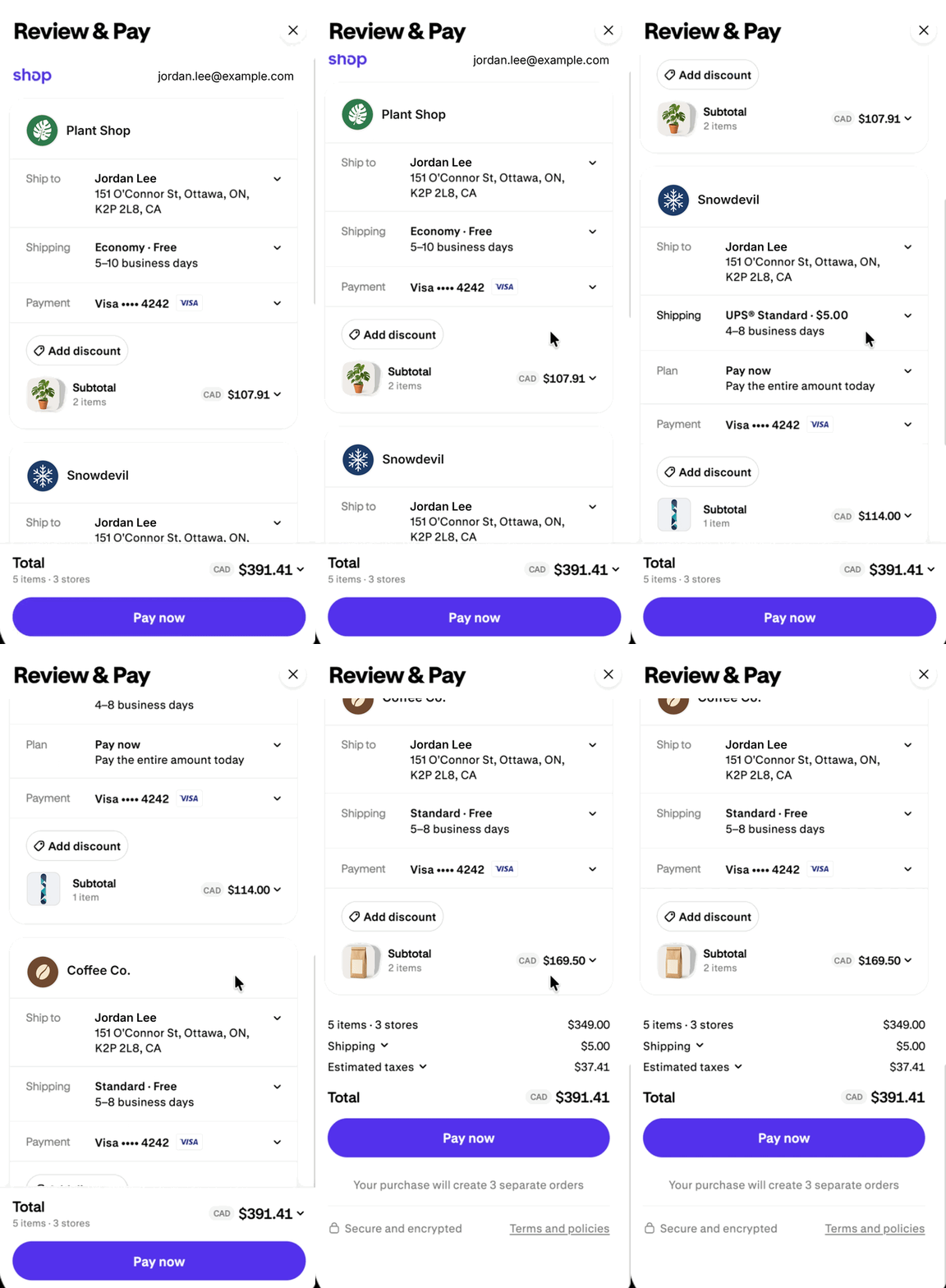
Universal Checkout turns one or more carts into one combined checkout. When a buyer finds products from multiple Shopify merchants, you can send them to one combined checkout for all of those items, instead of a separate checkout for each store.
In this tutorial, you'll create carts for two merchants using the Cart MCP, then pass both cart IDs to the create_checkout tool on the global UCP endpoint. The tool returns a top-level continue_url that leads to a combined checkout, and a continue_url for each cart's separate checkout that you can use if a combined checkout isn't available.
Universal Checkout is in early access and available by request. Tool names, inputs, and response fields might change before general availability. To request access for your API key, submit the Universal Checkout early access request form.
Universal Checkout is in early access and available by request. Tool names, inputs, and response fields might change before general availability. To request access for your API key, submit the Universal Checkout early access request form.
Anchor to What you'll learnWhat you'll learn
In this tutorial, you'll learn how to do the following tasks:
- Create multiple merchant carts.
- Create a combined checkout from multiple merchant carts.
- Render the combined checkout with Checkout Kit.
- Listen to checkout events and update your app.
- Handle carts that can't join a combined checkout.
Anchor to RequirementsRequirements
- You've generated API credentials from Catalogs in the Dev Dashboard and have your client ID and client secret. Use the same API key for the Catalog and Universal Checkout.
- Your API key has early access to Universal Checkout. To request access, submit the Universal Checkout early access request form with your client ID.
- You've authenticated with the Cart MCP for each merchant and with the global UCP endpoint. The global endpoint lists
create_checkoutonly for authenticated requests. - Your agent profile declares the draft
dev.shopify.shopping.universal_checkoutcapability. To create and host a profile, refer to Define a profile. - The buyer's carts use the same currency.
- The carts come from the Global Catalog. Refer to Choose carts that can share a checkout.
Anchor to Step 1: Create a cart for each merchantStep 1: Create a cart for each merchant
Universal Checkout combines carts. Create one cart per merchant with the create_cart tool on the Cart MCP. In this example, the buyer adds one item from shop1.myshopify.com and two items from shop2.myshopify.com.
https://shop1.myshopify.com/api/ucp/mcp
https://shop2.myshopify.com/api/ucp/mcp
Each response includes a cart id that ends with a key parameter. Store both IDs exactly as they're returned, including the key. Treat them as opaque values, and don't merge cart lines or build checkout URLs yourself.
If you call Cart MCP with an access token, then send the buyer's IP address in the Shopify-Buyer-IP header on every tools/call request. Refer to Buyer IP header.
Anchor to Step 2: Create a combined checkoutStep 2: Create a combined checkout
Call the create_checkout tool on the global UCP endpoint, and pass up to 15 merchant cart IDs in cart_ids. Send your access token in the Authorization: Bearer {access_token} header.
https://catalog.shopify.com/api/ucp/mcp
Shopify verifies every cart, then checks that the carts can share one checkout. The tool returns its payload in result.structuredContent. When the carts can share a checkout, that payload contains a top-level continue_url that leads to a combined checkout, and a continue_url for each cart's separate checkout:
Response: combined checkout created
The following fields are in result.structuredContent:
| Field | Description |
|---|---|
ucp.status | success when a combined checkout was created. Otherwise error. |
continue_url | A checkout link that combines all carts into one checkout. Returned only when ucp.status is success. |
carts[].id | The cart ID, exactly as you sent it. |
carts[].continue_url | The cart's separate checkout link, on the merchant's myshopify.com domain. Returned whenever every cart was verified, including when a combined checkout isn't available. |
messages | Empty on success. Otherwise, explains why a combined checkout isn't available. Refer to Handle incompatible carts. |
The top-level continue_url is a capability URL: anyone who has it can open the checkout. Don't parse it, build it yourself, share it with anyone other than the buyer, or log it.
The top-level continue_url is a capability URL: anyone who has it can open the checkout. Don't parse it, build it yourself, share it with anyone other than the buyer, or log it.
Anchor to Step 3: Render the universal checkout using Checkout KitStep 3: Render the universal checkout using Checkout Kit
Use Checkout Kit for Web to render the combined checkout, instead of redirecting your app to its URL. Pass the top-level continue_url from step 2 to the Universal Checkout element as src. Checkout Kit presents the session in a popup while your app stays open to receive checkout events.
Importing @shopify/checkout-kit/shopify-universal-checkout registers the element; the package root exports the ShopifyUniversalCheckout class and its types. The element keeps no checkout or error state for you to read back, so attach your listeners before calling open(), and call open() from the buyer's click so the browser allows the popup:
UniversalCheckout.tsx
The authenticatedContinueUrl prop is the combined checkout's continuation URL returned by your backend. If step 2 didn't return a top-level continue_url, then don't open a Universal Checkout element with a missing URL. Offer each cart's separate checkout continue_url instead.
The session URL grants access to the buyer's checkout: don't log it, persist it, or include it in diagnostics. Its path is /checkouts/uc/; the kit warns at the warn log level when src has another path. Create a new session for each checkout attempt. A URL that was already opened elsewhere can open as a copy of the session that reports no events to your page.
Authentication is the buyer's Shop Pay sign-in: a signed-out buyer sees a Shop sign-in page first. Until they finish, the element emits no start, update, or error, and the kit doesn't time out. A close with no earlier lifecycle event normally means the buyer dismissed the sign-in page before any checkout was shown, so let them open it again. It isn't proof that nothing happened: a session URL that was already opened elsewhere opens as a copy that reports no events to your page, so a close-only sequence on a reused URL is an unknown outcome. Create a fresh session for each attempt.
Anchor to Step 4: Listen to and respond to eventsStep 4: Listen to and respond to events
A Universal Checkout session contains a checkout for each participating merchant. Subscribe to start, update, complete, error, close, and blocked on the element to keep your app in sync while the buyer checks out. Lifecycle events are batched: event.detail is an array of entries, each with a context (sessionId, revision, shopId, and an optional status) and a full checkout snapshot for that shop. A batch doesn't have to contain every shop in the session, and the element keeps no state for you to read back: keep the latest entry per shop from start, update, and complete, and from error entries that carry a context. Events don't bubble, so attach them to the element.
Anchor to Decide how your app should respondDecide how your app should respond
| Event | When it fires | event.detail |
|---|---|---|
start | The child checkouts that became interactive | Initial full snapshots, {context, checkout}[] |
update | Shops whose state changed, including context.status changes. It can introduce a shop, even before start. Shops it omits are unchanged. | Full snapshots for the changed shops |
complete | Shops that completed. A session can emit more than one complete, and sibling shops can keep going. Ejected shops aren't repeated here. An ejection is reported by the entry that carries context.status ejected, in update or in error; an error entry includes the shop's final snapshot only when one exists and can arrive before any snapshot. Treat that entry as the shop's terminal state, and handle it idempotently if both arrive. | {context, checkout}[] |
error | A shop failed, the session failed, or the kit couldn't present (for example an unsupported browser or an invalid URL). | {context?, checkout?, error}[]; a resource error can include that shop's final snapshot |
close | The presentation closed | null |
blocked | The browser blocked the checkout window. The built-in overlay offers a retry; dismissing it emits close. Call open() again from a user action; calls made from this listener are ignored. | {code: 'popup_blocked'} |
A resource context.status of active means use the child's checkout.status; completed marks a completed shop; failed is a retryable failure that doesn't emit error; ejected means the shop no longer participates. Unknown statuses are reported as unknown and never mean success. These states never overwrite the child snapshot's own checkout.status.
Anchor to Handle partial outcomesHandle partial outcomes
complete and error are outcomes, and complete doesn't by itself end the session: a merchant's order arrives in a complete batch while sibling shops can keep going, and the kit ends the session once at least one shop has completed and every other shop has completed, failed terminally, or been ejected. A session-level error ends it immediately. close and blocked are separate presentation events and say nothing about success.
- Terminal outcomes are yours to render. A resource error doesn't close or fail the other shops, and one failed shop doesn't mean the session failed. Don't close the presentation on the first
completeunless you mean to stop the remaining shops. Acloseaftercompleteleaves your confirmation state as is. - Custom overlay. If you supply
slot="overlay", you replace the built-in focus and close controls and must provide your own.
A multi-shop session can end in more states than a single checkout. Handle each of the following:
- A buyer who closes the presentation before signing in (
closeonly) - A shop introduced by an
updatebeforestart - Partial completion: some shops complete while others remain
active - A retryable
failedstatus that returns toactive, with noerror - One shop ejected while the others continue
- A session-level error that ends the session as a whole
- A blocked popup (
blocked), retried from the overlay or by a fresh buyer gesture
Anchor to Handle incompatible cartsHandle incompatible carts
Some carts can't be combined, such as carts in different currencies. During early access, a combined checkout includes every cart, or fails when any of the carts are incompatible. When the carts can't share a checkout, the response doesn't include a top-level continue_url. It returns each cart's separate checkout continue_url and a message that explains why.
For the most reliable results, build carts from products that you find in the Global Catalog. create_checkout checks the carts' compatibility when it creates the checkout, and might return an error if a cart doesn't support a shared currency.
Anchor to Recognize the responseRecognize the response
| Response | How to recognize it | Recommended action |
|---|---|---|
| Combined checkout created | ucp.status is success and the top-level continue_url is present. | Render the top-level continue_url with Checkout Kit. |
| Separate checkouts | ucp.status is error, the top-level continue_url is missing, and carts is present. | Link to each cart's separate checkout continue_url. Refer to Checkout errors. |
| Request rejected | The tool result has isError: true, and the response includes no carts. | Fix the request, or create new carts, based on the message code. |
The following example shows a response where the carts use different currencies:
Response: separate checkouts
The following example shows a rejected request, where a cart expired or its key didn't match:
Response: request rejected
If cart_ids is missing, empty, has more than 15 entries, or contains a value that isn't a string, then the endpoint returns a JSON-RPC error instead of a tool result.
Log the message codes that you receive, but don't log buyer information, cart keys, or continue_url values. If you receive checkout_timeout, then don't retry automatically, because a checkout might already exist. Send the buyer to each cart's continue_url instead.
Log the message codes that you receive, but don't log buyer information, cart keys, or continue_url values. If you receive checkout_timeout, then don't retry automatically, because a checkout might already exist. Send the buyer to each cart's continue_url instead.
Anchor to Next stepsNext steps
- Search the Global Catalog to curate products from multiple merchants.
- Review the Cart MCP and Checkout MCP references.
- Monitor orders that buyers place through your app.