Build an ERP integration for Shopify Collective
Shopify Collective connects suppliers and retailers on Shopify. Suppliers share products through price lists, retailers import and sell those products, and when customers place orders, Collective automatically routes them to suppliers for fulfillment. Payments between retailers and suppliers are handled automatically.
If you're new to Shopify Collective, review About Shopify Collective to understand key features and how it works before continuing.
This tutorial shows you how to add Collective capabilities to an existing enterprise resource planning (ERP) system or external system integration. If your client uses an external system as their source of truth for products and orders but wants to leverage the Collective ecosystem to expand their retail distribution, then this integration enables them to:
- As a supplier: Automatically publish products from their system to Collective and receive retailer orders directly in their ERP for fulfillment.
- As a retailer: Identify which incoming orders contain Collective products and track supplier fulfillment status.
If you're new to building Shopify integrations, start with product synchronization and webhook basics before continuing.
If you're new to building Shopify integrations, start with product synchronization and webhook basics before continuing.
Anchor to What you'll learnWhat you'll learn
In this tutorial, you'll learn how to do the following Collective-specific tasks:
- Publish products to the Collective (Supplier) channel so they can be shared via price lists.
- Identify and filter orders that come from Collective using tags.
- Understand the Collective order routing workflow and fulfillment responsibilities.
- Configure Collective-specific identifiers for tracking supplier-retailer relationships.
Anchor to RequirementsRequirements
- You've created a Partner account and a development store.
- Your app has the
write_products,read_products,write_orders,read_orders, andwrite_webhooksaccess scopes. - You understand how GraphQL works.
- You're familiar with Shopify Collective concepts.
- You have an existing integration that syncs products and handles orders with Shopify.
Anchor to Understanding your integration's roleUnderstanding your integration's role
Your integration sits between your external system (ERP, OMS, or other platform) and Shopify. It adds Collective capabilities on top of your existing product and order sync. Your responsibilities differ depending on whether your client is a supplier or a retailer.
| Role | What your integration does | What Collective handles automatically |
|---|---|---|
| Supplier | Publishes products to the Supplier channel, receives and fulfills orders from retailers | Price list sharing, inventory sync across stores, order routing, payment processing |
| Retailer | Identifies Collective orders, tracks fulfillment status | Product importing, inventory sync, order splitting, supplier payments |
Anchor to As a supplierAs a supplier
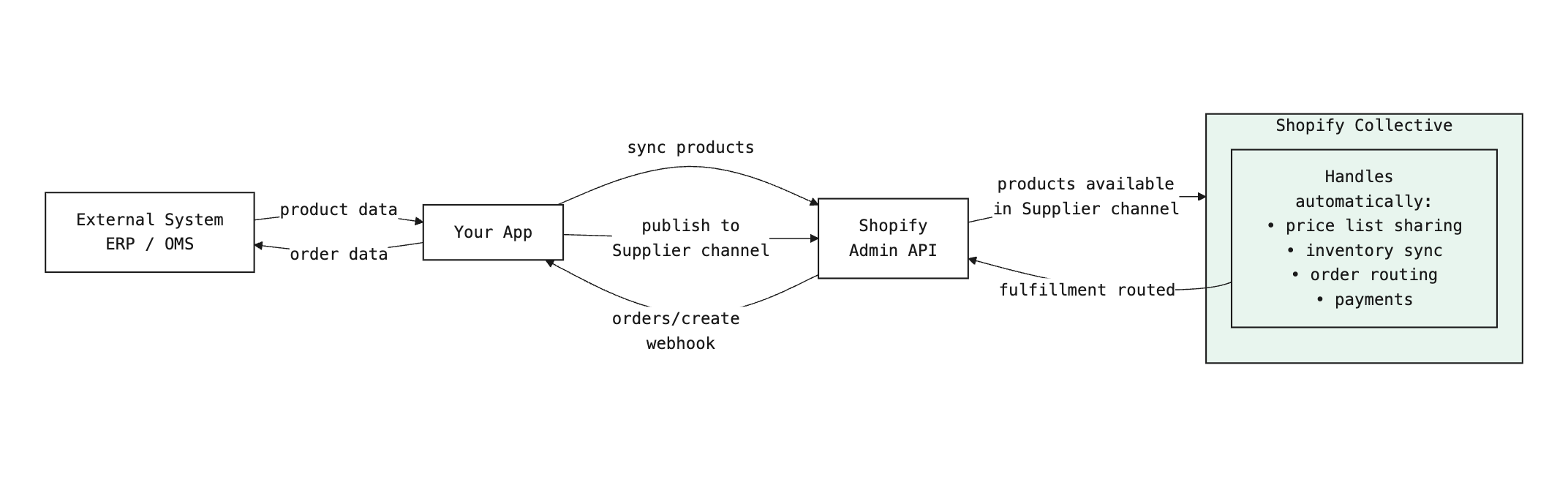
Products flow from your external system into Shopify and are published to the Collective Supplier channel, making them available for retailers to import via price lists. When retailers place orders, Shopify sends them to your app via webhooks for fulfillment in your ERP.
Anchor to As a retailerAs a retailer
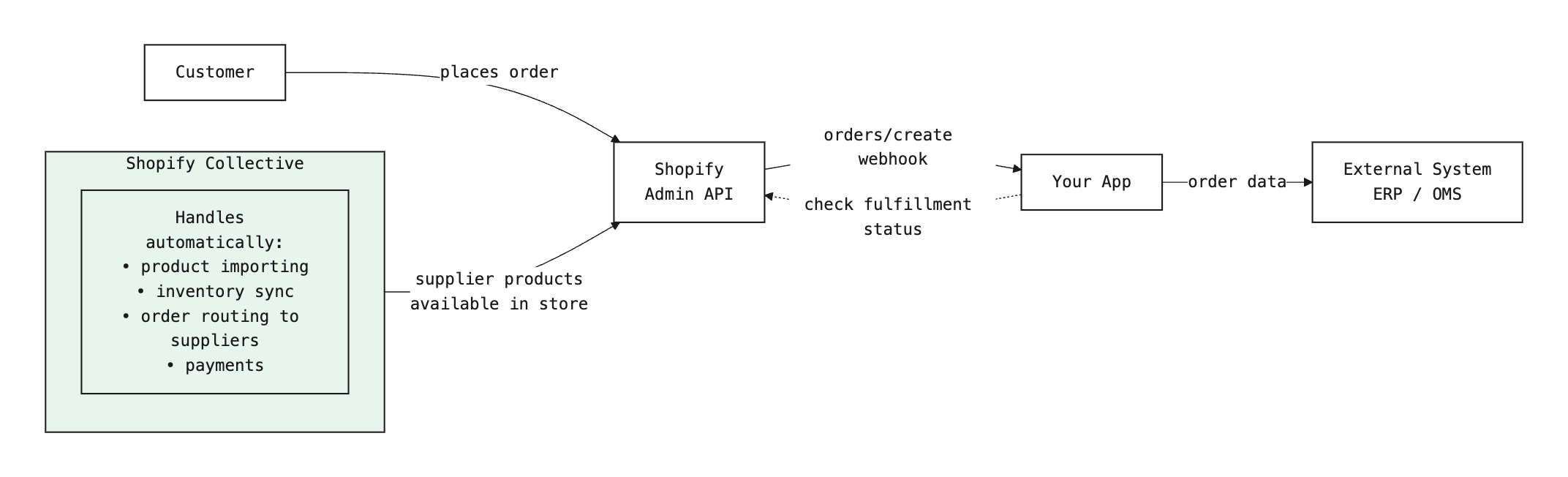
Collective automatically imports and syncs supplier products into your Shopify store. Your integration listens for incoming orders tagged with "Shopify Collective" via webhooks and routes them to your external system for tracking.
Price lists are managed in the Shopify admin, not via API. After your integration publishes products to the Supplier channel, suppliers create and share price lists with retailers through the Collective app.
Price lists are managed in the Shopify admin, not via API. After your integration publishes products to the Supplier channel, suppliers create and share price lists with retailers through the Collective app.
Anchor to How Collective order routing worksHow Collective order routing works
Collective automatically handles order routing between retailers and suppliers. Understanding this workflow helps you process orders correctly in your ERP.
Anchor to The order flowThe order flow
When a customer purchases Collective products on a retailer store:
- Order created on retailer store with
"Shopify Collective"tag. - After payment and fraud checks (2 minute delay), Collective sends fulfillment request to supplier.
- Order created on supplier store with
"Shopify Collective"and"{$retailer_name}"tags. - Supplier fulfills order directly to end customer (not to retailer).
- Payment processed automatically between retailer and supplier.
Anchor to What your integration handlesWhat your integration handles
Your integration's responsibilities differ based on whether you're a supplier or retailer:
As a supplier:
- Receive
orders/createwebhook for orders tagged with"Shopify Collective"and"{$retailer_name}". - Extract retailer name from tags to identify which retailer placed the order.
- Process order through your existing fulfillment workflow.
- Mark order as fulfilled in Shopify using
fulfillmentCreate.
As a retailer:
- Receive
orders/createwebhook for orders containing Collective products. - Identify which items are from suppliers using tags (
"Shopify Collective"and"{$supplier_name}"). - Track fulfillment status (suppliers fulfill directly to customers).
- Handle non-Collective items in your order through your normal fulfillment process.
Collective handles the complexity of order splitting (when an order contains products from multiple suppliers), payment routing, and shipping label generation. Your integration only needs to process orders and update fulfillment status.
Collective handles the complexity of order splitting (when an order contains products from multiple suppliers), payment routing, and shipping label generation. Your integration only needs to process orders and update fulfillment status.
Anchor to Step 1: Configure Collective identifiersStep 1: Configure Collective identifiers
Add Collective-specific identifiers to your integration's data model so you can track products and orders across Shopify and your external system.
How you store these values depends on your system. You might add columns to existing tables, use extension tables, or maintain a separate integration database.
How you store these values depends on your system. You might add columns to existing tables, use extension tables, or maintain a separate integration database.
Anchor to Required Shopify IDsRequired Shopify IDs
Add these Shopify IDs to your integration's database:
| Your database field | Stores this Shopify ID | Example value |
|---|---|---|
shopifyProductId | Product id from API responses | gid://shopify/Product/8234567890 |
shopifyVariantId | Variant id from API responses | gid://shopify/ProductVariant/4567890123 |
shopifyOrderId | Order id from webhooks | gid://shopify/Order/1234567890 |
shopifyLineItemId | Line item id from webhooks | gid://shopify/LineItem/1234567890 |
These are your local database field names. You'll extract Shopify's id values from API responses and webhooks (shown in later steps) and store them in these fields.
These are your local database field names. You'll extract Shopify's id values from API responses and webhooks (shown in later steps) and store them in these fields.
Anchor to Collective-specific trackingCollective-specific tracking
To identify Collective orders and track the supplier-retailer relationship, also add these fields to your database:
| Field | Purpose | How to get it |
|---|---|---|
tags | Identifies Collective orders | From order webhooks: orders have "Shopify Collective" tag |
retailerName | For suppliers: which retailer placed this order | From order tags: {$retailer_name} tag |
supplierName | For retailers: which supplier fulfills this order | From order tags: {$supplier_name} tag |
Learn more about Collective order tags and workflows.
Anchor to Step 2: Publish products to Collective (suppliers only)Step 2: Publish products to Collective (suppliers only)
After creating or updating a product in Shopify, update your product handler to call publishToCollective() to make it available for price lists.
This step is only for suppliers who create products. Retailers import products from supplier price lists and don't need to publish products.
This step is only for suppliers who create products. Retailers import products from supplier price lists and don't need to publish products.
Anchor to Create the API clientCreate the API client
Create a lib/shopify.server.ts file with a GraphQL client:
Anchor to Get the Collective publication IDGet the Collective publication ID
Add a getCollectivePublicationId() function to find the Collective publication. As described in the product sharing guide, you retrieve it by listing all store publications and finding the one with a catalog.title of "Collective (Supplier)":
Cache the Collective publication ID in your application. It doesn't change for a given store.
Anchor to Publish products to CollectivePublish products to Collective
Add a publishToCollective() function to your API client, then call it from your product creation and update handlers after every successful Shopify product operation:
Call publishToCollective() after:
- Creating a new product in Shopify
- Updating product availability or inventory
Publishing to the Supplier channel makes products available for inclusion in price lists. Suppliers create price lists in the Shopify admin and select which products to share with specific retailers. Learn more about creating price lists.
Publishing to the Supplier channel makes products available for inclusion in price lists. Suppliers create price lists in the Shopify admin and select which products to share with specific retailers. Learn more about creating price lists.
Anchor to Step 3: Filter and handle Collective ordersStep 3: Filter and handle Collective orders
Update your webhook handler to identify Collective orders by their tags and route them to your external system for processing.
Anchor to Identify Collective ordersIdentify Collective orders
Update your handleOrderCreate function to check the tags and determine whether an order came from Collective. In the following example code, storeOrderInERP represents your existing order storage logic. Replace this with your actual database write, API call, or OMS integration.
For suppliers, Collective orders have two tags: "Shopify Collective" and "{$retailer_name}". For retailers, orders have "Shopify Collective" and "{$supplier_name}". Use these tags to identify the relationship.
For suppliers, Collective orders have two tags: "Shopify Collective" and "{$retailer_name}". For retailers, orders have "Shopify Collective" and "{$supplier_name}". Use these tags to identify the relationship.
Anchor to Subscribe to order webhooksSubscribe to order webhooks
Subscribe to these webhooks to receive Collective orders:
orders/create- New orders from retailersorders/updated- Order status updates (payment, fulfillment)
Learn more about subscribing to webhooks.
Anchor to Add a webhook endpointAdd a webhook endpoint
Add a route to handle incoming webhooks:
Always verify webhooks using HMAC validation before processing them. Learn more about webhook verification.
Anchor to Check order fulfillment statusCheck order fulfillment status
Query the order's displayFulfillmentStatus to check whether the supplier has fulfilled it:
Anchor to Next stepsNext steps
- Learn more about Collective order fulfillment.
- Set up order cancellations and returns.
- Implement shipping rate customization.
Anchor to Additional resourcesAdditional resources
If you need to implement general Shopify integration features alongside Collective:
-
Learn how to sync products from your external system to Shopify.
-
Set up webhook subscriptions to receive and verify order events.
-
Use the GraphQL Admin API to query and manage orders.
-
Use bulk operations to sync large datasets efficiently.