POS list
The POS list component displays structured data in rows, using item templates composed of other web components. Use it to present large collections with consistent formatting and row interactions.
Anchor to Use casesUse cases
- Object display: Display and link to records such as cart items, customers, or products, with images and descriptions.
- Menu items: Display menu items and settings with switches, or a chevron icon to indicate navigation.
- Selectable options: Display selectable options, filters, and actions.
- Mixed layouts: Combine section headers, dividers, and content rows in one list by giving each kind of row its own template.
- Paginated data: Show paginated data with a loading indicator and an end-reached callback.
Anchor to PropertiesProperties
Displays a virtualized list of rows rendered from plain data and item templates compiled with .
- Anchor to idididstringstring
A unique identifier for the element.
- Anchor to itemTemplatesitem
Templatesitem Templates POSListTemplatesPOSListTemplates Reusable templates that define the layout of list rows. Use
to define one or more<s-pos-list-item>templates.- Anchor to loadingMoreloading
Moreloading More booleanbooleanDefault: falseDefault: false Whether more data is being loaded. Set to
truewhen paginating and fetching additional data for the list. POS shows a progress indicator after the last row.- Anchor to rowsrowsrowsPOSListRow[]POSListRow[]
An array of POSListRow objects that define the content of each row in the list.
POSListTemplates
- templates
POSListItemTemplate[]
POSListItemTemplate
One `<s-pos-list-item templateId="…">` root.
- children
POSListTemplateNode[] - templateId
string - type
`button` rows fire `rowclick`; `text` rows are static content.
'button' | 'text'
POSListTemplateNode
{
      kind: 'element';
      tag: string;
      props?: Record<string, POSListTemplateProp>;
      children?: POSListTemplateNode[];
    } | {
      kind: 'text';
      segments: POSListTemplateSegment[];
    } | {
      kind: 'if';
      path: string;
      children: POSListTemplateNode[];
    }
POSListTemplateProp
{
      kind: 'literal';
      value: string | boolean;
    } | {
      kind: 'field';
      path: string;
    } | {
      kind: 'segments';
      segments: POSListTemplateSegment[];
    }
POSListTemplateSegment
A literal string piece or a row-field lookup within interpolated text.
string | {
      path: string;
    }
POSListRow
A row supplied to `s-pos-list`. Rows are plain data; every member other than `id` and `templateFor` is available to the row's item template through `{{path}}`, `bind:prop`, and `{{#if path}}` bindings.
- [field: string]
unknown - id
A unique identifier for the row. Keys virtualization and identity across incremental loads.
string - templateFor
The `templateId` of the item template that renders this row.
string
Anchor to EventsEvents
The POS list component provides event callbacks for handling user interactions. Learn more about handling events.
- Anchor to loadmoreloadmoreloadmore(event: CallbackEvent<"s-pos-list">) => void(event: CallbackEvent<"s-pos-list">) => void
Callback when the list has scrolled near its end and more rows should be loaded.
- Anchor to rowclickrowclickrowclick(event: POSListRowClickEvent) => void(event: POSListRowClickEvent) => void
Callback when a
buttonrow is activated.event.detail.itemis the row andevent.detail.indexits position inrows. Rows rendered by atexttemplate never fire it.
CallbackEvent
- bubbles
boolean - cancelable
boolean - composed
boolean - currentTarget
HTMLElementTagNameMap[T] - detail
any - eventPhase
number - target
HTMLElementTagNameMap[T] | null
POSListRowClickEvent
The event fired when a `button` row is activated. `event.detail.item` is the activated row, and `event.detail.index` is its position in `rows`.
CallbackEvent<'s-pos-list'> & {
  detail: {
    item: POSListRow;
    index: number;
  };
}
Anchor to SlotsSlots
Content slots for the POS list.
- Anchor to headerheaderheaderHTMLElementHTMLElement
Content displayed before the rows as part of the list's scrollable content.
Anchor to TemplateTemplate
Each kind of row is laid out by a template. Write each template as an <s-pos-list-item> element, compile the templates with posListTemplate, and pass the result to itemTemplates.
Anchor to Define templatesDefine templates
Call posListTemplate as a tagged template, with one <s-pos-list-item> for each kind of row. Inside it, use the same components as the rest of your extension. Define templates outside your component, at the top level of the file, so they're compiled once instead of on every render.
Anchor to List item attributesList item attributes
| Attribute | Required | Description |
|---|---|---|
templateId | Yes | A unique name for the template. Rows select a template by this name. |
type | No | button (the default): the row is one button and fires rowclick.text: the row is static content with no button role. |
<s-pos-list-item> takes no other attributes, and it must be at the top level of the template, not inside another element.
Anchor to Connect rows to templatesConnect rows to templates
Each row's templateFor is the templateId of the template that renders it, and the row's fields fill the template's placeholders: {{name}} shows the row's name. Every row also needs a unique string id.
Row id | templateFor | Rendered by |
|---|---|---|
summer | section-header | <s-pos-list-item templateId="section-header"> |
graphic-tee | product | <s-pos-list-item templateId="product"> |
canvas-tote | product | <s-pos-list-item templateId="product"> |
Several rows can share a template. A row whose templateFor matches no templateId renders nothing.
Anchor to PathsPaths
A path names a field on the row. Use dots to reach nested fields. Take the graphic-tee row:
| Path | Value in this row |
|---|---|
name | 'Graphic tee' |
image.src | 'placeholder.png' |
onSale | true |
active | true |
A path that doesn't exist on the row resolves to undefined: text and attributes show it as empty, and {{#if}} hides its content.
Note: Paths can use letters (A–Z and a–z), digits, _, and dots, which is narrower than JavaScript property names. A field such as sale-price, $id, or café can't be read, so name row fields like salePrice.
Anchor to Template syntaxTemplate syntax
| Syntax | Example | What it does |
|---|---|---|
{{path}} in text | <s-text>{{name}}</s-text> | Shows the field as text: Graphic tee. |
{{path}} in an attribute | alt="Photo of {{name}}" | Builds a string from text and fields: "Photo of Graphic tee".Note: The result is always a string. On a boolean prop, any non-empty string counts as true, so checked="{{active}}" turns the switch on even when active is false. Use bind:checked="active" instead. |
bind:prop="path" | <s-switch bind:checked="active" /> | Passes the field's value with its own type: the switch gets true. Use it for booleans, numbers, and arrays. |
{{#if path}}…{{/if}} | {{#if onSale}}<s-badge tone="success">Sale</s-badge>{{/if}} | Shows the content only when the field is truthy: graphic-tee shows the badge and canvas-tote doesn't. Blocks can't nest, and there's no else. |
Anchor to Common errorsCommon errors
- An invalid template stops your extension from loading.
posListTemplatechecks templates when your extension runs, not when you build it, so the build succeeds. When a template is invalid, POS shows a generic "Error loading extension" message, not the problemposListTemplatefound. Templates are static, so an invalid template fails every time: after you change a template, open your extension withshopify app devand fix any error before you release. - A row with a non-string
idor notemplateForreplaces your extension with an error. POS APIs return numeric IDs, so convert them, for exampleid: product.id.toString(). A row whoseidrepeats another row's may not render, and POS doesn't report it. - Rows without
itemTemplatesrender nothing. IfitemTemplatesisn't set, the list shows no rows and POS doesn't report an error. The header and loading indicator still render.
Anchor to ExamplesExamples
Anchor to Display rows with item templatesDisplay rows with item templates
Define a section-header template for static headings and a product template for tappable rows, and keep the rows in state. Tapping a product row fires onRowClick; the handler finds the row from event.detail.item and flips its active field, which updates the switch bound to it. A banner in the header slot tells the POS user what tapping does.Display rows with item templates

Display rows with item templates
Anchor to Load rows incrementallyLoad rows incrementally
POS calls onLoadMore when the POS user scrolls near the end of the list. Append the next page of rows and set loadingMore while it loads, so the list shows a loading indicator. Ignore calls while a page is loading, and stop once every row is loaded. Here a one-second timer stands in for a real request.Load rows incrementally
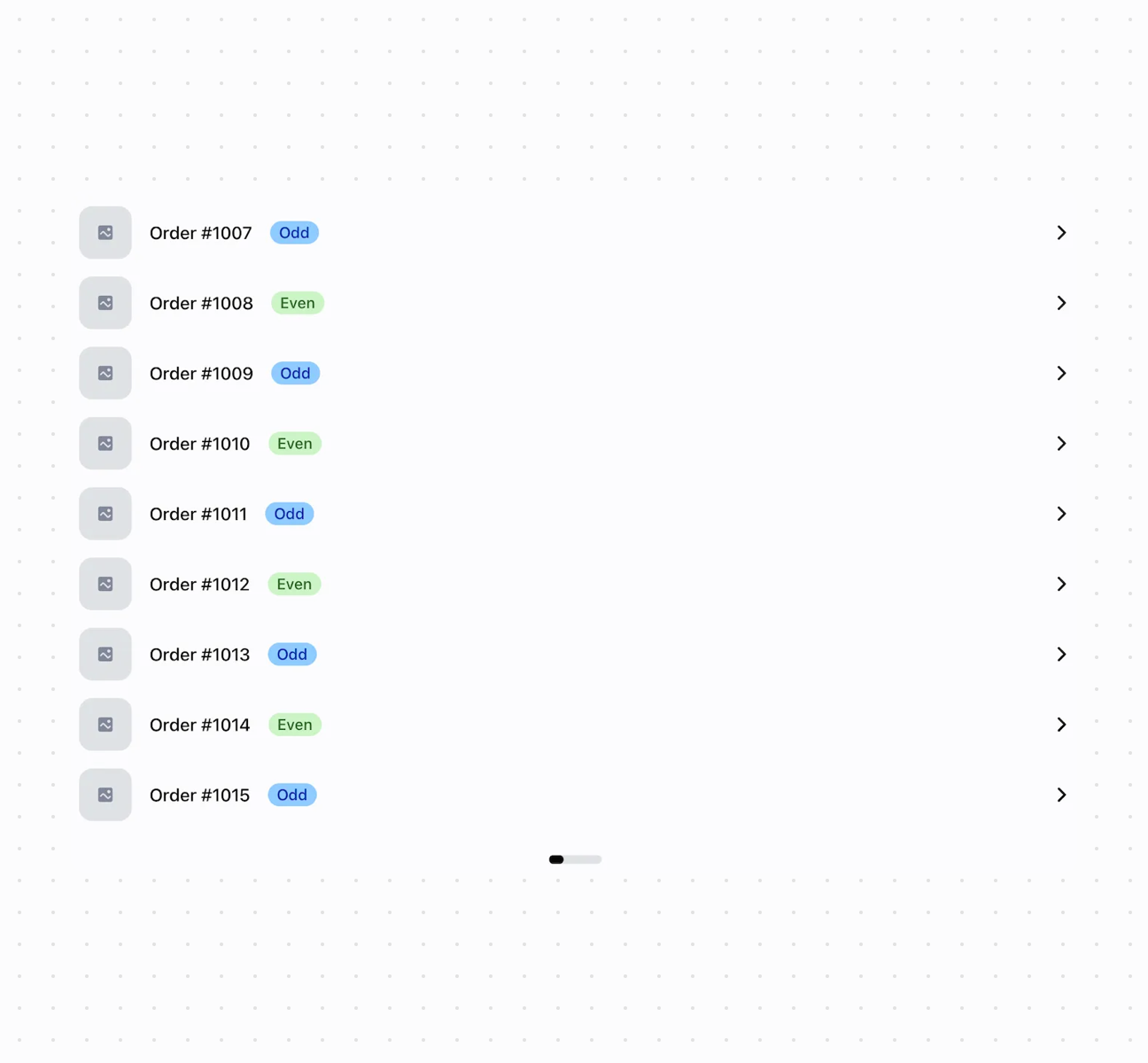
Load rows incrementally
Anchor to Best practicesBest practices
- Compile templates once: Define templates outside your component, at the top level of the file, so they're compiled once instead of on every render.
- Check new templates in POS: TypeScript doesn't check the markup inside a template. Unknown tags are skipped, but their children still render; props a component doesn't declare are ignored; and for props with a fixed set of allowed values, an unsupported value falls back to the prop's default.
- Use unique string row IDs: Give each row a unique string
idthat stays the same when you append or update rows. Convert numeric IDs from POS APIs, for exampleproduct.id.toString(). - Put display-ready values in rows: Format dates, prices, and other values as strings before you add them to a row. A
Date,Map,Set, or class instance doesn't render as readable text. - Keep rows flat: Put the fields a template reads directly on the row, or one level deep, and give them the type the component expects.
bind:proppasses values through unchanged, so a string"false"stays truthy. - Prefer
bind:for non-string props: Use{{path}}for text and string attributes, andbind:propwhenever the component expects a boolean, number, or array. - Prevent duplicate loads: Ignore
onLoadMoreevents while a request is already in progress or after you reach the final page. - Keep interactions consistent: Every row rendered by a
buttontemplate is one button. Usetype="text"for headings, dividers, totals, and other informational rows so they don't announce as buttons. - Place headings based on scroll behavior: Put a page-level heading outside the list. Use the
headerslot when the heading, a search field, or a banner should scroll with the rows. - Don't nest long lists in a scroll box:
s-pos-listscrolls on its own. A short list insides-scroll-boxworks, but place long or incrementally loaded lists directly on the screen rather than inside another scrolling container.
Anchor to LimitationsLimitations
- Nothing inside a row is individually interactive: a row is either one button or static content.
rowclickfires on the list, withevent.currentTargetset to thes-pos-listelement and the activated row and its index inevent.detail. To change a switch in a row, update the row's data. rowclickandloadmoreare element events. An error thrown or a promise rejected in the listener stays in your extension and isn't reported by POS as an extension error, so handle failures in the listener.- Templates are static and compiled by
posListTemplate. You can't interpolate values into a template or change a template per row; use{{#if}}and separate templates for variations. {{#if}}blocks can't nest and have noelse.{{else}}isn't a branch: like any other{{path}}, it reads a row field, here one namedelse. Precompute derived flags on the row instead.- A row's layout uses the same components as the rest of your extension, so a template can't layer or position elements, for example to place a badge over an image.