Register details
The register details screen displays information about the current register and cash drawer status. This screen provides access to cash management operations and register-specific tools for retail staff.
Anchor to Use casesUse cases
- Cash drawer operations: Open drawers for manual verification outside transactions.
- Register information: Display cash totals, shift summaries, and till balances.
- Cash management: Launch workflows for deposits, withdrawals, and reconciliation.
- Compliance features: Implement dual-authorization, audit trails, and cash limit alerts.
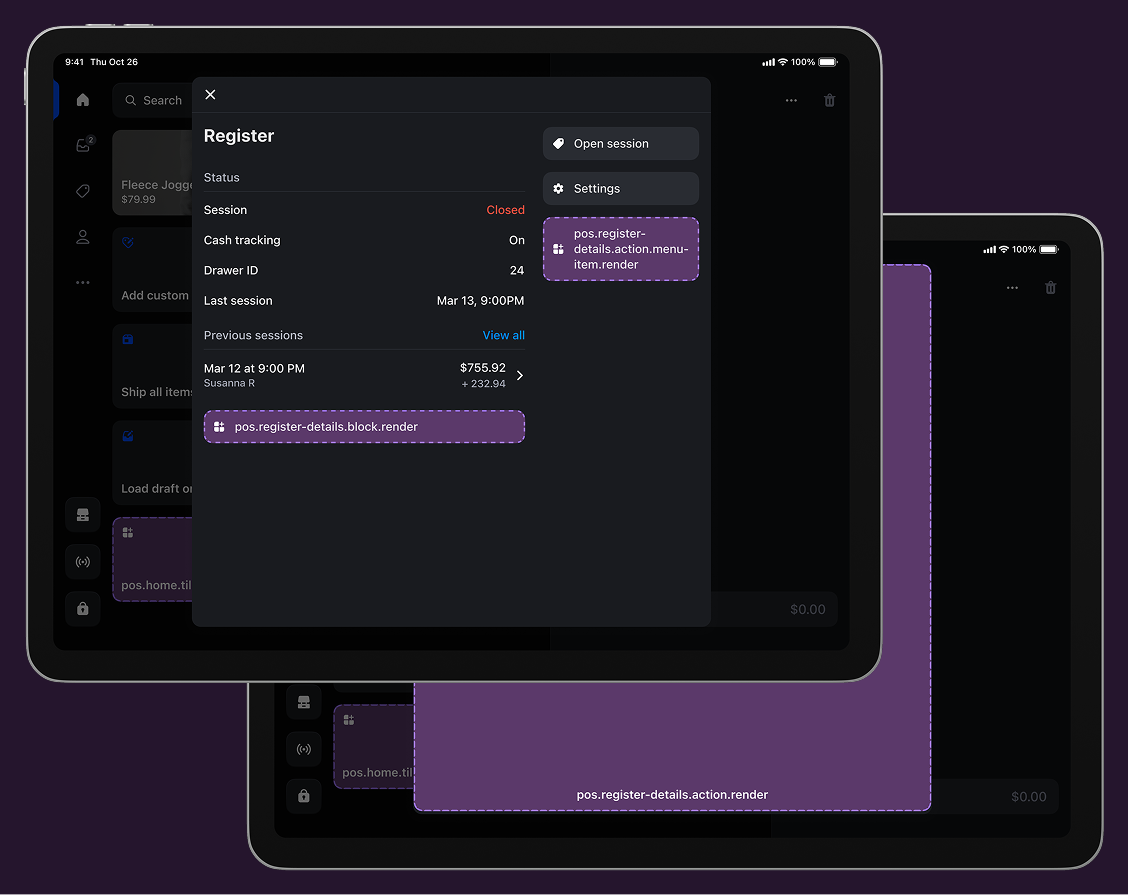
Anchor to Register details targetsRegister details targets
Use these targets for register-specific customizations, cash management operations, or compliance tools that enhance cash handling workflows.
pos.register-details.action.menu-item.render
Renders a single interactive button component as a menu item in the register details action menu. Use this target for register-specific operations like opening the cash drawer, launching cash management workflows, or accessing register verification tools.
Extensions at this target can access the Cash Drawer API to control cash drawer operations. Menu items typically invoke shopify.action.presentModal() to launch the companion modal for complete workflows.
jsx
Examples
Create a register details action menu item
Description
Add an interactive menu item to the register details action menu for register-specific operations. This example shows how to create a menu item that accesses register data and launches modal workflows for tasks like cash management, shift reporting, or register configuration.
jsx
import {render} from 'preact';

export default async () => {
  render(<Extension />, document.body);
};

const Extension = () => {
  return <s-button onClick={() => shopify.action.presentModal()} />;
};
Anchor to Register details action (modal) ,[object Object]Register details action (modal) target
pos.register-details.action.render
Renders a full-screen modal interface launched from register details menu items. Use this target for complex register workflows that require forms, multi-step processes, or detailed information displays beyond what a simple button can provide.
Extensions at this target have access to the Cash Drawer API to control cash drawer operations and support workflows with multiple screens, navigation, and interactive components.
Supported components
Supported components
jsx
Examples
Create a register details action modal
Description
Build a full-screen modal workflow launched from a register details action menu item. This example demonstrates creating register-specific experiences with multi-step processes, forms, and register data access for operations like cash drawer management or shift reports.
jsx
import {render} from 'preact';

export default async () => {
  render(<Extension />, document.body);
};

const Extension = () => {
  return (
    <s-page heading="Register Details Action">
      <s-scroll-box>
        <s-text>
          This is a action extension on the register details screen
        </s-text>
      </s-scroll-box>
    </s-page>
  );
};
Anchor to Register details block ,[object Object]Register details block target
pos.register-details.block.render
Renders a custom section directly within the register details screen. Use this target to display register-specific information or provide quick access to register operations without requiring a separate modal interface.
Extensions at this target appear inline on the register details screen and can include interactive elements like buttons in secondary action slots. This target is ideal for displaying register status information, quick actions, or alerts that should be immediately visible.
jsx
Examples
Create a register details information block
Description
Add a custom information section to the register details screen for displaying supplementary register data. This example shows how to create a block that provides additional register information, cash status, or shift details alongside standard register details.
jsx
import {render} from 'preact';

export default async () => {
  render(<Extension />, document.body);
};

const Extension = () => {
  return (
    <s-pos-block>
      <s-text>This is a block extension on the register details screen</s-text>
      <s-button
        slot="secondary-actions"
        onClick={() => shopify.cashDrawer.open()}
      >
        Open drawer
      </s-button>
    </s-pos-block>
  );
};
Anchor to Best practicesBest practices
- Control cash drawer access appropriately: Ensure cash drawer operations are protected with appropriate authorization checks and comply with your security requirements. Consider implementing PIN verification, manager approval, or audit logging for cash drawer operations initiated by your extension.
- Show clear register status information: When displaying register information in block extensions, ensure the data is current and clearly labeled. Show relevant details like current shift totals, last cash verification time, or pending cash management tasks that help staff understand the register state at a glance.
- Provide immediate feedback for operations: Show clear success or error messages when performing cash drawer operations or other register actions. Use toast notifications or banner messages to confirm actions like "Cash drawer opened successfully" or "Unable to open drawer: hardware error."
- Handle hardware errors gracefully: Cash drawer operations depend on connected hardware that may be unavailable or malfunctioning. Implement error handling that explains the issue clearly and suggests resolution steps, like "Cash drawer not responding. Check hardware connections and try again."
- Use action-oriented labels: Use clear, action-oriented labels for buttons and menu items that describe what the extension will do. Use "Open cash drawer" or "Start cash count" instead of generic labels like "Cash management app" or "Register tools."
- Support offline scenarios: Consider that register operations may need to work when connectivity is limited. Use the Connectivity API to detect network status and either queue operations for later sync or clearly communicate when features require network access.
Anchor to LimitationsLimitations
-
You can only render one button component for each POS UI extension using the action (menu item) target.
-
Cash drawer operations require compatible hardware connected to the POS device. The Cash Drawer API will return an error if no cash drawer is connected or if the hardware is unavailable.
-
Register details screen access is controlled by Shopify POS permissions. Extensions at these targets will only appear for staff members with appropriate permissions to access register management features.