Popover
The popover component displays contextual content in an overlay triggered by a button. Use for secondary actions, settings, or information that doesn't require a full modal.
For interactions that need more space or user focus, such as confirmations or complex forms, use modal instead.
Popovers don't support nesting — opening a second popover while one is already visible closes the first. Popovers open in response to buyer interaction only, not programmatically on page load.
Supported targets
- purchase.
checkout. actions. render-before - purchase.
checkout. block. render - purchase.
checkout. cart-line-item. render-after - purchase.
checkout. cart-line-list. render-after - purchase.
checkout. contact. render-after - purchase.
checkout. delivery-address. render-after - purchase.
checkout. delivery-address. render-before - purchase.
checkout. footer. render-after - purchase.
checkout. header. render-after - purchase.
checkout. payment-method-list. render-after - purchase.
checkout. payment-method-list. render-before - purchase.
checkout. pickup-location-list. render-after - purchase.
checkout. pickup-location-list. render-before - purchase.
checkout. pickup-location-option-item. render-after - purchase.
checkout. pickup-point-list. render-after - purchase.
checkout. pickup-point-list. render-before - purchase.
checkout. reductions. render-after - purchase.
checkout. reductions. render-before - purchase.
checkout. shipping-option-item. details. render - purchase.
checkout. shipping-option-item. render-after - purchase.
checkout. shipping-option-list. render-after - purchase.
checkout. shipping-option-list. render-before - purchase.
thank-you. announcement. render - purchase.
thank-you. block. render - purchase.
thank-you. cart-line-item. render-after - purchase.
thank-you. cart-line-list. render-after - purchase.
thank-you. customer-information. render-after - purchase.
thank-you. footer. render-after - purchase.
thank-you. header. render-after
Supported targets
- purchase.
checkout. actions. render-before - purchase.
checkout. block. render - purchase.
checkout. cart-line-item. render-after - purchase.
checkout. cart-line-list. render-after - purchase.
checkout. contact. render-after - purchase.
checkout. delivery-address. render-after - purchase.
checkout. delivery-address. render-before - purchase.
checkout. footer. render-after - purchase.
checkout. header. render-after - purchase.
checkout. payment-method-list. render-after - purchase.
checkout. payment-method-list. render-before - purchase.
checkout. pickup-location-list. render-after - purchase.
checkout. pickup-location-list. render-before - purchase.
checkout. pickup-location-option-item. render-after - purchase.
checkout. pickup-point-list. render-after - purchase.
checkout. pickup-point-list. render-before - purchase.
checkout. reductions. render-after - purchase.
checkout. reductions. render-before - purchase.
checkout. shipping-option-item. details. render - purchase.
checkout. shipping-option-item. render-after - purchase.
checkout. shipping-option-list. render-after - purchase.
checkout. shipping-option-list. render-before - purchase.
thank-you. announcement. render - purchase.
thank-you. block. render - purchase.
thank-you. cart-line-item. render-after - purchase.
thank-you. cart-line-list. render-after - purchase.
thank-you. customer-information. render-after - purchase.
thank-you. footer. render-after - purchase.
thank-you. header. render-after
Anchor to Use casesUse cases
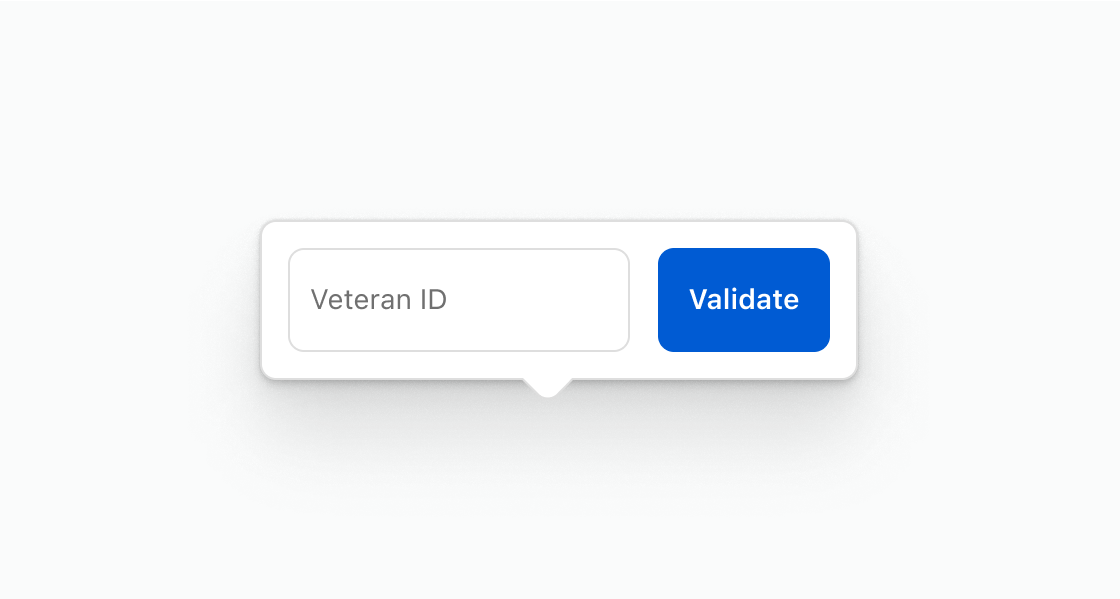
- Contextual forms: Collect small amounts of input, like a veteran ID or promo code, without leaving the current view.
- Size guides: Display product dimensions or sizing charts in a scrollable overlay anchored to a trigger button.
- Help content: Show brief instructions or definitions near the element they describe.
- Promotional details: Present active discounts or offers in a compact overlay that buyers can dismiss.
Anchor to PropertiesProperties
Configure the following properties on the popover component.
- Anchor to blockSizeblock
Sizeblock Size SizeUnitsOrAutoSizeUnitsOrAutoDefault: 'auto'Default: 'auto' The block size of the popover (height in horizontal writing modes). Learn more about the block-size property.
- Anchor to idididstringstring
A unique identifier for the element. Use this to reference the element in JavaScript, link labels to form controls, or target specific elements for styling or scripting.
- Anchor to inlineSizeinline
Sizeinline Size SizeUnitsOrAutoSizeUnitsOrAutoDefault: 'auto'Default: 'auto' The inline size of the popover (width in horizontal writing modes). Learn more about the inline-size property.
- Anchor to maxBlockSizemax
Block Sizemax Block Size SizeUnitsOrNoneSizeUnitsOrNoneDefault: 'none'Default: 'none' The maximum block size of the popover. Constrains the popover's height to prevent it from exceeding this value. Learn more about the max-block-size property.
- Anchor to maxInlineSizemax
Inline Sizemax Inline Size SizeUnitsOrNoneSizeUnitsOrNoneDefault: 'none'Default: 'none' The maximum inline size of the popover. Constrains the popover's width to prevent it from exceeding this value. Learn more about the max-inline-size property.
- Anchor to minBlockSizemin
Block Sizemin Block Size SizeUnitsSizeUnitsDefault: '0'Default: '0' The minimum block size of the popover. Ensures the popover maintains at least this height. Learn more about the min-block-size property.
- Anchor to minInlineSizemin
Inline Sizemin Inline Size SizeUnitsSizeUnitsDefault: '0'Default: '0' The minimum inline size of the popover. Ensures the popover maintains at least this width. Learn more about the min-inline-size property.
SizeUnitsOrAuto
Represents size values that can also be set to `auto` for automatic sizing. - `SizeUnits`: Specific size values in pixels, percentages, or zero for precise control. - `auto`: Automatically sizes based on content and layout constraints. Learn more about the [auto value](https://developer.mozilla.org/en-US/docs/Web/CSS/width#auto).
SizeUnits | "auto"SizeUnits
Represents size values in pixels, percentages, or zero. - `` `${number}px` ``: Absolute size in pixels for fixed dimensions (such as `100px`, `24px`). - `` `${number}%` ``: Relative size as a percentage of the parent container (such as `50%`, `100%`). - `0`: Zero size, equivalent to no dimension.
`${number}px` | `${number}%` | `0`SizeUnitsOrNone
Represents size values that can also be set to `none` to remove the size constraint. - `SizeUnits`: Specific size values in pixels, percentages, or zero for precise control. - `none`: No size constraint, allowing unlimited growth. Learn more about the [none value](https://developer.mozilla.org/en-US/docs/Web/CSS/max-width#none).
SizeUnits | "none"Anchor to EventsEvents
The popover component provides event callbacks for handling user interactions. Learn more about handling events.
- Anchor to hidehidehideCallbackEventListener<typeof tagName>CallbackEventListener<typeof tagName>
A callback fired immediately after the popover is hidden.
- Anchor to showshowshowCallbackEventListener<typeof tagName>CallbackEventListener<typeof tagName>
A callback fired immediately after the popover is shown.
CallbackEventListener
A typed event listener for custom element events. The listener receives a `CallbackEvent` with the correct `currentTarget` type for the associated custom element tag.
(EventListener & {
    (event: CallbackEvent<TTagName, Event> & TData): void;
}) | null
CallbackEvent
An event type that narrows the `currentTarget` to the specific HTML element associated with the custom element tag. This provides type-safe event handling in callback listeners.
TEvent & {
    currentTarget: HTMLElementTagNameMap[TTagName];
}
Anchor to ExamplesExamples
Anchor to Verify a veteran IDVerify a veteran ID
Collect buyer input in a popover without leaving the page. This example opens a popover from a button and shows a veteran ID form inside it.Verify a veteran ID
html
Anchor to Show a scrollable size chartShow a scrollable size chart
Cap the popover height so long content scrolls instead of expanding the page. This example shows a size chart with maxBlockSize set to limit the visible area.html
Anchor to Show active promotionsShow active promotions
List discount codes in a small overlay near the trigger button. This example shows a popover containing promotion details and a close button.html
Anchor to Best practicesBest practices
- Anchor to the trigger: Position the popover near the element that opens it so buyers understand the relationship between trigger and content.
- Constrain height for long content: Set
maxBlockSizeon the popover to cap its height. Wrap overflowing content in a scroll box to make it scrollable. - Keep content focused: Limit popovers to a single task or piece of information. For complex interactions, use a modal instead.
- Avoid placing critical information in a popover: Popovers are hidden until triggered and close when buyers click outside them, making them unsuitable for essential content or actions that require explicit confirmation.
- Trigger with a clearly labeled button: The button that opens the popover should clearly indicate what'll appear when activated.
- Group related actions: Contain actions that share a relationship to each other so the popover feels cohesive.