Theme architecture
A theme controls the organization, features, and style of a merchant's online store. Theme code is organized with a standard directory structure of files specific to Shopify themes, as well as supporting assets such as images, stylesheets, and scripts. To learn how themes fit into Shopify, and learn how to set up an environment to build and test themes, refer to the Shopify themes overview.
If you're building a theme for the Shopify Theme Store, then you need to meet certain requirements for the customization options that your theme offers, your theme's style, and the features that you include.
If you're building a theme for the Shopify Theme Store, then you need to meet certain requirements for the customization options that your theme offers, your theme's style, and the features that you include.
Theme files fall into the following general categories:
- Markup and features - These files control the layout and functionality of a theme. They use Liquid to generate the HTML markup that makes up the pages of the merchant's online store.
- Supporting assets - These files are assets, scripts, or locale files that are either called or consumed by other files in the theme.
- Config files - These files use JSON to store configuration data that can be customized by merchants using the theme editor.
Anchor to Markup and featuresMarkup and features
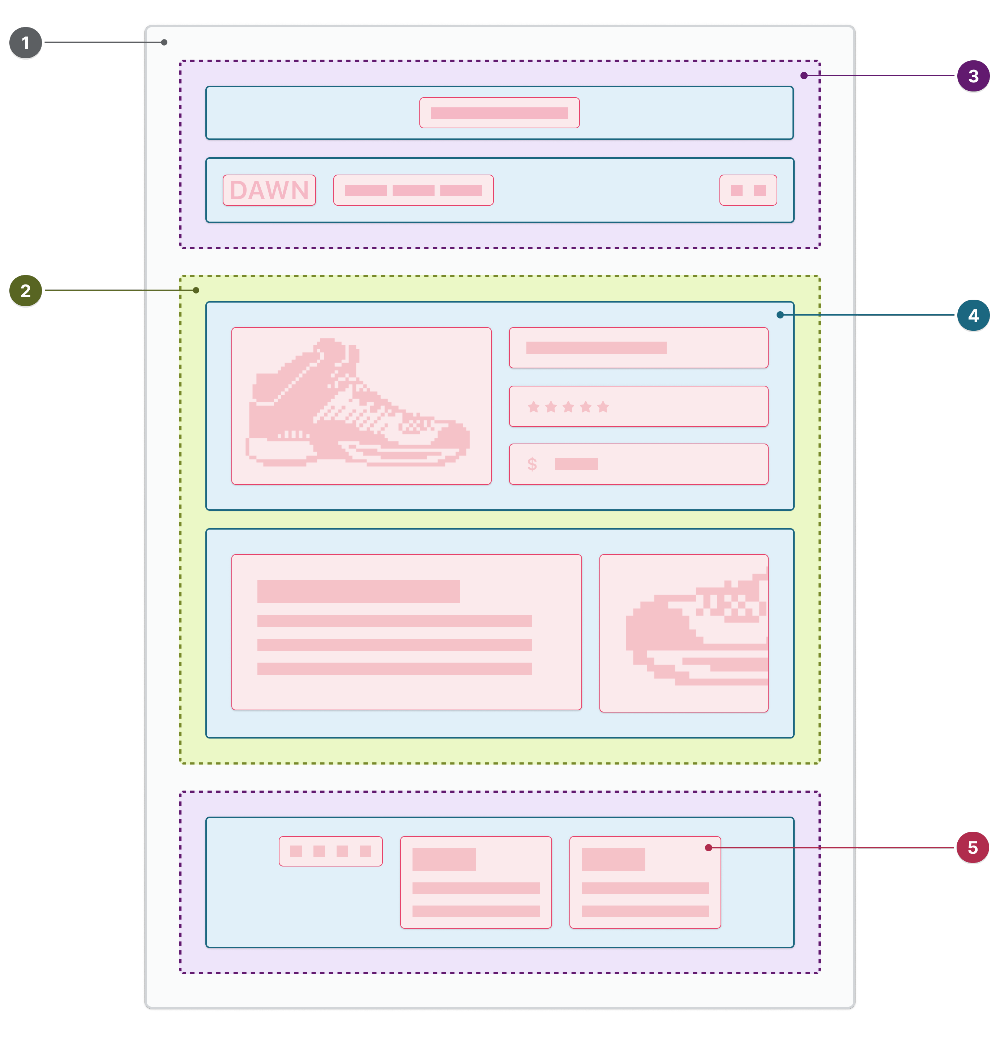
The following components determine the organization of each page:
| Number | Component | Description |
|---|---|---|
| 1 | The layout file | The base of the theme. Use the layout file to host repeated theme elements like headers and footers. |
| 2 | The template | The template that controls what's displayed on a page. Each theme should include different types of templates to display different types of content, such as the home page and products. You can also create multiple templates for the same resource type and associate them with your store resources, to allow for variation. JSON templates act only as a wrapper for sections, while Liquid templates contain code. |
| 3 | The section groups rendered by the layout | Containers that enable merchants to add, remove, and reorder sections in areas of the layout file such as the header and footer. |
| 4 | The sections rendered by the template | Reusable, customizable modules of content that merchants can add to JSON templates and section groups. |
| 5 | The blocks that each section contains | Reusable, customizable modules of content that can be added to sections, removed, and reordered. |
| 6 | The snippets being rendered | Reusable pieces of Liquid code that can be rendered anywhere in the theme. |
Features can be introduced into themes in Liquid template files, sections, blocks, and snippets. You can implement theme features using Liquid, CSS, and JavaScript. A theme's features determine how customers can interact with the content on an online store. For example, your theme needs to allow customers to add products to a cart by providing a Liquid form tag with a product type.
Anchor to JSON with commentsJSON with comments
Theme files with JSON support comments and trailing commas. Users can add comments within config/settings_schema.json and within schema tags.
For example:
settings_schema.json
Files that users typically don't edit won't persist comments or trailing commas. This includes the following:
If you're using the Assets API to fetch and parse theme files, then you'll need to adopt a JSON parser that supports comments and trailing commas. The unstable version of the Admin API will add an autogenerated comment at the top of files that do not persist comments. This comment header will appear in files in the next stable version of the Admin API, 2024-10
If you're using the Assets API to fetch and parse theme files, then you'll need to adopt a JSON parser that supports comments and trailing commas. The unstable version of the Admin API will add an autogenerated comment at the top of files that do not persist comments. This comment header will appear in files in the next stable version of the Admin API, 2024-10
Anchor to Supporting assetsSupporting assets
You can add supporting assets to your theme to control the presentation of components and features, or to store reusable pieces of code that can be used across components.
For example, you need to add assets to style the theme. These resources help to define the aesthetic of the online store and how content sections are styled to express the merchant’s brand. The style of a theme is defined by the CSS and JavaScript applied to layout, template, and section files. Liquid and HTML that you want to reuse across your theme can be stored in snippets. Theme CSS and JavaScript is stored in the assets directory of the theme.
In addition, you can translate your theme into different languages using locale files. Locale files contain a set of translations for text strings that are used throughout the theme, and are stored in the locales directory of the theme.
Anchor to Directory structure and component typesDirectory structure and component types
Themes must use the following directory structure:
Shopify theme directory structure
Subdirectories, other than the ones listed, aren't supported.
To see an example of a complete theme directory structure, and the various component types, explore the Dawn GitHub repository.
Only a layout directory containing a theme.liquid file is required for the theme to be uploaded to Shopify.
Only a layout directory containing a theme.liquid file is required for the theme to be uploaded to Shopify.
The assets directory contains all of the assets used in a theme, including image, CSS, and JavaScript files.
Use the asset_url Liquid URL filter to reference an asset within your theme.
You can access limited Liquid functionality in non-binary asset files by appending a .liquid extension. Common use cases include JavaScript (.js.liquid) and CSS (.css.liquid) files. Files with this extension have access to the following features:
- The settings object
- Liquid filters
The config directory contains the config files for a theme. Config files define settings in the Theme settings area of the theme editor, as well as store their values.
Theme settings are a good place to host general settings such as typography and color options. Theme settings can be accessed through the settings object.
You can also create settings for sections and blocks. These settings are defined as part of the parent section or block object, and appear in the theme editor with the associated object.
The layout directory contains the layout files for a theme, through which template files are rendered.
Layouts are Liquid files that enable you to include content that should be repeated on multiple page types in a single location. For example, layouts are a good place to include any content you might want in your <head> element, as well as section groups for headers and footers.
A theme.liquid file must exist in this folder for the theme to be uploaded to Shopify.
Anchor to [object Object]locales
localesThe locales directory contains the locale files for a theme, which are used to provide translated content. Locale files allow you to provide a translated experience in the theme editor, provide translations for the online store, and allow merchants to customize text in the online store.
Anchor to [object Object]sections
sectionsThe sections directory contains a theme’s sections and section groups.
Sections are Liquid files that allow you to create reusable modules of content that can be customized by merchants. They can also include blocks which allow merchants to add, remove, and reorder content within a section.
Section groups are JSON containers that allow merchants to add, remove, and reorder sections in areas of the layout file such as the header and footer.
Anchor to [object Object]snippets
snippetsThe snippets directory contains Liquid snippet files that host smaller reusable snippets of code. Snippets are reusable pieces of Liquid code that can be rendered anywhere in your theme, and are invisible to merchants in the theme editor.
You can provide LiquidDoc definitions which will enable additional tooling support through the Shopify VS Code Extension
You can provide LiquidDoc definitions which will enable additional tooling support through the Shopify VS Code Extension
Anchor to [object Object]templates
templatesThe templates directory contains a theme’s template files, which control what's rendered on each type of page.
The templates/customers directory contains the template files for legacy customer account pages, like login and account overview.
You can use the template to add functionality that makes sense for the page type. For example, you can add additional product recommendations to a product template, or add a comment form to an article template. You can also create multiple versions of the same template type to create custom templates for different use cases.
No templates are required. However, you need to have a matching template for any page type that you want to render. For example, to render a product page, you need at least one template of type product.