About headless commerce
Headless commerce separates your storefront's frontend from its backend. You build the frontend, and Shopify's APIs handle the commerce underneath. You can sell on a website, in a mobile app, in a game or a livestream, on a smart device, or through a buy button on a site that you already have.
Anchor to How headless worksHow headless works
You choose the stack, framework, and hosting for your frontend. It gets its data and commerce capabilities from Shopify. Data includes products, collections, and customers. Commerce capabilities include the cart, checkout, and international pricing.
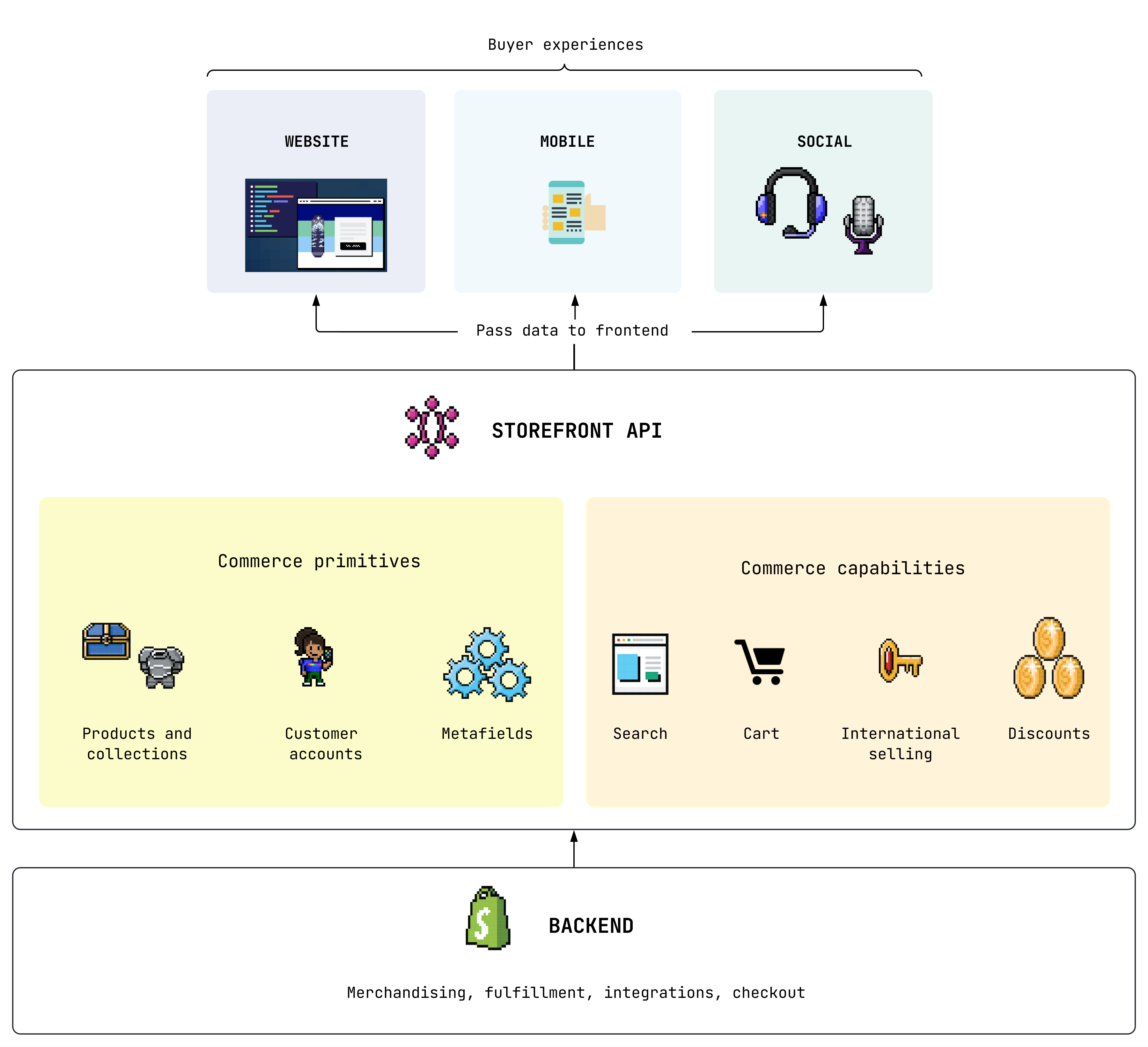
Because the frontend and backend are separate, you can also connect other business systems to either side, like a content management system (CMS), customer relationship management (CRM), enterprise resource planning (ERP), or product information management (PIM) system.
Anchor to When to build headlessWhen to build headless
If a merchant's business systems, processes, or customer experience can't be achieved with Shopify's sales channels, themes, and apps, then consider building headless. For example, build headless in the following cases:
- You're building a storefront experience that existing web or mobile tools can't support, or can't support easily.
- You have a web frontend stack that doesn't use Liquid.
- You want to add Shopify commerce to infrastructure that you already have.
- You sell on several channels that Shopify doesn't support out of the box.
- You use a CMS, or plan to, for content that's integrated with your storefront.
A headless storefront costs more to build and run than a theme. Before you commit, make sure that the merchant accepts the added cost and complexity, and has developers to maintain the storefront after launch.
Anchor to The headless APIsThe headless APIs
Shopify offers two headless APIs:
- The Storefront API serves products, collections, search, and the cart, and hands customers off to checkout.
- The Customer Account API lets customers sign in, and serves their orders, addresses, and profile.
To build before you have a store, use mock.shop, a public Storefront API with demo data. It doesn't need a store or an access token. When you're ready to connect a real store, get your keys.
Anchor to Choose how to buildChoose how to build
The options differ in how you build the storefront and call Shopify's APIs:
| You want to | Build with |
|---|---|
| Build a full storefront in a JavaScript framework, like Next.js or React Router | Hydrogen, Shopify's headless toolkit |
| Sell in a native iOS, Android, or React Native app | Mobile commerce, with the Storefront API and Checkout Kit |
| Build everything yourself, in any language or stack, without a Shopify toolkit | Bring your own stack, with the Storefront API and the Customer Account API called directly |
| Add products and buy buttons to a site that you already have | Storefront Web Components or Buy Button JS |
| Sell Shopify products on a WordPress site | The Shopify Plugin for WordPress |
For the full list of SDKs, refer to Additional SDKs.
Anchor to Get your keysGet your keys
You get Storefront API and Customer Account API access through a sales channel in the Shopify admin. Shopify offers two channels for headless storefronts:
| Channel | Use it when |
|---|---|
| Headless | You host the storefront yourself, on any stack. This includes mobile apps, and Hydrogen storefronts that you deploy somewhere other than Oxygen, like Vercel. |
| Hydrogen | You build with Hydrogen and deploy to Oxygen, Shopify's hosting for Hydrogen storefronts. |
Each channel gives your storefront the following credentials:
- Storefront API tokens: A public access token and a private access token. Use the public token for requests from a browser or mobile app, where it's visible to buyers. Use the private token for requests from your server. The private token is a secret. Never expose it in client-side code or a mobile app, and never give it a browser prefix like
NEXT_PUBLIC_. To learn how to send each token, refer to Storefront API authentication. - Customer Account API credentials: A client ID, and a client secret for confidential clients that run on a server. To set them up, refer to Getting started with the Customer Account API.
You don't need a token for tokenless access to the Storefront API. Tokenless access covers products, collections, search, and the cart, with a query complexity limit of 1,000.
Anchor to The Headless channelThe Headless channel
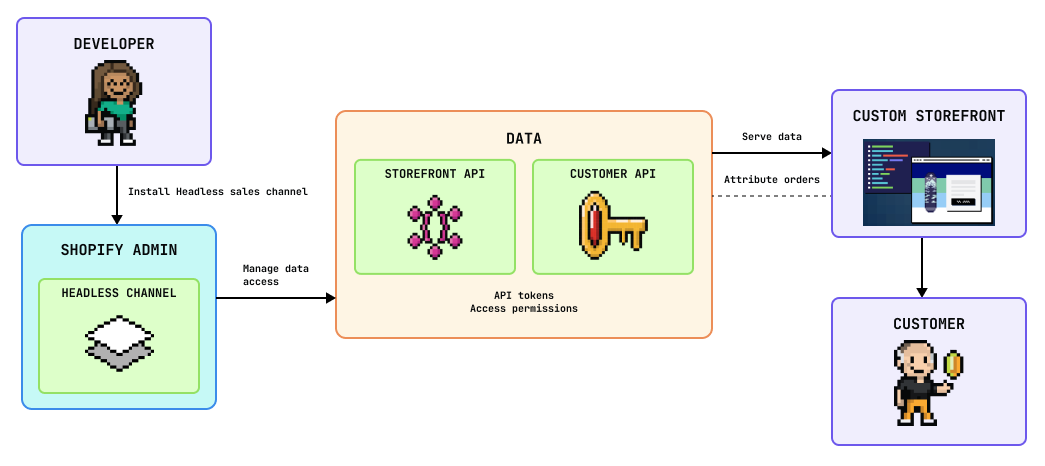
The Headless channel gives you a single place to manage API access for all your client applications, without creating a custom app. Use it for any storefront that you host yourself, whatever the stack.
In the Headless channel, you can do the following tasks:
- Create multiple storefronts. Each storefront has its own Storefront API tokens, but all storefronts in the channel share the same API permissions.
- Get each storefront's public and private Storefront API tokens, and rotate them.
- Configure the Customer Account API for each storefront, and get its client ID and client secret.
- Manage which store data the Storefront API and Customer Account API can access.
- Publish products to the Headless channel, and get order attribution, analytics, and sales reporting by channel.
To set up the channel, install it and create a storefront. For more ways to manage it, like renaming storefronts and order attribution, refer to Manage the Headless channel.
If you want to display products on an existing site or platform, then you can skip installing the Headless channel and use Storefront Web Components instead.
If you want to display products on an existing site or platform, then you can skip installing the Headless channel and use Storefront Web Components instead.
Anchor to The Hydrogen channelThe Hydrogen channel
The Hydrogen channel connects Hydrogen storefronts to your store and deploys them to Oxygen. Use it when you build with Hydrogen and host on Oxygen.
In the Hydrogen channel, you can do the following tasks:
- Create storefronts. Each storefront links to one app, and holds its environments, environment variables, and deployments.
- Deploy to Oxygen, from GitHub or from your own CI/CD system.
- Configure the Customer Account API in each storefront's Storefront settings.
- Publish products to the Hydrogen channel.
You don't copy tokens by hand on Oxygen. When you create a storefront, Shopify adds the environment variables that your app needs, including PRIVATE_STOREFRONT_API_TOKEN, PUBLIC_STOREFRONT_ID, PUBLIC_CUSTOMER_ACCOUNT_API_CLIENT_ID, and SHOP_ID. To use the same values locally, run npx shopify hydrogen link and npx shopify hydrogen env pull.
To install the channel and create a storefront, refer to Deploy to Oxygen. For the full list of variables and how to rotate your private token, refer to Environments and variables.
Anchor to Manage your Headless storefrontsManage your Headless storefronts
The following tasks set up and maintain storefronts in the Headless channel. They apply to any storefront that gets its API access from the Headless channel, whatever it's built with. This includes Hydrogen storefronts that use the Headless channel, like Vercel Shop.
If you deploy a Hydrogen storefront to Oxygen, then you manage it in the Hydrogen channel instead, and these tasks don't apply. To rotate its private token, refer to Rotate your private Storefront API token.
Anchor to Install the Headless channelInstall the Headless channel
- Install the Headless channel from the Shopify App Store.
- On installation, click Create storefront to generate your first storefront's public and private access tokens.
Anchor to Create a storefrontCreate a storefront
You can create multiple storefronts in the Headless channel. Each storefront has its own set of API tokens, but all storefronts in the Headless channel share the same API permissions.
- From your Shopify admin, under Sales channels, click Headless.
- Click Add storefront.
- Optional: On the storefront detail page, click Rename to edit the storefront's default name.
Anchor to Manage API permissionsManage API permissions
You can control which store data is available through the Storefront API and the Customer Account API. All storefronts in the Headless channel share the same API permissions.
- From your Shopify admin, under Sales channels, click Headless.
- Click the name of the storefront that you want to update.
- Under Manage API access, click Manage for the API that you want to update.
- Under Permissions, click the edit icon.
- Check the permission scopes that you want enabled.
- Click Save.
Anchor to Rotate API credentialsRotate API credentials
For security purposes, you can update your API credentials at any time. Rotate them right away if a private token or client secret is exposed.
- From your Shopify admin, under Sales channels, click Headless.
- Click the name of the storefront to update.
- Under Manage API access, click Manage for the API that you want to update.
- Under Rotate credentials, click Generate new token. Both the old and new credentials are valid until you delete the old credentials.
- Update your client apps with the new credentials.
- The Storefront API uses an access token.
- The Customer Account API uses a client ID, and might also use a client secret, depending on the type of access.
- After you've updated your apps, delete the old credentials by clicking Revoke.
Anchor to Delete a storefrontDelete a storefront
Deleting a storefront in the Headless channel revokes all its access tokens. You need to update any clients that use those tokens.
- From your Shopify admin, under Sales channels, click Headless.
- Click the name of the storefront that you want to delete.
- Click Delete storefront.
- To confirm, click Delete storefront.
Anchor to Configure routesConfigure routes
The standard format for product URLs is /products/:handle. If your storefront uses a different structure, then provide a server-side redirect (3XX) from the expected /products/:handle path to the product page.
Your storefront should also support cart permalinks. For an example, refer to this cart permalink route. Hydrogen handles cart permalinks for you with its request handlers.


