Abandoned checkouts
Abandoned checkout pages display information about checkouts where customers didn't complete their purchase. Extensions on these pages help merchants recover lost sales or analyze abandonment patterns.
Anchor to Use casesUse cases
- Recovery workflows: Launch automated or manual follow-up campaigns to re-engage customers who abandoned their checkout.
- Customer insights: Display additional context about the customer's browsing history, preferences, or engagement patterns to inform recovery strategies.
- Inventory alerts: Show real-time stock availability for items in the abandoned cart to help merchants prioritize follow-up.
- Third-party integrations: Sync abandoned checkout data with external marketing, CRM, or analytics platforms.
- Custom analytics: Display specialized metrics, conversion predictions, or abandonment reasons from your app's analysis.
Anchor to Abandoned checkouts targetsAbandoned checkouts targets
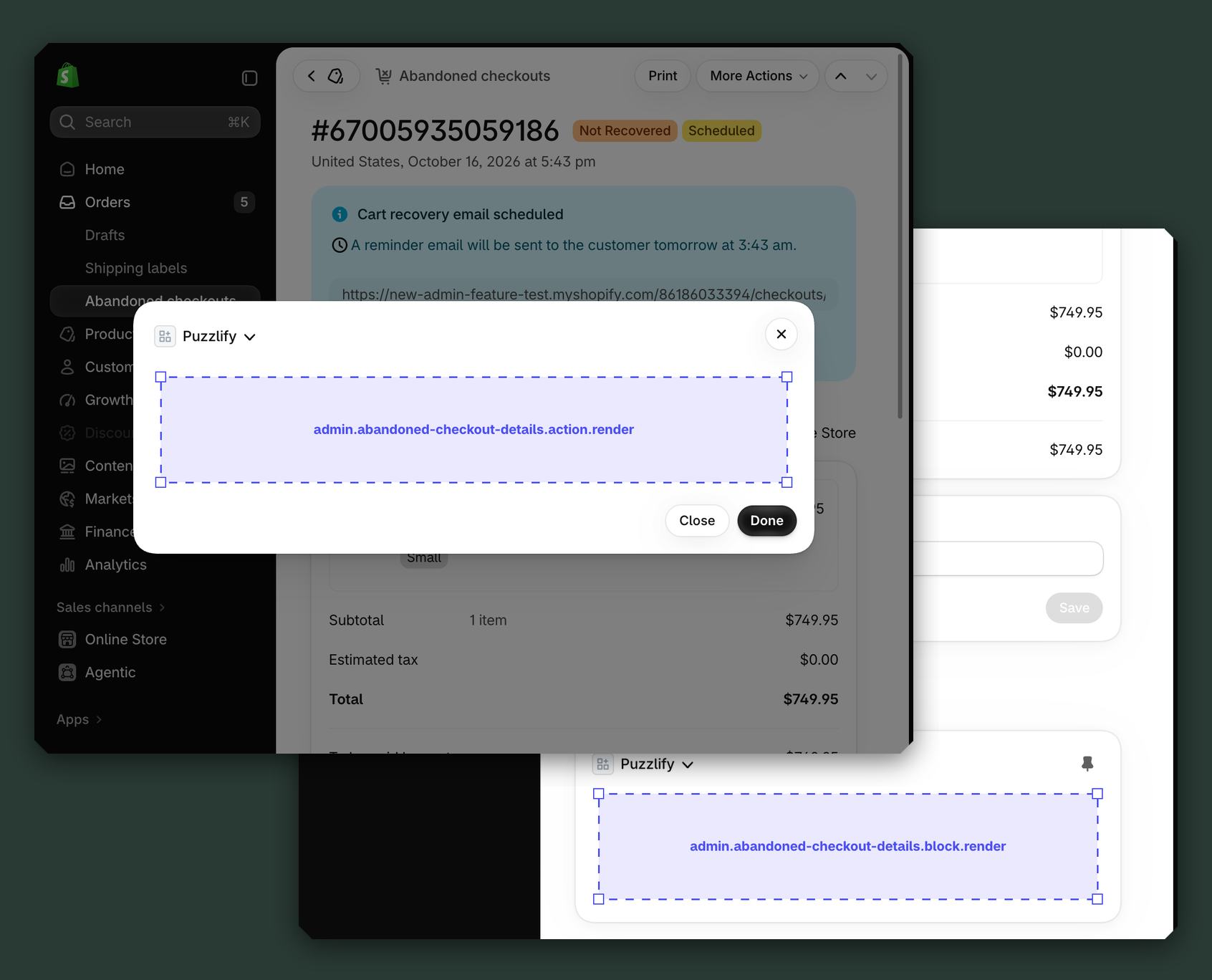
Use action and block targets to extend the abandoned checkout details page with workflows and contextual information that help merchants recover sales.
Action targets open as modal overlays from the More actions menu, while block targets display as inline cards. The examples demonstrate fetching data from Shopify's direct API or your app's backend.
Anchor to Abandoned checkout details action ,[object Object]Abandoned checkout details action target
admin.abandoned-checkout-details.action.render
Renders an admin action extension on the abandoned checkout details page. Merchants can access this extension from the More actions menu. Use this target to provide workflows that operate on the abandoned checkout data, such as sending custom recovery emails, creating follow-up tasks, or syncing with external systems.
Extensions at this target can access information about the abandoned checkout through the data property in the Action Extension API. The action renders in a modal overlay, providing space for multi-step workflows, forms, and confirmations.
Supported components
- Admin action
- Avatar
- Badge
- Banner
- Box
- Button
- Button group
- Checkbox
- Chip
- Choice list
- Clickable
- Clickable chip
- Color field
- Color picker
- Date field
- Date picker
- Divider
- Drop zone
- Email field
- Grid
- Heading
- Icon
- Image
- Link
- Menu
- Money field
- Number field
- Ordered list
- Paragraph
- Password field
- Popover
- Query container
- Search field
- Section
- Select
- Spinner
- Stack
- Switch
- Table
- Text
- Text area
- Text field
- Thumbnail
- Tooltip
- Url field
- Unordered list
Available APIs
Supported components
- Admin action
- Avatar
- Badge
- Banner
- Box
- Button
- Button group
- Checkbox
- Chip
- Choice list
- Clickable
- Clickable chip
- Color field
- Color picker
- Date field
- Date picker
- Divider
- Drop zone
- Email field
- Grid
- Heading
- Icon
- Image
- Link
- Menu
- Money field
- Number field
- Ordered list
- Paragraph
- Password field
- Popover
- Query container
- Search field
- Section
- Select
- Spinner
- Stack
- Switch
- Table
- Text
- Text area
- Text field
- Thumbnail
- Tooltip
- Url field
- Unordered list
Available APIs
jsx
Examples
Create an abandoned checkout recovery action
Description
Add an action extension that helps merchants send a personalized recovery email to the customer. This example shows how to create a modal workflow with form inputs and primary actions that operate on the abandoned checkout data.
jsx
import {render} from 'preact';
import {useState} from 'preact/hooks';

export default async () => {
  render(<Extension />, document.body);
};

const Extension = () => {
  const [loading, setLoading] = useState(false);
  const [message, setMessage] = useState('');
  const [success, setSuccess] = useState(false);
  const [error, setError] = useState(false);

  const handleSendRecovery = async () => {
    setLoading(true);
    setSuccess(false);
    setError(false);
    const checkoutId = shopify.data.selected[0].id;

    try {
      // Send recovery email through your app's backend
      const response = await fetch('https://your-app.com/api/send-recovery', {
        method: 'POST',
        headers: {'Content-Type': 'application/json'},
        body: JSON.stringify({
          checkoutId,
          customMessage: message,
        }),
      });

      if (response.ok) {
        setSuccess(true);
        shopify.close();
      } else {
        setError(true);
      }
    } catch (err) {
      setError(true);
    } finally {
      setLoading(false);
    }
  };

  return (
    <s-admin-action heading="Send Recovery Email">
      {success && (
        <s-banner tone="success" dismissible={false}>
          Recovery email sent successfully!
        </s-banner>
      )}
      {error && (
        <s-banner tone="critical" dismissible={false}>
          Failed to send recovery email. Please try again.
        </s-banner>
      )}

      <s-section heading="Customize recovery message">
        <s-text-area
          label="Custom message"
          value={message}
          onInput={(event) => setMessage(event.target.value)}
          details="Add a personalized message to encourage the customer to complete their purchase"
          rows={4}
        />
      </s-section>

      <s-button
        slot="primary-action"
        onClick={handleSendRecovery}
        disabled={loading || success}
      >
        {loading ? 'Sending...' : 'Send Recovery Email'}
      </s-button>
      <s-button slot="secondary-actions" onClick={() => shopify.close()}>
        Cancel
      </s-button>
    </s-admin-action>
  );
};
Create a discount code for abandoned checkout
Description
Add an action extension that generates and applies a discount code to incentivize checkout completion. This example shows how to use the [GraphQL Admin API](/docs/api/admin-graphql) to fetch checkout details and create targeted discounts.
jsx
import {render} from 'preact';
import {useState} from 'preact/hooks';

export default async () => {
  render(<Extension />, document.body);
};

const Extension = () => {
  const [loading, setLoading] = useState(false);
  const [discountPercent, setDiscountPercent] = useState('10');
  const [success, setSuccess] = useState(false);
  const [error, setError] = useState(false);

  const handleCreateDiscount = async () => {
    setLoading(true);
    setSuccess(false);
    setError(false);
    const checkoutId = shopify.data.selected[0].id;

    try {
      // Create discount code through your app's backend
      const response = await fetch('https://your-app.com/api/create-discount', {
        method: 'POST',
        headers: {'Content-Type': 'application/json'},
        body: JSON.stringify({
          checkoutId,
          percentOff: parseInt(discountPercent, 10),
        }),
      });

      if (response.ok) {
        setSuccess(true);
        shopify.close();
      } else {
        setError(true);
      }
    } catch (err) {
      setError(true);
    } finally {
      setLoading(false);
    }
  };

  return (
    <s-admin-action heading="Create Recovery Discount">
      {success && (
        <s-banner tone="success" dismissible={false}>
          Discount code created and sent to customer!
        </s-banner>
      )}
      {error && (
        <s-banner tone="critical" dismissible={false}>
          Failed to create discount code. Please try again.
        </s-banner>
      )}

      <s-section heading="Discount settings">
        <s-choice-list
          label="Discount percentage"
          name="discount-percent"
          onChange={(event) => setDiscountPercent(event.currentTarget.values[0])}
        >
          <s-choice value="10" selected={discountPercent === '10'}>
            10% off
          </s-choice>
          <s-choice value="15" selected={discountPercent === '15'}>
            15% off
          </s-choice>
          <s-choice value="20" selected={discountPercent === '20'}>
            20% off
          </s-choice>
        </s-choice-list>
      </s-section>

      <s-button
        slot="primary-action"
        onClick={handleCreateDiscount}
        disabled={loading || success}
      >
        {loading ? 'Creating...' : 'Create Discount Code'}
      </s-button>
      <s-button slot="secondary-actions" onClick={() => shopify.close()}>
        Cancel
      </s-button>
    </s-admin-action>
  );
};
Anchor to Abandoned checkout details action (should render) ,[object Object]Abandoned checkout details action (should render) target
admin.abandoned-checkout-details.action.should-render
Controls the render state of an admin action extension on the abandoned checkout details page. Use this target to conditionally show or hide your action extension based on the abandoned checkout's properties, such as cart value, customer status, or time since abandonment.
This target returns a boolean value that determines whether the corresponding action extension appears in the More actions menu. The extension is evaluated each time the page loads.
Supported components
Available APIs
Supported components
Available APIs
jsx
Examples
Show action only for high-value checkouts
Description
Conditionally display a recovery action only for abandoned checkouts exceeding a certain value. This example demonstrates how to use the `should-render` target to control extension visibility based on business logic.
jsx
export default async () => {
  const checkoutId = shopify.data.selected[0].id;

  try {
    // Fetch checkout details from GraphQL Admin API
    const response = await fetch(
      'shopify:admin/api/graphql.json',
      {
        method: 'POST',
        headers: {'Content-Type': 'application/json'},
        body: JSON.stringify({
          query: `
            query GetCheckout($id: ID!) {
              node(id: $id) {
                ... on Checkout {
                  totalPriceV2 {
                    amount
                  }
                }
              }
            }
          `,
          variables: {id: checkoutId},
        }),
      }
    );

    const {data} = await response.json();
    const totalAmount = parseFloat(data.node.totalPriceV2.amount);

    // Only show action for checkouts over $100
    return {display: totalAmount > 100};
  } catch (err) {
    console.error('Error fetching checkout:', err);
    return {display: false};
  }
};
Show action only for recently abandoned checkouts
Description
Conditionally display the recovery action only for checkouts abandoned within the last 24 hours when recovery rates are highest. This example demonstrates time-based filtering using the [GraphQL Admin API](/docs/api/admin-graphql).
jsx
export default async () => {
  const checkoutId = shopify.data.selected[0].id;

  try {
    // Fetch checkout details including abandonment time
    const {data} = await shopify.query(
      `
        query GetCheckout($id: ID!) {
          node(id: $id) {
            ... on Checkout {
              updatedAt
            }
          }
        }
      `,
      {variables: {id: checkoutId}}
    );

    const updatedAt = new Date(data.node.updatedAt);
    const now = new Date();
    const hoursSinceAbandonment = (now - updatedAt) / (1000 * 60 * 60);

    // Only show action for checkouts abandoned in the last 24 hours
    return {display: hoursSinceAbandonment < 24};
  } catch (err) {
    console.error('Error fetching checkout:', err);
    return {display: false};
  }
};
Anchor to Abandoned checkout details block ,[object Object]Abandoned checkout details block target
admin.abandoned-checkout-details.block.render
Renders an admin block extension inline on the abandoned checkout details page. Use this target to display contextual information, analytics, or status updates related to the abandoned checkout without requiring merchants to open a modal.
Extensions at this target appear as cards on the page and can show real-time data, insights, or quick actions. Blocks provide persistent visibility and are ideal for displaying information merchants need to see at a glance.
Supported components
- Admin block
- Avatar
- Badge
- Banner
- Box
- Button
- Button group
- Checkbox
- Chip
- Choice list
- Clickable
- Clickable chip
- Color field
- Color picker
- Date field
- Date picker
- Divider
- Drop zone
- Email field
- Form
- Grid
- Heading
- Icon
- Image
- Link
- Menu
- Money field
- Number field
- Ordered list
- Paragraph
- Password field
- Popover
- Query container
- Search field
- Section
- Select
- Spinner
- Stack
- Switch
- Table
- Text
- Text area
- Text field
- Thumbnail
- Tooltip
- Url field
- Unordered list
Available APIs
Supported components
- Admin block
- Avatar
- Badge
- Banner
- Box
- Button
- Button group
- Checkbox
- Chip
- Choice list
- Clickable
- Clickable chip
- Color field
- Color picker
- Date field
- Date picker
- Divider
- Drop zone
- Email field
- Form
- Grid
- Heading
- Icon
- Image
- Link
- Menu
- Money field
- Number field
- Ordered list
- Paragraph
- Password field
- Popover
- Query container
- Search field
- Section
- Select
- Spinner
- Stack
- Switch
- Table
- Text
- Text area
- Text field
- Thumbnail
- Tooltip
- Url field
- Unordered list
Available APIs
jsx
Examples
Display abandoned checkout insights
Description
Create a block extension that shows contextual insights about the abandoned checkout, such as customer engagement score, likelihood of recovery, and recommended actions. This example demonstrates how to present valuable information inline on the page.
jsx
import {render} from 'preact';
import {useState, useEffect} from 'preact/hooks';

export default async () => {
  render(<Extension />, document.body);
};

const Extension = () => {
  const [insights, setInsights] = useState(null);
  const [loading, setLoading] = useState(true);

  useEffect(() => {
    const fetchInsights = async () => {
      const checkoutId = shopify.data.selected[0].id;

      try {
        // Fetch insights from your app's backend
        const response = await fetch(
          `https://your-app.com/api/checkout-insights?id=${checkoutId}`
        );
        const data = await response.json();
        setInsights(data);
      } catch (err) {
        console.error('Error fetching insights:', err);
      } finally {
        setLoading(false);
      }
    };

    fetchInsights();
  }, []);

  if (loading) {
    return (
      <s-admin-block heading="Recovery Insights">
        <s-spinner size="base" /> Loading insights...
      </s-admin-block>
    );
  }

  if (!insights) {
    return (
      <s-admin-block heading="Recovery Insights">
        <s-text>Unable to load insights</s-text>
      </s-admin-block>
    );
  }

  return (
    <s-admin-block heading="Recovery Insights">
      <s-stack gap="base">
        <s-box>
          <s-heading>Recovery Likelihood</s-heading>
          <s-stack direction="inline" gap="small-300" alignItems="center">
            <s-badge tone={insights.likelihood > 70 ? 'success' : 'warning'}>
              {insights.likelihood}%
            </s-badge>
            <s-text color="subdued">
              Based on customer engagement patterns
            </s-text>
          </s-stack>
        </s-box>

        <s-divider />

        <s-stack gap="small-300">
          <s-heading>Customer Engagement</s-heading>
          <s-text>
            Last active: {insights.lastActive}
          </s-text>
          <s-text>
            Email open rate: {insights.emailOpenRate}%
          </s-text>
        </s-stack>

        <s-divider />

        <s-stack gap="small-300">
          <s-heading>Recommended Action</s-heading>
          <s-text>{insights.recommendation}</s-text>
          <s-button
            onClick={() => shopify.navigation.navigate('extension://send-recovery')}
            variant="primary"
          >
            Send Recovery Email
          </s-button>
        </s-stack>
      </s-stack>
    </s-admin-block>
  );
};
Display recovery attempt history
Description
Create a block extension that shows the timeline of recovery attempts for the abandoned checkout. This example demonstrates how to present historical data that helps merchants avoid over-contacting customers.
jsx
import {render} from 'preact';
import {useState, useEffect} from 'preact/hooks';

export default async () => {
  render(<Extension />, document.body);
};

const Extension = () => {
  const [attempts, setAttempts] = useState([]);
  const [loading, setLoading] = useState(true);

  useEffect(() => {
    const fetchAttempts = async () => {
      const checkoutId = shopify.data.selected[0].id;

      try {
        // Fetch recovery attempts from your app's backend
        const response = await fetch(
          `https://your-app.com/api/recovery-attempts?checkoutId=${checkoutId}`
        );
        const data = await response.json();
        setAttempts(data.attempts || []);
      } catch (err) {
        console.error('Error fetching attempts:', err);
      } finally {
        setLoading(false);
      }
    };

    fetchAttempts();
  }, []);

  if (loading) {
    return (
      <s-admin-block heading="Recovery Attempts">
        <s-spinner size="base" />
      </s-admin-block>
    );
  }

  if (attempts.length === 0) {
    return (
      <s-admin-block heading="Recovery Attempts">
        <s-text color="subdued">No recovery attempts yet</s-text>
      </s-admin-block>
    );
  }

  return (
    <s-admin-block heading="Recovery Attempts">
      <s-stack gap="base">
        {attempts.map((attempt) => (
          <s-box key={attempt.id}>
            <s-stack gap="small-300">
              <s-stack direction="inline" gap="small-300" alignItems="center">
                <s-badge tone={attempt.status === 'sent' ? 'success' : 'warning'}>
                  {attempt.type}
                </s-badge>
                <s-text color="subdued">{attempt.date}</s-text>
              </s-stack>
              <s-text>{attempt.description}</s-text>
            </s-stack>
          </s-box>
        ))}
      </s-stack>
    </s-admin-block>
  );
};
Anchor to Best practicesBest practices
- Prioritize high-value recovery opportunities: Use the
should-rendertarget to show recovery actions only for abandoned checkouts that meet specific criteria, such as cart value thresholds, returning customers, or carts with specific product types that warrant recovery efforts. - Display time-sensitive information: Show how long ago the checkout was abandoned in your block extensions to help merchants prioritize recent abandonments when recovery rates are typically higher.
- Enrich with customer context: Pull in additional customer data like past purchase history, email engagement rates, or loyalty status to help merchants personalize their recovery approach and gauge recovery likelihood.
- Account for inventory changes: When displaying abandoned cart contents, indicate if products are still in stock or if pricing has changed since abandonment, as this affects recovery strategy.
- Respect recovery fatigue: Consider tracking how many recovery attempts have already been made for a checkout to avoid over-contacting customers and provide this context to merchants in your extensions.
Anchor to LimitationsLimitations
- Single target per module: Each
[[extensions.targeting]]entry in your TOML configuration maps one target to one module file. - Checkout data retention: Abandoned checkouts are automatically removed when they're created more than three months ago, haven't been updated in one month, and have no associated transaction or order.
- Customer email limitations: Abandoned checkout data might not always include customer email addresses if the customer didn't provide one before abandoning. Your extensions should handle cases where contact information is incomplete or missing. The
customer,billingAddress, andshippingAddressfields are nullable. - Block target visibility: Block extensions must be manually added and pinned by merchants before they appear.
- Block collapse behavior: Returning
nullfrom a block extension collapses the block rather than removing it from the page. Blocks can't be fully hidden at runtime.