About manual pricing
For advanced use cases or custom billing flows that aren't supported by Shopify App Pricing, you can use manual pricing to build your own billing logic.
For public apps, use Shopify App Pricing. The Billing API is still supported for existing apps and outlier pricing models Shopify App Pricing doesn't cover.
For public apps, use Shopify App Pricing. The Billing API is still supported for existing apps and outlier pricing models Shopify App Pricing doesn't cover.
Anchor to Billing processBilling process
The following diagram describes the app billing process and the roles taken by merchants, your app, and Shopify when using the Billing API.
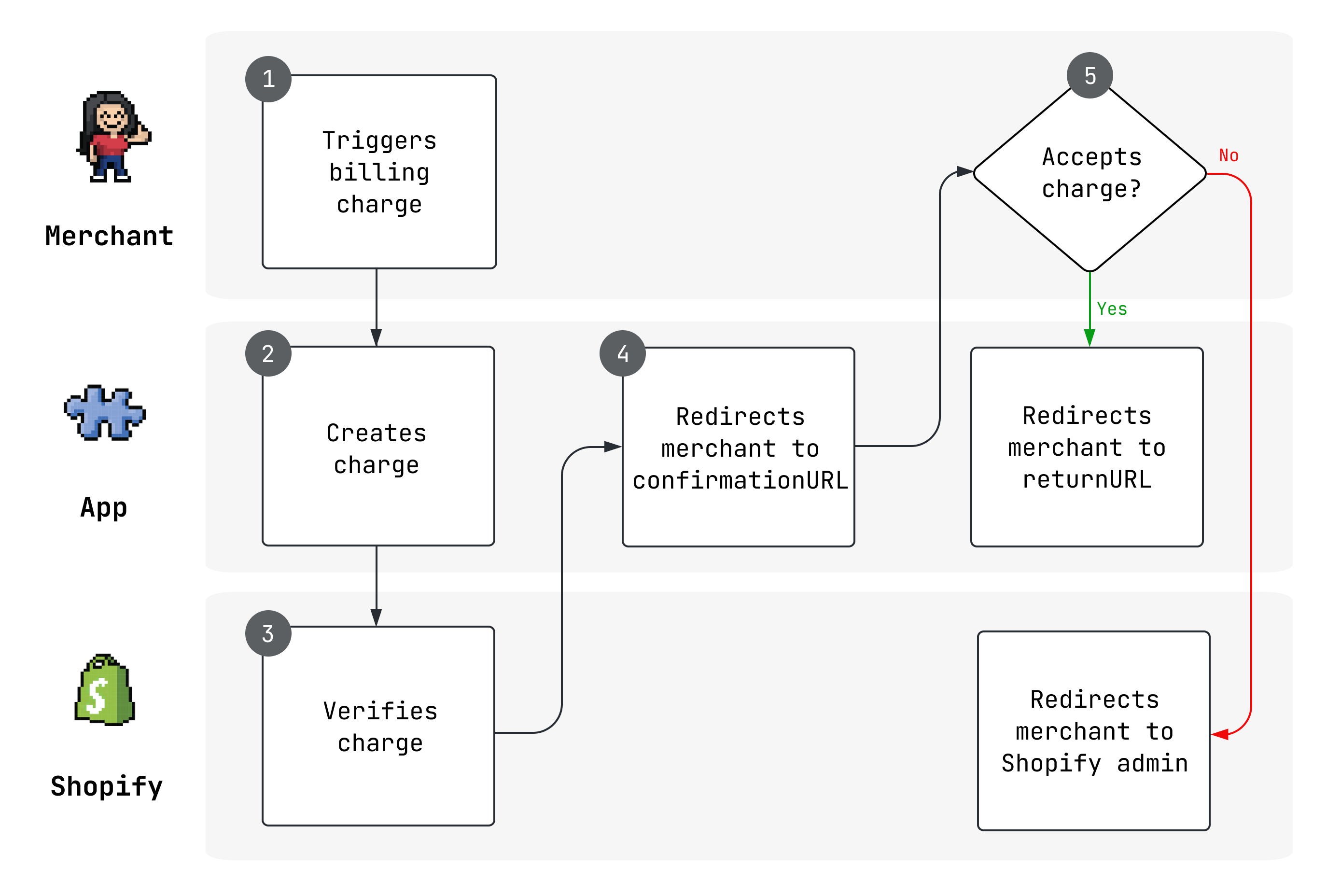
- A merchant starts an action that includes a charge, such as an app installation, a service plan upgrade, or an individual purchase.
- Your app creates a charge for the merchant, using either the
appPurchaseOneTimeCreateor theappSubscriptionCreatemutation. - Shopify verifies the charge and returns a
confirmationUrl, which is a page that Shopify hosts for the merchant to approve charges. - The app should redirect the merchant to the
confirmationUrl, where the merchant either approves or declines the charge. - If the merchant accepts the charge, then they're redirected to a
returnUrlthat your app specified when it issued the charge. If the charge is declined, then Shopify redirects the merchant to the Shopify admin, and provides a notification message about the app charge being declined.
Subscription upgrades and downgrades, for example going from a basic tier to a premium tier, or a premium tier to a basic tier, go through this flow.
Subscription upgrades and downgrades, for example going from a basic tier to a premium tier, or a premium tier to a basic tier, go through this flow.
Anchor to App actions to set up purchasesApp actions to set up purchases
The app billing process requires your app to perform actions that set up purchases.
Shopify provides an app package for React Router to help you configure charges for your app and make calls to the GraphQL Admin API's billing resources. If your app isn't React Router based, then you can use the code examples in the reference as a general guide to your app's configuration.
Shopify provides an app package for React Router to help you configure charges for your app and make calls to the GraphQL Admin API's billing resources. If your app isn't React Router based, then you can use the code examples in the reference as a general guide to your app's configuration.
Anchor to Configure a pricing modelConfigure a pricing model
A pricing model is how you monetize your app. Each pricing model configuration must contain an amount, a currencyCode, and an interval. You can also set the parameters that are allowed by the GraphQL Admin API's appSubscriptionCreate and appPurchaseOneTimeCreate mutations that are used for the charges.
React Router apps can set up plans by passing in the billing configuration when shopifyApp is called.
Anchor to Gate requestsGate requests
Gating requests require merchants to pay for the app before they can access specific routes. To gate requests, you can verify whether there's an active payment and require one if there isn't. The following is an example for the process:
-
Indicate which plans enable access to a specific route.
-
Pass a check to determine if there's a purchase for any of the plans.
-
Require a purchase if one isn't detected.
React Router apps can use the
admin.billing.requirefunction. The function verifies that there's an active payment and requires one if there isn't. You can send multiple plans torequire. It passes if there's a purchase for any of the plans and returns information on the active purchase.
Call the function in loaders and actions to avoid ungated requests. If you want to gate multiple routes, then use a layout like this example in the React Router template.
Call the function in loaders and actions to avoid ungated requests. If you want to gate multiple routes, then use a layout like this example in the React Router template.
Anchor to Request paymentRequest payment
If your billing check doesn't find a purchase, then you can decide where to take the merchant. The following are examples:
-
Request payment right away for one of the purchase configurations.
-
Redirect the merchant to a page where they can select a plan.
- In the plan selection page, you'll need to authenticate with the GraphQL Admin API for access. React Router apps can call
authenticate.admin.
- In the plan selection page, you'll need to authenticate with the GraphQL Admin API for access. React Router apps can call
Anchor to Pricing modelsPricing models
Your pricing model determines the charges that are collected for your app from merchants by Shopify.
You can use Shopify's manual pricing resources to implement one or more of the following models:
| Type | Description | Use cases | Learn how |
|---|---|---|---|
| Subscription fee | Charge either an annual or 30-day recurring fee to use the app, charge a capped fee based on usage, or employ both. Note, usage charges can only be paired with a 30-day recurring fee. | Charge merchants a fee every 30 days to use review features. Charge merchants a fee every 30 days and a fee per SMS message sent on their behalf. | |
| One-time purchase | Charge once for the app, or charge once to enable limited use. | Charge merchants a flat fee for translating their storefront. Enable merchants to purchase credits to use in your app. | One-time charges and multiple one-time charges |
Anchor to Pricing adjustmentsPricing adjustments
A pricing adjustment modifies an app's subscription fee or price. App billing API resources support the following price adjustments:
| Type | Description | Eligibility |
|---|---|---|
| App credits | Grant a sum that merchants can put towards future purchases, subscriptions, or usage charges. | Merchants who have the app installed |
| Subscription discounts | Offer a percentage or fixed-price discount on an app subscription for a set number of billing cycles. | New subscribers Merchants with existing subscriptions |
| Free trials | Delay the start of an app's billing cycle by a number of days. This enables merchants to experiment with apps before they commit to paying. Available only to merchants that agree to a new subscription. Can't be added to existing subscriptions. | New subscriptions only Can't be added to existing subscriptions |
| Refunds | Issue a full or partial refunds for a specific app charge. | All users |
Anchor to Webhook topicsWebhook topics
In addition to the mandatory webhook topics, Shopify provides the following webhook topics for billing:
-
APP_PURCHASES_ONE_TIME_UPDATE: Triggered when the status of anAppPurchaseOneTimeobject is changed. -
APP_SUBSCRIPTIONS_UPDATE: Triggered when the status, or capped amount, of anAppSubscriptionobject is changed, and when a subscription's status changes. -
APP_SUBSCRIPTIONS_APPROACHING_CAPPED_AMOUNT: Triggered when the balance used on an app subscription crosses 90% of the capped amount.
Anchor to Developer tools and resourcesDeveloper tools and resources
Explore the developer tools and resources available for app billing:


