Order management for enterprise
This guide describes three common integration patterns for using order management system (OMS) layers with Shopify at enterprise scale. The following sections give guidance on when to use each pattern, and discuss some typical architectural constraints and tradeoffs.
Anchor to Three integration patternsThree integration patterns
The following table is a quick reference comparing the three primary integration patterns. "Shopify location model" refers to how inventory data is mapped onto locations inside of Shopify. Each pattern is described in detail in the sections below.
| Dimension | External OMS | Hybrid | Shopify-native |
|---|---|---|---|
| Who orchestrates orders? | External OMS | Shared. Lightweight OMS as decision engine, Shopify for execution. | Shopify |
| Shopify's role | Checkout, storefront (possibly), payment gateway integration, and status reflection | Commerce platform and order state management | Checkout through fulfillment |
| Shopify location model | Single aggregated location. OMS owns real inventory topology. | Multiple locations as inventory buckets | Locations fully mapped inside of Shopify |
| Order management interface | OMS/External | Shopify admin (enhanced) | Shopify admin |
| System of record | OMS | Shopify | Shopify |
These three patterns represent common architectures seen at enterprise scale, and aren't strict rules to follow.
Anchor to Shopify's role across all patternsShopify's role across all patterns
Two architectural constraints apply equally across all three patterns: payment operations must flow through Shopify, and order identifiers come from a fixed set of fields on Shopify's Order type.
Anchor to Payment operations must flow through ShopifyPayment operations must flow through Shopify
All capture, refund, void, re-authorization, and related payment calls must go through Shopify's GraphQL Admin API. Shopify doesn't support exporting payment tokens to third parties. The OMS calls orderCapture, refundCreate, and related mutations, and Shopify communicates with the gateway.
Shopify has three native settings for how capture (settlement) is handled after checkout:
| Capture setting | Behavior | Typical use |
|---|---|---|
| Automatic at checkout | Payment captured immediately at order creation. | Shopify-native pattern. Simplest, no OMS capture action needed. |
| Automatic at fulfillment | Captured when a Fulfillment is created. | OMS controls capture indirectly by controlling fulfillment timing. |
| Manual | OMS calls orderCapture explicitly. | Most control. OMS decides when, how much, and which authorization to target. This setting is very common at enterprise scale. |
Fulfillment and capture are independent. Shopify doesn't gate fulfillment on payment capture. If the merchant requires capture before shipment, then the OMS must implement that hold logic.
Anchor to Order identifiersOrder identifiers
Shopify exposes multiple order identifiers on the GraphQL Admin Order type:
id: the global GID, for examplegid://shopify/Order/123456. Stable and unique.name: the merchant-facing identifier with merchant-configured prefix and suffix, for example#1001,EN1001, or1001-A. Not guaranteed to be unique.number: the bare integer used to generatename, for example1001. Not guaranteed to follow a consecutive sequence or to be unique across (or within) stores.confirmationNumber: a random alphanumeric string assigned at checkout, for exampleXPAV284CT. Not guaranteed to be unique.
External systems often have strict ID requirements such as digits only, maximum character length, or numeric range limits. Choose the right identifier early in the integration design, and confirm it meets the external system's constraints.
Anchor to Pattern 1: external OMS as orchestratorPattern 1: external OMS as orchestrator
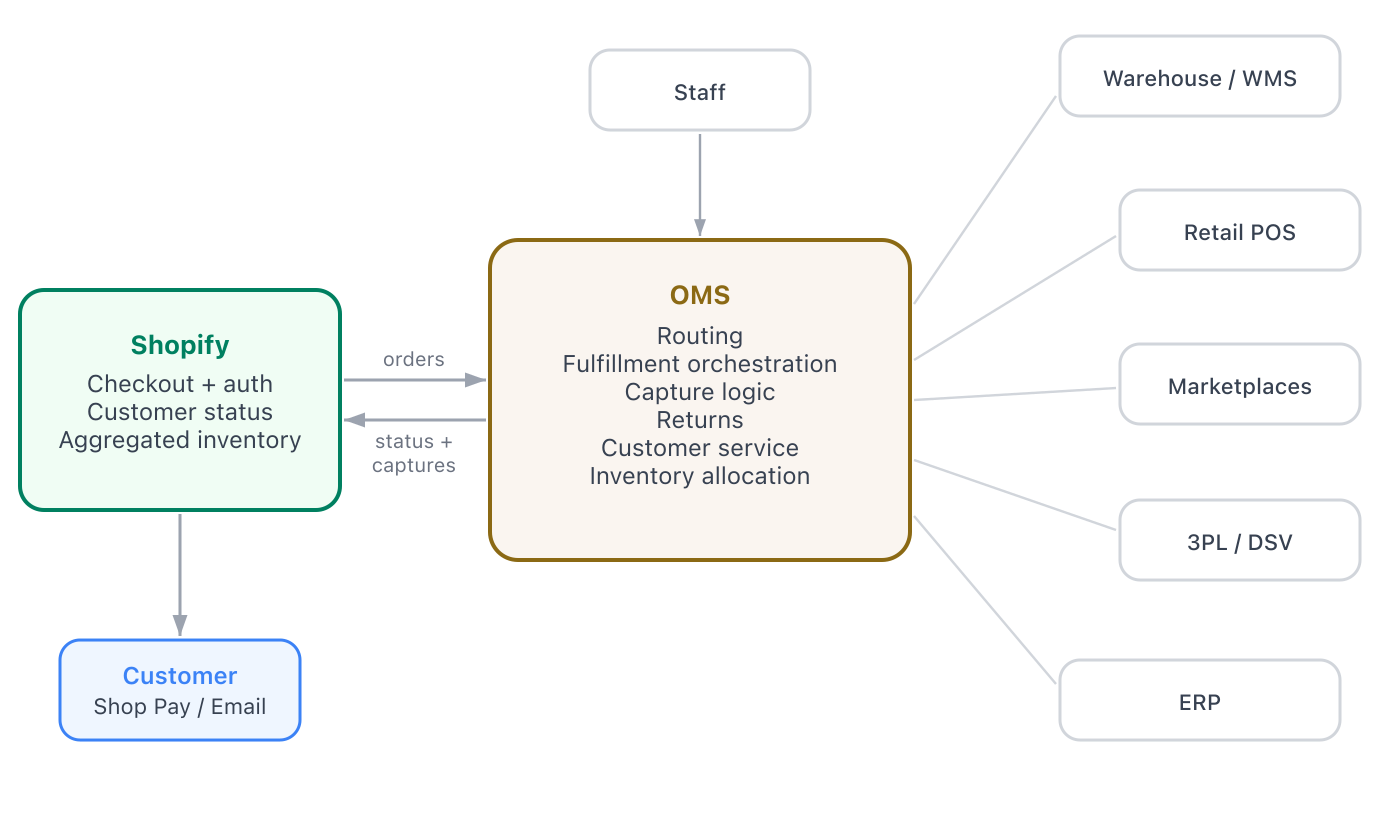
In this pattern, the external OMS owns the entire post-checkout order lifecycle, and employees can perform fulfillment updates, order-level changes, and financial transactions such as capture or refund from the order management interface. Shopify handles checkout, payment authorization, order creation, and customer-facing status.
Anchor to When to use this patternWhen to use this pattern
We recommend this pattern when the merchant has:
- A mature OMS with existing 3PL, warehouse, and vendor integrations.
- Complex sales channels beyond Shopify (marketplaces, wholesale, and retail POS) where the OMS already serves as the central hub and the channels can't be migrated to Shopify.
- Cross-channel customer service visibility (buy online return in store, buy in store return online) between Shopify and other sales channels.
- Fulfillment logic which exceeds what Shopify currently expresses natively. This logic gap could be in the rules themselves (vendor acceptance windows, split routing across legal entities, hold-until-confirmation gating) or in input data which Shopify doesn't currently model (factory-level SKU sourcing, vendor-specific allocation, legacy ERP business logic).
- Complex, conditional rules about payment capture timing (capture at different points for different payment methods, split-tender orders, or capture gated on vendor acceptance or shipment confirmation).
- Multi-brand or multi-entity structures where fulfillment routing spans legal entities, not just locations.
Anchor to How it worksHow it works
Shopify creates the order at checkout and authorizes payment. The OMS takes over from there. Routing, allocation, fulfillment, and capture decisions all happen in the OMS. The OMS evolves the fulfillment lifecycle and writes payment operations back to Shopify through the GraphQL Admin API.
This pattern pairs naturally with headless storefronts.
Anchor to InventoryInventory
In this pattern, the OMS owns the real inventory topology. Physical locations, in-transit stock, allocated reservations, and available-to-sell calculations all live outside Shopify. Shopify needs only what the storefront needs to gate purchase decisions: a single number per SKU representing what's available to sell online.
The standard model:
- Configure a single Shopify location, often named something like "Online" or "Available to sell".
- The OMS aggregates available-to-sell quantities from across its real inventory topology and pushes one number per SKU to that single Shopify location.
- All Shopify-originated orders allocate against that single location. The OMS receives the order via the
orders/createwebhook and decides where to physically fulfill from based on its own routing logic.
Sync follows three stages:
- Initial sync: Before orders begin flowing, the OMS pushes current available-to-sell quantities for every SKU to establish a baseline. Use
inventorySetQuantitiessince the OMS is the authoritative source. - Threshold-based ongoing sync: After the baseline is established, push updates only when available quantity crosses a meaningful boundary. The right cutoffs depend on per-SKU velocity, available-to-sell volume, and how aggressively the merchant wants to manage low-stock messaging on the storefront. The goal is to keep the storefront accurate at decision-relevant boundaries without spending API calls on every single inventory change in the OMS. Use
inventoryAdjustQuantitiesfor delta updates orinventorySetQuantitiesfor absolute writes, depending on whether the OMS is sending a change or the new authoritative value. - Cleanup reconciliation: On a daily or more frequent basis, run a reconciliation job that reads inventory quantities from Shopify, compares them against the OMS's current state, and corrects any drift. Use
inventorySetQuantitiesfor reconciliation writes.
Coordination is bidirectional. The OMS pushes available-to-sell into Shopify, and Shopify pushes order events out through orders/create and orders/paid so the OMS can decrement its real inventory.
Anchor to Receiving orders: webhook and API enrichmentReceiving orders: webhook and API enrichment
The recommended pattern is for the OMS to receive webhook notifications from Shopify, and then to use the GraphQL Admin API to read additional data. Webhook payloads don't include metafields, custom attributes, or enriched line-item metadata that the OMS might need for routing. The OMS should query the full order after each webhook, and periodically make API calls to catch any missed orders.
Anchor to Writing status back to ShopifyWriting status back to Shopify
Customer-facing features such as Shop Pay, the Shop app, transactional emails, customer account order status pages, and order tracking links all derive their shipping and delivery information exclusively from Shopify's fulfillment data. Because of this, it's critical that the OMS accurately updates order and fulfillment status in Shopify and keeps this data current throughout the fulfillment lifecycle. If the OMS fulfills an order but doesn't write that back, the customer sees no shipping update and support teams can't determine order status from the Shopify admin.
The OMS doesn't set an order status directly. Instead, it calls the following mutations that progress the FulfillmentOrder lifecycle:
fulfillmentCreate: records a shipment with tracking information. The shipping confirmation notification to the customer is opt-in via thenotifyCustomerinput field, which defaults tofalse.fulfillmentOrdersSetFulfillmentDeadline: sets expected fulfillment timelines, visible in the Shopify admin.
Shopify updates the customer-facing order status as a consequence of these GraphQL mutations.
Anchor to API surfaceAPI surface
Anchor to Webhooks (inbound to OMS)Webhooks (inbound to OMS)
| Webhook | Purpose |
|---|---|
orders/create | New order placed. Triggers OMS to pull full order through the API. |
orders/updated | Order edited or address changed after creation. |
orders/cancelled | Order cancelled. OMS stops fulfillment if in progress. |
orders/paid | Payment captured. OMS tracks payment state for reconciliation. |
refunds/create | Refund processed. OMS updates records and handles restock. |
order_transactions/create | Payment transaction created (auth, capture, or refund). OMS tracks payment state. |
Anchor to Mutations (outbound to Shopify)Mutations (outbound to Shopify)
| Mutation | Purpose |
|---|---|
fulfillmentOrderSubmitFulfillmentRequest | Requests fulfillment from a 3PL or fulfillment service location. |
fulfillmentCreate | Creates a shipment with tracking. Optionally notifies the customer (set notifyCustomer: true; defaults to false). |
orderCapture | Captures authorized payment (full or partial). |
refundCreate | Processes a refund with optional restock. |
orderEditBegin / orderEditCommit | Modifies an order post-creation. |
inventorySetQuantities | Sets absolute inventory (reconciliation sync). |
inventoryAdjustQuantities | Adjusts inventory by delta for incremental sync. |
Anchor to Pattern 2: hybrid Shopify-centric with external routingPattern 2: hybrid Shopify-centric with external routing
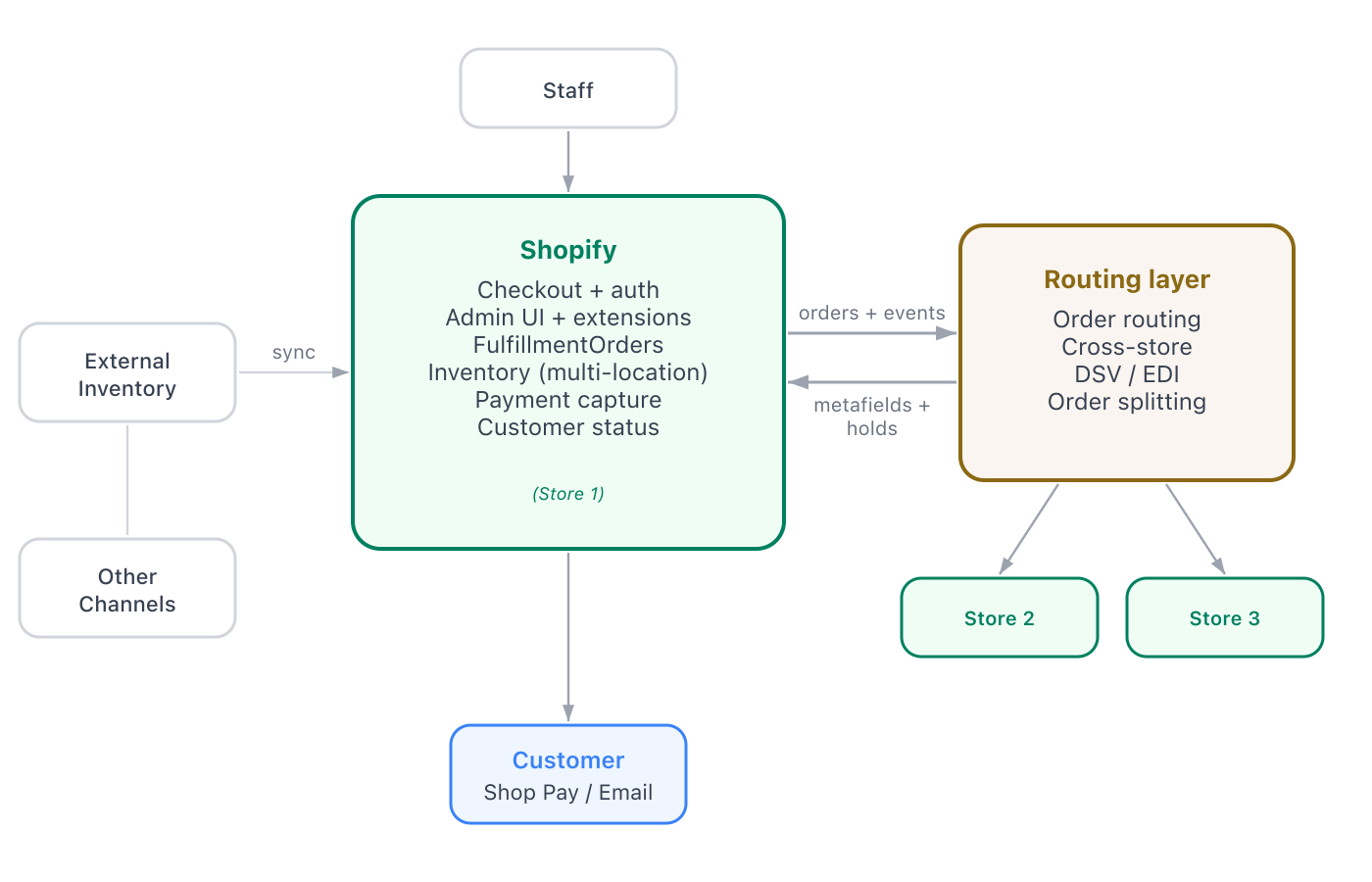
In this pattern, Shopify is the operational center. Employees manage orders, fulfillment, and transactions through the Shopify admin. An external layer handles routing, cross-store coordination, and vendor management that Shopify can't do natively.
Anchor to When to use this patternWhen to use this pattern
We recommend this pattern when the merchant:
- Wants staff to work in the Shopify admin, not a separate OMS.
- Needs routing beyond native capabilities, such as cross-store fulfillment, complex fallback logic, DSV coordination, or order splitting.
- Operates multiple Shopify stores that need coordination.
- Has other channels or systems but wants Shopify as the operational center.
- Needs to perform re-authorizations or custom capture processes.
Anchor to How it worksHow it works
An external application layer acts as a headless decision engine that makes order routing decisions, but has no independent staff-facing UI. It communicates decisions back to Shopify primarily through the order, fulfillment, and payment APIs. It can also communicate through metafields, tags, or fulfillment holds with reason notes.
Anchor to InventoryInventory
In this pattern, an external system (an OMS or similar) still owns the source-of-truth inventory and the allocation decisions. What changes from Pattern 1 is that more of the inventory data is mirrored into Shopify. Two reasons drive this:
- Reduce dependencies for the online shopping experience: When per-SKU availability is held in Shopify directly, the storefront can render product pages, cart eligibility, and low-stock indicators without waiting on a synchronous call to the external system. The shopping path is faster and more resilient when the external system is slow or unavailable.
- Support Shopify-connected channels that need per-location accuracy: Buy online pick up in store (BOPIS), ship-from-store, ship-to-customer, and Shopify POS all require Shopify to know real per-location quantities. The single aggregated location used in Pattern 1 is not sufficient for these channels.
The standard model:
- Configure one Shopify Location per physical fulfillment point: stores, warehouses, and any offsite pool that serves a Shopify-connected channel.
- For Shopify-aware locations (stores running Shopify POS, warehouses with a Shopify-aware WMS or fulfillment service), Shopify is the source of truth for that location and updates flow naturally from POS sales and fulfillment events.
- For external-source locations (third-party warehouses, drop-ship vendor inventory, offsite pools managed by the OMS), the external system pushes quantity updates into Shopify so the connected channels see accurate per-location stock.
Operations:
- The external routing layer can intervene on
fulfillment_orders/order_routing_completeto override Shopify's default location assignment when its rules disagree with Shopify's choice. - Use
fulfillmentOrderMoveto reassign a fulfillment order to a different location when the original location can't fulfill, or when the routing layer decides another location is a better fit (closer to the customer, lower-cost shipping, vendor acceptance). - For external-source locations, use the same threshold-based sync approach as Pattern 1 to keep external quantities current in Shopify without excessive API traffic.
Anchor to What the external layer handlesWhat the external layer handles
- Complex routing and fallback logic that exceeds what order routing functions can express.
- Cross-store coordination across separate Shopify stores, because the Shopify admin is per-store.
- Drop-ship vendor coordination including EDI lifecycle (850/855/856), vendor acceptance, and PO management.
- Order splitting across multiple fulfillment sources based on availability or vendor.
Anchor to API surfaceAPI surface
Anchor to Webhooks (inbound to external layer)Webhooks (inbound to external layer)
| Webhook | Purpose |
|---|---|
orders/create | New order. Routing layer evaluates where to fulfill. |
fulfillment_orders/order_routing_complete | Shopify assigned FulfillmentOrder objects. Routing layer checks or overrides. |
fulfillment_orders/placed_on_hold | Order held. Routing layer tracks for coordination. |
fulfillment_orders/cancelled | FulfillmentOrder cancelled. Routing layer reroutes. |
fulfillment_orders/moved | FulfillmentOrder moved to a different location. |
fulfillment_orders/split | FulfillmentOrder split for partial fulfillment. |
order_transactions/create | Payment state change. Routing layer might gate fulfillment on capture. |
Anchor to Mutations (outbound to Shopify)Mutations (outbound to Shopify)
| Mutation | Purpose |
|---|---|
metafieldsSet | Writes routing decisions to order metafields. |
fulfillmentOrderMove | Moves a FulfillmentOrder to a different location. |
fulfillmentOrderHold | Places a hold pending a routing decision. |
fulfillmentOrderReleaseHold | Releases a hold when fulfillment can proceed. |
fulfillmentCreate | Creates a fulfillment with tracking. |
inventorySetQuantities / inventoryAdjustQuantities | Syncs external inventory into Shopify locations. |
Anchor to Pattern 3: Shopify-native orchestrationPattern 3: Shopify-native orchestration
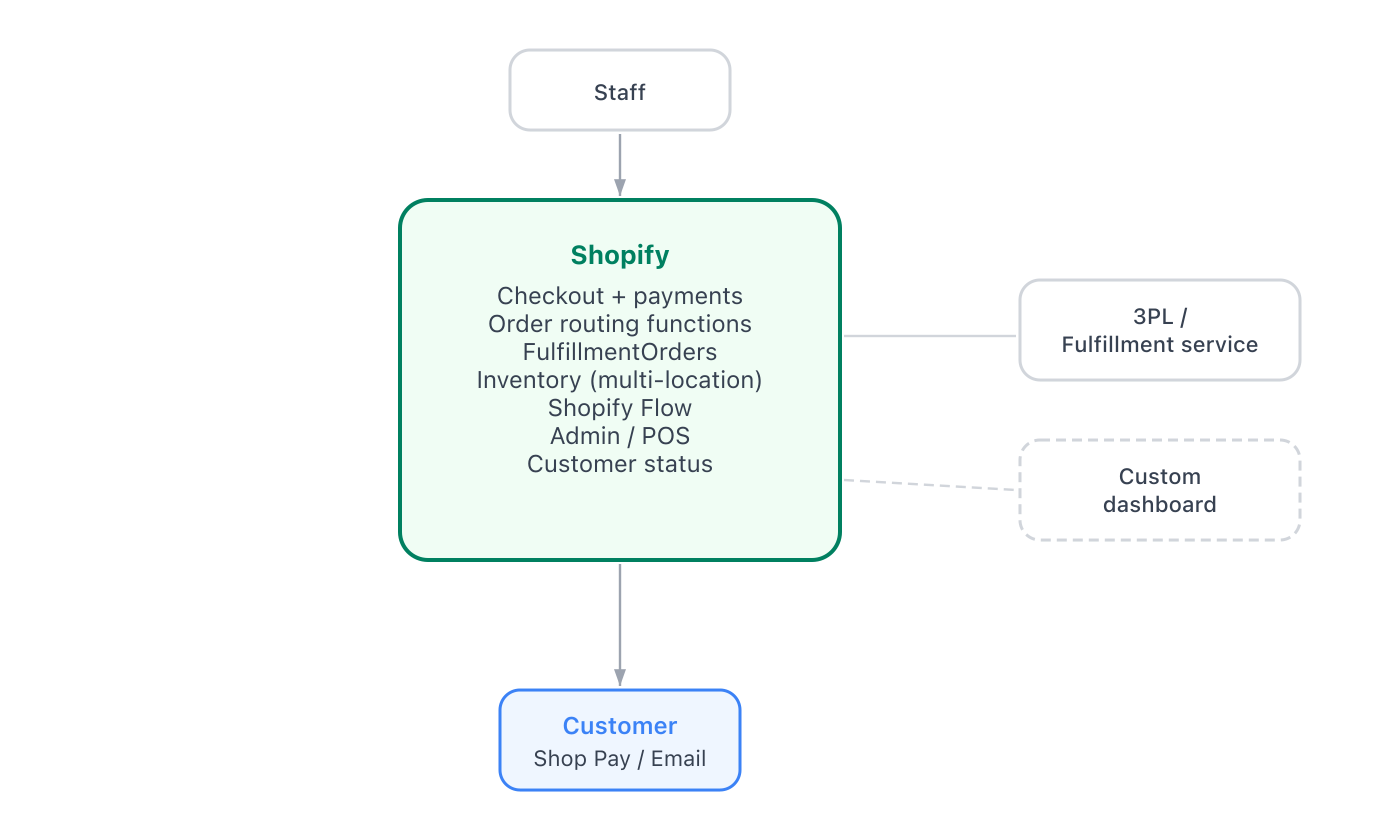
In this pattern, Shopify owns the entire order lifecycle using native capabilities. No external OMS is required.
Anchor to When to use this patternWhen to use this pattern
- The merchant operates within a single Shopify instance, or a small number of stores without cross-store fulfillment.
- Routing logic fits within order routing Functions.
- The fulfillment network maps to Shopify locations as physical fulfillment points, including natively supported 3PL fulfillment services and custom fulfillment services.
- No legacy OMS dependency.
Anchor to InventoryInventory
Shopify is the authoritative source for inventory. Use the standard Inventory API for any quantity adjustments. No external sync is required.
If your store uses a third-party logistics provider (3PL) or fulfillment service, they can push inventory updates into Shopify using their associated Location, like any other merchant-facing inventory write.
The native primitives that support this pattern are documented in:
- Apps in order management.
- Fulfillment service apps.
- Order Routing Location Rule Function.
- Build fulfillment solutions.
If fulfillment complexity outgrows native capabilities, then the architecture shifts toward the hybrid or external OMS pattern.
Anchor to Next stepsNext steps
- Apps in order management.
- Fulfillment service apps.
- Order Routing Location Rule Function.
- Build fulfillment solutions.
orderCapturemutation.refundCreatemutation.fulfillmentCreatemutation.- Webhooks overview.
- Metafields.