Full page
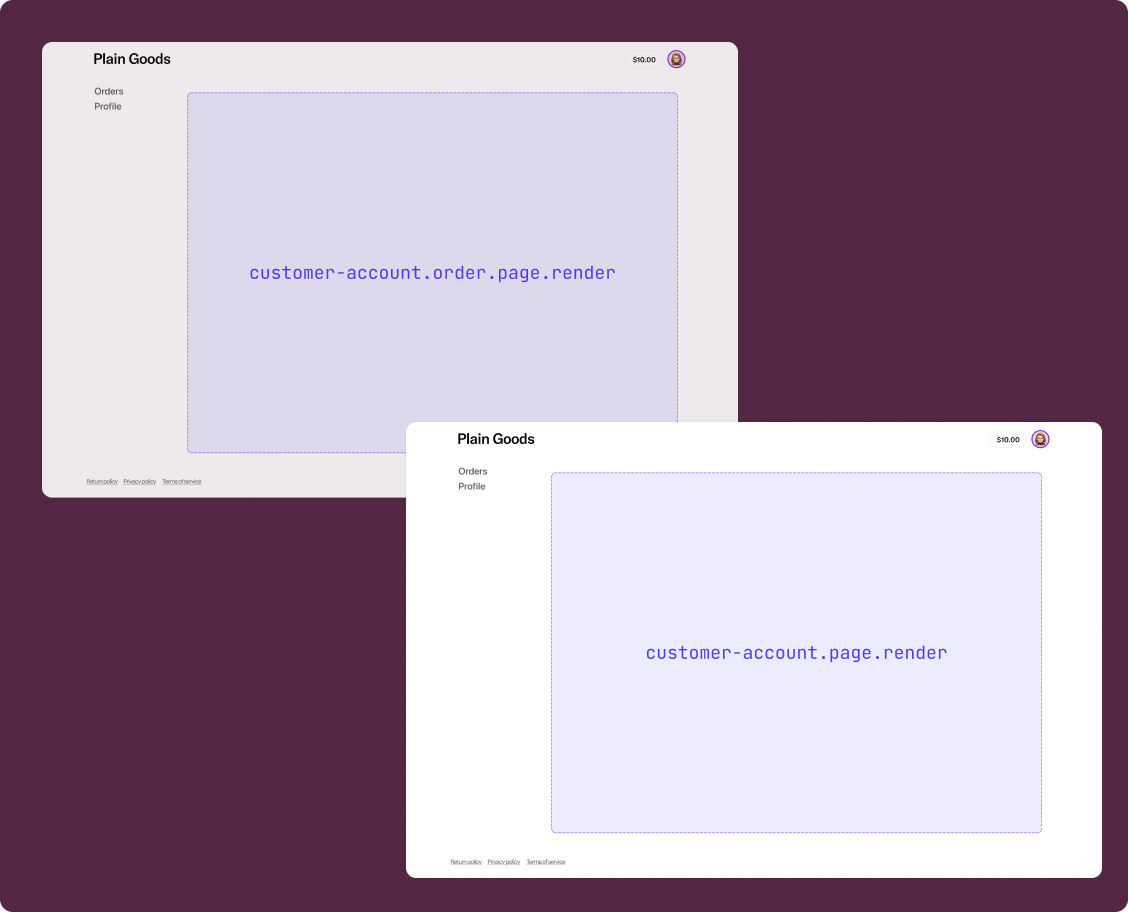
Full-page extensions allow you to create entirely new pages in customer accounts. They render in the main content area, below the header, and above the footer.
By default, when a merchant adds a full-page extension in the checkout and accounts editor, they're prompted to add it to the customer account header menu. Use the page component as the main container for placing content in your full-page extension.
Anchor to Use casesUse cases
- Wishlist: Build a dedicated page where customers can view and manage their saved products.
- Loyalty program: Display loyalty points, rewards tiers, and redemption options on a custom page.
- Return requests: Create an order-specific page where customers can initiate and manage product returns.
- Subscription management: Allow customers to view and manage their product subscriptions on a dedicated page.
- Custom order views: Build order-specific pages that display supplementary information such as warranty details or installation instructions.
Anchor to Full page targetsFull page targets
Full-page extensions support custom protocols and the Navigation API for in-extension routing.
A full-page extension target can't coexist with any other targets in the same extension. Each full-page extension must be defined in a separate [[extensions.targeting]] entry in your TOML configuration.
A full-page extension target can't coexist with any other targets in the same extension. Each full-page extension must be defined in a separate [[extensions.targeting]] entry in your TOML configuration.
Anchor to Customer account full page ,[object Object]Customer account full page target
customer-account.page.render
Renders a full-page extension in the main content area of customer accounts. Use this target for pages that aren't tied to a specific order, such as a wishlist or loyalty program page.
Supported components
- Abbreviation
- Announcement
- Avatar
- Badge
- Banner
- Box
- Button
- Button group
- Checkbox
- Chip
- Choice list
- Clickable
- Clickable chip
- Clipboard item
- Customer account action
- Date field
- Date picker
- Details
- Divider
- Drop zone
- Email field
- Form
- Grid
- Heading
- Icon
- Image
- Image group
- Link
- Map
- Menu
- Modal
- Money field
- Number field
- Ordered list
- Page
- Paragraph
- Password field
- Payment icon
- Phone field
- Popover
- Press button
- Product thumbnail
- Progress
- Qr code
- Query container
- Scroll box
- Section
- Select
- Sheet
- Skeleton paragraph
- Spinner
- Stack
- Switch
- Text
- Text area
- Text field
- Time
- Tooltip
- Unordered list
- Url field
Supported components
- Abbreviation
- Announcement
- Avatar
- Badge
- Banner
- Box
- Button
- Button group
- Checkbox
- Chip
- Choice list
- Clickable
- Clickable chip
- Clipboard item
- Customer account action
- Date field
- Date picker
- Details
- Divider
- Drop zone
- Email field
- Form
- Grid
- Heading
- Icon
- Image
- Image group
- Link
- Map
- Menu
- Modal
- Money field
- Number field
- Ordered list
- Page
- Paragraph
- Password field
- Payment icon
- Phone field
- Popover
- Press button
- Product thumbnail
- Progress
- Qr code
- Query container
- Scroll box
- Section
- Select
- Sheet
- Skeleton paragraph
- Spinner
- Stack
- Switch
- Text
- Text area
- Text field
- Time
- Tooltip
- Unordered list
- Url field
jsx
Examples
Build a wishlist page
Description
Create a full-page extension that displays a wishlist. This example uses [page](/docs/api/customer-account-ui-extensions/latest/polaris-web-components/layout-and-structure/page) as the main container with a heading, subheading, and a primary action button that navigates back to the customer account.
jsx
import '@shopify/ui-extensions/preact';
import {render} from 'preact';

export default async () => {
  render(<Extension />, document.body);
};

function Extension() {
  return (
    <s-page heading="Wishlist" subheading="Your saved items">
      <s-button
        slot="primary-action"
        onClick={() => navigation.navigate('shopify:customer-account/')}
      >
        Back to account
      </s-button>
      <s-stack direction="block" gap="base">
        <s-banner tone="info">
          Save items from the store to keep track of products you love.
        </s-banner>
        <s-stack direction="block" gap="base">
          <s-heading>No saved items yet</s-heading>
          <s-text color="subdued">
            Browse the store and save items to your wishlist.
          </s-text>
        </s-stack>
      </s-stack>
    </s-page>
  );
}
Handle in-extension navigation
Description
Build a full-page extension with multiple routes using the [Navigation API](/docs/api/customer-account-ui-extensions/latest/target-apis/platform-apis/navigation-api). Use `navigation.navigate()` to move between routes within the extension, and `navigation.currentEntry` to determine the current route.
jsx
import '@shopify/ui-extensions/preact';
import {render} from 'preact';
import {useReducer, useEffect} from 'preact/hooks';

export default async () => {
  render(<Extension />, document.body);
};

function useNavigationCurrentEntry() {
  const [entry, update] = useReducer(
    () => navigation.currentEntry,
    navigation.currentEntry,
  );

  useEffect(() => {
    navigation.addEventListener('currententrychange', update);
    return () => navigation.removeEventListener('currententrychange', update);
  }, []);

  return entry;
}

function Extension() {
  const currentEntry = useNavigationCurrentEntry();
  const currentPath = new URL(currentEntry.url).pathname;

  if (currentPath.endsWith('/settings')) {
    return (
      <s-page heading="Subscription Settings">
        <s-button
          slot="primary-action"
          onClick={() => navigation.navigate('extension://')}
        >
          Back
        </s-button>
        <s-stack direction="block" gap="base">
          <s-text>Manage your subscription preferences here.</s-text>
        </s-stack>
      </s-page>
    );
  }

  return (
    <s-page heading="Subscriptions">
      <s-stack direction="block" gap="base">
        <s-text>Manage your active subscriptions.</s-text>
        <s-button
          onClick={() => navigation.navigate('extension://settings')}
        >
          Subscription settings
        </s-button>
      </s-stack>
    </s-page>
  );
}
Anchor to Order-specific full page ,[object Object]Order-specific full page target
customer-account.order.page.render
Renders a full-page extension tied to a specific order in the main content area of customer accounts. Use this target for pages like return requests or warranty details. This target gives you access to order details through shopify.order, as well as line items through shopify.lines.
Supported components
- Abbreviation
- Announcement
- Avatar
- Badge
- Banner
- Box
- Button
- Button group
- Checkbox
- Chip
- Choice list
- Clickable
- Clickable chip
- Clipboard item
- Customer account action
- Date field
- Date picker
- Details
- Divider
- Drop zone
- Email field
- Form
- Grid
- Heading
- Icon
- Image
- Image group
- Link
- Map
- Menu
- Modal
- Money field
- Number field
- Ordered list
- Page
- Paragraph
- Password field
- Payment icon
- Phone field
- Popover
- Press button
- Product thumbnail
- Progress
- Qr code
- Query container
- Scroll box
- Section
- Select
- Sheet
- Skeleton paragraph
- Spinner
- Stack
- Switch
- Text
- Text area
- Text field
- Time
- Tooltip
- Unordered list
- Url field
Available APIs
- Addresses API
- Analytics API
- Attributes API
- Authenticated Account API
- Authentication State API
- Buyer Identity API
- Cart Lines API
- Checkout Settings API
- Cost API
- Customer Account API
- Customer Privacy API
- Discounts API
- Extension API
- Gift Cards API
- Intents API
- Localization API
- Metafields API
- Navigation API
- Note API
- Order API
- Order Status Localization API
- Require Login API
- Session Token API
- Settings API
- Shop API
- Storage API
- Storefront API
- Toast API
- Version API
Supported components
- Abbreviation
- Announcement
- Avatar
- Badge
- Banner
- Box
- Button
- Button group
- Checkbox
- Chip
- Choice list
- Clickable
- Clickable chip
- Clipboard item
- Customer account action
- Date field
- Date picker
- Details
- Divider
- Drop zone
- Email field
- Form
- Grid
- Heading
- Icon
- Image
- Image group
- Link
- Map
- Menu
- Modal
- Money field
- Number field
- Ordered list
- Page
- Paragraph
- Password field
- Payment icon
- Phone field
- Popover
- Press button
- Product thumbnail
- Progress
- Qr code
- Query container
- Scroll box
- Section
- Select
- Sheet
- Skeleton paragraph
- Spinner
- Stack
- Switch
- Text
- Text area
- Text field
- Time
- Tooltip
- Unordered list
- Url field
Available APIs
- Addresses API
- Analytics API
- Attributes API
- Authenticated Account API
- Authentication State API
- Buyer Identity API
- Cart Lines API
- Checkout Settings API
- Cost API
- Customer Account API
- Customer Privacy API
- Discounts API
- Extension API
- Gift Cards API
- Intents API
- Localization API
- Metafields API
- Navigation API
- Note API
- Order API
- Order Status Localization API
- Require Login API
- Session Token API
- Settings API
- Shop API
- Storage API
- Storefront API
- Toast API
- Version API
jsx
Examples
Display order information on a custom page
Description
Build an order-specific full-page extension that reads order data from `shopify.order` and displays it on a custom page. This example creates a warranty information page tied to the order.
jsx
import '@shopify/ui-extensions/preact';
import {render} from 'preact';

export default async () => {
  render(<Extension />, document.body);
};

function Extension() {
  const order = shopify.order.value;

  if (!order) {
    return null;
  }

  return (
    <s-page heading="Warranty Details" subheading={`Order ${order.name}`}>
      <s-button
        slot="primary-action"
        onClick={() => navigation.navigate('shopify:customer-account/orders')}
      >
        Back to orders
      </s-button>
      <s-stack direction="block" gap="base">
        <s-banner tone="success">
          Your warranty is active for this order.
        </s-banner>
        <s-stack direction="block" gap="base">
          <s-heading>Order information</s-heading>
          <s-text>Order ID: {order.id}</s-text>
          <s-text>Order number: {order.name}</s-text>
          {order.processedAt && (
            <s-text>Purchase date: {order.processedAt}</s-text>
          )}
        </s-stack>
      </s-stack>
    </s-page>
  );
}
Build a return request page
Description
Create an order-specific full-page extension for submitting return requests. This example demonstrates reading order line items from `shopify.lines` and using [page](/docs/api/customer-account-ui-extensions/latest/polaris-web-components/layout-and-structure/page) action slots for navigation.
jsx
import '@shopify/ui-extensions/preact';
import {render} from 'preact';
import {useState} from 'preact/hooks';

export default async () => {
  render(<Extension />, document.body);
};

function Extension() {
  const order = shopify.order.value;
  const lines = shopify.lines.value;
  const [submitted, setSubmitted] = useState(false);

  if (!order) {
    return null;
  }

  if (submitted) {
    return (
      <s-page heading="Return Request Submitted" subheading={`Order ${order.name}`}>
        <s-button
          slot="primary-action"
          onClick={() => navigation.navigate('shopify:customer-account/orders')}
        >
          Back to orders
        </s-button>
        <s-banner tone="success">
          Your return request has been submitted. We'll review it and get back to you.
        </s-banner>
      </s-page>
    );
  }

  return (
    <s-page heading="Request a Return" subheading={`Order ${order.name}`}>
      <s-button
        slot="primary-action"
        onClick={() => navigation.navigate('shopify:customer-account/orders')}
      >
        Back to orders
      </s-button>
      <s-stack direction="block" gap="base">
        <s-text>Select items to return from order {order.name}:</s-text>
        <s-stack direction="block" gap="base">
          {lines.map((line) => (
            <s-stack key={line.id} direction="inline" gap="base" alignItems="center">
              <s-text>{line.merchandise.title}</s-text>
              <s-text color="subdued">Qty: {line.quantity}</s-text>
            </s-stack>
          ))}
        </s-stack>
        <s-button onClick={() => setSubmitted(true)}>
          Submit return request
        </s-button>
      </s-stack>
    </s-page>
  );
}
Anchor to Best practicesBest practices
- Use the page component as the root container: Wrap your full-page extension content in a page component. It provides a consistent layout with support for headings, subheadings, and action slots (
primary-action,secondary-actions,breadcrumb-actions). - Choose the right target for the context: If the page needs access to order data, use
customer-account.order.page.render. Otherwise, usecustomer-account.page.render. - Handle route navigation within the extension: Use the Navigation API and
navigation.navigate()for programmatic in-extension routing. Use relative URLs or theextension:protocol with link components for declarative navigation. - Share direct links to the page: The URL for a full-page extension is static, so merchants can link customers directly to the page using the URL.
- Guard against missing data: When using
customer-account.order.page.render, always check thatshopify.order.valueis defined before rendering order-specific content. The order data loads asynchronously and may beundefinedon the initial render.