Payment
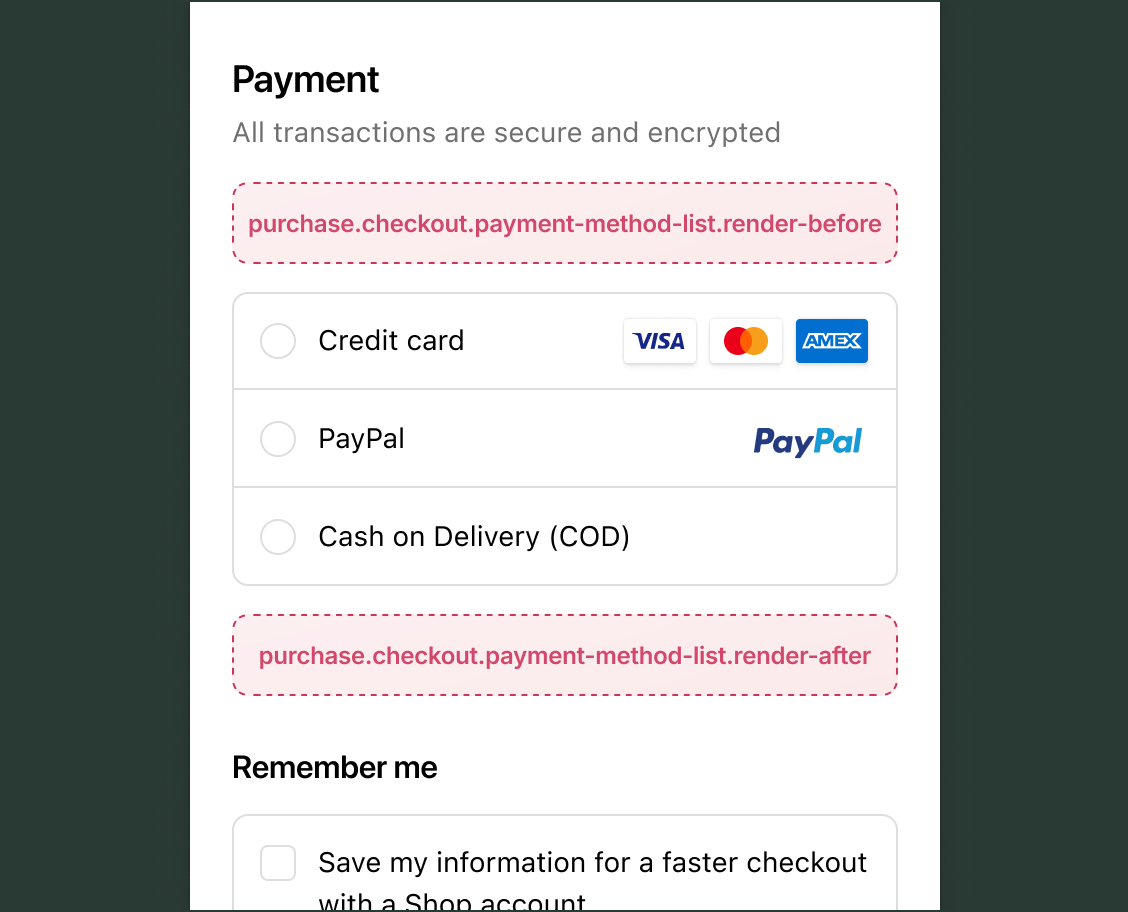
Checkout displays the payment methods available to the buyer, including digital wallets, credit cards, buy-now-pay-later plans, and regional options. Use these targets to add contextual messaging, security details, or incentives based on which methods are available and what the buyer has selected.
Payment targets are read-only for payment selection. Extensions can read available and selected payment methods but can't modify the list, pre-select options, or reorder or hide methods. Write operations at these targets are cart-scoped: notes, metafields, discount codes, and gift card codes.
Anchor to Use casesUse cases
- Express checkout promotion: Promote wallet options like Apple Pay or Google Pay when they're available to the buyer.
- Installment plan details: Display information about deferred payment options when they're offered, such as how the installment plan works.
- Credit card security: Display encryption assurances or purchase protection details when a credit card is selected, so buyers feel confident entering their card details.
- Gift card or store credit: Display messaging when gift-card or store-credit payment options are available, such as instructions on how to apply them.
Anchor to Payment targetsPayment targets
Use these targets to add content that helps buyers understand and choose their payment method.
Anchor to Render before payment methods ,[object Object]Render before payment methods target
purchase.checkout.payment-method-list.render-before
Renders before the list of payment methods. Use this target to display messaging that applies to all payment options before the buyer makes a selection.
Read available payment options through shopify.availablePaymentOptions and the buyer's current selection through shopify.selectedPaymentOptions. Both update reactively as the buyer interacts with payment choices.
Supported components
- Abbreviation
- Badge
- Banner
- Box
- Button
- Chat
- Checkbox
- Chip
- Choice list
- Clickable
- Clickable chip
- Clipboard item
- Consent checkbox
- Consent phone field
- Date field
- Date picker
- Details
- Divider
- Drop zone
- Email field
- Form
- Grid
- Heading
- Icon
- Image
- Link
- Map
- Modal
- Money field
- Number field
- Ordered list
- Paragraph
- Password field
- Payment icon
- Phone field
- Popover
- Press button
- Product thumbnail
- Progress
- Qr code
- Query container
- Scroll box
- Section
- Select
- Sheet
- Skeleton paragraph
- Spinner
- Stack
- Switch
- Text
- Text area
- Text field
- Time
- Tooltip
- Unordered list
- Url field
Available APIs
- Addresses API
- Analytics API
- Attributes API
- Buyer Identity API
- Buyer Journey API
- Cart Instructions API
- Cart Lines API
- Checkout Token API
- Cost API
- Customer Privacy API
- Delivery API
- Discounts API
- Extension API
- Gift Cards API
- Localization API
- Localized Fields API
- Metafields API
- Note API
- Payments API
- Session Token API
- Settings API
- Shop API
- Storage API
- Storefront API
Supported components
- Abbreviation
- Badge
- Banner
- Box
- Button
- Chat
- Checkbox
- Chip
- Choice list
- Clickable
- Clickable chip
- Clipboard item
- Consent checkbox
- Consent phone field
- Date field
- Date picker
- Details
- Divider
- Drop zone
- Email field
- Form
- Grid
- Heading
- Icon
- Image
- Link
- Map
- Modal
- Money field
- Number field
- Ordered list
- Paragraph
- Password field
- Payment icon
- Phone field
- Popover
- Press button
- Product thumbnail
- Progress
- Qr code
- Query container
- Scroll box
- Section
- Select
- Sheet
- Skeleton paragraph
- Spinner
- Stack
- Switch
- Text
- Text area
- Text field
- Time
- Tooltip
- Unordered list
- Url field
Available APIs
- Addresses API
- Analytics API
- Attributes API
- Buyer Identity API
- Buyer Journey API
- Cart Instructions API
- Cart Lines API
- Checkout Token API
- Cost API
- Customer Privacy API
- Delivery API
- Discounts API
- Extension API
- Gift Cards API
- Localization API
- Localized Fields API
- Metafields API
- Note API
- Payments API
- Session Token API
- Settings API
- Shop API
- Storage API
- Storefront API
jsx
Examples
Promote wallet payments before the payment list
Description
Display a banner encouraging buyers to use wallet payment options like Apple Pay or Google Pay when those options are available. This example reads availablePaymentOptions and only renders when a wallet option is present.
jsx
import '@shopify/ui-extensions/preact';
import {render} from 'preact';

export default function extension() {
  render(<Extension />, document.body);
}

function Extension() {
  const hasWallet = shopify.availablePaymentOptions.value.some(
    (option) => option.type === 'wallet',
  );

  if (!hasWallet) return null;

  return (
    <s-banner>
      Use Apple Pay or Google Pay to check out faster.
    </s-banner>
  );
}
Show a buy-now-pay-later promotion
Description
Highlight a buy-now-pay-later option above the payment method list. This example reads `shopify.cost.totalAmount.value` and renders a banner when the cart total qualifies for installment payments.
jsx
import '@shopify/ui-extensions/preact';
import {render} from 'preact';

export default function extension() {
  render(<Extension />, document.body);
}

function Extension() {
  const total = Number(shopify.cost.totalAmount.value?.amount ?? 0);

  if (total < 50) return null;

  return (
    <s-banner tone="info">
      Pay in 4 interest-free installments of ${(total / 4).toFixed(2)}.
    </s-banner>
  );
}
Anchor to Render after payment methods ,[object Object]Render after payment methods target
purchase.checkout.payment-method-list.render-after
Renders below the list of payment methods. Use this target for content that responds to the buyer's payment selection, such as security details or payment-specific messaging.
Supported components
- Abbreviation
- Badge
- Banner
- Box
- Button
- Chat
- Checkbox
- Chip
- Choice list
- Clickable
- Clickable chip
- Clipboard item
- Consent checkbox
- Consent phone field
- Date field
- Date picker
- Details
- Divider
- Drop zone
- Email field
- Form
- Grid
- Heading
- Icon
- Image
- Link
- Map
- Modal
- Money field
- Number field
- Ordered list
- Paragraph
- Password field
- Payment icon
- Phone field
- Popover
- Press button
- Product thumbnail
- Progress
- Qr code
- Query container
- Scroll box
- Section
- Select
- Sheet
- Skeleton paragraph
- Spinner
- Stack
- Switch
- Text
- Text area
- Text field
- Time
- Tooltip
- Unordered list
- Url field
Available APIs
- Addresses API
- Analytics API
- Attributes API
- Buyer Identity API
- Buyer Journey API
- Cart Instructions API
- Cart Lines API
- Checkout Token API
- Cost API
- Customer Privacy API
- Delivery API
- Discounts API
- Extension API
- Gift Cards API
- Localization API
- Localized Fields API
- Metafields API
- Note API
- Payments API
- Session Token API
- Settings API
- Shop API
- Storage API
- Storefront API
Supported components
- Abbreviation
- Badge
- Banner
- Box
- Button
- Chat
- Checkbox
- Chip
- Choice list
- Clickable
- Clickable chip
- Clipboard item
- Consent checkbox
- Consent phone field
- Date field
- Date picker
- Details
- Divider
- Drop zone
- Email field
- Form
- Grid
- Heading
- Icon
- Image
- Link
- Map
- Modal
- Money field
- Number field
- Ordered list
- Paragraph
- Password field
- Payment icon
- Phone field
- Popover
- Press button
- Product thumbnail
- Progress
- Qr code
- Query container
- Scroll box
- Section
- Select
- Sheet
- Skeleton paragraph
- Spinner
- Stack
- Switch
- Text
- Text area
- Text field
- Time
- Tooltip
- Unordered list
- Url field
Available APIs
- Addresses API
- Analytics API
- Attributes API
- Buyer Identity API
- Buyer Journey API
- Cart Instructions API
- Cart Lines API
- Checkout Token API
- Cost API
- Customer Privacy API
- Delivery API
- Discounts API
- Extension API
- Gift Cards API
- Localization API
- Localized Fields API
- Metafields API
- Note API
- Payments API
- Session Token API
- Settings API
- Shop API
- Storage API
- Storefront API
jsx
Examples
Show security messaging after credit card selection
Description
Display a security banner when the buyer selects a credit card. This example reads selectedPaymentOptions and renders only when a credit card type is active.
jsx
import '@shopify/ui-extensions/preact';
import {render} from 'preact';

export default function extension() {
  render(<Extension />, document.body);
}

function Extension() {
  const hasCreditCard = shopify.selectedPaymentOptions.value.some(
    (option) => option.type === 'creditCard',
  );

  if (!hasCreditCard) return null;

  return (
    <s-banner>
      Your payment information is encrypted and secure.
    </s-banner>
  );
}
Display accepted payment logos
Description
Reassure buyers by showing supported payment methods below the list. This example renders a row of `s-payment-icon` elements for common card brands and wallets.
jsx
import '@shopify/ui-extensions/preact';
import {render} from 'preact';

export default function extension() {
  render(<Extension />, document.body);
}

function Extension() {
  return (
    <s-stack direction="inline" gap="small-400" alignItems="center">
      <s-payment-icon type="visa" />
      <s-payment-icon type="mastercard" />
      <s-payment-icon type="amex" />
      <s-payment-icon type="apple-pay" />
      <s-payment-icon type="shop-pay" />
    </s-stack>
  );
}
Anchor to Best practicesBest practices
- Check payment method availability: Not all payment methods are available to every buyer. Read
shopify.availablePaymentOptionsto confirm the relevant payment type is offered before displaying type-specific messaging. Without this check, type-specific content can appear for payment methods the buyer can't use. - Match target to intent: Use
render-beforefor messaging about available payment options before the buyer selects. Userender-afterfor content that responds to the buyer's selection, such as security details for a specific payment type. - Keep content brief at the payment step: The payment step is where buyers enter sensitive information. Keep content before and after the payment list brief to avoid distracting from the payment flow.
- Don't recreate native payment UI: Checkout renders each payment method's own interactive UI. Adding buttons, form fields, or selection controls at these targets can confuse buyers about where to complete their payment.