Order summary
The order summary area displays cart line items, applied discounts, and cost totals on the checkout page. Extensions in this area help buyers make informed purchase decisions by surfacing information like product details, promotions, and savings alongside their order. Learn more about building checkout extensions.
Extensions at the reductions targets render alongside the native discount form, not in place of it. Your extension appears before or after the existing discount elements.
The cart line item target doesn't render for custom line items belonging to draft order invoices.
Anchor to Use casesUse cases
- Per-item warranty and protection offers: Display product protection plans or extended warranties on individual items, letting buyers add coverage before completing their purchase.
- Product customization display: Show personalized details like engraving text, gift messages, or configuration options beneath each item in the order summary.
- Cross-sell and product recommendations: Suggest related products or frequently bought together items after the cart line list, allowing buyers to add them directly.
- Custom discount interfaces: Build branded discount entry fields or loyalty point redemption controls before or after the native discount form.
- Gift card balance and application: Let buyers check gift card balances and apply them to their order alongside or separate from the standard discount inputs.
- Order savings breakdowns: Display detailed summaries of all applied discounts, automatic savings, and promotional offers after the discount area.
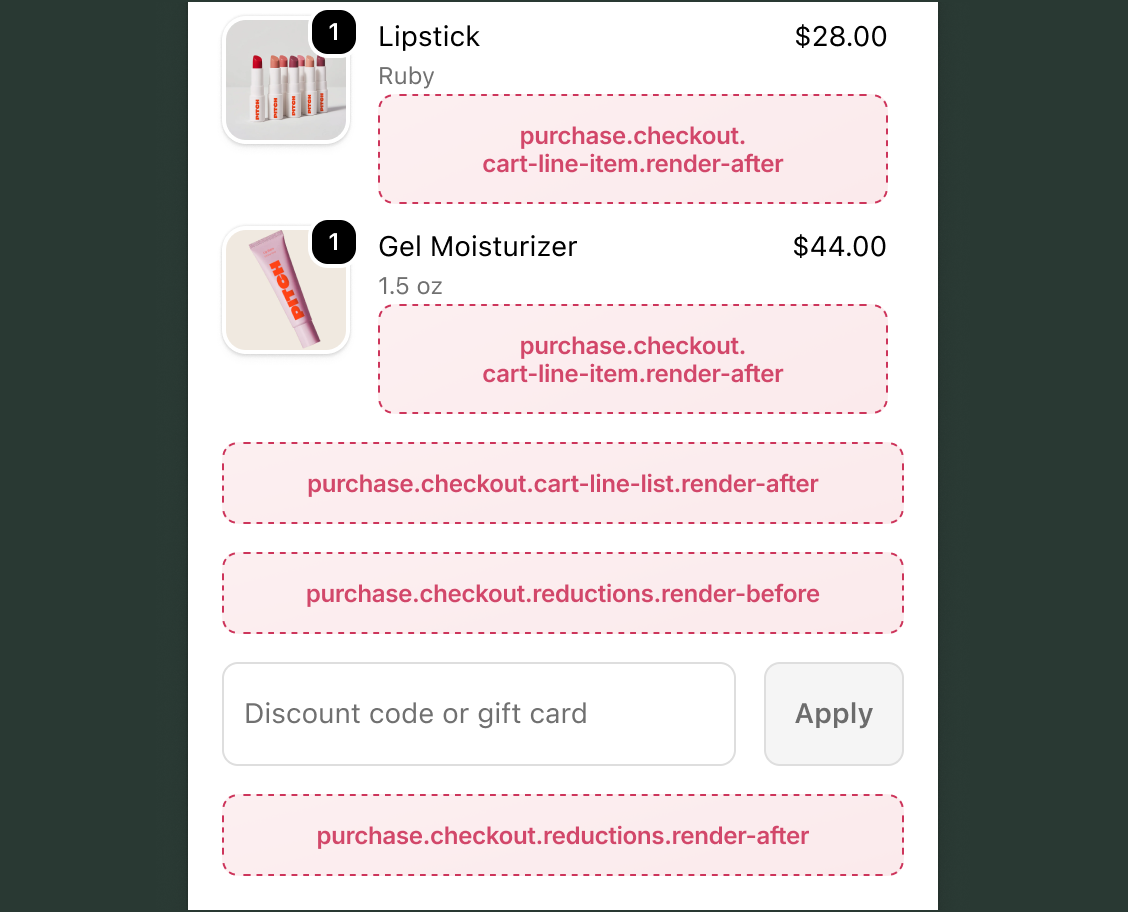
Anchor to Line item targetsLine item targets
Use these static extension targets to extend the order summary line items area during checkout. These targets support the full checkout component set, including form fields, banners, images, and interactive elements. The examples demonstrate using API methods for cart mutations and API properties for reading checkout state.
Anchor to Checkout cart line item ,[object Object]Checkout cart line item target
purchase.checkout.cart-line-item.render-after
Renders on every line item in the order summary, inside the details under the line item properties element. This target is instantiated once for each item in the cart. To selectively show content for specific items, inspect the cart line data from target and return null for items where your extension doesn't apply.
This target receives additional cart line item properties that provide the specific cart line through the target property with access to merchandise details, quantity, cost, attributes, discount allocations, and bundle line components.
Extensions at this target have write access through API methods for cart lines, discount codes, gift cards, notes, attributes, metafields, and shipping address changes. Extensions also have read access through API properties to checkout state, including shop information, buyer identity, cost breakdowns, and cart lines.
Supported components
- Abbreviation
- Badge
- Banner
- Box
- Button
- Chat
- Checkbox
- Chip
- Choice list
- Clickable
- Clickable chip
- Clipboard item
- Consent checkbox
- Consent phone field
- Date field
- Date picker
- Details
- Divider
- Drop zone
- Email field
- Form
- Grid
- Heading
- Icon
- Image
- Link
- Map
- Modal
- Money field
- Number field
- Ordered list
- Paragraph
- Password field
- Payment icon
- Phone field
- Popover
- Press button
- Product thumbnail
- Progress
- Qr code
- Query container
- Scroll box
- Section
- Select
- Sheet
- Skeleton paragraph
- Spinner
- Stack
- Switch
- Text
- Text area
- Text field
- Time
- Tooltip
- Unordered list
- Url field
Available APIs
- Addresses API
- Analytics API
- Attributes API
- Buyer Identity API
- Buyer Journey API
- Cart Instructions API
- Cart Lines API
- Checkout Token API
- Cost API
- Customer Privacy API
- Delivery API
- Discounts API
- Extension API
- Gift Cards API
- Localization API
- Localized Fields API
- Metafields API
- Note API
- Payments API
- Session Token API
- Settings API
- Shop API
- Storage API
- Storefront API
Supported components
- Abbreviation
- Badge
- Banner
- Box
- Button
- Chat
- Checkbox
- Chip
- Choice list
- Clickable
- Clickable chip
- Clipboard item
- Consent checkbox
- Consent phone field
- Date field
- Date picker
- Details
- Divider
- Drop zone
- Email field
- Form
- Grid
- Heading
- Icon
- Image
- Link
- Map
- Modal
- Money field
- Number field
- Ordered list
- Paragraph
- Password field
- Payment icon
- Phone field
- Popover
- Press button
- Product thumbnail
- Progress
- Qr code
- Query container
- Scroll box
- Section
- Select
- Sheet
- Skeleton paragraph
- Spinner
- Stack
- Switch
- Text
- Text area
- Text field
- Time
- Tooltip
- Unordered list
- Url field
Available APIs
- Addresses API
- Analytics API
- Attributes API
- Buyer Identity API
- Buyer Journey API
- Cart Instructions API
- Cart Lines API
- Checkout Token API
- Cost API
- Customer Privacy API
- Delivery API
- Discounts API
- Extension API
- Gift Cards API
- Localization API
- Localized Fields API
- Metafields API
- Note API
- Payments API
- Session Token API
- Settings API
- Shop API
- Storage API
- Storefront API
jsx
Examples
Display per-item warranty offer
Description
Create an extension that reads the cart line's merchandise title and offers a warranty add-on for the item.
jsx
import '@shopify/ui-extensions/preact';
import {render} from 'preact';

export default function extension() {
  render(<Extension />, document.body);
}

function Extension() {
  const line = shopify.target.value;
  const title = line.merchandise.title;
  const price = line.cost.totalAmount.amount;

  return (
    <s-stack gap="tight">
      <s-text color="subdued">
        Add protection for {title}
      </s-text>
      <s-button
        variant="secondary"
        onClick={() =>
          shopify.applyCartLinesChange({
            type: 'addCartLine',
            merchandiseId:
              'gid://shopify/ProductVariant/WARRANTY',
            quantity: 1,
          })
        }
      >
        Add 2-year warranty
      </s-button>
    </s-stack>
  );
}
Flag bulk quantities on a cart line item
Description
Surface a bulk badge when a buyer has three or more of the same item. This example reads `line.quantity` from `shopify.target` and renders an `s-badge` when the quantity meets the threshold.
jsx
import '@shopify/ui-extensions/preact';
import {render} from 'preact';

export default function extension() {
  render(<Extension />, document.body);
}

function Extension() {
  const line = shopify.target.value;

  if (line.quantity < 3) return null;

  return <s-badge tone="neutral">Bulk order</s-badge>;
}
Anchor to Checkout cart line list ,[object Object]Checkout cart line list target
purchase.checkout.cart-line-list.render-after
Renders once after all line items in the order summary. This target appears once per checkout, unlike the cart line item target, which is instantiated for each item.
Extensions at this target have write access through API methods for cart lines, discount codes, gift cards, notes, attributes, metafields, and shipping address changes. Extensions also have read access through API properties to checkout state, including shop information, buyer identity, cost breakdowns, and cart lines.
Supported components
- Abbreviation
- Badge
- Banner
- Box
- Button
- Chat
- Checkbox
- Chip
- Choice list
- Clickable
- Clickable chip
- Clipboard item
- Consent checkbox
- Consent phone field
- Date field
- Date picker
- Details
- Divider
- Drop zone
- Email field
- Form
- Grid
- Heading
- Icon
- Image
- Link
- Map
- Modal
- Money field
- Number field
- Ordered list
- Paragraph
- Password field
- Payment icon
- Phone field
- Popover
- Press button
- Product thumbnail
- Progress
- Qr code
- Query container
- Scroll box
- Section
- Select
- Sheet
- Skeleton paragraph
- Spinner
- Stack
- Switch
- Text
- Text area
- Text field
- Time
- Tooltip
- Unordered list
- Url field
Available APIs
- Addresses API
- Analytics API
- Attributes API
- Buyer Identity API
- Buyer Journey API
- Cart Instructions API
- Cart Lines API
- Checkout Token API
- Cost API
- Customer Privacy API
- Delivery API
- Discounts API
- Extension API
- Gift Cards API
- Localization API
- Localized Fields API
- Metafields API
- Note API
- Payments API
- Session Token API
- Settings API
- Shop API
- Storage API
- Storefront API
Supported components
- Abbreviation
- Badge
- Banner
- Box
- Button
- Chat
- Checkbox
- Chip
- Choice list
- Clickable
- Clickable chip
- Clipboard item
- Consent checkbox
- Consent phone field
- Date field
- Date picker
- Details
- Divider
- Drop zone
- Email field
- Form
- Grid
- Heading
- Icon
- Image
- Link
- Map
- Modal
- Money field
- Number field
- Ordered list
- Paragraph
- Password field
- Payment icon
- Phone field
- Popover
- Press button
- Product thumbnail
- Progress
- Qr code
- Query container
- Scroll box
- Section
- Select
- Sheet
- Skeleton paragraph
- Spinner
- Stack
- Switch
- Text
- Text area
- Text field
- Time
- Tooltip
- Unordered list
- Url field
Available APIs
- Addresses API
- Analytics API
- Attributes API
- Buyer Identity API
- Buyer Journey API
- Cart Instructions API
- Cart Lines API
- Checkout Token API
- Cost API
- Customer Privacy API
- Delivery API
- Discounts API
- Extension API
- Gift Cards API
- Localization API
- Localized Fields API
- Metafields API
- Note API
- Payments API
- Session Token API
- Settings API
- Shop API
- Storage API
- Storefront API
jsx
Examples
Display a cross-sell recommendation
Description
Create an extension that displays the cart item count after the line list and lets the buyer add an item to their cart.
jsx
import '@shopify/ui-extensions/preact';
import {render} from 'preact';

export default function extension() {
  render(<Extension />, document.body);
}

function Extension() {
  const itemCount = shopify.lines.value.length;

  return (
    <s-stack gap="base">
      <s-text>
        You have {itemCount} items in your cart.
        Buyers who purchased these items also
        liked:
      </s-text>
      <s-button
        variant="secondary"
        onClick={() =>
          shopify.applyCartLinesChange({
            type: 'addCartLine',
            merchandiseId:
              'gid://shopify/ProductVariant/123',
            quantity: 1,
          })
        }
      >
        Add recommended item
      </s-button>
    </s-stack>
  );
}
Summarize total savings below the cart
Description
Show the total amount saved on the order below the line items. This example sums `discountedAmount` across `shopify.discountAllocations` and renders a success banner with the total savings.
jsx
import '@shopify/ui-extensions/preact';
import {render} from 'preact';

export default function extension() {
  render(<Extension />, document.body);
}

function Extension() {
  const allocations = shopify.discountAllocations.value;

  if (allocations.length === 0) return null;

  const totalSavings = allocations.reduce(
    (sum, a) => sum + Number(a.discountedAmount.amount),
    0,
  );

  return (
    <s-banner tone="success">
      You saved ${totalSavings.toFixed(2)} with applied discounts.
    </s-banner>
  );
}
Anchor to Reductions targetsReductions targets
Use these static extension targets to extend the order summary reductions area, where discount codes and gift cards are applied. These targets support the full checkout component set, including form fields, banners, images, and interactive elements. The examples demonstrate using API methods for applying discount codes and gift cards.
Anchor to Checkout reductions before ,[object Object]Checkout reductions before target
purchase.checkout.reductions.render-before
Renders in the order summary before the discount form element.
Extensions at this target have write access through API methods for cart lines, discount codes, gift cards, notes, attributes, metafields, and shipping address changes. Extensions also have read access through API properties to checkout state, including shop information, buyer identity, cost breakdowns, and cart lines.
Supported components
- Abbreviation
- Badge
- Banner
- Box
- Button
- Chat
- Checkbox
- Chip
- Choice list
- Clickable
- Clickable chip
- Clipboard item
- Consent checkbox
- Consent phone field
- Date field
- Date picker
- Details
- Divider
- Drop zone
- Email field
- Form
- Grid
- Heading
- Icon
- Image
- Link
- Map
- Modal
- Money field
- Number field
- Ordered list
- Paragraph
- Password field
- Payment icon
- Phone field
- Popover
- Press button
- Product thumbnail
- Progress
- Qr code
- Query container
- Scroll box
- Section
- Select
- Sheet
- Skeleton paragraph
- Spinner
- Stack
- Switch
- Text
- Text area
- Text field
- Time
- Tooltip
- Unordered list
- Url field
Available APIs
- Addresses API
- Analytics API
- Attributes API
- Buyer Identity API
- Buyer Journey API
- Cart Instructions API
- Cart Lines API
- Checkout Token API
- Cost API
- Customer Privacy API
- Delivery API
- Discounts API
- Extension API
- Gift Cards API
- Localization API
- Localized Fields API
- Metafields API
- Note API
- Payments API
- Session Token API
- Settings API
- Shop API
- Storage API
- Storefront API
Supported components
- Abbreviation
- Badge
- Banner
- Box
- Button
- Chat
- Checkbox
- Chip
- Choice list
- Clickable
- Clickable chip
- Clipboard item
- Consent checkbox
- Consent phone field
- Date field
- Date picker
- Details
- Divider
- Drop zone
- Email field
- Form
- Grid
- Heading
- Icon
- Image
- Link
- Map
- Modal
- Money field
- Number field
- Ordered list
- Paragraph
- Password field
- Payment icon
- Phone field
- Popover
- Press button
- Product thumbnail
- Progress
- Qr code
- Query container
- Scroll box
- Section
- Select
- Sheet
- Skeleton paragraph
- Spinner
- Stack
- Switch
- Text
- Text area
- Text field
- Time
- Tooltip
- Unordered list
- Url field
Available APIs
- Addresses API
- Analytics API
- Attributes API
- Buyer Identity API
- Buyer Journey API
- Cart Instructions API
- Cart Lines API
- Checkout Token API
- Cost API
- Customer Privacy API
- Delivery API
- Discounts API
- Extension API
- Gift Cards API
- Localization API
- Localized Fields API
- Metafields API
- Note API
- Payments API
- Session Token API
- Settings API
- Shop API
- Storage API
- Storefront API
jsx
Examples
Display a promotional banner
Description
Create an extension that shows a promotional message before the discount form, encouraging the buyer to apply a discount code.
jsx
import '@shopify/ui-extensions/preact';
import {render} from 'preact';

export default function extension() {
  render(<Extension />, document.body);
}

function Extension() {
  return (
    <s-banner>
      Use code SAVE10 for 10% off your order.
    </s-banner>
  );
}
Show a loyalty points banner above the discount input
Description
Promote a loyalty program incentive above the discount code input. This example renders an `s-banner` inviting buyers to apply loyalty points before they enter a discount code.
jsx
import '@shopify/ui-extensions/preact';
import {render} from 'preact';

export default function extension() {
  render(<Extension />, document.body);
}

function Extension() {
  return (
    <s-banner tone="info">
      Members can redeem loyalty points for a discount. Sign in to apply your points.
    </s-banner>
  );
}
Anchor to Checkout reductions after ,[object Object]Checkout reductions after target
purchase.checkout.reductions.render-after
Renders in the order summary after the discount form and discount tag elements.
Extensions at this target have write access through API methods for cart lines, discount codes, gift cards, notes, attributes, metafields, and shipping address changes. Extensions also have read access through API properties to checkout state, including shop information, buyer identity, cost breakdowns, and cart lines.
Supported components
- Abbreviation
- Badge
- Banner
- Box
- Button
- Chat
- Checkbox
- Chip
- Choice list
- Clickable
- Clickable chip
- Clipboard item
- Consent checkbox
- Consent phone field
- Date field
- Date picker
- Details
- Divider
- Drop zone
- Email field
- Form
- Grid
- Heading
- Icon
- Image
- Link
- Map
- Modal
- Money field
- Number field
- Ordered list
- Paragraph
- Password field
- Payment icon
- Phone field
- Popover
- Press button
- Product thumbnail
- Progress
- Qr code
- Query container
- Scroll box
- Section
- Select
- Sheet
- Skeleton paragraph
- Spinner
- Stack
- Switch
- Text
- Text area
- Text field
- Time
- Tooltip
- Unordered list
- Url field
Available APIs
- Addresses API
- Analytics API
- Attributes API
- Buyer Identity API
- Buyer Journey API
- Cart Instructions API
- Cart Lines API
- Checkout Token API
- Cost API
- Customer Privacy API
- Delivery API
- Discounts API
- Extension API
- Gift Cards API
- Localization API
- Localized Fields API
- Metafields API
- Note API
- Payments API
- Session Token API
- Settings API
- Shop API
- Storage API
- Storefront API
Supported components
- Abbreviation
- Badge
- Banner
- Box
- Button
- Chat
- Checkbox
- Chip
- Choice list
- Clickable
- Clickable chip
- Clipboard item
- Consent checkbox
- Consent phone field
- Date field
- Date picker
- Details
- Divider
- Drop zone
- Email field
- Form
- Grid
- Heading
- Icon
- Image
- Link
- Map
- Modal
- Money field
- Number field
- Ordered list
- Paragraph
- Password field
- Payment icon
- Phone field
- Popover
- Press button
- Product thumbnail
- Progress
- Qr code
- Query container
- Scroll box
- Section
- Select
- Sheet
- Skeleton paragraph
- Spinner
- Stack
- Switch
- Text
- Text area
- Text field
- Time
- Tooltip
- Unordered list
- Url field
Available APIs
- Addresses API
- Analytics API
- Attributes API
- Buyer Identity API
- Buyer Journey API
- Cart Instructions API
- Cart Lines API
- Checkout Token API
- Cost API
- Customer Privacy API
- Delivery API
- Discounts API
- Extension API
- Gift Cards API
- Localization API
- Localized Fields API
- Metafields API
- Note API
- Payments API
- Session Token API
- Settings API
- Shop API
- Storage API
- Storefront API
jsx
Examples
Display a savings summary
Description
Create an extension that shows a breakdown of all applied discounts and savings after the discount area.
jsx
import '@shopify/ui-extensions/preact';
import {render} from 'preact';

export default function extension() {
  render(<Extension />, document.body);
}

function Extension() {
  const discounts =
    shopify.discountAllocations.value;
  const total =
    shopify.cost.totalAmount.value.amount;
  const currency =
    shopify.cost.totalAmount.value.currencyCode;

  return (
    <s-stack gap="tight">
      {discounts.map((discount, i) => (
        <s-text key={i} color="subdued">
          {discount.title}: -{discount.amount}
        </s-text>
      ))}
      <s-text type="strong">
        Total: {total} {currency}
      </s-text>
    </s-stack>
  );
}
Promote an additional discount below reductions
Description
Offer a next-tier discount when the buyer is close to a cart-total threshold. This example reads `shopify.cost.totalAmount.value` and renders a suggestion when the cart is below the threshold.
jsx
import '@shopify/ui-extensions/preact';
import {render} from 'preact';

export default function extension() {
  render(<Extension />, document.body);
}

function Extension() {
  const total = Number(shopify.cost.totalAmount.value?.amount ?? 0);

  const THRESHOLD = 100;
  const remaining = THRESHOLD - total;

  if (remaining <= 0) return null;

  return (
    <s-text color="subdued">
      Add ${remaining.toFixed(2)} more to unlock free shipping.
    </s-text>
  );
}
Anchor to Best practicesBest practices
- Reserve space for dynamic content: The order summary is visible throughout checkout. If you load data asynchronously, use a skeleton paragraph or spinner to hold space while content loads.
- Keep per-item extensions lightweight: The cart line item target runs once for each item in the cart. Avoid heavy network calls for each instance and consider caching data using the Storage API to reduce repeated requests.
- Use the cart line target property directly: In the cart line item target, read
shopify.target.valuefor the specific cart line rather than searching throughshopify.lines. The cart line item properties give you direct access to the attached line item. - Re-read cart line IDs after mutations: Cart line IDs can change after any cart modification through
applyCartLinesChange. Always re-read the ID from the API before mutating a specific line.